Cloud backup and disaster recovery for healthcare is an architecture decision and not a migration decision. It. Most healthcare IT teams already know cloud storage is part of their infrastructure future. What they are still working out is which clinical workloads belong there, what compliance obligations follow the data when it moves, and whether recovery actually works across a hybrid environment at the speed clinical operations require.
This post covers the healthcare-specific considerations that generic cloud backup content does not address: data residency, BAA scope, workload tiering, hybrid architecture design, and DR planning for cloud-connected environments. For the foundational framework covering RPO, RTO, and backup program components, see the complete framework for healthcare data backup and recovery.
See How Zmanda Pro Handles Cloud Backup for Healthcare
Why cloud backup decisions in healthcare are different from other industries
Cloud backup for healthcare involves compliance obligations, vendor contract restrictions, and recovery time requirements that do not exist in most other regulated industries. These are not generic statements about healthcare being complex. They are specific decision gates that must be cleared before any clinical workload moves to cloud storage.
Data residency and EHR vendor contract restrictions
Many EHR vendor contracts, Epic, Oracle Health, and Cerner among them, include data residency requirements or restrictions on where ePHI can be stored or transmitted. Before selecting a cloud storage destination for clinical backup data, IT teams need to verify two things: whether their EHR vendor contract permits cloud storage of backup data, and whether the cloud storage provider can satisfy data residency requirements if the contract specifies geographic restrictions.
This is a procurement and legal review step that happens before the cloud storage evaluation, not during it. Healthcare organizations that discover a contract restriction after deploying cloud backup for healthcare have a compliance exposure that requires remediation before the next audit cycle.
BAA obligations follow the data, not the tool
When backup data containing ePHI moves to a cloud storage destination, the cloud storage provider becomes a business associate under HIPAA and requires a signed BAA. This applies regardless of which backup software is used. AWS, Azure, Google Cloud, and Wasabi all offer BAA agreements for their storage services, but the BAA must be executed before ePHI is stored, not after.
In a direct-to-storage architecture, backup data flows from the source to the cloud storage destination without transiting backup vendor infrastructure, limiting BAA exposure to the storage provider. In a vendor-routed architecture, the backup vendor also handles ePHI and requires a separate BAA. For a full treatment of the HIPAA requirements that govern healthcare backup, including BAA scope and covered entity obligations, see the HIPAA compliance guide.
Recovery time implications of cloud storage are different for clinical workloads
Restoring a clinical database or EHR system from cloud storage takes longer than restoring from local storage. For a hospital managing sub-1-hour RTO requirements for EHR availability, cloud-only backup for healthcare is not a viable architecture. The recovery time implications need to be mapped against the RTO requirements for each clinical system tier before a migration decision is made.
Large imaging datasets, specifically PACS libraries at multi-terabyte scale, are particularly affected. Restoring a full PACS library from cloud storage over a standard internet connection can take days. The cloud copy is valuable as a DR destination. It is not a viable primary recovery source for time-sensitive clinical workloads.
The three deployment models healthcare IT teams actually use
Cloud backup and disaster recovery for healthcare does not mean choosing between fully on-premises and fully cloud. Most healthcare organizations land on one of three architectures, and the right choice depends on workload profile, data residency requirements, IT resource capacity, and RTO commitments.
| Model | Best fit | Key advantage | Key constraint |
|---|---|---|---|
| Self-hosted on-premises | Strict data residency or air-gap requirements; EHR contract restrictions | Fastest local recovery; no internet dependency; full data control | No geographic separation without a secondary site; higher infrastructure overhead |
| Cloud-hosted BaaS | Teams with limited backup infrastructure resources; multi-site organizations | Reduced operational overhead; built-in geographic DR | BaaS provider BAA required; RTO for large clinical datasets must be validated |
| Hybrid (on-prem and cloud) | Mid-size and large health systems; mixed workload RTO requirements | Fast local recovery for Tier 1 workloads; cloud DR for site-level incidents | More complex to architect and monitor; requires workload tiering discipline |
Self-hosted on-premises
Full control over data residency, storage destinations, and backup schedules with no internet connectivity required. This is the only viable option for true air-gapped deployments and for organizations where EHR vendor contracts or regulatory requirements restrict cloud storage use.
Recovery from on-premises storage is fastest: no bandwidth constraint, no cloud egress cost. The trade-off is infrastructure management overhead and the absence of geographic separation for DR purposes unless a secondary on-premises site exists.
Cloud-hosted backup as a service
Vendor-managed backup infrastructure delivered as a service. Reduces operational overhead significantly: no on-premises backup server to manage, no storage infrastructure to maintain. Geographic separation for DR is built in to the delivery model.
Healthcare-specific considerations: the BaaS provider becomes a business associate if they handle ePHI in the backup data path, and BAA scope must cover the full data flow. RTO for large clinical workloads must be confirmed against the provider’s SLA before deployment. A cloud-hosted SLA that guarantees restore initiation time is not the same as a guarantee on restore completion time for a multi-terabyte clinical database.
Hybrid: on-premises plus cloud storage destinations
The most common architecture in mid-size and large healthcare organizations. An on-premises backup server manages the full backup program with multiple storage destinations: local NAS or disk for fast primary recovery, cloud storage for offsite DR, and optionally an air-gapped copy for ransomware resilience.
This architecture supports the 3-2-1-1-0 strategy across local, cloud, and offline destinations. Recovery from local storage handles time-sensitive clinical RTO requirements. Cloud storage handles geographic DR: site-level disasters rather than individual system failures. The air-gapped copy handles last-resort scenarios where both production and cloud-connected backup destinations have been compromised. For a detailed look at how modern hospitals structure their backup architecture across these layers, including workload-specific recovery requirements, read How Modern Hospitals Protect Critical Systems
Workload tiering for cloud replication in healthcare environments
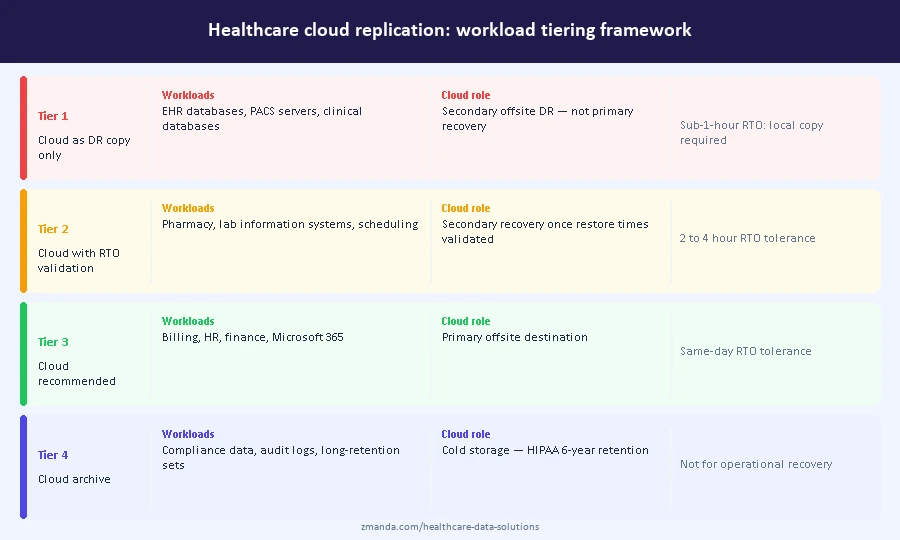
Not all clinical workloads have the same cloud replication requirements. The framework below defines which workloads belong in which cloud strategy for a healthcare facility using cloud storage for data protection and DR.
| Tier | Workloads | Cloud role | Replication frequency |
|---|---|---|---|
| Tier 1: Cloud as secondary DR only | EHR databases, PACS servers, clinical databases with sub-1-hour RTO | Offsite DR copy, not primary recovery source | Daily or less frequent |
| Tier 2: Cloud with defined RTO validation | Pharmacy management, lab information systems, scheduling platforms | Secondary recovery source once RTO is validated against actual restore times | Every 4 to 8 hours |
| Tier 3: Cloud recommended | Billing, HR, finance, Microsoft 365 | Primary offsite destination; RTO tolerance supports cloud recovery | Every 4 to 24 hours |
| Tier 4: Cloud archive | Compliance data, audit logs, long-retention backup sets | Cold storage for six-year HIPAA retention; not for operational recovery | Monthly or on-demand |
Tier 1 workloads require local recovery capability. Cloud storage for these workloads provides geographic DR coverage, not operational recovery capability. The distinction matters: a hospital that relies on cloud backup for healthcare as the primary recovery destination for EHR data will discover the gap during an incident, not during planning.
Tier 4 workloads represent a meaningful cost optimization. Cold storage tiers including AWS Glacier and Azure Archive are well suited to the six-year HIPAA retention requirement for documentation that is unlikely to be needed for operational recovery but must be retained for audit purposes.
What to verify before selecting a cloud storage provider for healthcare backup
These five verification steps apply before any clinical backup data moves to a cloud storage destination.
- BAA availability and scope. Confirm the cloud storage provider offers a signed BAA for the specific service and storage tier being used. AWS S3, Azure Blob Storage, Google Cloud Storage, and Wasabi all offer BAAs, but the BAA must cover the specific service configuration. Cold storage tiers, cross-region replication, and third-party integrations may not be covered under a standard BAA without explicit confirmation.
- Immutable storage support. Confirm S3 Object Lock or equivalent is available on the storage tier being used, and confirm Compliance Mode specifically rather than Governance Mode. Governance Mode allows users with sufficient permissions to delete or modify protected objects. Compliance Mode does not. Some storage configurations disable Object Lock by default and require explicit enablement at the bucket level.
- Data residency. Confirm the cloud provider can commit to a specific geographic region for data storage and that cross-region replication is either disabled or limited to approved regions where data residency requirements apply. Get the commitment in writing before deploying cloud backups for healthcare workloads.
- Encryption key ownership. Confirm whether the cloud storage provider manages encryption keys through server-side encryption or whether customer-managed keys are supported. For healthcare environments where data sovereignty matters, customer-managed keys ensure the storage provider cannot access backup data even if compelled.
- Egress costs for large dataset recovery. Cloud storage egress costs for multi-terabyte PACS libraries can be significant. Confirm egress pricing before committing to a cloud storage tier for large clinical workloads. Some healthcare cloud solutions, including Wasabi, offer zero-egress pricing that materially affects total cost of ownership for imaging-heavy environments.
When cloud backup creates more risk than it removes
Cloud backup and disaster recovery for healthcare reduces risk when the architecture is designed for clinical recovery requirements. The following four scenarios introduce risk without adequate mitigation and are worth validating before finalizing a cloud deployment plan.
- A single cloud destination with no local copy violates the 3-2-1 minimum and removes fast local recovery capability for time-sensitive clinical workloads.
- A cloud storage bucket without Object Lock enabled is not meaningfully more resilient against ransomware than on-premises storage if cloud credentials have been compromised.
- Server-side encryption with provider-managed keys satisfies the HIPAA encryption requirement but creates a BAA obligation and a key ownership exposure that many healthcare organizations do not account for in their compliance posture.
- And deploying cloud-only backup for EHR systems without validating restore times against clinical RTO requirements creates a recovery gap that surfaces during an actual incident, not a test.
Building a hybrid backup architecture for healthcare
A reference architecture for a mid-size health system running cloud backup and disaster recovery for healthcare across a main hospital and two to three affiliate clinics looks like the following.
The primary backup server runs on-premises at the main hospital. Backup schedules run overnight during off-peak clinical hours. The local NAS destination handles Tier 1 and Tier 2 recovery for time-sensitive clinical workloads. Cloud replication runs to an immutable S3-compatible storage bucket with Object Lock in Compliance Mode for offsite DR coverage. A scheduled air-gapped copy to an offline storage destination provides last-resort ransomware recovery for scenarios where both production and cloud-connected environments have been compromised. Affiliate clinic sites run consistent backup policies pushed from the central console, with local recovery capability at each site and cloud replication for offsite DR.
This architecture satisfies the 3-2-1-1-0 strategy across all three destinations, supports sub-1-hour RPO for Tier 1 clinical workloads through local backup, and maintains last-resort recovery through the air-gapped copy.
Next steps for healthcare IT teams evaluating cloud backup
The architecture decisions above are pre-migration steps, not post-deployment discoveries. Data residency verification, BAA execution, workload tiering, and RTO validation should be completed before any clinical workload moves to cloud storage. Healthcare organizations that complete these steps before migrating avoid the compliance and operational gaps that surface during audits or actual incidents.
To see how Zmanda Pro supports flexible hybrid deployment for healthcare, including cloud, on-prem, and air-gapped destinations managed from a single console, see the healthcare solutions page.
FAQs