Evaluating backup software for healthcare is different from a standard enterprise backup evaluation, and the criteria that make the difference are specific.
- Can the platform restore a single EHR database to a specific transaction without rebuilding the full backup chain?
- Can it cover every workload type your environment runs from a single console with no coverage gaps across sites?
- Does the pricing model stay predictable as imaging libraries grow 20 to 40 percent annually?
This post builds the evaluation framework around those questions. For teams evaluating BaaS rather than self-managed software, evaluating BaaS as an alternative to self-managed backup covers the full managed service framework.
See How Zmanda Pro Performs Against This Evaluation Framework
Why generic backup evaluation criteria fail in healthcare
Three specific mismatches explain why generic enterprise backup checklists underperform as evaluation frameworks for backup software for healthcare.
- Workload diversity is underspecified in generic evaluations. “Supports VMware” is not the same as “supports granular file-level recovery from VMware VMs without pulling the full machine.” Generic criteria check workload support. Healthcare backup solutions need to confirm recovery granularity per workload type your environment actually runs.
- Recovery precision is not a standard criterion in generic frameworks. Restoring a server to its last backup state is sufficient in most enterprise environments. Restoring an EHR database to its last backup state may mean losing eight hours of patient record updates. Point-in-time recovery at the transaction level is a requirement specific to backup software for healthcare that generic evaluation frameworks do not include.
- Pricing model implications compound over time in clinical environments. Per-GB pricing that looks competitive at current data volumes may become unsustainable as imaging libraries and EHR records grow. Generic evaluations compare current cost. Healthcare evaluations need to project cost at three and five-year data volumes using healthcare-specific growth rates.
The evaluation criteria that actually matter for healthcare backup software
Six criteria specific to clinical environments determine whether backup software for healthcare will perform when it matters most, or reveal gaps during an actual recovery event. Each criterion includes what to look for, what a strong response looks like, and what should disqualify a platform from further consideration.
1. Workload coverage depth, not breadth
The evaluation question is not which workload types appear in the feature matrix. It is the depth of recovery capability for each workload type your environment actually runs. Backup software for healthcare must answer four specific questions before the demo:
For EHR databases (SQL Server, Oracle): does the platform support agent-based backup with transaction log support, enabling point-in-time recovery to a specific transaction? Or does it rely on VM snapshots that capture machine state but not database transaction granularity? The distinction matters significantly for clinical operations and is covered in more detail in how modern hospitals structure their backup architecture.
For PACS servers: does the platform back up both the imaging data and the PACS application database that indexes it? A platform that backs up imaging files without the index creates a restore scenario where individual study retrieval is impossible until the index is rebuilt.
For VMware and Hyper-V: does the platform support file-level recovery from VMs without requiring a full machine restore? For Microsoft 365: does coverage include Exchange Online, SharePoint, OneDrive, and Teams, not mailboxes only?
Strong response: yes to all of the above, with documentation and a live demo during evaluation. Disqualifying response: reliance on VM snapshots for database backup, inability to demonstrate file-level VM recovery, or Microsoft 365 coverage limited to mailboxes only.
2. Recovery precision: testing during evaluation, not after deployment
Any healthcare backup solutions vendor can describe recovery capabilities in a presentation. The evaluation test is whether those capabilities perform with your data under demo conditions. Three specific recovery tests should be required of every platform under evaluation:
Point-in-time database recovery: restore a test database to a specific transaction timestamp, not to the last backup state. Verify the restore completes within the RTO defined for that workload tier and that the restored state is accurate to the specified transaction.
File-level VM recovery: restore a single file from a VM backup without recovering the full machine. Verify the process works within the platform’s standard interface without manual intervention or support assistance.
PACS study recovery: restore a specific imaging study from a backup set without restoring the full PACS library. Verify the PACS application database index is intact and the study is immediately retrievable after restore.
Any platform that cannot demonstrate these three recovery capabilities with representative data during evaluation has precision gaps that will surface in a real incident.
3. Multi-site management from a single console
The evaluation question is whether the platform genuinely manages backup across all sites from a single console, or whether multi-site coverage requires separate tool instances, separate logins, or site-level administration. Three specific questions:
Can backup policies be defined centrally and pushed to all sites without site-level configuration? Can a failed backup job at a satellite clinic generate an alert visible in the central dashboard without requiring the clinic’s local administrator to report it? Can a recovery be initiated for any site from the central console without requiring on-site IT presence?
Strong response: yes to all three, with a demo of policy push, central alerting, and remote recovery initiation. Disqualifying response: separate console instances per site, site-level policy management, or alerts that require site-level acknowledgment before escalating to central visibility.
4. Deployment flexibility matching your architecture requirements
Secure healthcare data backups require a deployment model that matches your compliance requirements, not the vendor’s preferred architecture. Backup software for healthcare that forces you into a vendor-managed cloud model may not satisfy air-gap mandates or EHR vendor contract restrictions on cloud storage. Three deployment requirements specific to healthcare:
Air-gapped deployment: can the platform operate with no internet connectivity for organizations with air-gap mandates or EHR vendor contract restrictions on cloud storage? Is air-gapped deployment a standard option or a custom engagement?
Hybrid deployment: can the platform manage on-premises and cloud storage destinations from a single console, sending backup data to local NAS, cloud storage, and an offline destination simultaneously? The architecture decisions that affect this are covered in detail in cloud and hybrid deployment considerations for healthcare.
Bring-your-own storage: can the organization connect its own cloud storage accounts (AWS S3, Azure Blob, Wasabi) rather than being required to use vendor-managed storage? This affects BAA scope and data sovereignty for ePHI in backup data.
5. Pricing model evaluated at future data volumes
Healthcare data grows at rates that make pricing evaluation at current volumes insufficient. Two pricing model questions specific to backup storage for healthcare IT solutions:
Per-workload vs per-GB: a per-workload pricing model charges by the number of systems protected, not by the data those systems generate. For healthcare environments where imaging libraries grow 20 to 40 percent annually, per-workload pricing stays predictable as data grows. Per-GB pricing scales with data volume growth, creating cost escalation that compounds year over year against healthcare-specific growth rates.
Deduplication and compression at source: platforms that deduplicate and compress backup data client-side before sending to storage reduce the effective data volume. Confirm ratios with representative healthcare data, not vendor-published averages. Also confirm that backup retention policies for healthcare compliance (six-year HIPAA retention for covered records) are supported within the standard pricing tier, not charged as additional storage.
6. HIPAA compliance architecture: three specific questions
The full evaluation framework for HIPAA-specific controls is covered in HIPAA compliance evaluation criteria for backup software. Three questions that apply specifically to the operational context of backup and recovery solutions for healthcare:
- Does the platform support client-side encryption with customer-managed keys, so the vendor cannot access backup data even if compelled?
- Does the platform produce exportable audit logs in a standard format (JSON, CSV, syslog) with configurable retention periods?
- Does the platform support restore testing documentation: exportable records of each restore test including date, system tested, backup set used, RTO achieved, and outcome?
Ready to put Zmanda Pro through this evaluation framework?
Book a technical discovery call and test recovery precision with your own clinical workloads.
Red flags in healthcare backup software evaluations
Six conditions that should disqualify a platform from consideration when evaluating data backup and recovery for healthcare providers:
- Database backup relies entirely on VM snapshots with no agent-based option. This is a recovery precision gap for any EHR or clinical database workload that requires point-in-time recovery.
- File-level VM recovery requires manual intervention or support assistance. A recovery capability that cannot be executed by the IT team during an incident without vendor support is not a reliable recovery capability in clinical operations.
- Multi-site management requires separate console instances or separate licenses per site. This creates administrative fragmentation that leads to coverage gaps and missed alerts at satellite sites.
- Per-GB pricing with no deduplication or compression at source. This pricing model scales poorly against healthcare data growth rates and creates cost escalation that compounds annually as imaging libraries expand.
- Immutable storage available only in Governance Mode. Governance Mode allows administrator override and does not protect against ransomware that has compromised administrator credentials.
- Air-gapped deployment requires a custom engagement or is not listed as a standard option. For organizations with air-gap requirements, a platform that cannot support air-gapped deployment as a standard configuration is not a viable option regardless of other capabilities.
How to structure a healthcare backup software proof of concept
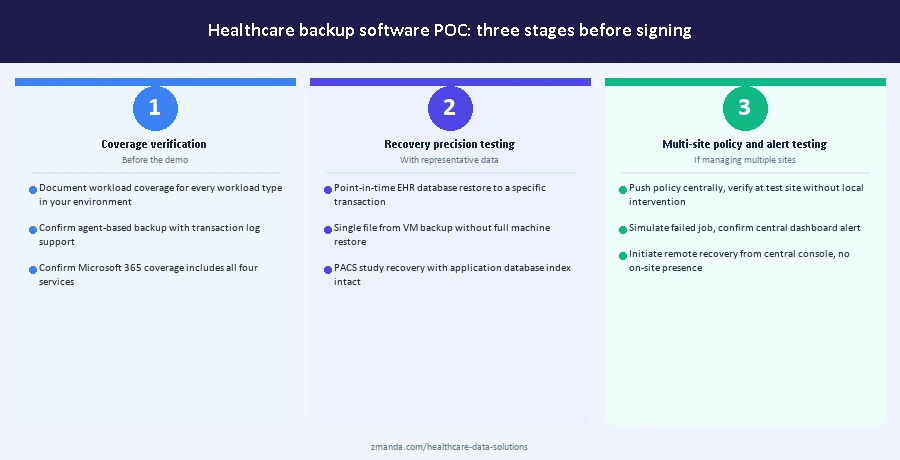
A meaningful POC for backup software for healthcare follows three stages. The stages are sequential: each one produces documentation that informs the next and contributes to the procurement record.
Stage 1: coverage verification before the demo
Before scheduling a product demo, request documentation of workload coverage for every workload type in your environment. Confirm agent-based database backup with transaction log support is available for your specific database versions. Confirm PACS backup includes the application database index. Confirm Microsoft 365 coverage includes all four services. Confirm air-gapped or hybrid deployment is a standard option if your architecture requires it.
A vendor that cannot document coverage for your specific workload versions before the demo is demonstrating that coverage. Move to the demo only after written coverage confirmation for every workload type in your environment.
Stage 2: recovery precision testing with representative data
During the POC, test the three recovery scenarios above (point-in-time database recovery, file-level VM recovery, PACS study recovery) using representative data from your environment, not synthetic vendor data. Document the time to complete each recovery, the accuracy of the restored state, and whether any manual intervention was required.
This documentation serves two purposes. It confirms the platform meets your clinical RTO requirements before you sign. It also becomes part of your HIPAA restore testing record under section 164.308(a)(7), which requires documented evidence of restore testing with specific dates, systems tested, and outcomes. A structured POC produces compliance documentation as a byproduct of the procurement process.
Stage 3: multi-site policy and alert testing
If the platform will manage multiple sites, test policy push and central alerting during the POC. Configure a backup policy centrally, push it to a test site, and verify it applies correctly without site-level intervention. Simulate a failed backup job and verify the alert reaches the central dashboard without requiring site-level escalation. Verify that recovery for the test site can be initiated from the central console without on-site IT presence.
The output of Stage 3 is a documented baseline of multi-site management capability against the three specific requirements in the evaluation criteria above. A platform that cannot pass Stage 3 during a controlled POC will not perform better across real satellite sites in production.
Next steps for healthcare IT teams evaluating backup software
The evaluation criteria and POC structure above apply before signing any contract for backup software for healthcare. Workload coverage depth, recovery precision testing, multi-site management verification, and pricing model projection should be completed during the evaluation period, not confirmed after deployment. Healthcare organizations that complete this evaluation before signing have a procurement record that also serves as partial HIPAA restore testing documentation under section 164.308(a)(7).
See how Zmanda Pro performs against this evaluation framework
30+ workload types. Agent-based database backup. Single console across all sites. Built for clinical environments.
FAQs