MONGODB backup
Enterprise MongoDB
backup & recovery
General-purpose NoSQL database backup using mongodump integration with
implicit chunking and deduplication
Why MongoDB needs enterprise backup
MongoDB's mongodump provides the officially supported mechanism for backing up a MongoDB database. Production MongoDB backup and recovery needs automated orchestration beyond manual processes.
Manual mongodump requires scripting for automation
No centralized management for multiple databases
Backup jobs cause additional load on MongoDB server
How Zmanda Pro offers MongoDB backup
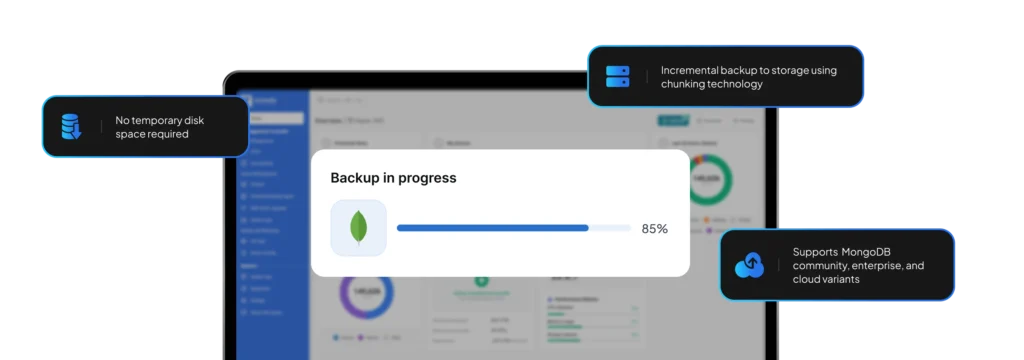
Zmanda Pro's MongoDB backup solution streams database content directly from the MongoDB server into Zmanda's deduplication engine without requiring any temporary disk space.
Direct connection options - enter a hostname and port for the MongoDB server (mongod/mongos). The default port is 27017. Alternatively, use an SSH tunnel where Zmanda will run locally installed mongodump against a forwarded port connection.
Replica set support - specify the name of the replica set and add hostname and port for each replica set member. Zmanda will only read data from one member based on your read preference: Primary, Primary preferred, Secondary, Secondary preferred, or Nearest.
Authentication mechanisms - supports unauthenticated, username/password (SCRAM) with authentication database selection, and client certificates (MONGODB-X509) when using SSL transport layer.
Incremental forever technology - all backup jobs require only incremental storage using Zmanda's chunking technology after the initial full backup.
Advanced MongoDB backup capabilities
Version support
Zmanda uses your system-installed mongodump version for best compatibility. If Zmanda is unable to automatically detect the binary path, you can override the binary path.
MongoDB backup selection
Use the database browser to select individual MongoDB databases for backup. Zmanda Pro will back up all MongoDB collections within the selected MongoDB databases.
Compatible services
Self-hosted MongoDB Community Server, MongoDB Enterprise Server, TokuMX/Percona Server, MongoDB Atlas, Amazon DocumentDB, Azure CosmosDB's API for MongoDB, Alibaba Cloud ApsaraDB.
Restore options
Produces a .bson file for each selected MongoDB database. You can restore all databases, or selected databases only. Restore as Files and Folders or as Program Input for direct streaming into mongorestore.
You choose the location, we provide the protection

FAQs
Got a question that you need an answer to asap?
At Zmanda, we offer 24 x 7 service across all our offerings. There's no waiting time, we're just a call away.
Call Us
888-495-2632 (US)
408-732-3208 (INTL)