In healthcare, backup programs rarely fail at the backup stage. Job completion rates look clean, dashboards show green, and storage fills on schedule. The gap appears at recovery: when a clinical system goes down, and the team discovers the architecture was designed for infrastructure that no longer reflects what the hospital actually runs. More sites, more workload types, more imaging data, and more EHR complexity have accumulated since the healthcare backup program was last redesigned.
This post covers what modern hospital backup and recovery architecture actually looks like and how to assess whether your current environment matches it. For the complete framework covering RPO, RTO, immutability, and the six-component model, see the complete framework for healthcare data backup and recovery.
See How Zmanda Pro Handles Healthcare Backup
What modern hospital IT environments actually look like
A modern hospital or health system does not run a single-workload environment. The infrastructure a typical mid-size health system manages spans multiple technology platforms, growth trajectories, and recovery requirements that did not exist when most healthcare backup programs were last formally reviewed.
| System | Technology stack | Recovery profile |
|---|---|---|
| Core EHR (Epic, Oracle Health, Cerner) | SQL Server or Oracle DB on VMware or Hyper-V | Transaction-critical; point-in-time recovery required |
| PACS and medical imaging | NAS or dedicated imaging servers | Multi-TB; 20-40% annual growth; study-level granularity required |
| Clinical applications | Pharmacy, LIS, scheduling; physical and virtual mix | Variable criticality; often not formally tiered |
| Administrative systems | Billing, HR, finance, Microsoft 365 | Business-critical; less time-sensitive than clinical systems |
| Remote and satellite sites | Varies by location | Network-constrained; often managed independently |
| Endpoints | Workstations, laptops, clinical devices | Distributed across wards, departments, and sites |
The healthcare backup challenge is not protecting any one of these workloads. It is protecting all of them from a single console, with consistent policies, across every site, while the IT team managing the environment is often four to eight people responsible for everything from network infrastructure to endpoint support.
Where hospital backup programs break down in practice
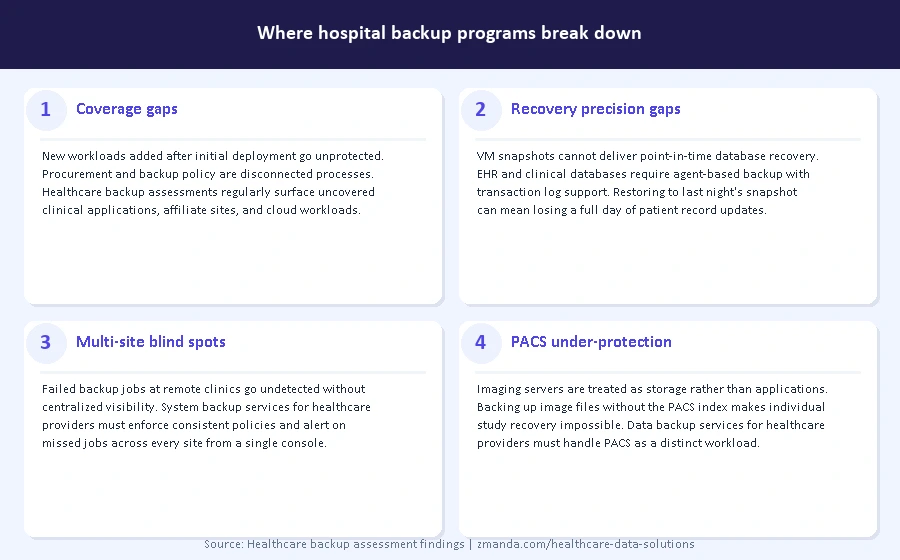
Most healthcare backup programs were functional when they were deployed. The breakdown is architectural drift: the infrastructure grew faster than the backup program was updated to match it. These are the four failure patterns that surface most consistently in hospital environments.
1. Coverage gaps at the workload level
Most healthcare backup environments were designed around the primary workloads at the time of deployment. Three to five years later, new clinical applications have been added, a Proxmox cluster was stood up alongside the existing VMware environment, a new affiliate clinic was onboarded, and Microsoft 365 was adopted for clinical communications. None of these appear in the backup policy because nobody connected the procurement process to the healthcare backup program.
The gap is not malicious. It is a process failure. A workload that was never added to the backup policy is unprotected regardless of how well everything else in the environment is configured. Healthcare backup assessments consistently surface workloads that IT teams assumed were covered but were never formally included in policy.
2. Recovery precision gaps for clinical databases
EHR platforms run on structured databases, SQL Server and Oracle, where patient records are written continuously during active clinical hours. A backup that captures the full database nightly is not sufficient for a clinical environment where a restore to yesterday’s state means losing eight hours of patient record updates.
Point-in-time database recovery, the ability to restore to a specific transaction rather than a nightly snapshot, is the capability that clinical environments require. Many healthcare backup solutions deployed five or more years ago were not designed to provide it. This gap surfaces regularly when healthcare data backup and recovery programs are formally assessed after an incident.
3. Multi-site coverage without multi-site visibility
A health system that manages healthcare backup at the main hospital but relies on manual processes or separate tools at affiliate clinics has coverage in name only. A failed backup job at a remote clinic that goes undetected for two weeks is a recovery gap waiting to surface under incident conditions.
Multi-site backup requires centralized visibility: a single dashboard showing backup status, storage consumption, and alert conditions across every site, not just the main data center. System backup services for healthcare providers that operate across multiple sites need to enforce consistent policies from a central console rather than relying on site-level coordination.
4. PACS and imaging data: the workload most often under-protected
Medical imaging data is among the fastest-growing data types in healthcare IT, with mid-size radiology departments generating terabytes of new imaging data monthly. PACS servers are frequently treated as storage infrastructure rather than application workloads, which means they are either excluded from backup policies entirely or backed up without the granular recovery capability required for clinical use.
An imaging server that can be fully restored but cannot recover a specific patient’s imaging study from a defined date creates a data availability problem even after a technically successful restore. Data backup services for healthcare providers need to account for PACS as a distinct workload with distinct recovery requirements, separate from general file or VM backup. This gap appears consistently in healthcare backup assessments of radiology-heavy environments.
What a modern hospital backup architecture looks like
Let’s talk about what complete healthcare backup program components look like in practice for hospital-specific workloads, where the technical requirements are more constrained than in a general enterprise environment.
1. EHR backup: what the database layer requires
EHR healthcare backup in a clinical environment requires agent-based database backup with transaction log support, not just VM snapshots. A VM snapshot of an EHR server captures the virtual machine state but does not provide the granular, point-in-time database recovery that clinical environments require. Agent-based backup at the database layer, using SQL Server Agent or Oracle RMAN, enables recovery to a specific transaction rather than a nightly state.
Backup windows for EHR databases should align with clinical workflow patterns: typically overnight during the lowest activity window, with transaction log backups running at shorter intervals during active clinical hours to support the RPO requirements defined for each clinical system tier.
2. PACS and imaging backup: handling multi-terabyte growth
Medical imaging backup has two distinct requirements: protecting the imaging data itself and protecting the PACS application and database that indexes and serves that data. Backing up only the imaging files without the PACS database index means a restore requires rebuilding the index, a process that can take days on large imaging libraries and makes individual study retrieval impossible until complete.
Forever-incremental backup architecture is particularly valuable for imaging environments. After the initial full backup, only changed data is captured, deduplicated, and compressed before leaving the source. Every recovery point restores at the same speed regardless of age, which matters when a clinical team needs a specific imaging study from six months ago. This is a healthcare backup architecture decision with significant storage and recovery-time implications for radiology-heavy environments.
3. Multi-site architecture: what centralized management requires
A hospital healthcare backup architecture that covers multiple sites requires consistent policies pushed from a central console and enforced at every site, automated alerting for failed or missed jobs at any location, storage visibility across all destinations, and the ability to initiate a recovery from the central console for any site without requiring on-site IT presence.
For satellite clinics and remote sites with limited bandwidth, backup schedules should run during off-peak hours with bandwidth throttling during business hours. Local recovery capability at each site reduces RTO for site-level incidents by eliminating the need to pull data from a central location or the cloud. Cloud and hybrid deployment considerations for multi-site healthcare environments are covered in the next post in this series.
4. Immutable storage and air-gapped copies in a hospital context
A complete healthcare backup architecture should include at least one immutable copy using S3 Object Lock in Compliance Mode and at least one air-gapped copy with no network connectivity. These address different threat scenarios: immutability protects against ransomware that targets backup destinations through compromised credentials, while air-gapping protects against ransomware that has compromised the entire network-connected environment.
For a hospital managing the 3-2-1-1-0 strategy across a hybrid environment, a practical implementation includes local backup to on-premises NAS for fast recovery, cloud backup to immutable S3-compatible storage for offsite DR, and a scheduled air-gapped copy to offline storage for last-resort recovery. The HIPAA requirements that govern healthcare backup include specific provisions under §164.308(a)(7) for exact retrievability and offsite storage that this architecture addresses.
Unsure if your recovery architecture fits your clinical RTOs?
Book a 30-minute expert review — we'll map your workloads against your recovery commitments.
How to assess whether your current hospital backup environment matches these requirements
The Healthcare Data Backup and Recovery Guide covers a ten-question self-assessment for the full framework. These four questions focus on hospital backup architecture specifically.
- Does your backup coverage map match your current infrastructure?
Pull your backup policy documentation and compare it against your current infrastructure inventory. Every system that stores or processes clinical data should appear in both. The gap between the two is your unprotected workload list. Healthcare backup assessments frequently surface systems added in the past two to three years that were never formally included in the backup program. - Can you perform point-in-time database recovery for every EHR and clinical database in scope?
This requires agent-based database backup, not VM snapshots. If your healthcare backup for EHR systems relies entirely on VM snapshots, you have a recovery precision gap that will surface when granular database recovery is required under incident conditions. - Do you have a single dashboard showing backup status for every site?
If verifying backup status across your health system involves logging into multiple tools or contacting site administrators, you have a multi-site visibility gap. When evaluating backup and recovery solutions for healthcare, centralized status visibility across all sites without manual aggregation is a baseline requirement, not an optional feature. - Can you demonstrate a complete recovery from your air-gapped copy?
If you have never tested recovery specifically from the air-gapped copy rather than the primary backup destination, you do not know whether your last-resort recovery option works. Recovery testing should include the air-gapped copy on an annual basis.
Next steps for hospital IT teams
The architecture requirements above apply regardless of which backup platform is in place. The first step is mapping your current environment against them: workload coverage, recovery precision, multi-site visibility, and immutable and air-gapped copy configuration. The gaps that surface in that mapping tell you where the work is.
See how Zmanda Pro protects every workload across your healthcare infrastructure, including the full workload coverage list and deployment options.
See how Zmanda Pro protects every workload across your healthcare infrastructure
30+ workload types. Single console. Sub-1-hour RPO. Built for clinical environments.