
Enterprise Proxmox Backup
Zmanda pro provides Proxmox VM backup with enterprise deduplication, immutable
storage, and flexible cloud integration.
Get enterprise Proxmox backup without
the enterprise complexity
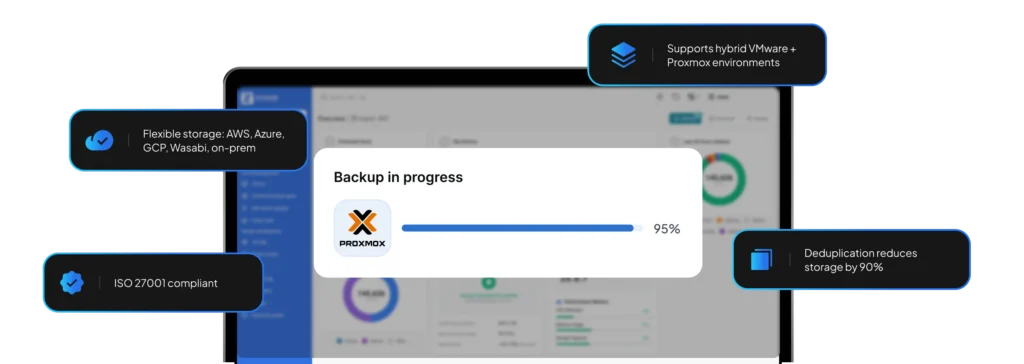
Zmanda Pro delivers the advanced capabilities IT teams need for Proxmox environments—centralized management, flexible storage options, and enterprise-grade data protection.
Agentless Proxmox VM protection
Deploy a single Zmanda Pro agent on each Proxmox host to back up all VMs without installing software inside virtual machines.
Unified multi-hypervisor management
Manage Proxmox backups alongside VMware, Hyper-V, physical servers, databases, and workstations from a single console. Eliminate the operational overhead of managing separate backup tools for different infrastructure layers.
Forever incremental backups with deduplication
Reduce storage consumption by 90% with block-level deduplication and forever incremental backups—minimizing backup windows, network bandwidth, and storage costs.
Flexible storage destinations
Backup your Proxmox environment to AWS S3, Google Cloud Storage, Wasabi, Azure, local disk, or NAS. Implement 3-2-1-1 backup strategies with automated replication to multiple storage locations for disaster recovery.
Why enterprises require more than
just the built-in Proxmox backup feature
Proxmox VE includes a basic backup capability. But organizations with compliance requirements,
multi-site operations, or hybrid infrastructure require a more robust, feature-complete solution like Zmanda Pro.
Enterprise-scale storage management
Managing petabytes across multiple Proxmox clusters requires centralized storage orchestration with tiered strategies — recent backups on fast disk, older data on cost-effective cloud. Without unified vault management, teams face storage sprawl and manual, error-prone data migration processes.
Cross-platform recovery requirements
IT environments rarely run a single hypervisor. During VMware-to-Proxmox migrations, organizations need simultaneous backup coverage for both platforms. Separate backup tools double management overhead, create inconsistent recovery procedures, and consume critical hours when disaster strikes mid-migration.
Compliance and audit requirements
Regulated industries need immutable backups, detailed audit logs, and documented retention policies. Healthcare requires HIPAA compliance, financial services SEC rule adherence, and government entities data residency standards. Without proper certifications and audit trails, passing compliance reviews becomes a significant challenge.
Advanced data protection strategies
Enterprise business continuity demands more than basic backup: geo-redundant replication, air-gapped ransomware-resistant copies, and SIEM integration. Without these, IT teams resort to manual scripting, creating technical debt and single points of failure.
Enterprise requirements for Proxmox backup
| Capability | Why it matters for Proxmox environments | Zmanda Pro |
|---|---|---|
| Hypervisor migration | Back up VMware, restore to Proxmox | |
| Enterprise deduplication | Reduce storage costs across all infrastructure | |
| Immutable backups | Ransomware protection & compliance | |
| Centralized management | Manage multiple Proxmox clusters from one console | |
| Flexible storage destinations | AWS, Azure, Google Cloud, Wasabi, on-prem | |
| Application-aware backups | Protect databases and apps inside VMs |
Proxmox backup implementation
in three steps
1. Install Zmanda Pro agent and configure authentication
Install the Zmanda Pro agent on a device associated with your backup user. Complete authentication to establish secure communication between Zmanda Pro and your Proxmox environment. One agent installation enables centralized protection for all virtual machines across your Proxmox infrastructure—no agents required inside guest VMs.
2. Configure backup policies and storage
Once authentication is complete, select which Proxmox hosts to protect and define backup schedules, retention policies, and storage destinations from the centralized console. Zmanda captures snapshots at the Proxmox host level and securely streams backup data to your chosen storage location.

3. Automate backups and restore when needed
Once configured, backups run automatically based on your defined schedules. When restoration is needed, choose from multiple restore options: full VM restore, file-level recovery, or point-in-time restoration directly back to Proxmox, minimizing downtime and maintaining business continuity. All backup and restore activity is tracked through the Zmanda dashboard for complete visibility.

Common Proxmox backup scenarios
VMware to Proxmox migration
Organizations can reduce virtualization costs by 70-90% through Proxmox adoption. Zmanda Pro backs up both VMware and Proxmox VMs simultaneously, eliminating the need for parallel backup infrastructure. It also supports migrations, allowing you to restore your VMware VMs directly into Proxmox, providing a simple workflow for large-scale transitions.
Multi-site Proxmox deployments
Enterprises running Proxmox clusters across multiple data centers need centralized backup management. Zmanda Pro provides a single console to manage backup policies, monitor job success, and execute recoveries across all locations.
Hybrid cloud infrastructure
Organizations running Proxmox on-premises with cloud workloads need unified data protection. Zmanda Pro backs up Proxmox VMs, cloud instances, databases, and applications which becomes essential when disaster recovery plans involve restoring on-premises workloads to cloud infrastructure or vice versa.
High-compliance environments
Healthcare, finance, and government organizations running Proxmox need audit-ready backup systems. Zmanda Pro provides detailed audit logs, and the security certifications compliance officers require.
Expanded workload support for maximum protection
Trusted by healthcare organizations worldwide
Industry average NPS
Reduced storage costs
RPO and fast RTO
FAQs
No. Zmanda Pro uses an agentless approach—one agent per Proxmox host backs up all VMs on that node using Proxmox’s native vzdump utility.
Yes. Zmanda Pro provides unified management for multiple hypervisor types, making it ideal for organizations running hybrid environments or migrating between platforms.
Backup jobs run on the Proxmox host and consume CPU and memory resources. Schedule backups during off-peak hours or stagger backup times across hosts to minimize impact on running VMs.
Recovery time depends on VM size and network bandwidth. Most organizations restore VMs in 5–60 minutes. Zmanda Pro supports direct-to-hypervisor restoration, eliminating intermediate steps.
Yes. Zmanda Pro backs up VMs in Proxmox clusters and high-availability configurations. Configure backup policies per cluster or per individual node based on your requirements.
Zmanda Pro supports all major cloud providers (AWS S3, Azure, GCP, Wasabi), local disk, NAS and SAN. You can replicate backups to multiple destinations for disaster recovery.
Got a question that you need an answer to asap?
Call Us
888-495-2632 (US)
408-732-3208 (INTL)