Most healthcare backup programs are measured by backup job completion rates. The metric that actually matters is whether recovery works, at the right granularity, for the right systems, within the timeframe clinical operations require.
This guide covers what makes healthcare data backup operationally different from generic enterprise backup, how to build a recovery architecture that works under pressure, and how to evaluate whether your current environment is ready when it matters.
See how Zmanda Pro covers every clinical workload
Why healthcare data backup is operationally different from generic enterprise backup
Three specific differences drive this.
1. Workload diversity that generic tools were not designed for
A mid-size hospital does not run a single-workload environment. It runs Windows file servers, Oracle and SQL Server instances supporting EHR platforms, VMware clusters hosting clinical applications, PACS servers managing medical imaging at multi-terabyte scale, Microsoft 365 for clinical communications, NAS storage for shared file systems, and endpoint devices across wards, clinics, and administrative offices, often spanning dozens of sites. Each workload type carries different backup requirements, different recovery precision expectations, and different RTO tolerances.
Generic enterprise backup tools protect most of these workloads. Healthcare industry data backup demands all of them, managed from a single console with consistent policy enforcement. An IT team running four separate backup tools across three sites is not managing a backup program. They are managing the conditions for a coverage gap to appear at the worst possible moment.
2. Recovery precision matters as much as recovery speed
In a standard enterprise environment, restoring a server to its last backup state is usually sufficient. In a clinical environment, it is not. An EHR database restored to the wrong state, one missing the last two hours of patient records, creates a clinical data integrity problem, not just an IT problem. A PACS server restored to yesterday’s state loses imaging studies ordered and captured today.
Data backup and recovery for healthcare providers requires point-in-time precision: restore a single database to a specific transaction, recover a single file from a VM without pulling the full machine, restore an application to its exact state at a defined moment before an incident. This recovery precision is what separates a managed event from a clinical disruption.
3. The threat model is different in healthcare
Modern ransomware attacks on healthcare organizations follow a documented pattern: compromise production systems, then target backup infrastructure before triggering encryption. The attacker’s goal is to eliminate recovery options before the attack becomes visible.
IBM’s Cost of a Data Breach Report has ranked healthcare as the highest-cost breach sector for over a decade, with the average healthcare breach exceeding $10 million per incident. Healthcare backup that relies on standard network-connected destinations without immutability leaves recovery options exposed to exactly this attack pattern. An immutable backup copy stored using WORM technology or S3 Object Lock in Compliance Mode cannot be encrypted or deleted by anyone, including administrators, until the retention period expires.
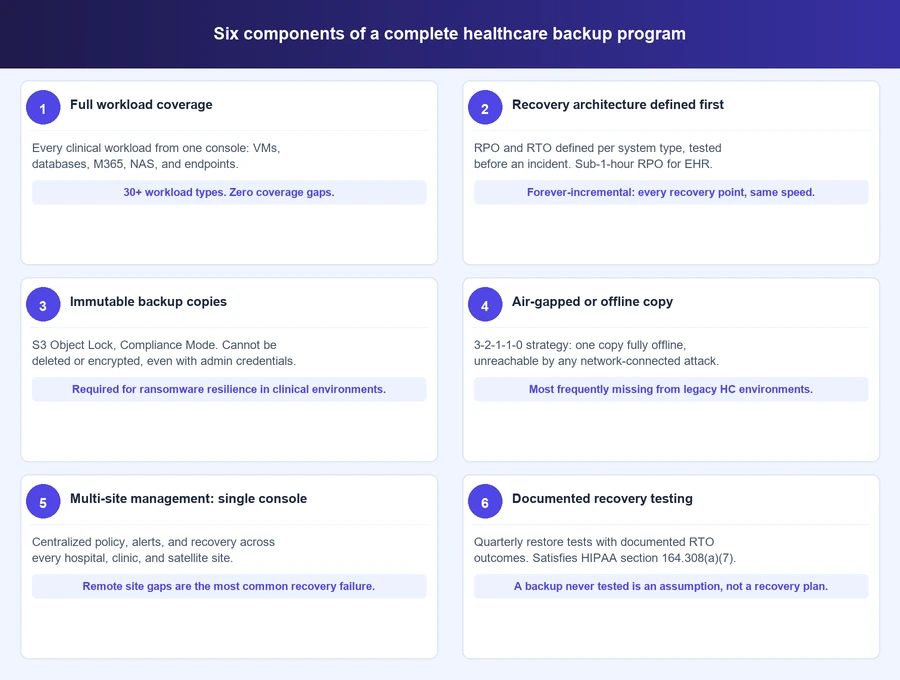
The six components of a complete healthcare data backup program
These are not aspirational standards. They are the components that separate a healthcare backup environment that recovers from one that simply runs.
1. Full workload coverage with no gaps
Coverage requirements for a healthcare environment span every workload type that stores or processes clinical data: physical servers running Windows and Linux, virtual machines on VMware, Hyper-V, and Proxmox, structured databases including SQL Server, Oracle, PostgreSQL, MySQL, MariaDB, and MongoDB, unstructured file systems and NAS, Microsoft 365 including Exchange Online, SharePoint, and Teams, and endpoint devices across every site.
The coverage gap risk is specific. An organization that protects VMs but not databases, or protects on-site servers but not remote clinic endpoints, has a recovery problem waiting to surface. In a clinical workflow, a single gap is enough to cause an operational disruption. Single console management across all workload types is not a convenience feature in healthcare data backup, it is a risk management requirement.
2. Recovery architecture defined before an incident
RPO and RTO in healthcare are clinical commitments, not generic IT metrics. They should be defined per system type, not as a single organization-wide number.
| Clinical system | Recommended RPO | RTO tolerance |
|---|---|---|
| EHR platform | Less than 1 hour | Minutes (emergency care) / Hours (elective care) |
| PACS / medical imaging | Varies by imaging volume | 2 to 4 hours typical |
| Clinical databases (non-EHR) | Less than 1 hour | Hours |
| Microsoft 365 / communications | 24 hours | Same day |
| Endpoint devices | 24 hours | Next business day |
Healthcare data backup and recovery requires a different approach to RTO than generic enterprise backup. Forever-incremental backup architecture supports sub-1-hour RPO by capturing only changed data after the initial full backup. Every recovery point restores at the same speed regardless of how old it is, removing the full-rebuild penalty that affects organizations on traditional differential backup schedules.
3. Immutable backup copies enforced at the storage layer
Ransomware specifically targets backup systems. An immutable backup copy stored with S3 Object Lock in Compliance Mode cannot be modified, encrypted, or deleted by any user, including administrators, until the configured retention period expires.
The distinction between Compliance Mode and Governance Mode matters in a healthcare backup environment. Governance Mode allows administrator override. For an attacker who has compromised administrator credentials, Governance Mode provides no protection. Clinical environments require Compliance Mode. Snapshot protection at the policy level adds a second layer that holds even if backup server credentials are fully compromised.
4. Air-gapped or offline backup copies
The 3-2-1-1-0 backup strategy is the architectural standard for healthcare environments: three copies of data on two different media types, with one offsite copy, one offline or air-gapped copy, and zero unverified errors. The air-gapped copy is the component most frequently absent from healthcare environments that have not been reviewed in several years.
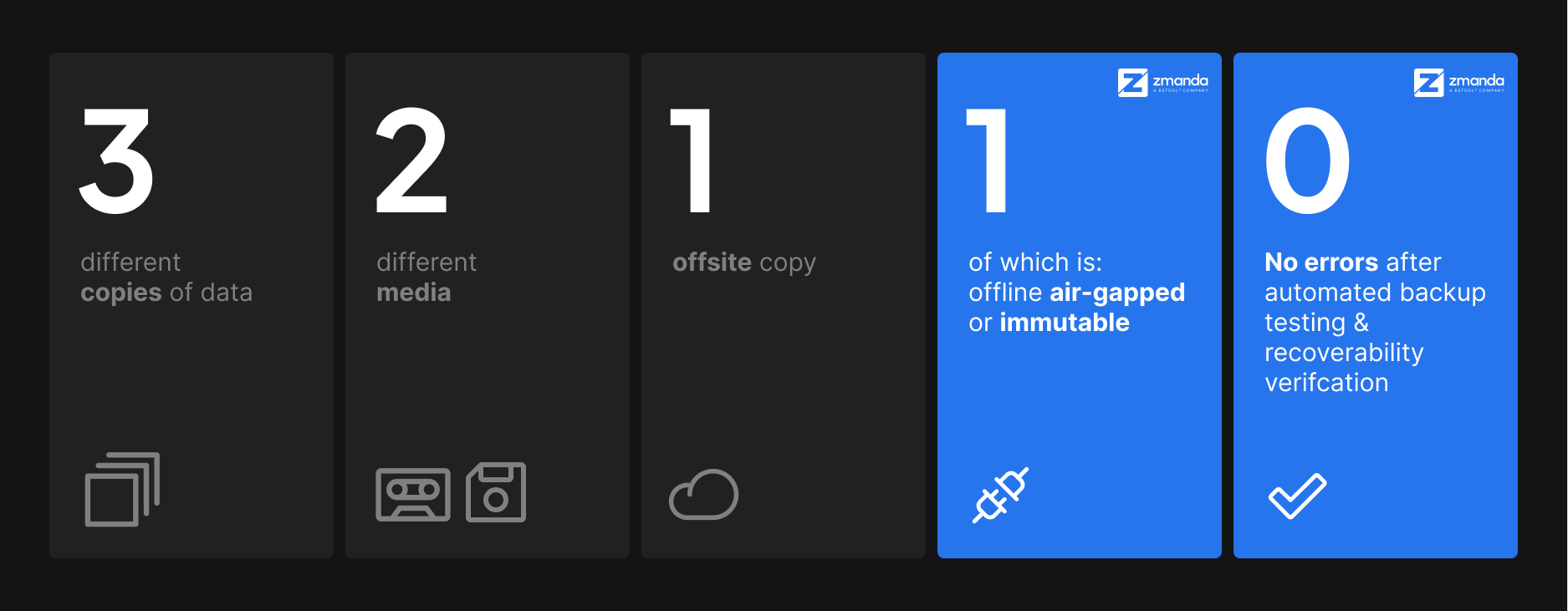
An air-gapped copy has no network connectivity. It cannot be reached by ransomware that has compromised every network-connected system. Deployment options include fully offline on-premises storage or a dedicated air-gapped cloud deployment with no connection to the primary environment.
5. Multi-site backup management from a single console
A health system running a main hospital, affiliated clinics, and remote diagnostic centers needs consistent backup coverage at every site. Managing this across separate tools creates the configuration drift and coverage gaps that surface during recovery events.
Single console management means consistent policies applied and enforced centrally, unified visibility into backup status across every site, centralized alert management so a failed job at a remote clinic does not go unnoticed, and consistent recovery procedures regardless of which site is affected. Backup schedules should run during off-peak clinical hours to avoid performance impact on EHR systems during active care delivery.
6. Documented recovery testing on a defined cadence
A backup that has never been tested is not a backup. It is an assumption.
Recovery testing for a complete healthcare data backup environment requires quarterly restore tests for every critical clinical system, with documented results: date, system tested, backup set used, RTO achieved, and outcome. Test both full system restores and granular recovery, including file-level recovery from VMs and point-in-time database recovery. A system that passes a full restore test but cannot perform granular recovery has a precision problem that will surface in a real incident.
The documentation satisfies HIPAA’s Contingency Plan testing requirement under §164.308(a)(7), making it dual-purpose work. It is also one of the primary areas where the audit gaps that surface even in well-run healthcare environments consistently appear.
HIPAA compliance and operational backup: How they intersect
HIPAA sets minimum compliance requirements. In clinical environments, operational backup requirements often exceed what the regulation mandates. Building a healthcare backup program solely around compliance leaves operational gaps that a ransomware event or hardware failure will expose.
The intersection points are specific. HIPAA’s Contingency Plan standard at §164.308(a)(7) requires documented backup, disaster recovery, and recovery testing, which maps directly to components 2 and 6 above. HIPAA’s integrity controls at §164.312(c)(1) require protection against unauthorized data modification, which maps to immutable storage. HIPAA’s access controls map to RBAC and audit logging on backup systems.
Understanding the full scope of the HIPAA requirements that govern healthcare backup is the foundation for compliance-aligned architecture. The key distinction: a backup environment built to pass HIPAA review meets minimum requirements. A backup environment built to recover clinical systems under real incident conditions will exceed those requirements and pass review as a natural result.
Deployment model considerations for healthcare IT
Three deployment models work for clinical environments. The right choice depends on team capacity and data residency requirements, not preference.
Self-hosted on-premises gives full control over data residency, storage destinations, and backup schedules. No internet connectivity is required, making this the only viable option for true air-gapped deployments and for organizations where contracts or regulations restrict cloud storage use.
Cloud-hosted backup as a service reduces operational overhead by shifting infrastructure management to the vendor. This requires internet connectivity and a BAA with the cloud storage provider. It fits organizations with distributed sites and limited on-site IT resources where managing on-premises backup infrastructure exceeds available team capacity.
Hybrid architectures combine on-premises backup for fast local recovery with cloud storage for offsite disaster recovery. This is the most common model in mid-size and large healthcare organizations and the most practical path to 3-2-1-1-0 compliance across local, cloud, and air-gapped destinations. The next post in this series covers cloud and hybrid deployment considerations for healthcare IT in depth.
How to evaluate your current healthcare data backup environment
Ten questions for finding gaps in your current backup program. Any “no” or “uncertain” answer maps back to one of the six components above.
- Does your backup solution cover every workload type from a single console, or do you manage separate tools for VMs, databases, and endpoints?
- Have you defined RPO and RTO for every critical clinical system and tested whether your current environment meets them?
- Do you have at least one immutable backup copy using S3 Object Lock Compliance Mode or equivalent WORM technology?
- Do you have an air-gapped or offline backup copy that cannot be reached by a ransomware attack that has compromised network-connected systems?
- Are remote clinic and satellite site endpoints covered by your backup policy, or do gaps exist outside the main hospital site?
- Can you restore a single database to a specific point in time without pulling the entire backup chain?
- Have you performed and documented a restore test for critical clinical systems in the last 90 days?
- Are backup schedules configured to run during off-peak clinical hours at every site, not just the primary data center?
- Does your backup vendor sign a BAA if they handle ePHI, and does your BAA inventory reflect your current environment?
- If your backup server credentials were compromised tonight, could an attacker delete or encrypt your backup copies?
What a complete healthcare data backup program looks like in practice
A healthcare data backup program that covers all six components, full workload coverage, defined RPO and RTO, immutable copies, air-gapped storage, multi-site management, and documented recovery testing, is one that works when it needs to. Not one that simply passes a daily job success report.
The gap between a backup program that runs and one that recovers is where most healthcare organizations are exposed. Ransomware events and hardware failures do not fail the backup. They fail recovery architectures that were never built or tested for the scale of a real incident.
Building that architecture is the work. The daily backup job is the first step, not the finish line.
When you are ready to see what this framework looks like in a real deployment, see how Zmanda Pro protects every workload across your healthcare infrastructure.