Healthcare data breaches now cost an average of $7.42 million per incident, the highest of any industry for 14 consecutive years, according to IBM’s Cost of a Data Breach Report 2025. Backup is the last technical control standing between a ransomware attack and a reportable HIPAA breach, and yet it’s also the most frequently misconfigured layer of healthcare IT infrastructure.
HIPAA doesn’t name a specific backup product you must use. The Security Rule is deliberately technology-neutral. What it does require, specifically, under 45 CFR §164.308(a)(7), is that covered entities and business associates establish procedures for creating and maintaining retrievable exact copies of electronic protected health information (ePHI). The word “retrievable” is doing a lot of work there. A backup that fails your restore test is not a HIPAA compliant backup.
This guide breaks down what HIPAA actually requires from your backup infrastructure, which technical safeguards apply, how to evaluate whether a solution is genuinely HIPAA compliant (not just marketed as such), and what controls matter for both the backup and the recovery side of the equation.
See how Zmanda Pro supports HIPAA compliant backup
What HIPAA actually requires for backup
The HIPAA Security Rule (45 CFR Part 164) governs the protection of ePHI. It organizes requirements into three safeguard categories: administrative, physical, and technical. All three intersect with backup in ways organizations routinely underestimate.
The most directly relevant provision is the Contingency Plan standard under Administrative Safeguards (§164.308(a)(7)), which requires covered entities to:
- Establish and implement procedures to create and maintain retrievable exact copies of ePHI, the Data Backup Plan.
- Establish and implement disaster recovery procedures, the Disaster Recovery Plan.
- Establish and implement emergency mode operation procedures, the Emergency Mode Operation Plan.
- Implement procedures for periodic testing and revision of contingency plans, the Testing and Revision Procedures.
- Assess the relative criticality of specific applications and data, the Applications and Data Criticality Analysis.
Two of those five — the Data Backup Plan and the Testing and Revision Procedures are required specifications. The other three are addressable, meaning you must assess whether they apply and document your reasoning if you don’t implement them. In practice, any organization with ePHI in production should implement all five.
| HIPAA provision | Standard type | What it requires from your backup |
|---|---|---|
| §164.308(a)(7) — Data Backup Plan | Required | Retrievable exact copies of all ePHI; documented backup procedures |
| §164.308(a)(7) — Disaster Recovery Plan | Required | Procedures to restore any loss of data; defined RTO/RPO targets |
| §164.308(a)(7) — Testing and Revision | Addressable | Periodic restore testing; documented test results and remediation |
| §164.312(a)(2)(iv) — Encryption at rest | Addressable | Encrypt ePHI in backup files; NIST-approved algorithms recommended |
| §164.312(e)(2)(ii) — Encryption in transit | Addressable | Encrypt ePHI during transmission from source to backup destination |
| §164.312(b) — Audit controls | Required | Logging of all backup and restore activity; access monitoring |
| §164.312(c)(1) — Integrity controls | Required | Mechanisms to verify ePHI has not been improperly altered or destroyed |
| §164.312(d) — Authentication | Required | Verify user identity before granting access to backup systems and ePHI |
The three safeguard categories and how they apply to backup
Administrative safeguards
Administrative safeguards are the policies and procedures that govern how your backup program operates. This includes defining who is responsible for backup operations, how access to backup systems is provisioned and revoked, and how your organization will respond to a data loss event. A HIPAA compliant backup solution must produce audit logs that support these administrative controls, not just protect the data, but help you prove you’re protecting it.
Physical safeguards
Physical safeguards apply primarily to where backup data is stored. On-premises backup destinations, NAS, local disk, require physical access controls. Cloud-based backup destinations must be hosted in facilities with appropriate physical security certifications. If you’re replicating ePHI to a cloud storage provider as part of your backup strategy, that provider’s physical infrastructure falls within your vendor risk management scope.
Technical safeguards
Technical safeguards are where most backup compliance decisions live. Encryption (at rest and in transit), access controls, integrity verification, and audit logging are all technical safeguard requirements that your backup software must natively support. If your backup agent encrypts data before it leaves the source endpoint, you’ve addressed one of the most important technical requirements at the point of origin, before the data is ever exposed to network risk or vendor infrastructure.
Key technical requirements for HIPAA compliant backup software
Not every backup solution marketed as “HIPAA compliant” actually meets the technical requirements. Here’s what to verify before you assume your current solution qualifies.
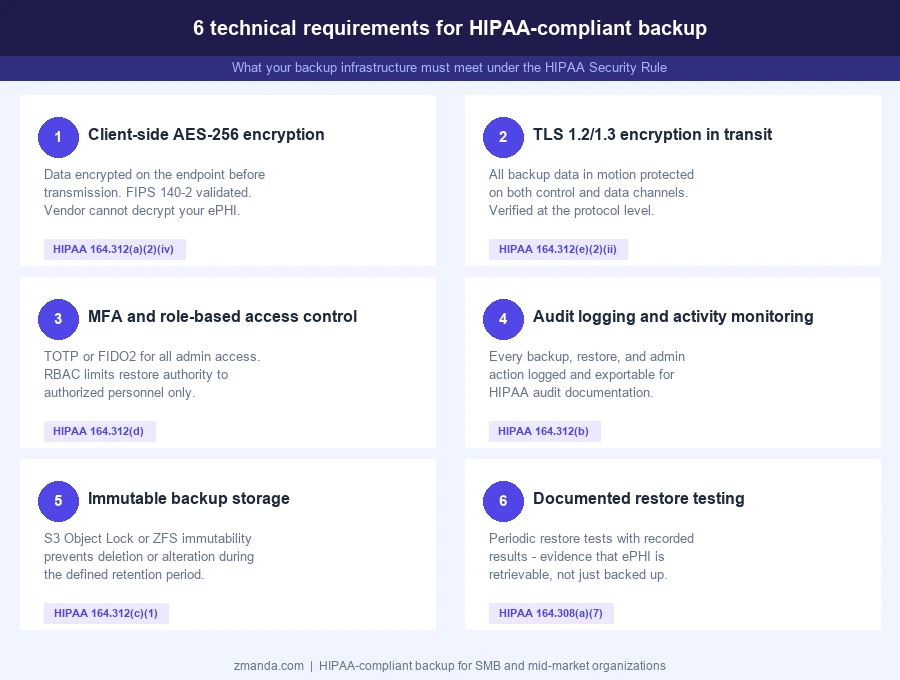
1. Client-side encryption with NIST-approved algorithms
Encryption is technically “addressable” under HIPAA, but HHS has made clear that organizations must encrypt ePHI unless they can document a reasonable alternative. In practice, any organization that transmits or stores ePHI in backup must encrypt it. What matters for compliance is where encryption happens and which algorithm is used. Client-side encryption, where data is encrypted on the source endpoint before transmission, is significantly stronger from a HIPAA perspective than server-side encryption, because it means even your backup provider cannot access your ePHI. AES-256, specifically in a FIPS 140-2 validated implementation, is the standard to look for.
2. Encryption in transit
Backup data in motion from the protected endpoint to the backup destination must be encrypted. TLS 1.2 or 1.3 is the expected baseline. Verify that your backup software encrypts both the control channel (authentication, job management) and the data channel (the actual backup payload) in transit. Some solutions encrypt the control plane but not the data plane; that gap creates exposure.
3. Access controls and multi-factor authentication
HIPAA’s authentication requirement (§164.312(d)) demands that users be verified before accessing systems containing ePHI. For backup systems, this means MFA should be enforced for any administrator who can access, delete, or restore backup data. Role-based access control (RBAC) is equally important,11 not every IT staff member needs restore authority over every workload. Least-privilege access applies to backup administration just as it does to production systems.
4. Audit logging and activity monitoring
Backup software must maintain detailed logs of who initiated a backup, when it ran, what succeeded or failed, who triggered a restore, and what data was accessed. These logs are evidence during a HIPAA audit, and they help you identify unauthorized access attempts before they become reportable incidents. Verify that audit logs are tamper-evident, exportable, and retained for a minimum period that aligns with HIPAA’s six-year record retention requirement.
5. Data integrity verification
HIPAA requires integrity controls to detect unauthorized modification or deletion of ePHI. On the backup side, this means your solution should verify that backup data is byte-for-byte consistent with the source, and ideally run automated restore testing to confirm recoverability. A backup that silently corrupts data is worse than no backup, because it creates false confidence precisely when you can least afford it.
6. Immutable storage options
Ransomware attacks on healthcare organizations increased 264% between 2018 and 2023. Immutable backup storage, where backup data cannot be altered or deleted for a defined retention period, even by administrators, is becoming a de facto standard in HIPAA-regulated environments. Object Lock support (AWS S3, Wasabi) or ZFS-level immutability provides this protection at the storage layer, independent of any controls at the backup software layer. See our guide to immutable backup solutions for a full breakdown of available approaches.
What a business associate agreement covers and what it doesn’t
If your backup software is SaaS-hosted, meaning the vendor manages the backup server infrastructure, your backup vendor is a business associate under HIPAA. You must have a signed Business Associate Agreement (BAA) with them before any ePHI passes through their systems. Operating without a BAA exposes your organization to breach notification requirements and potential OCR penalties, regardless of how technically sound the solution is.
A BAA establishes that your vendor will only use ePHI to perform the contracted service, will implement appropriate safeguards to protect ePHI, will report any security incident or breach involving ePHI, and will return or destroy ePHI at contract termination.
What a BAA does not cover: your vendor signing a BAA doesn’t make their product HIPAA compliant for your specific use case. You still need to verify that the technical controls, encryption, access management, and logging are configured correctly on your end. The BAA shifts some legal responsibility; it doesn’t transfer technical responsibility.
One architectural consideration that changes this calculus: if your backup software uses a direct-to-storage architecture, where backup data flows directly from your protected endpoints to your chosen storage destination without ever passing through the vendor’s servers, then your backup software vendor may not be handling ePHI at all. In that model, your storage provider is the business associate (if cloud-hosted), not your backup software vendor. This architectural distinction is worth verifying explicitly before you decide which vendors require BAAs in your compliance program.
How to evaluate HIPAA-compliant backup software
Use this checklist when assessing any backup solution for HIPAA compliance. Ask vendors to document their answers in writing; verbal assurances are not sufficient for HIPAA audit purposes.
| Requirement | What to verify | Key question to ask the vendor |
|---|---|---|
| Client-side encryption | AES-256, FIPS 140-2 validated | “Where does encryption happen? Are keys stored on your servers?” |
| Encryption in transit | TLS 1.2/1.3 on all channels | “Is both the control plane and data plane encrypted in transit?” |
| Multi-factor authentication | TOTP or FIDO2 for admin access | “Is MFA enforced at the policy level, or optional per user?” |
| Role-based access control | Granular permission levels | “Can I restrict restore access to specific workloads or user groups?” |
| Audit logging | Tamper-evident, exportable logs | “What events are logged? How long are logs retained? Can I export them?” |
| Data integrity verification | Automated restore testing | “Does the solution verify backup integrity? Are restore tests automated?” |
| Immutable storage support | Object Lock or equivalent | “Do you support S3 Object Lock or ZFS immutability?” |
| BAA availability | Signed BAA from vendor | “Do you offer a Business Associate Agreement? Is it standard or upon request?” |
| Disaster recovery documentation | RTO/RPO definitions and testing | “How do I document and test my DR plan for HIPAA audits?” |
| Data architecture | Direct-to-storage vs. vendor-routed | “Does backup data pass through your infrastructure, or go direct to my storage?” |
Common backup mistakes that create HIPAA risk
No restore testing. HIPAA requires not just that you back up ePHI, but that you can retrieve it. Many organizations run backups for months or years without testing a restore. When ransomware hits or hardware fails, they discover their backup was silently failing or producing corrupt data. Regular, documented restore tests are a compliance requirement, not an optional best practice. If you can’t prove recoverability, your backup doesn’t satisfy the “retrievable exact copies” standard.
Backup credentials with excessive access. If your backup service account has domain admin or root-level permissions, an attacker who compromises it gains access to both your production environment and your backup data simultaneously. Backup accounts should follow least-privilege: enough access to read what needs to be backed up, nothing more. This is basic security hygiene, but it’s frequently overlooked in backup configuration reviews.
Unencrypted backup destinations. Backing up ePHI to an unencrypted NAS share, an S3 bucket without encryption enabled, or an external drive that leaves the office unprotected creates direct HIPAA exposure. Encryption must be applied before the data reaches the destination, not assumed to be handled by the destination layer. Verify encryption is active at both the software and storage levels.
Missing or unsigned BAA. If you’re using a SaaS backup solution and haven’t executed a BAA with your vendor, you’re in violation regardless of how technically sound the solution is. This is a documentation gap that OCR will find in any compliance review. BAAs must be signed before ePHI flows to any business associate’s infrastructure.
Single-location backup. Storing backup data in a single location, especially the same physical location as your production data, creates a single point of failure that undermines your disaster recovery plan. HIPAA’s Contingency Plan requirements imply geographic separation for ePHI backups. A ransomware attack, fire, or flood that takes down your primary environment will take down co-located backups at the same time.
How Zmanda Pro supports HIPAA compliant backup
Zmanda Pro is designed to meet the technical controls that HIPAA requires from backup infrastructure. Here’s how the relevant requirements map to Zmanda Pro’s architecture.
Client-side AES-256 encryption. Backup data is encrypted on the source endpoint using AES-256-CTR with Poly1305 AEAD, FIPS 140-2 compliant, before it leaves the device. Zmanda Pro’s servers cannot decrypt your backup data. This is a zero-knowledge architecture by design: encryption keys are generated at vault initialization and never transmitted to or stored on Zmanda infrastructure.
Direct-to-storage architecture. Backup data transfers directly from the protected endpoint to your chosen storage destination. It never flows through Zmanda’s servers. This limits your BAA exposure, your storage provider is the business associate for data in transit, not Zmanda. The data protection architecture is designed to keep your ePHI in environments you control.
MFA and RBAC. Zmanda Pro supports TOTP and FIDO2 for multi-factor authentication, and SSO via Microsoft Entra ID, Google, and generic OIDC providers. Role-based access control allows administrators to restrict which users can access, restore, or delete specific backup data, enforcing least-privilege access at the backup layer.
Immutable storage. Zmanda Pro supports AWS S3 Object Lock and Wasabi Object Lock in both Governance and Compliance modes, as well as ZFS-level immutability for local storage destinations. Snapshot protection prevents users, including administrators, from deleting backup snapshots during the retention period. Combined with ransomware protection controls, this gives healthcare organizations a defensible posture against both external attacks and insider threats.
Audit logging. Every backup job, restore operation, and administrative action is logged. Email reporting supports immediate job notifications, summary reports, and activity reports, all exportable for HIPAA audit documentation.
HIPAA BAA available. Zmanda Pro offers a signed Business Associate Agreement for customers operating under HIPAA. Combined with the direct-to-storage architecture, this provides a defensible compliance posture for covered entities and business associates. Zmanda Pro is also certified under SOC 2 Type II and ISO 27001, providing independent third-party validation of the security controls that underpin HIPAA compliance.
For organizations evaluating HIPAA-compliant backup solutions, Zmanda Pro’s combination of client-side encryption, direct-to-storage architecture, immutable storage support, and BAA availability addresses the full range of technical requirements without a separate compliance add-on.
See Zmanda Pro pricing to understand how workload-based pricing works for healthcare environments.
Building a HIPAA compliant backup program: Next steps
Your backup infrastructure needs to meet technical requirements, but so does your documentation, your testing cadence, and your vendor management process.
Start with a gap assessment:
- Does your current backup solution encrypt data client-side using a FIPS 140-2 validated algorithm, enforce MFA, maintain exportable audit logs, and support immutable storage?
- Do you have a signed BAA with your backup vendor if they handle ePHI?
- Have you tested and documented a restore from backup in the last 90 days?
If any of those answers is “no” or “not sure,” that’s your starting point.
FAQs