Most healthcare IT teams that face HIPAA audit findings are not running careless operations. They have nightly backup jobs completing successfully, a Business Associate Agreement on file, and encryption enabled. The technical controls exist. What an OCR review surfaces instead is the evidence gap is documentation that was never created, processes that were never formalized, and a HIPAA compliant data backup program that functions well but cannot prove it did.
This post maps six specific audit gaps to the HIPAA Security Rule requirements they violate, gaps that surface in otherwise well-run HIPAA compliant data backup programs, and closes with a 10-point checklist you can take into your next internal compliance review session.
See how Zmanda Pro is built for HIPAA audit readiness
Why HIPAA compliant data backup environments still fail audits
When OCR investigators review an environment, they are evaluating two things simultaneously: whether technical controls exist, and whether the organization can demonstrate it.
- Well-run environments routinely fail the second test.
- A restore performed informally during a system migration is not a documented test under §164.308(a)(7).
- A BAA signed in 2021 does not cover the EHR module your team provisioned in 2023.
- An audit log that rolls over every 90 days does not satisfy the six-year retention requirement under §164.312(b).
The distinction that matters is between operational backup and audit-ready HIPAA compliant data backup. Operational means data is protected. Audit-ready means you can demonstrate, on demand and with specific dated records, that every Security Rule requirement has been met and maintained. Most environments achieve the former. Far fewer satisfy the latter under scrutiny.
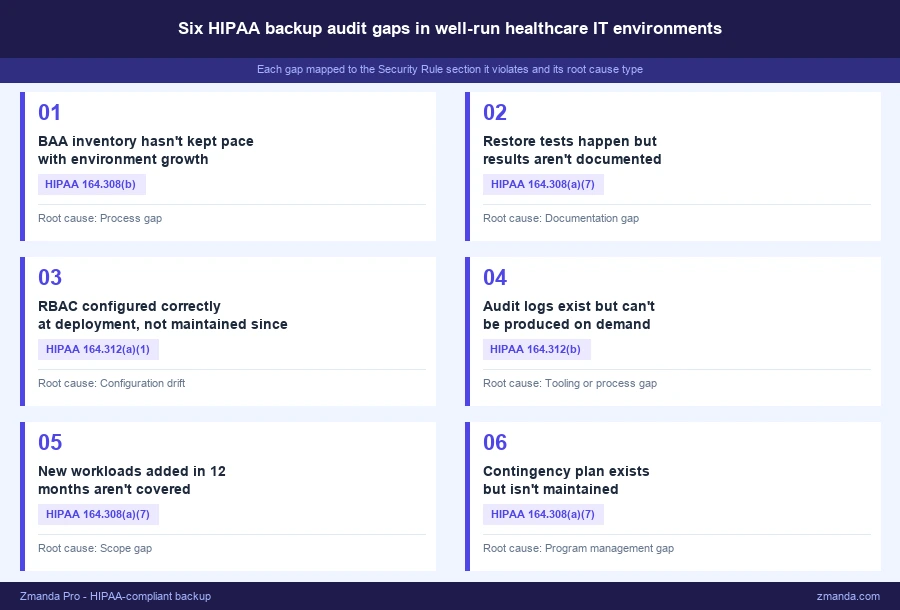
Gap 1: Your BAA inventory hasn’t kept pace with your environment
This isn’t about missing a BAA entirely. It’s about what happens to BAA coverage as your environment grows.
Consider a realistic 18-month window: the organization adds a cloud-hosted EHR module, a telehealth platform goes live, and one workload migrates to a new cloud storage tier. Each system touches ePHI. None of them have a Business Associate Agreement. The original BAA with the backup vendor is still on file. But coverage hasn’t followed the environment.
The reason this gap is non-obvious is that it’s a process failure, not a knowledge failure. The compliance review that produced the original BAA was a one-time exercise tied to a specific environment. There’s no process that triggers a BAA review when the HIPAA compliant data backup environment expands or a new tool is provisioned. The inventory becomes stale by default whenever the environment changes.
OCR’s published settlement agreements consistently identify BAA-related deficiencies as a primary finding, particularly in organizations that completed initial BAA coverage but had no mechanism to maintain it. What auditors look for is a current, complete inventory of every vendor handling ePHI, with a signed BAA for each, reflecting the environment as it exists today.
The fix is procedural: a quarterly BAA inventory review tied directly to the IT procurement process. Every new tool or service that creates, receives, maintains, or transmits ePHI requires a BAA before go-live. For a breakdown of what a BAA must cover and what it doesn’t, including what the agreement must contain to satisfy OCR scrutiny, the complete HIPAA backup guide outlines the specific contractual requirements.
Gap 2: Restore testing happens but the documentation doesn’t exist
Restores happen during migrations, during application go-lives, during break-fix events. People on the team know backups work because they’ve used them. But HIPAA compliant data backup under §164.308(a)(7) does not ask whether restores are possible. It asks whether restore testing has been performed and documented.
This distinction matters because informal restore activity feels like compliance. The technical act happened. But the regulation requires evidence: dated records, the system tested, which backup set was used, the recovery time achieved, the result, and the responsible party. Verbal confirmation that restores “work” is not sufficient. Neither is a closed ITSM ticket with no documented outcome.
OCR’s Contingency Plan guidance identifies testing and revision procedures as a discrete, separately evaluated component of the standard. In enforcement actions where contingency plan gaps were cited, the recurring finding was not the absence of restore capability but the absence of records proving restore testing was performed intentionally and documented.
What auditors want to see is a restore testing log covering at least the last 12 months, with sign-off and specific records for each test: date and time, system tested, backup set used, RTO achieved, outcome, and the responsible party. That log should be stored outside the backup tool’s dashboard, producible independently of any vendor interface. Quarterly documented restore testing for critical systems is the cadence that holds up in practice. For the full regulatory picture of what §164.308(a)(7) actually requires for contingency plan testing, the complete HIPAA backup guide covers the documentation standards OCR evaluates.
Gap 3: RBAC was configured correctly at deployment, not today
This is about what happens to a correctly configured system over 18 months and not about misconfiguring access controls at the start.
Access roles in the backup system were set up properly at deployment. Since then, several staff members have left, a contractor was granted temporary admin credentials during a project, and two team members changed roles. The backup system reflects none of it. Former employee accounts remain active. The contractor’s admin credentials were never revoked.
RBAC drift is invisible until an audit makes it visible. Under §164.312(a)(1), covered entities must implement technical policies and procedures to allow access only to those persons or software programs that have been granted access rights. An audit log showing a former employee account accessing backup data after their termination date is a direct violation. Nothing malicious needs to have occurred. The exposure alone constitutes the finding.
HHS guidance on the Workforce Security standard is explicit: access rights must be modified or terminated when an employee’s role changes or their employment ends. Backup system access reviews need to be tied to HR offboarding procedures, not handled as a separate ad hoc process. Ongoing access control enforcement is a core requirement of any HIPAA compliant data backup program, not a one-time configuration task. What auditors look for is evidence of that enforcement: an access review log showing periodic audits and sign-off tied to personnel changes.
The fix requires two changes: quarterly RBAC reviews on backup systems specifically, and a hard dependency in the HR offboarding checklist that triggers a backup system access audit for every departure. For detail on how Zmanda Pro handles RBAC and audit logging, the HIPAA backup requirements page covers the specific access control architecture.
Gap 4: Audit logs exist but cannot be produced on demand
The backup solution logs every job, access event, and configuration change. Technically, the audit trail is there. But having logs stored in a vendor dashboard is not the same as having HIPAA compliant data backup documentation that can be produced on demand during an OCR review.
Logs are only accessible through the vendor’s dashboard, they roll over after 90 days, there is no documented export process, and no one has tested log retrieval outside of an emergency. When an OCR investigation or internal audit requires log production, the team discovers that the evidence they assumed was available is not accessible in the required form or timeframe.
The HIPAA Security Rule under §164.312(b) requires hardware, software, and procedural mechanisms that record and examine activity in information systems containing or using ePHI. The documentation retention requirement under §164.530(j)(2) requires retention for six years from the date of creation or last effective date. A vendor dashboard with a 90-day rolling window satisfies neither requirement.
What auditors look for is logs in an exportable, standard format such as JSON, CSV, or syslog, stored outside the backup tool, with a documented retention policy enforced at the storage level and access controls on the log archive.
The fix: confirm the backup solution can export logs in a standard format, establish automated monthly exports to a separate access-controlled location, and test that export process before urgency forces it.
Gap 5: New workloads added in the last 12 months aren’t covered
The HIPAA compliant data backup program was designed for the environment as it existed at the time. That environment no longer exists.
A new clinical application went live, a department moved to a SaaS platform handling patient scheduling, and a shared file server migrated to cloud storage. None of these systems appear in the current backup policy. The contingency plan, last updated 18 months ago, describes an infrastructure the organization has substantially moved away from.
This gap forms silently. No one intends to skip backup coverage on a new system. But when there is no formal process connecting IT provisioning to backup policy review, new systems go live without being evaluated. The scope creep accumulates. Under §164.308(a)(7), the contingency plan must accurately reflect the current environment. An auditor who receives a plan describing decommissioned systems will note the discrepancy as a finding.
The fix is structural: an annual backup scope review tied to the risk assessment cycle, with a checkpoint evaluating every system handling ePHI added since the last review. Any new system handling ePHI should be evaluated for backup coverage, RPO and RTO targets, and BAA status before go-live, not during the annual review cycle.
Gap 6: The contingency plan is a document, not a program
The written contingency plan exists. It was produced during a compliance initiative, reviewed once, approved, and filed. Since then the infrastructure it describes has changed substantially. It names systems that have been decommissioned, references an RTO that has never been tested, and lists an owner whose role has been vacant for six months.
Having the document satisfies the administrative requirement on paper. But §164.308(a)(7) also requires testing and revision procedures as a discrete, separately evaluated component of the standard. A plan that has never been tested and has not been updated after infrastructure changes is a compliance gap even if it exists as a formatted document.
OCR evaluates five distinct components under the Contingency Plan standard: a data backup plan, a disaster recovery plan, an emergency mode operation plan, testing and revision procedures, and an applications and data criticality analysis. A static document may address the first three. Testing and revision procedures are only satisfied by evidence: restore test records, revision history, and a currently-in-role owner.
What auditors look for is evidence of active maintenance: revision history with dates, test results attached to the plan, documented sign-off after each review cycle, and a named owner in the role today.
The fix: annual review with documented sign-off, restore test results attached after each quarterly test cycle, revisions triggered by infrastructure changes, and a currently-in-role owner assigned and maintained.
HIPAA compliant data backup audit readiness checklist
Use this checklist to evaluate your HIPAA compliant data backup program before an internal audit prep session or a formal OCR review. Each item maps directly to a specific Security Rule requirement and is specific enough to assign as a pre-audit verification task.
- ☐ BAA inventory is current and reflects every vendor handling ePHI today, not just at last review (§164.308(b))
- ☐ Restore tests have been conducted and documented within the last 90 days (§164.308(a)(7))
- ☐ Restore test records include date, system, backup set, RTO achieved, outcome, and responsible party (§164.308(a)(7))
- ☐ RBAC on backup systems was reviewed within the last 90 days and reflects current staff (§164.312(a)(1))
- ☐ No former employee or inactive contractor accounts retain backup system access (§164.312(a)(1))
- ☐ Audit logs are exported outside the vendor UI and retained for six years (§164.312(b))
- ☐ Log export format is suitable for production in an OCR review: JSON, CSV, or syslog (§164.312(b))
- ☐ Every system handling ePHI added in the last 12 months is covered by the current backup policy (§164.308(a)(7))
- ☐ Contingency plan reflects the current environment and has a documented revision date (§164.308(a)(7))
- ☐ Contingency plan has a named, currently-in-role owner (§164.308(a)(7))
When the checklist surfaces gaps in your current solution
Some of the gaps above are process gaps the team can close without changing tools. RBAC reviews, BAA inventory audits, and restore test documentation are organizational discipline problems. They require consistent process, clear ownership, and integration with existing HR and IT procurement workflows. The right procedures close these gaps regardless of which backup platform is in use.
Others depend directly on whether the backup platform supports the required capabilities. If your HIPAA compliant data backup solution does not export logs in a standard format, lacks granular RBAC controls, or has no mechanism for producing restore test documentation, the gap is in the tool. A process improvement cannot substitute for a capability the platform does not have. How to evaluate whether your backup platform closes these gaps is covered in the next post in this series.
For a direct look at how Zmanda Pro addresses each requirement above, the Zmanda HIPAA-compliant backup page covers the specific controls in detail.
HIPAA compliant data backup is a documentation and program management discipline as much as a technical one. The teams most exposed in an audit are not the ones with no controls. They are the ones who implemented controls correctly and then stopped managing them. A stale BAA inventory, undocumented restore tests, and a contingency plan no one has reviewed in two years carry the same compliance exposure as a missing encryption key. The checklist above gives you a starting point for identifying which category each gap falls into.