Modern IT teams rely on Proxmox to run business-critical virtual machines and containers—but protecting those workloads isn’t always straightforward. According to a study done by Saturn, 1.5 million Proxmox hosts have been deployed globally and adoption has accelerated after organizations moved away from VMware’s post-Broadcom licensing.
Since more production environments are running on Proxmox, the challenges are also growing with this infrastructure. Some examples are: VM sprawl, inconsistent backup policies, limited visibility across hosts, and recovery processes that feel more manual than they should be.
Although Proxmox VE offers powerful virtualization and clustering capabilities, but production deployments still need a reliable backup layer to ensure data protection, compliance, and fast recovery from failures or ransomware events.
That’s where Zmanda Pro comes in.
This guide covers what native Proxmox backup can and can’t do at enterprise scale, what to look for in an enterprise backup solution that closes those gaps, and how Zmanda Pro delivers centralized, automated, recovery-ready protection for your Proxmox infrastructure.
How Proxmox backup works natively
Native Proxmox backup is designed primarily for single-cluster, small-scale environments.
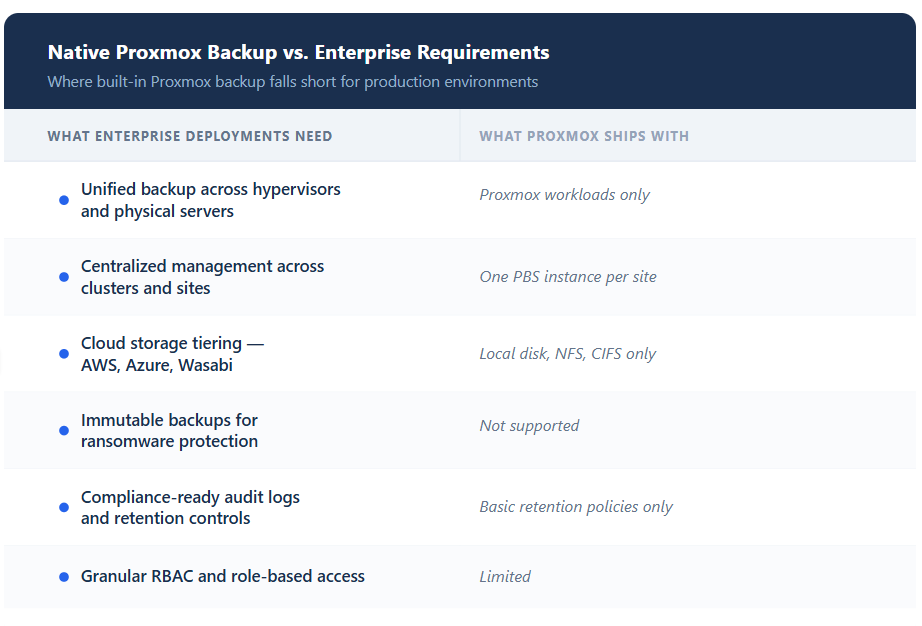
PBS stores backups locally or on mounted NFS/CIFS shares and supports basic scheduling and retention policies. But once environments grow or require multi-site replication, hybrid hypervisor support, centralized reporting, or compliance-ready immutability, limitations become clear.
Native Proxmox backup lacks:
- Centralized management across multiple clusters
- Unified protection for Proxmox alongside VMware, physical servers, and cloud workloads
- Policy-based automation at enterprise scale
- Built-in immutable storage for ransomware protection
- Compliance reporting and audit-ready logs
- Flexible cloud-tiering and disaster recovery workflows
As organizations expand their Proxmox deployments or migrate from VMware, teams quickly encounter operational silos, fragmented storage, and manual recovery processes. At that point, enterprises need more than basic Proxmox backup.
Where built-in Proxmox backup falls short at scale
1. Multi-Hypervisor and Hybrid Environments
Here’s the reality most organizations face: VMware-to-Proxmox migrations don’t happen overnight. Proxmox co-founder Martin Maurer estimates that 95% of VMware setups can be converted, but enterprise migrations typically span 6–18 months. During that window, you’re running both hypervisors simultaneously.
PBS only backs up Proxmox. Your VMware environment still needs its own backup infrastructure. That means two consoles, two sets of recovery procedures, two retention policy frameworks, and critically, two sets of skills your team needs to maintain. When an incident happens at 2 AM during a migration, the last thing you want is ambiguity about which recovery workflow applies to which workload.
Organizations migrating hundreds of VMs need a unified backup approach that covers both VMware and Proxmox from day one of migration through final decommission.
2. Centralized Management Across Clusters and Sites
For an IT Manager overseeing Proxmox clusters in three data centers, this creates operational blind spots. Which site missed its backup window last night? Are retention policies consistent across locations? Is storage consumption tracking to budget? Answering these questions requires logging into each PBS instance individually — a process that doesn’t scale and makes centralized backup management nearly impossible.
3. Storage Sprawl and Cost Predictability
PBS stores backups locally or on network-attached storage. It doesn’t natively tier data to cloud storage, which means your backup storage strategy is limited to whatever disk you provision up front.
Enterprise backup strategies like 3-2-1-1 — three copies, two media types, one offsite, one immutable — require backup data to flow across storage tiers: recent backups on fast local disk, older data archived to cost-effective cloud storage like AWS S3 or Wasabi. Without automated tiering, teams either overprovision local storage (expensive) or manually migrate data between media (error-prone and labor-intensive).
4. Compliance Gaps
Regulated industries don’t get to choose whether they need immutable backups, detailed audit trails, and documented retention policies. HIPAA, SOC 2, SEC 17a-4, and government data residency standards all mandate specific data protection controls.
PBS offers encrypted backups and basic retention policies. What it doesn’t offer: immutable storage that prevents backup deletion (even by administrators), comprehensive audit logs suitable for compliance audits, or security certifications like ISO 27001 that procurement teams at regulated organizations require before approving vendors. For organizations in healthcare, finance, or government, these aren’t nice-to-haves — they’re procurement blockers.
What to look for in an enterprise Proxmox backup solution
Before evaluating specific tools, establish your criteria. An enterprise Proxmox backup solution should check these boxes:
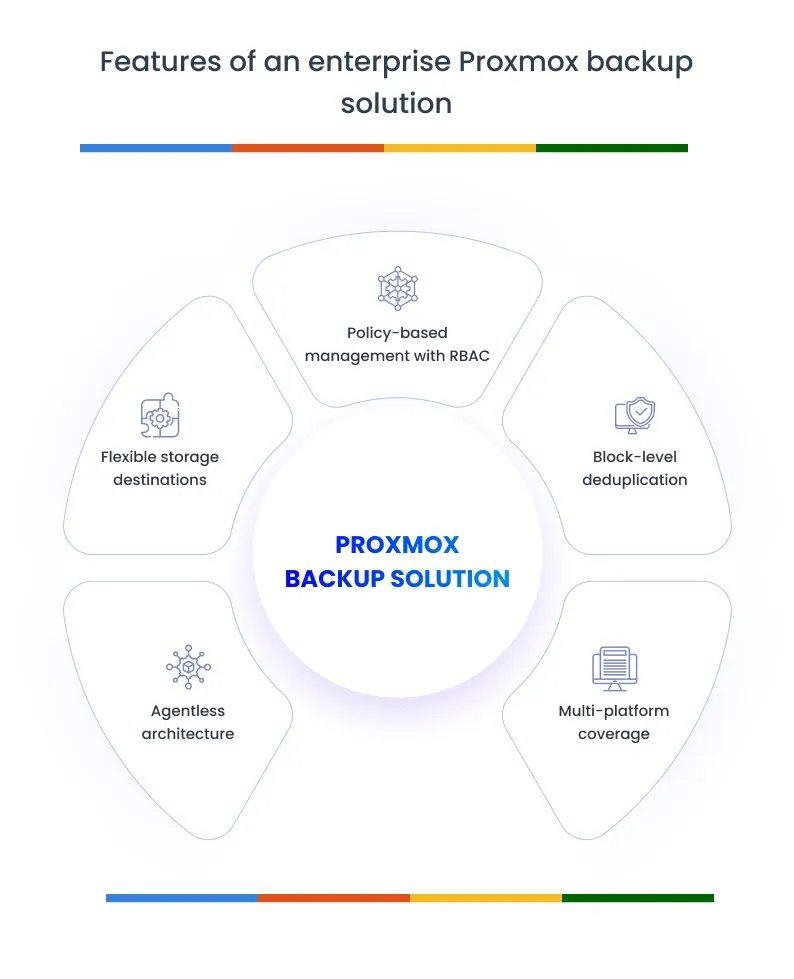
- Agentless architecture. Installing backup agents inside every guest VM creates maintenance overhead that scales linearly with your environment. Host-level, agentless backup using Proxmox’s native APIs eliminates that burden.
- Block-level deduplication. Full VM backups generate massive data volumes. Deduplication that works at the block level can reduce storage consumption by up to 90%, which directly impacts your cloud storage costs.
- Multi-platform coverage. If you’re running Proxmox alongside VMware, Hyper-V, physical servers, or databases, your backup tool should cover all of them. One console, one set of policies, one recovery workflow. This is especially critical during VMware migrations where parallel coverage is non-negotiable.
- Flexible storage destinations. Your backup solution should write to local disk, NAS, and major cloud providers (AWS S3, Azure, Google Cloud, Wasabi) without requiring separate configurations or plugins for each destination. Automated replication between storage targets enables true disaster recovery strategies.
- Policy-based management with RBAC. Define backup schedules, retention rules, and recovery procedures once, then apply them across your entire infrastructure. Role-based access control ensures your backup admin and your compliance officer have different permissions — a fundamental requirement for audit readiness.
When choosing the right backup solution, prioritize tools that meet these architectural requirements over feature checklists.
Introducing Zmanda Pro: Purpose-built enterprise Proxmox backup
Zmanda Pro extends enterprise-grade data protection to Proxmox environments through centralized management, flexible storage, and advanced recovery options.
Rather than treating Proxmox as an isolated platform, Zmanda Pro integrates it into a unified backup ecosystem—supporting multi-hypervisor, hybrid cloud, and compliance-driven deployments from a single console.
This approach enables consistent Proxmox VM backup policies across your entire infrastructure.
Here’s the Zmanda Pro architecture diagram to see how Proxmox and other workload backups are supported and intergrated across to provide IT admins with a centralized backup view.
Proxmox Backup Server vs. Zmanda Pro
Here’s a quick reference for IT teams evaluating their options. Below is a practical comparison between Proxmox Backup Server (PBS) and Zmanda Pro—focused on the capabilities that matter most for enterprise Proxmox backup.
| Capability | Proxmox Backup Server (PBS) | Zmanda Pro |
|---|---|---|
| Proxmox VM backup | ✅ Native vzdump integration | ✅ Agentless |
| VMware / Hyper-V backup | ❌ Proxmox only | ✅ Unified multi-hypervisor |
| Physical server & database backup | ❌ | ✅ Windows, Linux, SQL, MySQL, Oracle, PostgreSQL |
| Block-level deduplication | ✅ Per-datastore | ✅ Cross-infrastructure (up to 90% reduction) |
| Cloud storage destinations | ❌ Local / NFS / CIFS only | ✅ AWS S3, Azure, GCP, Wasabi, local disk, NAS |
| Automated storage tiering | ❌ | ✅ Policy-based replication across tiers |
| Immutable backups | ❌ | ✅ Object lock on supported cloud storage |
| Centralized multi-site management | ❌ Separate PBS per site | ✅ Single console across all locations |
| Role-based access control (RBAC) | Basic | ✅ Granular RBAC with audit logging |
| Compliance certifications | None | ISO 27001 |
| Restore options | Full VM, file-level | Full VM, file-level, point-in-time |
Zmanda Pro is built for environments where Proxmox is one part of a broader infrastructure that needs unified protection, flexible storage, and compliance-grade controls.
How to backup Proxmox using Zmanda Pro
Zmanda Pro approaches Proxmox VM backup through an agentless, host-level architecture. Implementation breaks down into three steps:
Step 1: Install the Zmanda Pro agent and configure authentication
Install the Zmanda Pro agent on a device associated with your backup user, then complete authentication to establish secure communication between Zmanda Pro and your Proxmox environment. This is a one-time setup per Proxmox host. Once authenticated, a single agent installation enables centralized protection for all virtual machines across your Proxmox infrastructure — no agents required inside guest VMs.
Step 2: Configure backup policies and storage destinations
With authentication in place, select which Proxmox hosts to protect from the centralized Zmanda Pro console. Define your backup schedules, retention policies, and storage destinations — AWS S3, Google Cloud Storage, Wasabi, Azure, or local disk and NAS. Zmanda Pro captures snapshots at the Proxmox host level and securely streams backup data to your chosen storage location. After the initial full backup, forever incremental backups capture only changed data blocks, minimizing backup windows and network bandwidth consumption. You can also configure replication to multiple storage targets simultaneously — enabling 3-2-1-1 backup strategies with automated offsite and immutable copies.
Step 3: Automate backups and restore when needed
Once configured, backups run automatically on your defined schedules with no manual intervention. Block-level deduplication across your entire infrastructure — not just Proxmox VMs — reduces storage consumption by up to 90%. All backup and restore activity is tracked through the Zmanda Pro dashboard, giving IT Managers complete visibility into job success rates, storage consumption, and compliance status.
When restoration is needed, Zmanda Pro provides multiple recovery paths: full VM restore to bring an entire virtual machine back online, file-level recovery to retrieve specific files without restoring the whole VM, or point-in-time restoration to roll back to a precise moment before an incident. All restore operations go directly back to Proxmox, eliminating intermediate conversion steps and minimizing downtime.
The critical differentiator: this same console manages backup for VMware, Hyper-V, Windows servers, Linux servers, databases, and workstations.
Common use cases for enterprise Proxmox backup
1. VMware-to-Proxmox migration
The most immediate use case. Organizations reducing virtualization licensing costs by 70–90% through Proxmox adoption can’t afford a backup gap during the transition. Zmanda Pro backs up both VMware and Proxmox VMs simultaneously from the same console. As workloads migrate over 6–12 months, backup coverage remains constant — no staff retraining, no new recovery procedures, no parallel backup infrastructure doubling your costs.
For teams planning or mid-flight on this migration, our VMware migration guide covers the operational considerations in detail.
2. Multi-site Proxmox deployments
Enterprises running Proxmox clusters across multiple data centers need a single pane of glass for backup management. Zmanda Pro provides centralized policy enforcement, monitoring, and recovery orchestration across all locations. Replicate backups between sites for geographic redundancy while maintaining consistent retention policies, essential for business continuity planning.
3. High-compliance environments
Healthcare, financial services, and government organizations running Proxmox need backup systems that satisfy auditors, not just IT teams. Zmanda Pro delivers immutable backup storage, detailed audit logs, ISO 27001 compliance, and ransomware-resistant data protection. Automated backup verification and documented retention policies mean your compliance team isn’t scrambling before audit season.
Getting Started with Zmanda Pro
If you’re evaluating enterprise Proxmox backup options, the fastest path to clarity is hands-on experience. Zmanda Pro offers a free trial so you can test Proxmox VM backup in your own environment.
FAQs