The enterprise virtualization landscape is experiencing its most significant shift in decades. With Broadcom’s $69 billion VMware acquisition triggering substantial changes in licensing, support, and pricing models, IT leaders face crucial decisions about their infrastructure strategy.
According to IDC’s latest research, 47% of current VMware customers are actively evaluating alternatives, while another 27% have already begun proof-of-concept testing. This unprecedented market movement isn’t just about costs—it’s about finding the right platform to support your organization’s future growth while ensuring business continuity today.
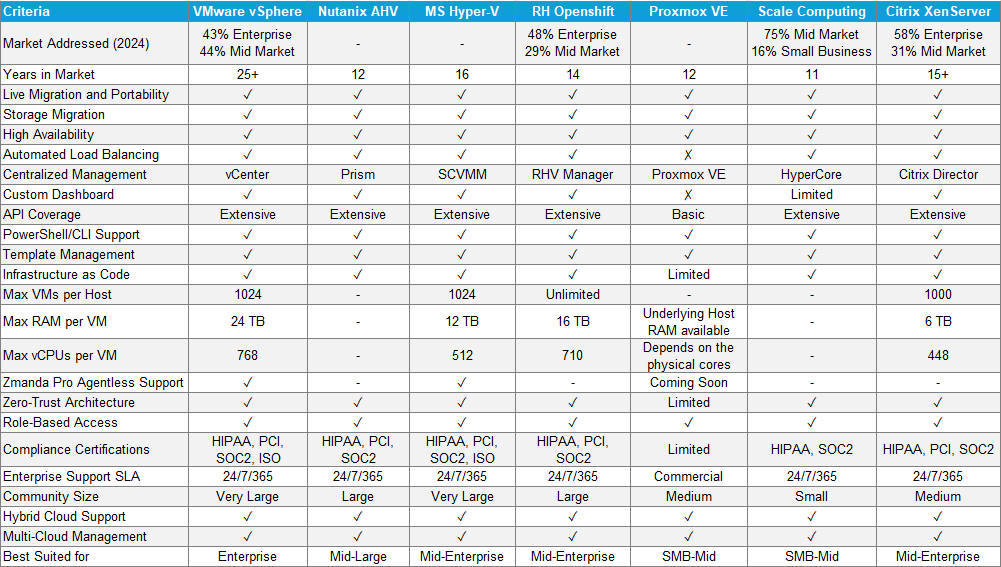
This comprehensive guide helps IT leaders navigate their VMware Alternatives with clarity, focusing on practical comparisons that matter to your bottom line and operational efficiency.
Let’s dive into the top alternative VMware solutions proven successful for mid-to-large enterprises:
1. Microsoft Hyper-V

Among VMware alternatives, Microsoft Hyper-V stands out with 48% enterprise and 29% mid-market adoption rates. As the premier VMware alternative for Windows environments, its deep integration with Windows environments and familiar management interfaces make it a natural choice for Microsoft-centric organizations.
Think Windows Server Datacenter Edition with enterprise-grade virtualization built right in. Microsoft’s offering shines brightest in Windows-centric environments, where integration with existing Microsoft tools creates natural operational synergies.
Key Capabilities:
- Enterprise-grade feature set including live migration and failover clustering
- Supports up to 1,024 VMs per host with 512 vCPUs each
- Native Windows Admin Center integration
- PowerShell automation for scaled management
- Storage Migration Services for simplified workload movement
- Software-defined networking with advanced security features
- Built-in replication for disaster recovery
Ideal Use Cases: Organizations leveraging:
- Extensive Windows Server deployments
- Active Directory-centric environments
- Microsoft System Center management
- Windows-based application stacks
- Microsoft 365 integrated workloads
Migration Considerations:
- Direct conversion tools available for VMware VMs
- 4-6 month average migration timeframe
- Simplified transition for Windows workloads
- More complex for Linux-heavy environments
- Requires planning for VMware-specific feature transitions
Cost Impact:
- Included with Windows Server Datacenter licenses
- Reduced training costs for Microsoft-certified teams
- Potential 30-40% savings on virtualization licensing
- ROI typically achieved within 12-18 months
- Lower total cost of ownership for Microsoft shops
2. Nutanix AHV

With 44% mid-market adoption, Nutanix AHV offers a fresh approach to virtualization by combining storage, computing, and network management into a single platform. Its hyper-converged infrastructure (HCI) approach particularly appeals to organizations seeking an alternative VMware solution with operational simplicity without sacrificing enterprise capabilities.
Key Capabilities:
- One-click infrastructure operations
- Built-in backup and disaster recovery
- Advanced VM migration capabilities
- Native security features including micro-segmentation
- Flow network security with automated policies
- Integrated performance monitoring
- AI-powered resource optimization
Ideal Use Cases: Organizations prioritizing:
- Simplified infrastructure management
- Rapid deployment requirements
- Multi-site consistency
- Edge computing initiatives
- VDI workloads
- Database and analytics platforms
Migration Considerations:
- 3-5 month average migration timeframe
- Built-in V2V conversion tools
- Automated workload balancing
- Simplified storage management
- Streamlined backup integration
Cost Impact:
- Subscription-based licensing model
- Potential 40-50% reduction in operational costs
- Hardware vendor flexibility
- Reduced management overhead
- Typical ROI within 8-12 months
3. Red Hat OpenShift Virtualization

Capturing 58% enterprise and 31% mid-market share among open-source solutions, Red Hat OpenShift Virtualization brings container-native virtualization to enterprises seeking modern infrastructure approaches. It uniquely positions organizations for both traditional VM workloads and cloud-native applications.
Key Capabilities of this VMware Alternative:
- Unified management for VMs and containers
- Enterprise-grade Kubernetes integration
- Advanced automation capabilities
- Native CI/CD pipeline support
- Comprehensive security features
- Multi-cluster management
- Automated scaling policies
Ideal Use Cases: Organizations focusing on:
- Hybrid cloud deployments
- DevOps initiatives
- Container adoption strategies
- Linux workload optimization
- Cloud-native transitions
- Application modernization
Migration Considerations:
- 6-8 month typical migration timeline
- Strong Linux workload support
- Container-ready infrastructure
- Required skills transformation
- Comprehensive automation options
Cost Impact:
- Subscription-based pricing
- Consolidated platform savings
- Reduced operational overhead
- Technology stack simplification
- 18-24 month average ROI timeline
4. Citrix Hypervisor

With over 15 years in virtualization and a strong 75% adoption rate in the mid-market segment, Citrix Hypervisor (formerly XenServer) excels in desktop virtualization while maintaining robust server virtualization capabilities. Its strength lies in delivering high-density virtual desktop infrastructure (VDI) alongside traditional workloads.
Key Capabilities of this VMware Alternative:
- Industry-leading graphics virtualization
- Advanced VM live migration
- Dynamic memory allocation
- Integrated workload balancing
- Comprehensive API support
- Multi-server management
- GPU virtualization optimization
Ideal Use Cases: Organizations requiring:
- High-performance VDI deployments
- Graphics-intensive workloads
- Mixed desktop/server environments
- Financial trading platforms
- Design/engineering workstations
- Educational lab environments
Migration Considerations:
- 4-6 month typical migration timeline
- Direct conversion from VMware formats
- Strong VDI-specific tools
- Simplified GPU passthrough
- Extensive performance monitoring
Cost Impact:
- Flexible licensing options
- VDI-optimized pricing
- Reduced endpoint costs
- Hardware Independence
- 12-15 month typical ROI
5. Scale Computing Platform

Emerging as a powerful VMware alternative with 58% adoption among mid-sized enterprises, Scale Computing’s HC3 platform stands out for its simplicity and automated management capabilities. It’s particularly effective for organizations with limited IT resources seeking enterprise-grade functionality.
Key Capabilities:
- Self-healing infrastructure
- Automated failover
- Zero-touch scaling
- Native disaster recovery
- Integrated backup solutions
- Edge computing support
- Automated resource balancing
Ideal Use Cases: Organizations prioritizing:
- Distributed IT environments
- Edge computing deployments
- Retail/branch office scenarios
- Manufacturing facilities
- Healthcare clinics
- Educational institutions
Migration Considerations:
- 2-4 month average migration timeline
- Automated migration tools
- Simplified management transition
- Minimal training requirements
- Built-in high availability
Cost Impact:
- Predictable pricing model
- Reduced management overhead
- Minimal training costs
- Hardware cost optimization
- 6-12 month typical ROI
6. Proxmox VE

With a growing presence in mid-sized enterprises and a 31% adoption rate among cost-conscious organizations, Proxmox VE offers enterprise virtualization features with open-source flexibility. This strong VMware Alternative is built on proven KVM technology, providing a robust alternative for organizations that value both control and cost-effectiveness.
Key Capabilities:
- Full-featured web management interface
- Software-defined storage integration
- Live migration capabilities
- Container and VM support
- Built-in backup functionality
- High availability clustering
- Flexible storage options
Ideal Use Cases: Organizations seeking:
- Cost-effective virtualization
- Direct infrastructure control
- Combined VM/container environments
- Development/test environments
- Research institutions
- Technical service providers
Migration Considerations:
- 3-5 month typical migration timeline
- Direct VM format conversion
- Strong Linux compatibility
- Community-driven support options
- Extensive documentation available
Cost Impact:
- Open-source core functionality
- Optional enterprise support
- Significant license cost reduction
- Hardware flexibility
- 4-8 month typical ROI
Making Your Choice: Selecting the Right VMware Alternative
After examining these VMware alternatives, you might be wondering which platform best fits your organization. The answer lies in a methodical evaluation of your current infrastructure, team capabilities, and future goals. While each alternative offers unique advantages, success depends more on your organization’s readiness than the platform itself.
Let’s put this all together. Your choice of virtualization platform impacts everything from daily operations to long-term scalability. Here’s how to make an informed decision:
Prioritize your VMware Alternative based on:
- Your existing infrastructure and skill set
- Growth projections for the next 3-5 years
- Budget constraints and ROI expectations
- Specific workload requirements
- Support and training needs

Assessing Your Migration Readiness
Migration success starts with a thorough understanding of your current environment. Before selecting an alternative platform, you need visibility into your infrastructure’s complexity, application dependencies, and operational requirements. This assessment helps identify potential challenges and opportunities specific to your organization. We’ve developed a comprehensive checklist to help you evaluate your readiness and make informed decisions about your migration journey.
Download the Migration Readiness Checklist.
Understanding Migration Risks
Every infrastructure transition carries inherent challenges, but proper planning transforms these challenges into manageable steps. Our experience with hundreds of successful migrations shows that organizations who thoroughly assess risks before migration are 3x more likely to complete their transition on schedule and within budget. From data protection requirements to compliance maintenance, each aspect needs careful consideration and planning.
Download Technical Whitepaper on VMware Migration for IT Experts
Choose Zmanda for Your Expert VMware Migration Journey
Successful platform transitions require more than just technical knowledge—they need experienced guidance. For over two decades, Zmanda has been at the forefront of enterprise data resilience and IT services. Our approach combines deep technical expertise with practical experience, ensuring organizations can transition between platforms confidently and securely. We understand that each migration is unique, which is why we offer customized solutions tailored to your specific needs.
Zmanda’s comprehensive VMware migration services include:
- detailed infrastructure assessment
- customized transition planning
- implementation support
- post-migration optimization.
With our seamless migration guarantee and 24/7 expert support, you can focus on your business while we ensure your infrastructure transition succeeds. Learn more about our VMware Migration services.
Ready to explore how Zmanda can support your migration journey? Our team of experts is here to help you evaluate your options and develop a comprehensive transition strategy that aligns with your business objectives. Book a free 30-minute VMware Migration Assessment.