Every backup vendor claims to offer HIPAA compliant backup solutions. Almost none explain what that means for your specific architecture. A signed BAA and AES-256 encryption in the marketing copy does not tell you where your ePHI actually goes, who can access it, or whether the vendor’s infrastructure becomes a business associate the moment backup data transits their servers. The marketing claim and the compliance reality are two different things.
This post delivers a structured evaluation framework that starts with data flow, covers the criteria that carry real compliance weight, and identifies the vendor responses that should disqualify a solution before contract.
See how Zmanda Pro supports HIPAA compliant backup environments
Understanding where your ePHI is stored and who handles it
Before evaluating any feature, map your ePHI data flow. The single most important question in any evaluation of HIPAA compliant backup solutions is whether backup data transits the vendor’s infrastructure or goes directly to your chosen storage destination. The answer determines your BAA exposure, your data residency obligations, and your encryption key ownership requirements. Most vendor marketing materials skip this entirely.
Two architectures dominate the market. In a vendor-routed architecture, backup data passes through the vendor’s servers before reaching storage. The vendor becomes a business associate and must sign a BAA. Their infrastructure is in scope for your HIPAA audit. Vendors offering HIPAA compliant backup solutions through a routed architecture are not automatically disqualified, but the compliance implications are materially different and must be accounted for in your BAA, your audit scope, and your data residency assessment.
In a direct-to-storage architecture, backup data flows from the endpoint directly to your chosen storage destination without passing through vendor infrastructure. The vendor does not handle ePHI. Your BAA exposure is limited to your storage provider, not your backup software vendor. This architecture simplifies your compliance posture significantly.
The choice between HIPAA compliant backup solutions often comes down to this architectural difference before a single feature is evaluated. Know your data flow before the demo. For a full breakdown of what a BAA must cover and what it does not, the complete HIPAA backup guide outlines the specific contractual requirements that apply to each architecture.
What to actually look for in a HIPAA backup vendor
Every marketing page for HIPAA compliant backup solutions checks the same boxes: AES-256, SOC 2, BAA available. The differentiating questions are the ones that go one level deeper, from what a vendor claims to what they can verify on request. The table below maps each criterion to the key question and the response that should end the evaluation.
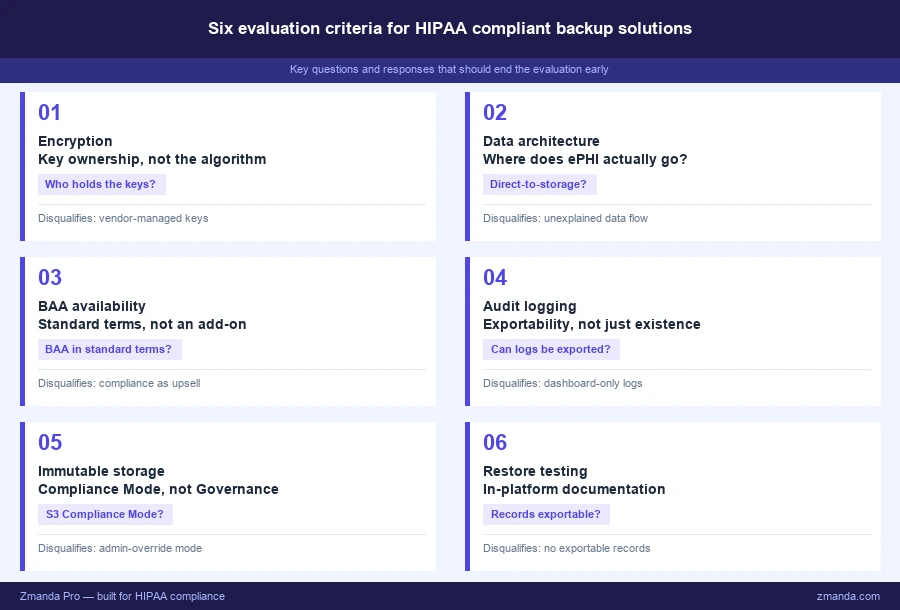
1. Encryption: key ownership is the question, not the algorithm
AES-256 is table stakes when evaluating HIPAA compliant backup solutions. Every vendor will claim it. The differentiating question is who holds the encryption keys, because key ownership determines whether your ePHI is actually protected if the vendor’s infrastructure is breached.
A strong vendor response: keys are generated at vault initialization on the customer side and never transmitted to or stored on vendor infrastructure. Zero-knowledge architecture means the vendor cannot decrypt backup data even if compelled by a legal order or subpoena.
A disqualifying response: the vendor holds master keys, customer keys are “managed” by the vendor, or the sales team cannot clearly explain where key generation and storage occur. For federal-adjacent healthcare environments and cyber insurance requirements, FIPS 140-2 validation is an additional signal worth requesting with documentation, not a verbal claim during a demo.
2. Data architecture: where does ePHI actually go
The data architecture question separates genuine HIPAA compliant backup solutions from those that use compliance language without the underlying controls. This is the same question as the data flow analysis above, now applied as a direct evaluation criterion during vendor assessment.
A strong vendor response: direct-to-storage architecture with a documented data flow diagram available before the product demo. The vendor confirms the backup payload never transits their servers, and that confirmation is available in writing before contract.
A disqualifying response: the vendor cannot explain their data flow clearly, confirms backup data passes through their infrastructure without a clear BAA and compliance documentation covering that specific leg of the journey, or cannot produce a data flow diagram on request.
3. BAA availability and scope
When assessing any HIPAA compliant backup service, the question is not just whether a BAA is available. It is whether it is standard, what it covers, and whether it reflects the vendor’s actual data handling practices rather than a subset of them.
A strong vendor response: the BAA is included in standard terms, not a premium add-on. The vendor can explain which of their services handle ePHI and which do not. BAA scope matches the actual data flow, and the vendor can walk through that mapping on request before contract.
A disqualifying response: BAA is an optional add-on, requires separate negotiation, or covers only a subset of the services in scope for your deployment. The specific contractual requirements a BAA must include are covered in detail in the guide to what a BAA must cover and what it does not.
4. Audit logging: exportability is the requirement, not existence
Every modern backup solution logs events. When comparing HIPAA compliant data backup services, the question is whether those logs can be exported, in what format, and for how long they are retained. Having logs and being able to produce them for an OCR review are different capabilities, and most vendor marketing conflates the two.
A strong vendor response: logs exportable in JSON, CSV, or syslog format, with retention configurable to six years minimum. The export process is documented and testable before an emergency requires it. The vendor can demonstrate log export during evaluation, not just describe it.
A disqualifying response: logs accessible only through the vendor dashboard, retention capped at 90 days or less, no documented export process, or the vendor cannot produce a sample export during evaluation. The documentation gaps that show up even in well-run environments covers in detail what happens when this criterion is missed after deployment.
5. Immutable storage support
Immutability is not just a ransomware protection feature in HIPAA compliant backup systems. It is a data integrity control under §164.312(c)(1), which requires covered entities to implement security measures that protect ePHI from improper alteration or destruction. In a ransomware scenario, the immutability mode in use determines whether backup data can be recovered or whether it was also encrypted by the attacker.
A strong vendor response: support for S3 Object Lock in Compliance Mode, ZFS immutability, or equivalent. Compliance Mode specifically, not just Governance Mode which allows administrator override, is the standard that holds up in both a ransomware scenario and an OCR review of your data integrity controls.
A disqualifying response: immutability not supported, only Governance Mode available, or the vendor cannot distinguish between the two modes and explain the compliance implications of each.
6. Restore testing support
HIPAA requires documented restore testing. The question for HIPAA compliant backup solutions is whether the platform makes that documentation possible within the tool, or whether the team must build the entire process in a separate system with no connection to the backup platform itself.
A strong vendor response: the platform provides restore job records including timestamps, the system tested, the backup set used, and the outcome. Records are exportable and retention is configurable. Restore testing can be scheduled and documented within the platform rather than tracked manually outside it.
A disqualifying response: restore events logged only as job completions with no supporting detail, records not exportable, or documentation must be maintained entirely in a separate system with no integration to the backup platform.
Red flags that should end an evaluation early
Some vendor responses to evaluation questions about HIPAA compliant backup solutions should stop the process before it advances further. Each of the following maps directly to a compliance gap that cannot be patched after deployment or managed around with process improvements after contract.
- BAA is an optional add-on or premium tier. If the vendor treats HIPAA compliant backup as an upsell, their architecture was not designed for regulated environments. A vendor serious about regulated healthcare builds compliance into the standard offering, not into an upgrade tier.
- Vendor cannot produce a full SOC 2 Type II report. Type I covers design only. Type II covers operational effectiveness over 6 to 12 months. Require the full report with observation dates, not a certificate page or vendor-produced summary sheet.
- Vendor cannot explain where encryption keys are stored. If the sales team cannot answer this question clearly, the architecture does not support the answer you need for your compliance documentation.
- Logs are only accessible through the vendor dashboard with no export capability. This is a six-year retention problem and an OCR production problem. A dashboard you cannot export from is not an audit log in any compliance sense.
- Backup data transits vendor infrastructure with no BAA covering that leg. Unless the vendor can produce documentation covering the full data flow and the BAA scope matches it, this is an uncovered ePHI exposure regardless of how the marketing describes the product.
- No immutable storage support. This disqualifies a solution for any environment where ransomware is a realistic threat, which includes every healthcare environment regardless of size or tier.
How to structure the vendor evaluation process
Evaluating HIPAA compliant backup solutions is as much a process discipline as a technical one. Three stages structure the work and create a paper trail that reflects due diligence if your vendor selection is ever questioned during an audit or investigation.
Stage 1: Data flow documentation before the demo. Before scheduling a product demo, request a data flow diagram showing where backup data goes from endpoint to storage. If a vendor cannot produce this before the demo, the demo is premature. You cannot evaluate compliance posture without understanding architecture. A vendor who pushes back on this request is providing useful information about how they approach regulated-environment sales.
Stage 2: Written responses to compliance questions. Verbal assurances during a sales call are not audit documentation. Any vendor under serious evaluation should provide written responses covering data flow architecture, key ownership and management, BAA scope and availability, log export capability and retention, immutable storage modes supported, and certifications with evidence. Evidence means the SOC 2 Type II report with observation dates, ISO 27001 certificate, and FIPS 140-2 documentation where applicable, not a vendor-produced summary sheet.
Stage 3: Verify before you sign. Three verifications before contract: request and read the full SOC 2 Type II report, not the summary. Test log export by requesting a sample export during evaluation, not after deployment. Confirm BAA scope matches the data flow diagram, specifically that every service handling ePHI is covered and no exceptions exist in the fine print.
Total cost of compliance, not just total cost of the tool
The evaluation of HIPAA compliant backup solutions should include compliance operational cost, not just licensing cost. Three questions surface what is often underweighted in an initial vendor comparison.
How much manual effort does audit documentation require? A platform that produces exportable restore logs and audit trails reduces compliance overhead across every audit cycle. A platform requiring the team to maintain all documentation outside the tool adds ongoing cost that compounds with organization size and audit frequency, and that cost rarely appears in a licensing comparison.
What does the vendor’s support model look like during an OCR investigation? Can they produce documentation on request? What is their SLA for compliance-related support, and is that SLA written into the contract terms?
What is the cost of a BAA gap? One undocumented vendor handling ePHI without a BAA is a HIPAA violation regardless of how technically sound everything else is. The risk of an incomplete vendor inventory should factor into the cost comparison alongside the licensing fee.
How to apply this framework to your evaluation
The criteria above are not a comprehensive feature comparison. They are the compliance-specific questions that determine whether a HIPAA compliant backup solution can support an audit-ready program. A vendor that clears all of them is not automatically the right choice for your environment. But a vendor that fails any of them creates a compliance gap that no process improvement can close after deployment.
Once gaps in a current solution are identified, the next step is understanding which are process gaps the team can close and which are platform limitations. The documentation gaps that show up even in well-run environments covers that distinction in detail. For a direct look at how Zmanda Pro performs against each criterion in this framework, how Zmanda Pro answers each question in this framework maps every evaluation point to specific capabilities.
How Zmanda Pro answers this framework
Here is how Zmanda Pro answers each criterion directly:
- Encryption: AES-256 with keys generated and held on the customer side. Zmanda does not hold or manage master keys, which means the vendor cannot decrypt backup data under any circumstance, including a legal compulsion.
- Data architecture: Direct-to-storage model. Backup data flows from the protected endpoint to your chosen storage destination without transiting Zmanda infrastructure, which limits your business associate exposure to your storage provider, not your backup software vendor.
- BAA availability: You do not need to sign a BAA with Zmanda. Because backup data flows directly to your storage destination without transiting Zmanda infrastructure, Zmanda is not a business associate under HIPAA. If you use a third-party storage provider, a BAA with that provider is recommended.
- Immutable storage: S3 Object Lock in Compliance Mode is supported, not just Governance Mode. This is the standard that holds up in both a ransomware scenario and an OCR review of your data integrity controls.
- Restore testing: The platform produces restore job records that include timestamps, the system tested, the backup set used, and the outcome. Those records are exportable and can be retained as part of your contingency plan documentation.
FAQs