Most HIPAA backup evaluations start with the feature list. Not all HIPAA compliant backup software is built the same way. Two solutions can both advertise AES-256 encryption and a signed BAA and carry materially different HIPAA exposure, depending on one factor: whether backup data transits vendor infrastructure before reaching storage. That single architectural decision determines your BAA obligations, your encryption key ownership, and the scope of your HIPAA audit.
This post covers five HIPAA compliant backup software solutions evaluated against five criteria: data architecture, BAA scope, encryption key ownership, immutable storage, and audit log exportability. For a full walkthrough of what a BAA must cover and what it does not, see the complete HIPAA backup guide, which covers the contractual requirements in detail.
See how Zmanda Pro supports HIPAA compliant backup environments
How we evaluated each solution
Evaluating HIPAA compliant backup software requires a consistent methodology. Every vendor in this post is assessed against the same five criteria, applied in the same way. This is the same framework covered in depth in the post on how to evaluate these criteria before signing a contract. The table below defines each criterion and what it determines for your compliance posture.
| Criterion | What it determines |
|---|---|
| Data architecture | Whether the vendor handles ePHI and whether a BAA with the vendor is required |
| BAA scope | Which parties must sign a BAA, whether it is standard or configuration-dependent |
| Encryption key ownership | Who holds the keys and who can decrypt backup data |
| Immutable storage | Level of protection against ransomware and unauthorized deletion or modification |
| Audit log exportability | Whether logs can be produced outside the vendor UI for an OCR review |
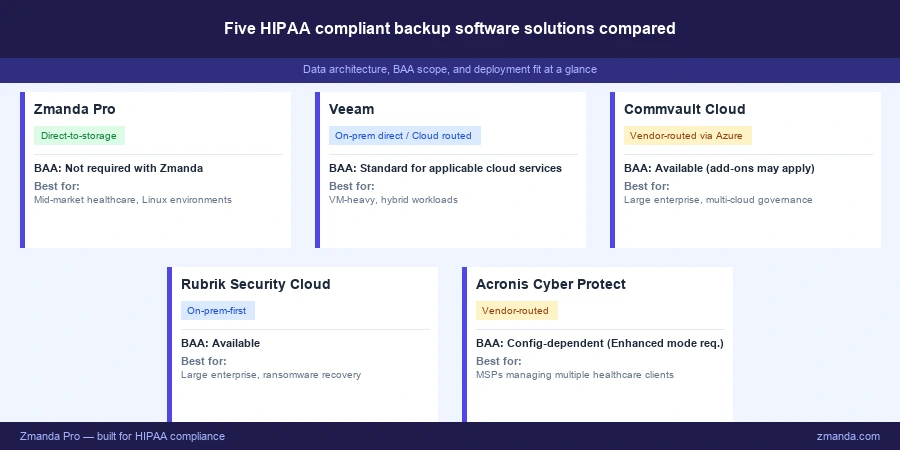
The five HIPAA compliant backup software solutions evaluated
These five solutions represent the range of architectures, pricing tiers, and deployment models that healthcare IT teams most commonly evaluate when selecting HIPAA compliant backup software.
1. Zmanda Pro
Best for: Healthcare organizations that want direct control over ePHI, customer-held encryption keys, and enterprise-grade backup capability without enterprise-level licensing cost or complexity.
Data architecture: Direct-to-storage. Backup data flows from the protected endpoint directly to the customer’s chosen storage destination without transiting Zmanda infrastructure. Zmanda does not handle ePHI at any point in the backup or restore process. This applies to self-hosted deployments, which is the standard deployment model for most healthcare organizations.
BAA scope: For self-hosted deployments, Zmanda is not a business associate under HIPAA and no BAA with Zmanda is required. BAA exposure is limited to the customer’s chosen storage provider — AWS, Azure, Google Cloud, Wasabi, or any S3-compatible storage that offers a BAA. For Zmanda-hosted or managed service deployments, BAA requirements should be confirmed with Zmanda’s compliance team based on the specific deployment model. This is a compliance simplification that vendor-routed HIPAA compliant backup software cannot match for self-hosted environments.
Encryption key ownership: Customer-held. When Zmanda Pro sets up a backup destination for the first time, it generates high-entropy random encryption keys. All backup data is stored encrypted using AES-256 and authenticated to ensure data integrity. Encryption keys never leave the client in unencrypted form and are never transmitted to or stored on Zmanda infrastructure. The only party with the decryption key is the customer’s organization or backup administrator. Zmanda cannot decrypt backup data under any circumstance.
Immutable storage: S3 Object Lock in Compliance Mode is supported. Every backup is stored in a secure vault with WORM (write once, read many) technology that prevents unauthorized changes, deletions, or encryption. Air-gapped storage and the 3-2-1-1-0 backup strategy are available with a two-click setup, providing protection that holds up under both a ransomware scenario and an OCR data integrity review under §164.312(c)(1).
Audit log exportability: Detailed logs track every data access, modification, backup, and recovery operation. Compliance reports can be generated on demand to demonstrate adherence to HIPAA documentation requirements during audits or investigations. Log retention is managed at the storage layer, giving the customer full control over retention periods and ensuring the six-year retention requirement under §164.312(b) can be met through the customer’s chosen storage destination.
Encryption in transit: TLS 1.2 encryption protects all data in transit. AES-256 encryption protects data at rest. Both are applied by default, not as optional configuration.
Access controls: Role-based access controls (RBAC) and SSO integration ensure only authorized personnel can access protected health information. Every access and administrative action is logged for audit purposes.
Deployment: Linux-first, with broad workload support covering 30-plus workload types including Windows and Linux servers, VMware, Hyper-V, Microsoft SQL, Oracle databases, file systems, and endpoint devices. Strong support for hybrid environments combining on-prem and cloud storage destinations. Open-source foundation via the Amanda heritage. Workload-based pricing means costs scale with the number of systems protected, not the volume of data stored.
Where it fits well: Mid-market healthcare organizations and enterprises that want strong backup capability without enterprise licensing complexity. Organizations where data sovereignty, deployment control, and cost-effectiveness matter more than a fully managed SaaS offering. Healthcare IT teams running Linux-heavy or hybrid infrastructure.
See how Zmanda Pro supports HIPAA compliant backup environments
2. Veeam Backup and Replication
Best for: Healthcare organizations with significant on-prem and hybrid environments, particularly those running VMware, Hyper-V, or Microsoft workloads at scale.
Data architecture: Depends on deployment model. For on-premises deployments, backup data does not transit Veeam infrastructure and Veeam is not a business associate. For cloud-hosted Veeam services, backup data transits Veeam infrastructure, making Veeam a business associate for those workloads.
BAA scope: Available for cloud services where Veeam handles ePHI, included in standard service agreement terms for applicable services. For on-premises deployments, no BAA with Veeam is required. Organizations running a mixed model need to confirm which workloads are covered by the BAA and which fall outside it.
Encryption key ownership: On-premises deployments support customer-managed keys. For cloud-hosted services, key ownership depends on the specific configuration and should be confirmed with Veeam before deployment.
Immutable storage: Supported, including S3 Object Lock. SureBackup automated recovery verification is a meaningful differentiator for HIPAA restore testing documentation requirements.
Audit log exportability: Logs available with configurable retention. Export process and format should be confirmed with the vendor against six-year retention requirements before deployment.
Deployment: Broad workload coverage across virtual, physical, cloud, SaaS, and Microsoft 365. 18,000-plus healthcare customers. Compliance features including SureBackup and the Best Practices Analyzer are available but require configuration and are not enabled by default.
Where it fits well: Large healthcare organizations with complex hybrid estates and existing Veeam deployments. Organizations that need broad workload coverage and are comfortable with per-workload subscription licensing at scale.
3. Commvault Cloud
Best for: Large healthcare enterprises that need unified data governance, multi-cloud coverage, and advanced compliance reporting across complex, multi-system environments.
Data architecture: Vendor-routed, built on Microsoft Azure infrastructure. Backup data handled by Commvault Cloud transits Commvault and Microsoft infrastructure, making Commvault a business associate for HIPAA workloads.
BAA scope: Available. Commvault signs a BAA for applicable services. However, compliance capabilities in some configurations are available as add-on products rather than standard features. Confirming the scope of what the BAA covers against your specific deployment configuration is an important procurement step.
Encryption key ownership: The default encryption for Commvault Cloud is Azure Blob Storage AES-256, which is server-side encryption with Microsoft-managed keys at the storage layer. Customer-managed key options require additional configuration and potentially additional licensing tiers. This is a meaningful distinction from HIPAA compliant backup software solutions that offer customer-held keys as a standard capability.
Immutable storage: Supported. Immutable vaults and air-gapped storage options are available.
Audit log exportability: Compliance reporting and audit trails are available. Report format and export process should be confirmed against OCR production requirements before deployment.
Deployment: Comprehensive platform covering cloud-native, hybrid, multi-cloud, SaaS, and on-premises workloads from a single control plane. FedRAMP High authorized. High implementation complexity and total cost of ownership. Faster time-to-value is a common challenge for mid-market healthcare organizations evaluating this platform.
Where it fits well: Large healthcare enterprises and health systems managing complex multi-cloud estates that need a single platform for data protection, governance, and compliance reporting at scale.
4. Rubrik Security Cloud
Best for: Large healthcare enterprises with significant on-prem footprints that prioritize ransomware recovery and cyber resilience alongside HIPAA compliance requirements.
Data architecture: On-prem-first, with cloud-native workload coverage continuing to improve. For on-premises deployments, data does not transit Rubrik infrastructure. Rubrik is not primarily an appliance model — the more relevant considerations are cost and deployment complexity relative to cloud-native alternatives.
BAA scope: Rubrik signs a BAA and supports HIPAA compliance programs across on-prem and cloud workloads.
Immutable storage: Strong. Immutable backups with logical air-gapping are a core platform capability. Ransomware anomaly detection across backup data is a differentiating feature not available in most HIPAA compliant backup software at this tier.
Audit log exportability: Compliance reports formatted for auditor consumption are available. RBAC at the platform level enforces separation between production administration and backup administration, a control requirement increasingly required by cyber insurers and relevant to HIPAA access control requirements under §164.312(a)(1).
Deployment: Higher cost and setup complexity relative to cloud-native alternatives. Strong fit for large enterprises with existing Rubrik deployments. Reference customers across large healthcare systems confirm the platform’s maturity in regulated environments.
Where it fits well: Large healthcare enterprises with complex on-prem estates, security-first posture, and ransomware recovery as a primary requirement alongside HIPAA compliance.
5. Acronis Cyber Protect Cloud
Best for: Managed service providers supporting multiple healthcare clients from a single console, or healthcare organizations already operating under an Acronis MSP relationship.
Data architecture: Vendor-routed. Backup data transits Acronis infrastructure, making Acronis a business associate for HIPAA workloads.
BAA scope: Available, but configuration-dependent. This is the most important procurement consideration for Acronis in a HIPAA context. HIPAA compliance with Acronis requires Enhanced Security mode to be enabled. Additionally, HIPAA coverage varies by product and by data center. A buyer who purchases Acronis without enabling Enhanced Security mode and confirming the correct data center configuration may not be operating a HIPAA compliant backup service, regardless of what the product’s general marketing states. The BAA is handled alongside the master agreement rather than as a standalone document. Confirming the specific configuration before storing any ePHI is not optional.
Encryption key ownership: AES-256 encryption at rest and in transit. Key ownership specifics in Enhanced Security mode should be confirmed with the vendor for the specific configuration before deployment.
Immutable storage: Immutable backup storage and ransomware-resistant recovery are available.
Audit log exportability: Compliance reporting is available. Export format and retention configuration should be confirmed against six-year retention requirements before deployment.
Deployment: All-in-one platform combining backup, endpoint security, patch management, and anti-malware. The platform’s strength is in MSP multi-tenancy — managing multiple healthcare clients from a single console. Direct purchase by a single healthcare organization adds cost without the economies of scale that MSPs benefit from.
Where it fits well: MSPs managing multiple healthcare practices who want backup and endpoint protection on a single platform. Healthcare organizations already in an Acronis MSP relationship.
Side-by-side comparison
The table below applies the same five criteria to each vendor using consistent, descriptive language. Where a value requires configuration confirmation, that is noted explicitly rather than assumed.
| Vendor | Data architecture | BAA scope | Encryption key ownership | Immutable storage | Audit log export |
|---|---|---|---|---|---|
| Zmanda Pro | Direct-to-storage | Not required with Zmanda | Customer-held | S3 Object Lock Compliance Mode | Exportable outside platform UI |
| Veeam | On-prem: direct. Cloud: vendor-routed | Standard for applicable cloud services | On-prem: customer-managed. Cloud: confirm | Supported, including S3 Object Lock | Available — confirm format and retention |
| Commvault Cloud | Vendor-routed via Azure | Available — confirm add-on scope | Server-side default (Microsoft-managed). Confirm customer-managed option | Supported, immutable vaults | Available — confirm format and retention |
| Rubrik Security Cloud | On-prem-first | Available | Confirm per deployment | Strong — immutable with logical air-gapping | Auditor-formatted reports available |
| Acronis Cyber Protect Cloud | Vendor-routed | Configuration-dependent — Enhanced Security mode and correct data center required | Confirm per configuration | Available | Available — confirm format and retention |
What the comparison tells you
The primary differentiator across these five HIPAA compliant backup software options is not the feature list. It is data architecture. Direct-to-storage solutions remove the vendor from the ePHI data path entirely, which eliminates the vendor-level BAA requirement, simplifies audit scope, and gives the customer unambiguous encryption key ownership. Vendor-routed solutions add the backup software vendor to the compliance perimeter. That is not a disqualifying architecture, but it requires additional documentation, ongoing BAA oversight, and an expanded audit boundary that direct-to-storage avoids.
For mid-market healthcare organizations that want enterprise-grade backup capability without enterprise complexity and cost, the criteria above narrow the field quickly. For large enterprises with complex multi-cloud estates and existing platform investments, the calculus is different. Veeam, Commvault, and Rubrik have earned their positions in large healthcare systems for reasons that compliance criteria alone do not fully capture, including workload breadth, existing integrations, and support infrastructure.
The proposed 2026 HIPAA Security Rule update, still a proposal as of June 2026, would make encryption mandatory and tighten BAA oversight across the board. Whatever solution you select, confirm it is capable of meeting stricter technical controls as that rule moves toward finalization. Solutions where encryption is a default rather than a configuration, and where the data path is architecturally clear, are better positioned for whatever the final rule requires.
Before you make a final decision
Three things to verify for any HIPAA compliant backup software vendor on this list before contract.
- Request a data flow diagram before the product demo so you understand the architecture before evaluating features.
- Request the full SOC 2 Type II report with observation dates, not a certificate or vendor-produced summary.
- Test log export during the evaluation, not after deployment, by requesting a sample export in the format you would need to produce for an OCR review.
The gaps that surface after deployment are usually different from the gaps in a vendor evaluation. OCR findings most commonly trace to organizational failures: undocumented restore tests, stale BAA inventories, and contingency plans that have not been updated after infrastructure changes. Those are covered in detail in the audit gaps that show up even after a solution is deployed. For the full framework behind this comparison, the post on how to evaluate these criteria before signing a contract covers the vendor question methodology in detail.
FAQs