Encryption is part of the baseline that official guidance sets. CISA’s #StopRansomware Guide lists maintaining offline, encrypted backups of critical data among its first best practices. It also matters because backups attract attention: Sophos found that in 94% of ransomware attacks, attackers tried to compromise the victim’s backups. Encryption makes sure that a copy someone reaches is still a copy they cannot read.
One question IT teams still ask each other: do you encrypt your backups? For business data, the answer is yes. This guide covers what an encrypted backup protects you from, what to encrypt, client-side versus server-side encryption, who should hold the keys, what happens if you lose one, and the standards to look for.
This guide is for IT managers and IT directors deciding how their organization’s backups are protected and, just as important, who can read them. Every backup is a complete copy of your most important data, stored somewhere other than the systems you watch every day. An encrypted backup keeps that copy unreadable to anyone without the key. The harder questions are where the encryption happens and who holds the keys, and that is what this guide answers.
See How Zmanda Pro Encrypts Before Data Leaves
What an Encrypted Backup Protects You From
Backup encryption protects the confidentiality of your data wherever the copy goes. It turns a backup file, a cloud storage bucket or a removed disk into something useless to anyone without the key.
- Stolen or exposed backup files. If a backup file is copied, a storage bucket is misconfigured or a backup disk leaves the building, the data stays unreadable.
- Interception in transit. Encrypting the connection between your systems and the storage target protects backups as they move across networks.
- Unwanted access by third parties. With the right encryption design, even the storage provider or backup vendor cannot read your data.
- Compliance exposure. Many security frameworks and regulations expect sensitive data to be encrypted at rest, and backups hold exactly that data.
Encryption has one clear limit. It keeps data private, but it does not stop anyone from deleting or overwriting a backup. Protecting copies from deletion is the job of immutable backups and an offline or air gap backup. A secure backup needs both: encryption for confidentiality, and immutability or isolation for survival.
What to Encrypt: In Transit, at Rest, and Before It Leaves
A backup passes through three stages, and each one needs protection. Gaps usually appear where one stage is covered and another is assumed.

| Stage | Risk | Control |
|---|---|---|
| Before it leaves the source | Data is readable to anything between the source and storage | Client-side encryption, so data is encrypted on the protected system itself |
| In transit | Interception on the network between systems and storage | An encrypted connection such as TLS 1.2 or later |
| At rest | Stolen files, exposed buckets, removed disks | Encryption of stored backup data with a strong cipher such as AES-256 |
When data is encrypted before it leaves the source, the later stages are protected automatically: what travels across the network and sits in storage is already encrypted. That is why where encryption happens matters as much as whether it happens.
Client-Side vs Server-Side Encryption
Server-side encryption happens after data arrives at the storage or backup server. Client-side encryption happens on the protected system, before data leaves. Both use strong ciphers. The difference is who can see the data before it is encrypted and where the keys live.
| Question | Client-side encryption | Server-side encryption |
|---|---|---|
| Where is data encrypted? | On the protected system, before it leaves | On the backup server or storage service, after it arrives |
| Who can see unencrypted data? | Only systems you control | The backup server or storage service as well |
| Where do the keys usually live? | With you | With the server or service provider |
| What if storage is breached? | Data stays unreadable without your key | Depends on how the provider stores and protects its keys |
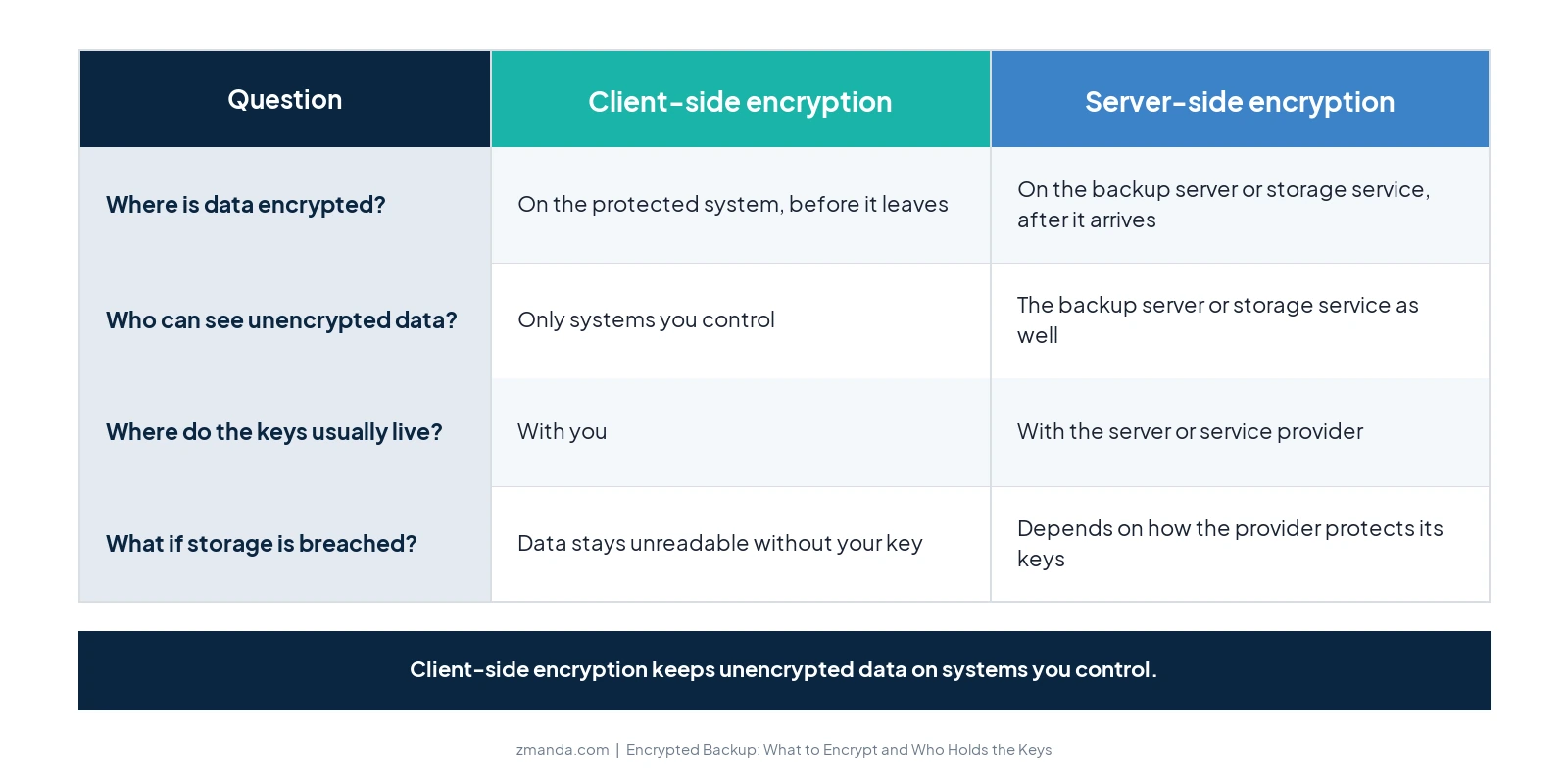
Server-side encryption is better than none, and it is often switched on by default in cloud storage. Client-side encryption gives you more control, because the data is already unreadable by the time anyone else handles it.
Who Holds the Keys
The strength of the cipher rarely decides how safe an encrypted backup is. Who holds the keys does. There are three common models, and each asks you to trust a different party.
- Provider-managed keys. The storage or backup provider creates and holds the keys. It is convenient, but the provider can, in principle, decrypt your data.
- Customer-managed keys (bring your own key, or BYOK). You generate and control the keys, and the provider uses them on your behalf. You decide who has access and can revoke it.
- Zero-knowledge. Data is encrypted before the provider ever sees it, and the provider never has the keys. It cannot read your backups, even if asked to.

Self-hosting users comparing the best backup solution with encryption weigh exactly this trade-off, and business buyers should too. Before choosing a backup vendor, ask three plain questions: where is my data encrypted, who holds the keys, and can your staff read my backups?
Who can read your backups today?
Book a 30-minute review of your backup encryption and key ownership with our experts.
What Happens If You Lose the Encryption Key
The protection that keeps attackers out also applies to you. With customer-held keys and a zero-knowledge design, nobody, including the vendor, can decrypt a backup whose key or password is lost. That is the point of the design, and it means key management needs as much care as the backups themselves.
A few practices keep keys safe without keeping them out of reach:
- Store keys and backup passwords separately from the systems they protect. A key that lives only on the server that just failed cannot help you restore it.
- Use a dedicated secret store. An enterprise password manager or key management system is far safer than a document on a shared drive.
- Give more than one trusted person access. Recovery should not depend on a single administrator being available.
- Include key retrieval in your restore tests. A test restore that skips the step of retrieving the key does not prove you can recover. Our guide to backup and recovery testing covers how to build that into a routine.
Key Management and Access Control
Good key management goes beyond storing keys safely. Many organizations rotate encryption keys on a schedule, replacing them so that a single compromised key exposes less data, and their security policies often set how and when that happens. Whatever your policy, apply it consistently and document it.
Access control matters just as much. Limit who can change backup settings, restore data or reach encryption keys, require multi-factor authentication for those accounts, and give each person only the permissions their role needs. Encryption protects the data; access control protects the people and accounts that can unlock it.
Encryption Standards to Look For
Encryption claims can be hard to compare, so it helps to know the standards behind them.
| Standard | What it means | Why it matters |
|---|---|---|
| AES-256 | A widely used symmetric cipher with a 256-bit key | The common benchmark for strong encryption of stored data |
| FIPS 140 validation | A US government standard for cryptographic modules | Often required in government, healthcare and financial environments |
| TLS 1.2 or later | Current versions of the protocol that encrypts data in transit | Older versions have known weaknesses |
| Authenticated encryption | Encryption that also detects tampering | Confirms the backup has not been altered as well as keeping it private |
Where Zmanda Pro Fits
Zmanda Pro is designed so that you decide who can read your backups. Data is encrypted client-side with FIPS 140-2 compliant AES-256 encryption (AES-256-CTR with Poly1305 authenticated encryption) before it leaves the source, and it travels to storage over TLS 1.2 or 1.3.
Zmanda Pro uses a zero-knowledge model: Zmanda’s servers cannot decrypt your data. Bring your own key (BYOK) is available for organizations that want full control of their keys, and an optional zero-trust mode removes password resets entirely. In that mode, a lost password means the data cannot be recovered by anyone, so it suits teams with strong key management in place.
The architecture helps too. Backup data travels directly from your systems to the storage you choose and never passes through Zmanda’s servers. Access to the backup console can be secured with single sign-on through OpenID Connect, multi-factor authentication using TOTP or FIDO2, and role-based access control. For copies that also need protection from deletion, Zmanda Pro supports Object Lock immutability on AWS S3 and Wasabi.
Choosing an Encrypted Backup You Can Trust
An encrypted backup is only as private as its key management. Encrypt data before it leaves your systems, protect it in transit and at rest, keep the keys under your control, and make sure more than one trusted person can retrieve them. Pair encryption with immutable or offline copies so your backups stay both private and available. For how encryption fits into your wider approach, see our guide to building a backup and recovery plan.
Keep the keys to your own backups
Start a free trial and encrypt backups before they leave your systems.
Frequently Asked Questions
What is an encrypted backup?
An encrypted backup is a copy of your data that has been converted into an unreadable form using an encryption key. Anyone who gets hold of the backup without the key sees only scrambled data, which protects it if a backup file, storage bucket or disk is stolen or exposed.
Should backups be encrypted?
Yes. Backups are complete copies of your most important data, often stored off site or in the cloud. CISA recommends maintaining offline, encrypted backups of critical data, and many security frameworks expect sensitive data to be encrypted at rest.
What is the difference between client-side and server-side encryption?
Client-side encryption happens on the protected system before data leaves it, so only systems you control ever see unencrypted data. Server-side encryption happens after data reaches the backup server or storage service, which means that server or provider can see the data before it is encrypted and usually holds the keys.
What happens if you lose your backup encryption key?
With customer-held keys and a zero-knowledge design, a lost key or password means the backup cannot be decrypted by anyone, including the vendor. That is why keys should be stored separately from the systems they protect, in a dedicated secret store that more than one trusted person can access.
Can a backup vendor see your data?
It depends on the encryption design. If the vendor manages the keys or encrypts data on its own servers, it can in principle read your data. With client-side encryption and a zero-knowledge model, the vendor never holds the keys and cannot read your backups.
What is BYOK?
BYOK stands for bring your own key. It means you generate and control the encryption keys used to protect your data, rather than relying on keys created and held by the provider. You decide who has access and can revoke it.