“How do we ensure zero data loss while migrating from VMware without disrupting business operations?”
This is a very important question to ask before migrating off VMware. With Broadcom’s $69 billion VMware acquisition driving unprecedented changes in licensing and support models, 73% of IT leaders are actively planning their VMware migration strategy. However, a concerning statistic emerges: 42% of enterprises experience some form of data loss or corruption during major platform migrations.
The challenge isn’t just about moving workloads – it’s about maintaining complete data integrity while transitioning business-critical applications across different virtualization platforms. Whether you’re considering Microsoft Hyper-V, Proxmox, Nutanix AHV, or any other VMware alternative, each target platform presents unique data protection challenges that must be carefully navigated.
In this comprehensive guide, we’ll outline proven strategies to ensure zero data loss during your VMware migration. You’ll learn:
- Critical risks to watch for during platform transitions
- Essential pre-migration preparation steps
- Platform-specific protection strategies
- Validation procedures for ensuring complete workload migration
- Best practices for maintaining business continuity throughout the process
Whether you’re in the early planning stages or ready to begin your migration, this guide will help you develop a robust data protection strategy for a successful platform transition.
Common Risks Associated with VMware Migration

During VMware migrations, seemingly routine operations can quickly escalate into significant data protection challenges. Understanding these risks is the first step in developing an effective migration protection strategy.
Let us explore some common causes of data loss during VMware Migration.
1. Service Disruptions
One of the most significant risks during VM migration is service disruption, which can lead to downtime, application unavailability, and potential loss of productivity or revenue. Disruptions can occur if the migration process is not properly planned or dependencies between services and applications are not accounted for. Appropriate migration techniques need to be used, like live migration or cold migration, based on the service/workload dependencies running on those virtual machines.
When migrating mission-critical applications, even minimal downtime can translate directly to lost revenue and productivity. Organizations migrating VMware environments typically experience 4-6 hours of application downtime per migration wave, with each hour costing an average of $84,000 for enterprise operations.
Key Risk Factors:
- Interdependent application components requiring synchronized migration
- Insufficient bandwidth causing extended transfer windows
- Incomplete application dependency mapping leading to cascading service failures
- Migration operations exceeding planned maintenance windows
2. Incomplete Migrations
Our analysis of enterprise migrations reveals that 28% of initial migration attempts result in incomplete data transfers, leaving critical data stranded on the source platform. These partial migrations occur when:
- VM disk states change during the migration process
- Network interruptions disrupt data transfer sequences
- Format conversion processes fail to capture all disk blocks
- Memory state snapshots fail to synchronize with disk states
Without robust verification and rollback capabilities, these incomplete migrations can result in corrupted application states or permanent data loss.
3. Platform Knowledge Gaps
The technical differences between VMware’s architecture and alternative platforms create significant protection challenges:
| VMware Component | Alternative Platform Equivalent | Migration Protection Challenge |
|---|---|---|
| VMDK/VMFS | VHD(X)/ReFS or QCOW2/XFS | Storage format compatibility and block-size alignment |
| VMware Snapshots | Hyper-V Checkpoints / Proxmox Snapshots | Snapshot chain consistency during migration |
| vSphere Replication | Hyper-V Replica / Proxmox Replication | Maintaining replication targets during transition |
| vCenter Inventory | SCVMM / Proxmox Cluster Manager | Configuration and metadata preservation |
There are multiple data protection challenges associated if you’re moving from VMware’s VMDK files and VMFS storage to alternative formats (like VHD or QCOW2) and their corresponding storage architectures. This transition requires careful handling of both the file format conversion and the underlying storage structure changes to prevent data corruption or loss.
Protection strategies must account for differences in storage block sizes, thin provisioning implementations, and snapshot mechanisms between platforms to ensure data integrity throughout the conversion process.
Without addressing these platform-specific differences, organizations risk misconfigured systems, performance degradation, and data access issues post-migration.
4. Security and Integrity Challenges
According to Sophos’ State of Ransomware 2024 report, 32% of ransomware attacks exploit unpatched vulnerabilities – precisely the type of security gaps that can emerge during migration processes. Migration operations often create temporary security states where:
- Standard protection controls may be temporarily disabled
- Data exists simultaneously in multiple environments with different security models
- Authentication and access control systems operate in transitional states
- Normal monitoring and alerting functions are reduced or interrupted
These transitional states create prime opportunities for data theft, unauthorized modifications, or ransomware infections. A proper understanding of the security considerations of VMware and the chosen alternative platform is a must to ensure the security and integrity of the data being migrated. Organizations also face challenges in setting up protective measures against ransomware attacks.
5. Unpredictable Migration Timeframes
For large VMware environments, migration operations frequently exceed initial planning estimates. Our research shows:
- Large enterprise migrations average 2.3x longer than initially projected
- Data change rates during migration often exceed pre-migration measurements by 40-60%
- Migration tool performance varies significantly between lab testing and production environments
Insufficient planning of migration maintenance windows can lead to extended data synchronization gaps and incomplete backups. When migration durations exceed planned windows, organizations face a choice between rushing completion (risking data integrity) or extending downtime (impacting business operations). These extended timeframes create wider data synchronization gaps that must be addressed in your protection strategy.
Protection strategies must account for variable transfer rates, data change volumes, and potential technical issues to maintain consistent data protection throughout extended migration periods.
6. Inadequate Rollback Capability
Cross-platform migrations require more than simple backup copies – they need comprehensive rollback plans that account for format differences, storage architectures, and application dependencies. Without platform-specific rollback procedures, organizations risk incomplete reversions or data loss during fallback attempts. Protection strategies should include platform-aware rollback points, tested recovery procedures, and clear trigger criteria for initiating rollbacks.
Navigating the Risks to ensure zero-data loss during VMware migration
With a clear understanding of migration risks, let’s examine proven strategies to safeguard your data throughout the transition process. These approaches blend technical controls, procedural safeguards, and strategic planning to create comprehensive protection.
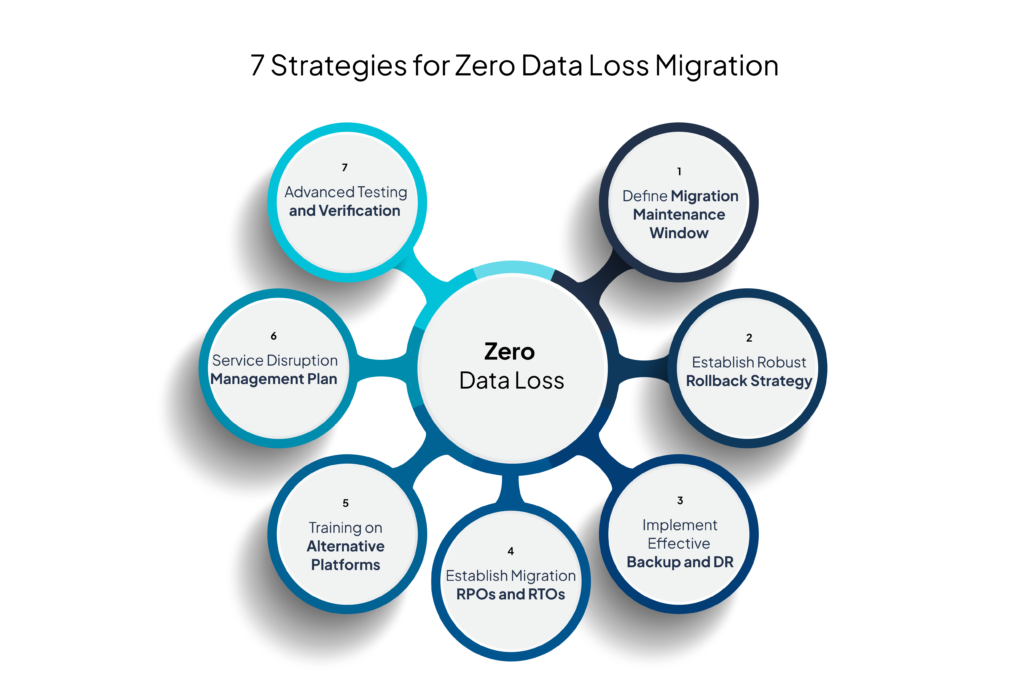
1. Define Migration Maintenance Window: Minimize Downtime and Duration
Proper timing can dramatically reduce data protection challenges during migration. A well-designed maintenance window strategy includes:
Optimal Scheduling:
- Schedule the migration to begin immediately after completing your regular backup cycle
- Select periods of minimal business activity (typically 12 AM-4 AM for most enterprises)
- Avoid end-of-month, quarter-end, or other high-activity business periods
Window Duration Management:
- Allocate 2-3 hours of buffer time beyond expected completion estimates
- Increase incremental backup frequency for 48 hours before migration (reduce from 24-hour to 4-hour cycles)
- Perform a final incremental capture immediately before migration begins
Zmanda Pro’s migration toolkit includes bandwidth estimation tools that help accurately predict transfer times based on your specific environment, reducing the risk of exceeded maintenance windows.
2. Establish a Robust Rollback Strategy
Your rollback strategy should function as a safety net throughout the migration process. A comprehensive approach includes:
Platform-Specific Rollback Points:
- Create host-level snapshots in vSphere environments before migration begins
- Configure VMware Storage vMotion to maintain consistent snapshots across datastores
- Maintain source VMs in powered-off state until migration verification completes
- Document specific rollback procedures for different failure scenarios
Trigger Criteria:
- Define clear metrics that trigger rollback decisions
- Establish time-based thresholds for extended migrations
- Document decision authority for initiating rollbacks
For example, in a vSphere environment with multiple ESXi hosts, leverage Zmanda’s snapshot management capabilities to create application-consistent backups of critical VMs. These provide an additional layer of protection while ensuring synchronized restore points across your infrastructure.
3. Implement an Effective Backup and DR Strategy
Cross-platform migrations demand specialized backup and recovery strategies that account for both source and target environments:
Pre-Migration Protection:
- Create full baseline backups with application consistency
- Verify backup integrity through test restores
- Document application dependency chains for proper restore sequencing
During-Migration Coverage:
- Maintain protection of source systems until migration completes
- Implement temporary protection measures for in-transit data
- Begin protection of newly migrated systems immediately upon validation
Consider a multi-tier application running on several VMs with database dependencies. Create a backup schedule that accounts for interdependencies between components like domain controllers, database servers, and application servers. Test restore procedures for different VM groups and validate application consistency before migration. Zmanda’s VMware backup features ensure consistent backup across VM groups, maintaining application integrity throughout the transition. For setting up your backup environment, visit VMware Backups with Zmanda Pro.
6. Implement Advanced Testing and Verification
Thorough testing significantly reduces migration risks. Develop a structured verification process:
Progressive Verification Stages:
- Initial data integrity validation
- Configuration and settings verification
- Application functionality testing
- Performance benchmark comparison
Consider an enterprise e-commerce platform running on VMware with 500GB SQL databases, multiple web servers handling 10,000 daily transactions, and a middleware layer managing payment processing. Testing should progress methodically through each tier:
- Database Tier: Begin with isolated database backups to verify transaction logs and data consistency
- Web Server Tier: Validate web server VM backups, including static content and session data
- Middleware Tier: Ensure middleware components like payment processing configurations and API connections migrate correctly
Establish specific verification checkpoints throughout the migration: after initial data sync, post-schema migration, following application settings transfer, and after final cutover. At each stage, validate backup integrity using SQL consistency checks, web service availability monitoring, and transaction processing verification, creating restore points after successfully testing each tier. This comprehensive approach ensures protection at each critical point while maintaining the ability to roll back any tier if issues arise.
7. Develop a Service Disruption Management Plan
Even with careful planning, some service disruption is inevitable. Prepare for this with:
Communication Protocols:
- Pre-written notification templates
- Escalation procedures
- Status update schedules
- Completion confirmation processes
Dependency Mapping: Consider a vCenter Server managing 50+ VMs. Map out:
- Primary dependencies: vCenter Server, ESXi hosts, and vSphere networking
- Secondary dependencies: DNS, Active Directory, and storage systems
- Application dependencies: database servers, web servers, and middleware
Create staged migration groups based on these dependencies, scheduling migration windows around business-critical periods to minimize operational impact. Leverage Zmanda’s expertise in understanding your VMware components and mapping out service dependencies to create a migration plan that maintains business continuity while ensuring complete data protection.
4. Establish Migration-Specific RPOs and RTOs
Standard RPO/RTO targets often prove insufficient during migrations. Develop migration-specific recovery objectives:
Tiered Protection Approach:
- Tier 1 (Critical): 15-30 minute RPO, 2-hour RTO during migration
- Tier 2 (Important): 1-hour RPO, 4-hour RTO during migration
- Tier 3 (Supporting): 4-hour RPO, 8-hour RTO during migration
Documentation Requirements:
- Record temporary protection adjustments in change management systems
- Update service level agreements for the migration period
- Create migration-specific recovery runbooks for each tier
Take an Exchange Server VM cluster with a 15-minute RPO requirement as an example. Configure more frequent backups during the migration window for such critical services, setting up staged backup verification points throughout the process. Align backup schedules with application usage patterns to minimize business impact while maintaining data protection standards. Zmanda’s expertise in backup and disaster recovery will help you understand and achieve these RPOs and RTOs.
5. Ensure Proper Training on Alternative Platforms
Knowledge gaps represent one of the most significant sources of migration risk. Address this through structured training:
Platform-Specific Areas:
- Backup/restore procedure differences
- Snapshot management variations
- Storage management differences
- Monitoring and alerting transitions
Practical Skill Development:
- Create sandbox environments for hands-on practice
- Develop migration scenario simulations
- Include disaster recovery scenario practice
- Document platform-specific troubleshooting procedures
This creates a comprehensive reference for the team during and after migration. Zmanda’s Vmware Migration Service allows you to add on training and enablement sessions for your IT staff on the chosen alternative platform.
6. Implement Advanced Testing and Verification
To reduce migration risks, advanced testing and verification, which require a systematic approach, must be included to ensure complete data protection during migration. This includes developing a structured verification process having:
Progressive Verification Stages:
- Initial data integrity validation
- Configuration and settings verification
- Application functionality testing
- Performance benchmark comparison
Automated Verification Methods:
- Checksum validation for transferred data
- Configuration comparison tools
- Automated application testing scripts
- Performance monitoring baselines
Example: Consider an enterprise e-commerce platform running on VMware with 500GB SQL databases, multiple web servers handling 10,000 daily transactions, and a middleware layer managing payment processing. Testing should progress methodically through each tier – starting with isolated database backups to verify transaction logs and data consistency, then validating web server VM backups including static content and session data, and finally ensuring middleware components like payment processing configurations and API connections migrate correctly.
Establish specific verification checkpoints throughout the migration: after initial data sync, post-schema migration, following application settings transfer, and after final cutover. At each stage, validate backup integrity using SQL consistency checks, web service availability monitoring, and transaction processing verification, creating restore points after successfully testing each tier.
This comprehensive testing approach ensures protection at each critical point while maintaining the ability to roll back any tier if issues arise during migration.
Zmanda’s verification tools can automatically validate database integrity, application configurations, and performance metrics against pre-migration baselines, ensuring complete workload validation.

7. Develop a Service Disruption Management Plan
Service disruption management requires careful mapping of VMware component dependencies. Even with careful planning, some service disruption is inevitable. Prepare for this with:
Communication Protocols:
- Pre-written notification templates
- Escalation procedures
- Status update schedules
- Completion confirmation processes
Business Impact Mitigation:
- Temporary process alternatives
- Service prioritization guidelines
- Resource allocation procedures for extended disruptions
By mapping dependencies between VMware components, application services, and business processes, you can create a staged migration approach that minimizes operational impact while maintaining comprehensive protection.
Example: Consider a vCenter Server managing 50+ VMs. Map out primary dependencies like vCenter Server, ESXi hosts, and vSphere networking; secondary dependencies including DNS, Active Directory, and storage systems; and application dependencies covering database servers, web servers, and middleware. Create staged migration groups based on these dependencies, scheduling migration windows around business-critical periods to minimize operational impact.
Leverage Zmanda’s expertise in understanding your VMware components and mapping out the service dependencies.
Conclusion
Successful platform transitions demand a comprehensive data protection strategy that goes beyond basic backup and recovery. When migrating from VMware environments, organizations must carefully balance migration speed with data security, implementing staged verification processes while maintaining business continuity.
The key to achieving zero data loss lies in thorough preparation:
- Defining appropriate maintenance windows
- Establishing clear rollback procedures
- Implementing rigorous testing protocols
- Managing service disruptions effectively
- Training teams on platform-specific protection methods
By following a systematic approach to data protection during migration, organizations can significantly reduce risks while ensuring successful platform transitions. Remember that each component of your VMware environment requires specific protection considerations, and maintaining application consistency throughout the migration process is crucial for business continuity.
As you plan your platform migration, consider implementing robust backup and recovery solutions that can support cross-platform transitions while ensuring data integrity. Zmanda’s enterprise backup solutions provide the necessary tools and capabilities to protect your data throughout the migration journey, helping you achieve a successful transition while maintaining business operations.
For organizations seeking additional guidance, consider these resources:
- VMware Migration Planning Guide
- Zmanda VMware Backup Documentation
- Disaster Recovery Planning Templates
Ready to ensure complete data protection for your platform migration? Contact our experts to learn how Zmanda can support your transition strategy or schedule a demo to see our migration protection capabilities in action.