Are Backups Enough in the Face of Ransomware?
For the longest time, one of the most effective strategies to protect an organization against a ransomware attack is regularly backing up data. Regular backups significantly increase the chances of successful recovery, minimize downtime, and reduce the risk of data loss.
However, ransomware attackers have adapted to this defense.
They now target these critical backup files, undermining the overall recoverability of an organization. Popular ransomware variants like Ryuk (which first emerged in 2018 and popularized ‘big-game ransomware’ attacks against high-value targets with ransom demands averaging over USD 1 million) now work to find and disable backup files and system recovery features. Backups targeted by these sophisticated attacks often include both local and cloud-based data storage systems, making recovery significantly more challenging.
As a result, today’s ransomware attacks increasingly focus on compromising backups, thus targeting the overall recoverability of an organization. This proves that organizations can never be truly immune to ransomware attacks but can build stronger cyber resilience.
What Are the Implications of Ransomware Attacks on Backups?
The financial and operational impacts of ransomware attacks on backups are immense and multifaceted. When ransomware targets and compromises backups, the potential costs and disruptions to an organization can be staggering:
1. Direct Financial Costs
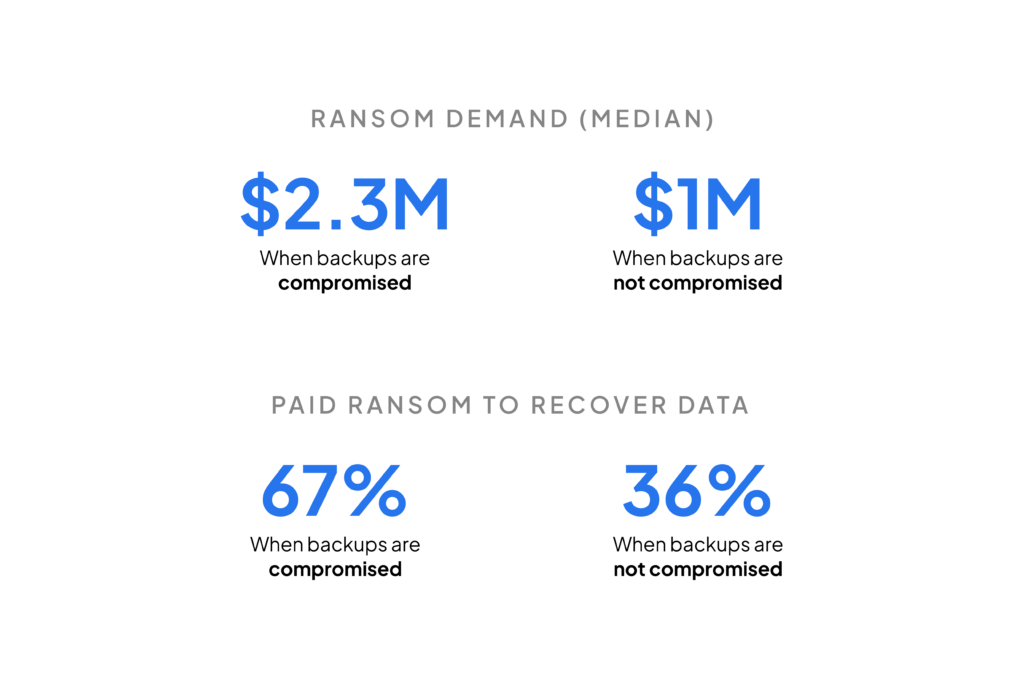
- Ransom Payments: If backups compromised or destroyed, organizations may feel compelled to pay the ransom to regain access to their data. The average ransom payment has been steadily increasing, with some demands exceeding millions of dollars. According to Sophos, the average ransom payment in 2021 was $170,404, and this number is expected to continue rising.
- Data Recovery Costs: Even if the ransom is not paid, the costs associated with recovering compromised backup from unaffected backups (if any remain) or attempting to rebuild lost data can be substantial. This includes expenses for forensic investigation, data restoration, and IT overtime.
2. Operational Disruption
- Downtime: When backups are compromised, the time required to restore operations from unaffected backups (if available) or rebuild systems from scratch can lead to significant downtime. Pingdom estimates that the average cost of IT downtime is $5,600 per minute, which can quickly add up to hundreds of thousands of dollars depending on the length of the outage.
- Loss of Productivity: During downtime, employees may be unable to access critical systems, leading to lost productivity across the organization. This can have ripple effects, impacting everything from customer service to supply chain operations.
3. Reputational Damage
- Customer Trust: The compromise of backups can result in the loss of sensitive customer data, leading to a breach of trust. This can result in long-term damage to an organization’s reputation, loss of customers, and reduced market share. According to a report by IBM, the average cost of a data breach in 2021 was $4.24 million, with a significant portion attributed to the loss of business due to reputational harm.
- Regulatory Fines: Compromised backups can lead to the exposure of personally identifiable information (PII), triggering regulatory fines under laws like GDPR or CCPA. Non-compliance with data protection regulations can result in hefty fines, sometimes reaching up to 4% of a company’s annual global turnover under GDPR.
4. Long-Term Consequences
- Increased Cybersecurity Insurance Premiums: After a ransomware attack, organizations may face increased premiums for cybersecurity insurance or find it more difficult to obtain coverage. Insurers are increasingly scrutinizing the robustness of an organization’s backup and recovery strategies before issuing policies, as noted by PwC.
- Investment in Enhanced Security Measures: Post-attack, organizations often need to invest heavily in enhancing their cybersecurity posture, including upgrading backup solutions, implementing stronger encryption, and conducting employee training. These investments, while necessary, add to the overall cost of recovery.
How to Protect Backups from Ransomware Attacks?
Awareness of such a compromise is needed amongst executives, system admins, and everyone involved in managing the IT infrastructure of an organization. The impact of a ransomware attack on your company can be reduced drastically by identifying and neutralizing malicious actors before your backups are compromised.
Key Strategies to Prevent Ransomware on Backups
To effectively prevent ransomware from compromising your backups, organizations should implement the following strategies:
1. Implement Immutable storage for Backups
- What it is: Immutable backups are designed to be unchangeable, ensuring that once backup data is written, it cannot be altered or deleted.
- Why it works: This prevents ransomware from encrypting or corrupting your backup data, providing a reliable recovery point.
- How to implement: Leverage cloud storage solutions or on-premises storage systems that support immutability features. Many cloud providers offer this as part of their data protection services.
- Real-world Impact: One Fortune 500 company implemented immutable storage and air-gapped systems, significantly reducing the risk of ransomware encryption spreading to their backup files. During a ransomware attack in 2022, the organization’s backups remained intact, allowing for a quick and complete recovery without paying the ransom. According to a Cybersecurity Ventures report, organizations that implement such measures experience a 95% higher success rate in recovering data without paying a ransom.
2. Use Multi-Factor Authentication (MFA)
- What it is: MFA requires users to provide two or more verification factors to access backups, such as a password and a temporary code sent to a mobile device.
- Why it works: It adds an extra layer of security, making it more difficult for unauthorised access (including ransomware attackers) to access and compromise backups.
- How to implement: It adds an extra layer of security, making it more difficult for unauthorized users (including ransomware attackers) to access and compromise backups. As part of a zero-trust architecture, MFA ensures that no entity is trusted by default, even within the organization, requiring verification at every access point.
- Real-world Impact: Another example is an international financial institution that integrated MFA into its backup access controls. This additional layer of security prevented unauthorized access during a ransomware incident, ensuring that the backups were not compromised. According to Microsoft’s research, the use of MFA can block 99.9% of automated cyberattacks.
3. Regularly Test and Verify Backups
- What it is: Periodically testing your backups involves restoring data from them to ensure they are functioning correctly and the data is intact, maintaining backup integrity.
- Why it works: This ensures that backups are not only present but also reliable when needed during a recovery effort.
- How to implement: Schedule regular backup tests and audits. Use automated tools where possible to streamline the verification backup process.
- Real-World Impact: Companies that regularly test their backups, like the healthcare provider that conducted quarterly recovery drills, saw a 20% faster recovery time compared to those that did not. Regular testing ensures that backups are not only present but fully functional and ready to be deployed in the event of an attack.
4. Maintain Offline Air-Gapped or Offline Backups
- What it is: Offline backups or air-gapped backups are stored on devices that are disconnected from the network, making them inaccessible to ransomware that spreads across the network.
- Why it works: This isolation protects backups from being encrypted or deleted by ransomware.
- How to implement: Store critical backups on removable media, such as external drives, that are disconnected from your network after backups are completed. Keep at least one backup in a different location.
- Real-world Impact: During the 2020 Maze ransomware attacks, several financial institutions with air-gapped backups successfully restored their data without paying the ransom. They were able to recover quickly within hours, compared to days or weeks for those without offline backups, as noted by the Federal Financial Institutions Examination Council
5. Encrypt Your Backups
- What it is: Encryption converts your backup data into a coded format that is inaccessible without the correct decryption key.
- Why it works: Even if ransomware gains access to your backups, encrypted data remains protected from unauthorized use. Advanced encryption techniques, such as AES-256-CTR with Poly1305 in AEAD mode using high-entropy random keys, ensure data is encrypted before it is backed up to storage. This method provides both encryption and authentication, adding an additional layer of security
- How to implement: Apply encryption both at rest and in transit to ensure your backups are protected from unauthorized access at all times.
- Real-world Impact: According to Sophos, 59% of businesses that implemented end-to-end encryption were able to protect their backups from being compromised by ransomware, while those without encryption faced much higher risks of data breaches. A telecommunications company that used encrypted backups was able to safeguard sensitive data even when its system was partially compromised by ransomware.
6. Segment and Isolate Backup Systems
- What it is: Network segmentation involves dividing your network into isolated segments, so a compromise in one area does not easily spread to others.
- Why it works: Isolating backup systems from the primary network can prevent ransomware from reaching backup data.
- How to implement: Use firewalls and access controls to create isolated network segments for backup storage, limiting the pathways ransomware can take. Consider user permissions carefully to minimize human error.
- Real-world Impact: A case study from the SANS Institute showed that organizations employing network segmentation saw a 25% reduction in the spread of ransomware across their systems. One healthcare provider, after segmenting its backup systems, managed to contain a ransomware attack on only a small portion of its network, preventing it from accessing critical backup data. This strategy allowed them to quickly recover operations without paying a ransom.
7. Implement the 3-2-1-1-0 Backup Rule
- What it is: The 3-2-1-1-0 backup rule is a best practice that ensures your backups are safe and recoverable. It means keeping 3 copies of your data (creating multiple copies), on 2 different media, with 1 copy stored offsite, 1 copy kept offline or air-gapped, and 0 errors after backup verification.
- Why it works: This rule minimizes the risk of data loss by diversifying the storage locations and ensuring that at least one backup is isolated from your primary network and inaccessible to ransomware. The final “0” ensures that backup verification is consistently performed, so there are no errors during recovery.
- How to implement: Store data across multiple media types, such as cloud storage, local storage, and offline systems, while regularly testing and verifying their integrity. Many backup solutions, including cloud providers, support this strategy.
- Real-world Impact: According to the National Cyber Security Centre (NCSC), organizations that follow the 3-2-1 backup principle, or variants of it like 3-2-1-1-0, have a higher success rate in recovering data and minimizing downtime after ransomware attacks. This approach is widely recommended by security experts for strengthening data resilience and ensuring business continuity.
Case Study: Pros of Investing in the Prevention of Ransomware Attack on Backups
A recent study conducted among 2,974 IT/cybersecurity professionals whose organizations were hit by ransomware in 2023 highlights the critical importance of investing in backup compromise prevention. The study provides insights into how attackers target backups and the resulting consequences for organizations that did or did not invest in protective measures.
Observation 1: The Prevalence of Ransomware Targeting Backups
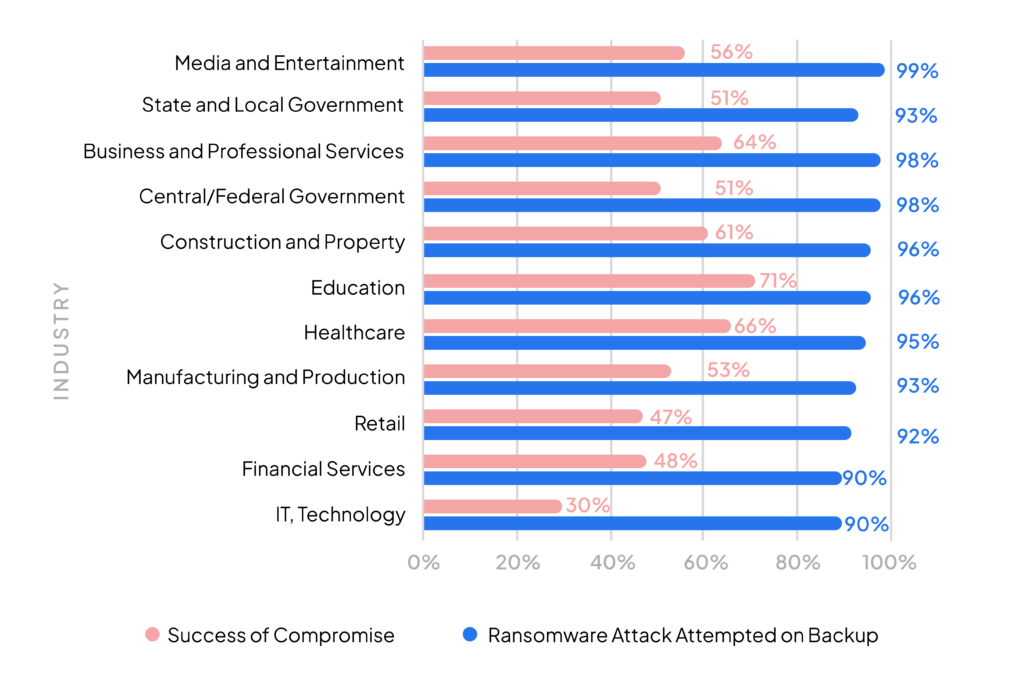
The study found that approximately 94.14% of ransomware attacks involved attempts to compromise backups. This highlights the need for robust backup protection strategies to maintain effective Recovery Point Objectives (RPOs) and Recovery Time Objectives (RTOs).
Observation 2: Industry Variations in Success Rates
Success rates of backup compromise varied across industries, with IT organizations experiencing lower success rates due to likely higher investments in backup protection. However, for organizations that did not invest adequately in these measures, the impact on business continuity was severe.
The Benefits of Proactive Investment
Organizations that have invested in comprehensive backup protection strategies have significantly reduced the likelihood of their backups being compromised during a ransomware attack. This proactive investment includes measures such as immutable backups, multi-factor authentication (MFA), and regular testing and verification of backups.
Achieving Ransomware Protection with Zmanda
When it comes to protecting your organization against the devastating impact of ransomware, Zmanda Pro offers a comprehensive suite of features designed to ensure the integrity and availability of your backups. Our ransomware protection solution is tailored to provide robust cyber resilience against ransomware, enabling businesses to recover quickly and effectively in the event of an attack.
Zmanda has key features including immutable backups, end-to-end encryption, multi-factor authentication (MFA), automated backup testing, air-gapped backup solutions, and comprehensive data recovery options. These features ensure that your backups remain secure, intact, and readily available when you need them most.
Explore more about Zmanda’s backup solutions or start your journey with a free trial today. If you need personalized advice, talk to an expert to understand your specific needs.