Backup Exec is end-of-sale (March 31, 2026) and full end-of-life arrives April 30, 2029. If you’re running it today, you have a defined window to evaluate, select, and migrate to a replacement. The replacement landscape has six credible candidates depending on your environment, scale, and what you’re willing to trade off.
This guide profiles the six Backup Exec Alternatives that most of their customers will actually consider in 2026: Veeam, Acronis, BackupAssist, Backblaze, NetBackup, and Zmanda Pro. Each profile covers what the product does well, what to watch out for, indicative pricing (where it’s published), and the customer profile each one fits. The guide is written by Zmanda, so apply the appropriate skepticism. We’ll try to earn it back by being direct about where each competitor is a better fit than we are.
Two things we won’t do here. We won’t lead with fear about the Backup Exec EOL date (for the full context, see our complete migration guide). And we won’t pretend any one product wins every category—that’s never true in backup, and pretending otherwise is the thing that makes vendor comparisons unreadable.
See where Zmanda Pro fits in this list
The Quick-Decision Matrix
If you want the punchline before the deep dive, this is it.
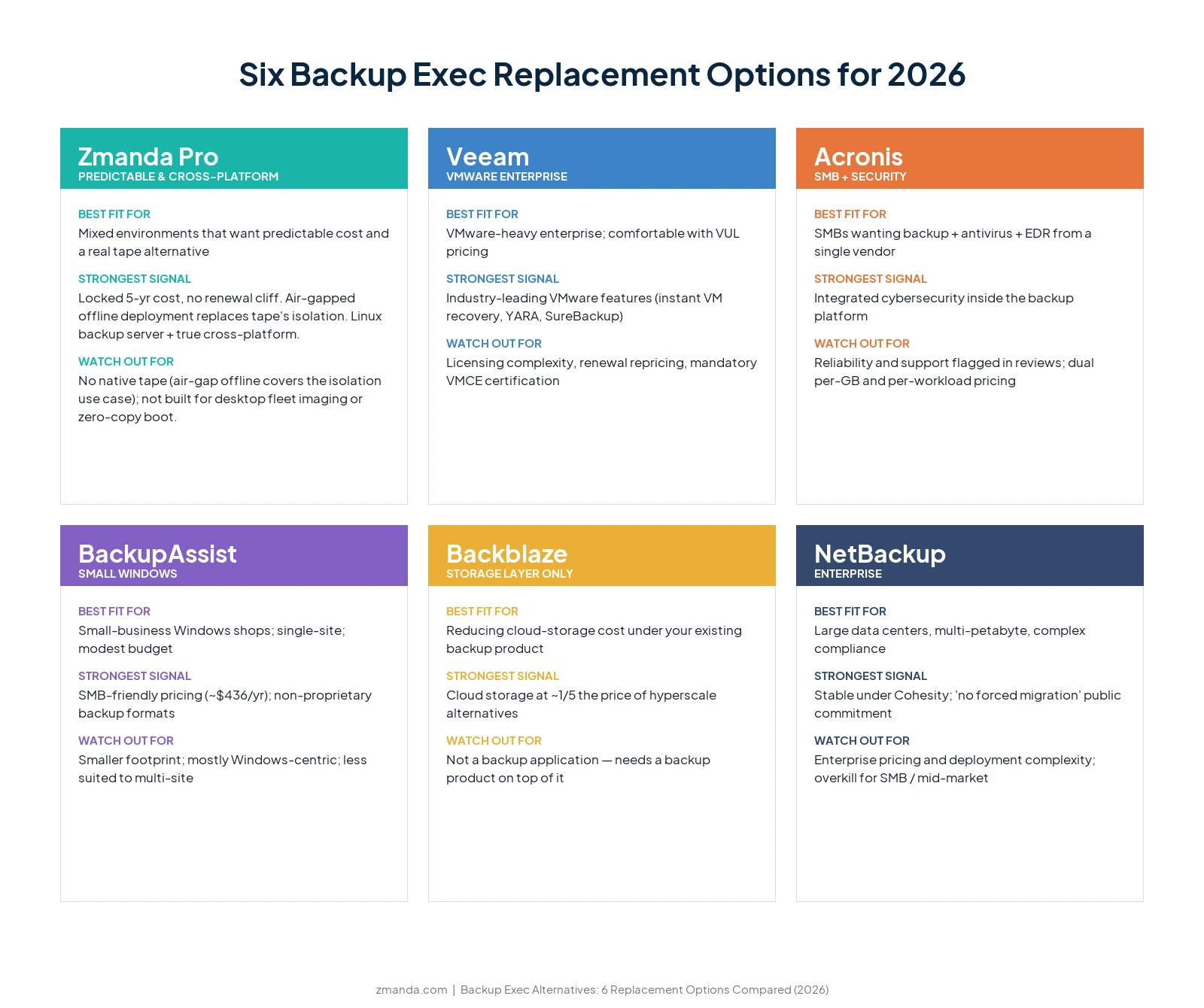
| Vendor | Best fit for | Strongest signal | Watch out for |
|---|---|---|---|
| Zmanda Pro | Organizations wanting predictable per-workload pricing and cross-platform coverage | Locked 5-yr cost, no renewal cliff; air-gapped offline deployment as a tape alternative; Linux backup server + true cross-platform | Disk and cloud only (no native tape); not specialized for desktop fleet imaging or zero-copy boot |
| Veeam | VMware-heavy enterprise, customers comfortable with VUL pricing | Industry-leading VMware features (instant VM recovery, YARA detection, SureBackup) | Licensing complexity, renewal repricing, mandatory VMCE certification, 24/7 support is paid add-on |
| Acronis | SMBs wanting backup + antivirus + EDR from one vendor | Integrated cybersecurity inside the backup platform | Reliability and support quality flagged in customer reviews; dual per-GB and per-workload pricing can confuse |
| BackupAssist | Small-business Windows shops, single-site, modest budgets | SMB-friendly pricing (~$436/yr starting), founder-driven product voice | Smaller product footprint, mostly Windows-centric, less suited to multi-hypervisor or multi-site |
| Backblaze | Organizations keeping their primary backup product but moving cloud copies to cheaper storage | Cloud storage at roughly 1/5 the price of hyperscale alternatives | It’s a storage vendor, not a backup application — you still need a backup product on top of it |
| NetBackup | Enterprise (large data centers, multi-petabyte, complex compliance) | Stable under Cohesity ownership; “no forced migration” public commitment | Enterprise pricing, complex deployment, overkill for SMB / mid-market |
Zmanda Pro
The last profile in this list, and the part where we’re directly pitching our own product. We’ll keep it honest about the boundaries.
Strongest signal: This is the modern, predictable alternative for organizations leaving Backup Exec, at any scale. Pricing is per-workload and locked for the life of the contract, $81,294 for a typical mid-market environment of 100 workloads and 500 Microsoft 365 users on the Business plan ($94,044 on Business Plus, which adds 24/7 support), published on a self-serve calculator with no quote gate. It is genuinely cross-platform where most rivals are still Windows-first: a Linux backup server option (Debian, Ubuntu, RHEL-family), first-class Windows, Linux, and Mac clients, and agentless coverage of VMware, Hyper-V, and Proxmox VE with direct hypervisor restore to all three. Native, application-aware protection spans SQL Server, Oracle, MySQL, MariaDB, PostgreSQL, and MongoDB, plus Microsoft 365 — all from one console. And the air-gapped, offline deployment delivers the offline isolation most tape programs actually exist to provide, without the tape hardware. Compliance is documented, not asserted: BETSOL holds SOC 2 Type II (audited annually by QRC), ISO 27001, and PCI DSS, and Zmanda Pro supports HIPAA-regulated environments with BAAs available.
Watch out for: No native tape, but the air-gapped offline deployment gives you the same offline isolation most tape programs are really after, which is why customers in this category usually treat “no tape” as a feature, not a gap. Not built for high-volume desktop and laptop fleet imaging—it protects endpoints No zero-copy boot-from-backup, direct hypervisor restore to VMware, Hyper-V, or Proxmox is fast but copies data first, so flag it if zero-copy is a hard RTO requirement. And no YARA or ML malware scanning inside the tool, the ransomware defense is architectural instead (Object Lock immutability that admin credentials cannot override, zero-knowledge encryption, and access controls that survive credential compromise), which is a different and arguably a more durable model.
Migration complexity: Like every option on this list, the move is a transition, not a catalog import—no product can read Backup Exec’s proprietary catalogs. You stand Zmanda Pro up alongside your existing deployment, take fresh baselines, run a 60-to-90-day parallel period, and cut over once you’ve validated restores. The step-by-step playbook is here: How to Migrate From Backup Exec to Zmanda Pro.
When to pick Zmanda Pro: You want predictable per-workload pricing you can plan against for five years, your environment is mixed (Windows + Linux + Mac or other variants), and you carry compliance load that requires documented audit-ready posture, at anything from a handful of systems to several thousand. If you need tape, or zero-copy boot, or integrated AV/EDR, look at one of the other options.
Veeam
The market-leading modern backup platform, particularly strong in VMware-heavy enterprise environments. Used by 550,000+ organizations including a documented share of the Fortune 500.
Strongest signal: Veeam’s VMware capabilities are genuinely best-in-class. Instant VM recovery (boot a VM directly from backup storage without a full restore), SureBackup verification (automated restore-validation of backup integrity), YARA-based threat scanning inside the backup, and broad integration with VMware-native features. For VMware-centric enterprise environments, no other vendor matches the depth.
Watch out for: Veeam Universal License (VUL) pricing is per-workload, but renewal pricing can spike substantially when transitioning from older license models. One r/sysadmin admin running Backup Exec at £3,000/year received a Veeam quote at £40,000/year for the equivalent environment, a 13x jump. Customers also frequently report renewal increases in the 2.85x range during VUL transitions. VMCE certification is mandatory for many advanced features ($3,000+ per admin, 3-day course). 24/7 support is a paid add-on (approximately 27% additional). The all-in number can differ significantly from the headline.
Migration complexity: The same transition model applies, Veeam can’t import Backup Exec’s catalogs either, so you run both in parallel and start fresh. Veeam offers sales-led migration assistance (no self-serve tool). The heavier lift sits on the Veeam side: translating your licensing model, a VMware-first architecture if you’re coming from a general BE deployment, and the VMCE certification investment for whichever admin will run it.
When to pick Veeam: You’re VMware-heavy at enterprise scale, you want best-in-class VMware backup features specifically, and the licensing model fits your environment. For a deeper Veeam-specific comparison, see our honest 3-way comparison.
Acronis
Backup and cyber-protection platform aimed at SMBs that want a single tool for backup, antivirus, EDR, and ransomware response.
Strongest signal: Acronis Cyber Platform integrates cybersecurity directly into the backup product. For SMBs without separate AV/EDR contracts, this consolidation reduces tool sprawl. The product is one of the few in the category that genuinely treats backup and security as a single category, not two.
Watch out for: Reliability and support quality are flagged in customer reviews on G2 and PeerSpot, recurring themes include software crashes, slow UI, and support quality issues. The pricing model is dual (per-GB and per-workload depending on tier), which creates confusion in multi-product deployments. Acronis currently offers 50% off year-one pricing for Backup Exec migrations specifically, which can shift the math.
Migration complexity: The same transition model applies, fresh baselines, parallel run, no catalog import. Acronis publishes migration messaging targeted at Backup Exec customers but no self-serve migration tool.
When to pick Acronis: You’re an SMB that wants to consolidate backup, antivirus, and EDR into a single vendor, and you’re willing to do diligence on the reliability concerns raised in customer reviews.
BackupAssist
SMB-focused backup product with a founder-driven product voice. Positioned explicitly as the spiritual successor to Backup Exec for small businesses.
Strongest signal: Pricing accessibility (starts at $1.19/day, around $436/yr). Non-proprietary backup formats (VHDX, ZIP64, PST, SQL) reduce vendor lock-in concerns, if you stop paying for the software tomorrow, you can still read your backup files with standard Windows tools. Specific ransomware protection features (CryptoSafeGuard, Cyber Black Box forensic logging).
Watch out for: Smaller product footprint than the broader-coverage alternatives. Mostly Windows-centric (less suited if you have meaningful Linux infrastructure). Less suited to multi-hypervisor environments or large multi-site deployments. The product is excellent at what it does but operates in a narrower scope than vendors like Veeam or Zmanda Pro.
Migration complexity: The same transition model applies, and BackupAssist publishes the most detailed manual playbook of any vendor here, a documented 1-2 day timeline for SMB environments. There’s still no automated catalog import (no vendor has one).
When to pick BackupAssist: You’re a small Windows shop, single-site, with a modest budget and no meaningful Linux or Mac footprint. Best fit for the smaller end of the Backup Exec install base.
Not sure which alternative fits your environment?
Spend 30 minutes with our team. We'll honestly tell you which of these six is the right call for your specific setup.
Backblaze
This one is a different category than the rest of the list. Backblaze isn’t a backup application, it’s a cloud storage vendor (Backblaze B2). It shows up in Backup Exec replacement conversations because many BE customers want to move cloud copies of their backup data to cheaper storage as part of a modernization step.
Strongest signal: Backblaze B2 cloud storage is priced at roughly one-fifth of hyperscale alternatives (AWS S3, Azure Blob, Google Cloud Storage). For organizations whose backup data is the dominant cloud-storage cost line item, the savings can be significant. 10 GB free trial, no data retention minimums, no egress fees on the basic tier.
Watch out for: You still need a backup application that writes to Backblaze. Backblaze itself doesn’t replace Backup Exec; it replaces the storage layer underneath whatever backup product you choose. The most common pairing is “keep current backup product + move cloud destinations to B2.”
Migration complexity: Relies on Backup Exec’s native Cloud Connector. Configurable in a few easy steps, but obviously won’t be relevant once Backup Exec itself is decommissioned.
When to pick Backblaze: Your immediate goal is cloud-storage cost reduction and you’re not yet ready to migrate the backup application itself. Plan to pair Backblaze with a backup product (potentially one of the others on this list) once you do migrate.
NetBackup
Veritas’s enterprise backup product, now owned by Cohesity after the December 2024 acquisition. The most direct organizational sibling to Backup Exec (both were Veritas products for years), but a different generation and scale.
Strongest signal: Stable, well-developed enterprise backup platform with deep coverage of large-scale data centers, petabyte deployments, and complex compliance environments. Cohesity has publicly committed to “no forced migration” for NetBackup customers and continued investment in the product alongside its own Cohesity DataProtect.
Watch out for: NetBackup is enterprise-grade, which means enterprise pricing, enterprise deployment complexity, and an enterprise admin skillset. For SMB and mid-market customers, it’s almost always overkill. The pricing is not publicly published; expect lengthy sales conversations and custom quotes. Coexistence in Cohesity’s portfolio with Cohesity DataProtect creates some uncertainty about the long-term roadmap, though current commitments are explicit.
Migration complexity: No “in-family” migration from Backup Exec to NetBackup, they’re owned by different companies now, so it’s the same fresh-baseline transition as any other replacement. For the full NetBackup vs Backup Exec story post-split, see our dedicated comparison.
When to pick NetBackup: You’re an enterprise customer running petabyte-scale deployments, multiple data centers, complex compliance, and you have the dedicated admin capacity NetBackup requires. For SMB and mid-market, look elsewhere.
Pricing at a Glance
Pricing in this category is genuinely hard to compare because the licensing models are so different (per-workload, per-VM, per-TB, per-socket, capacity-based, consumption-based credits). Treat the numbers below as directional, not as quotes.
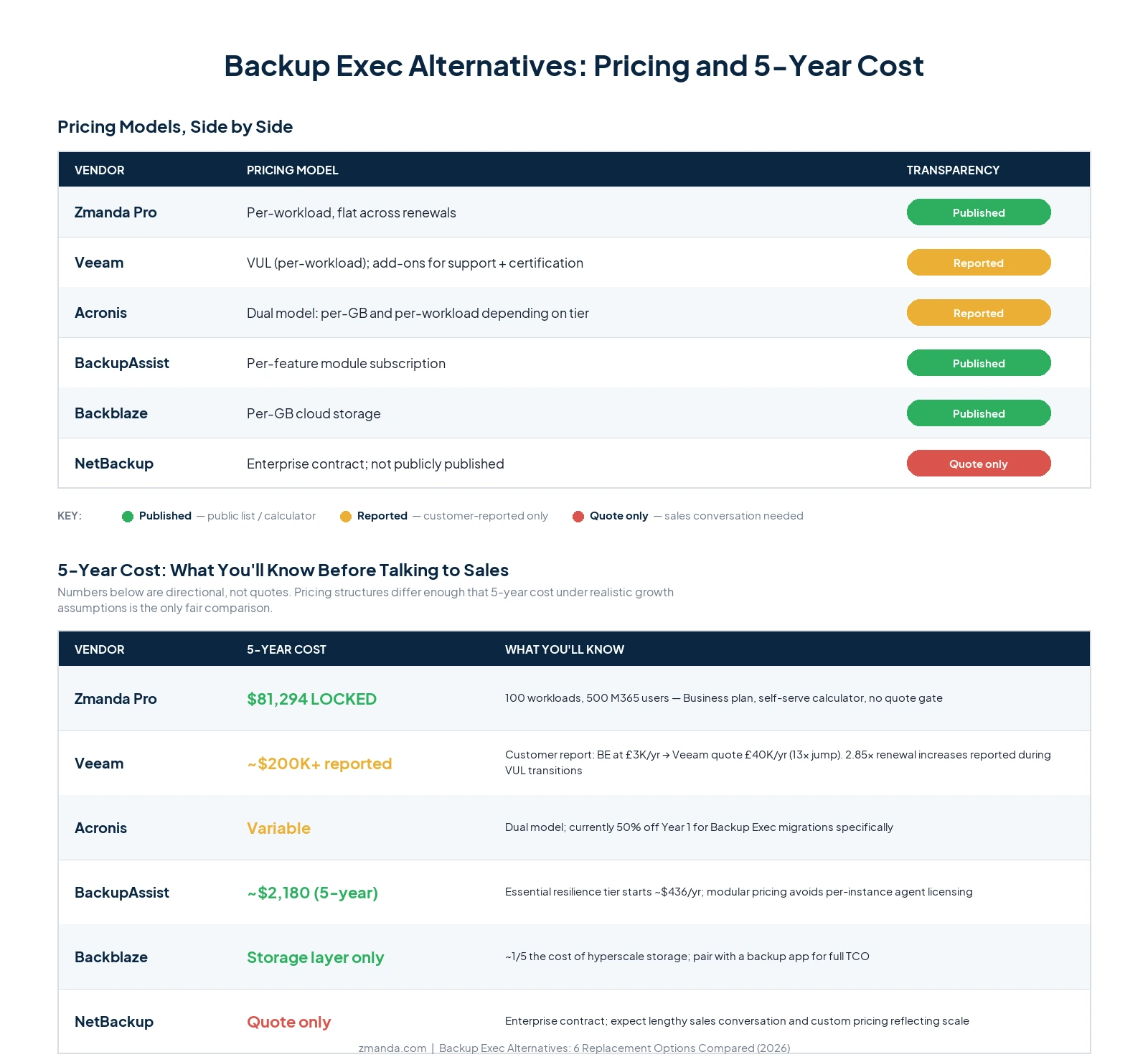
The point of putting these side-by-side is to show that the pricing structures themselves are different, and the right comparison for your environment is “five-year cost under realistic growth assumptions,” not “year-one quote.”
| Vendor | Pricing model | Indicative cost (mid-market environment) |
|---|---|---|
| Zmanda Pro | Per-workload, flat across renewals | $19,128/yr Year 1 (100 workloads, 500 M365 users, Business plan). $50,498 locked 3-year total. $81,294 locked 5-year total. Business Plus (adds 24/7 support): $94,044 over five years. Self-serve calculator, no quote gate. |
| Veeam | Per-workload (Veeam Universal License); separate add-ons for support and certification | Customer-reported quotes vary widely. One r/sysadmin admin received £40,000/yr for an environment Backup Exec was serving at £3,000/yr. Renewal increases of 2.85x reported during VUL transitions. Add VMCE certification ($3,000+) and 24/7 support (~27% additional). |
| Acronis | Dual model: per-GB and per-workload depending on tier | Variable based on data volume and product mix. Currently offers 50% off year-one pricing for Backup Exec migrations. |
| BackupAssist | Per-feature module subscription | Essential resilience tier starts at $1.19/day (~$436/yr). Modular pricing avoids per-instance agent licensing. |
| Backblaze (B2 storage) | Per-GB cloud storage | Roughly 1/5 the price of AWS S3, Azure Blob, or Google Cloud Storage. No egress fees on basic tier, no retention minimums. |
| NetBackup | Enterprise contract; not publicly published | Custom quotes only. Expect enterprise-tier pricing reflecting deployment complexity and scale. |
A Decision Tree: Which One Should You Actually Pick?
The honest answer depends more on your environment than on any of the vendors’ marketing. Some patterns:
If you’re a VMware-centric enterprise with the budget for it: Veeam is the default. The VMware features genuinely are best-in-class, and at enterprise scale the licensing complexity is manageable.
If you want backup and security from one vendor: Acronis is the clearest fit. Do diligence on the reliability concerns flagged in customer reviews, but the integration story is real.
If you’re a small Windows shop, single-site, modest budget: BackupAssist is the cleanest fit. Don’t over-spec; if you’re at the smaller end of the Backup Exec install base, this is probably your match.
If your main goal is reducing cloud-storage cost: Backblaze, paired with a backup application (potentially one of the others on this list). Backblaze alone doesn’t replace Backup Exec.
If you’re an enterprise with petabyte-scale and a dedicated backup admin team: NetBackup is the right level of product. For SMB or mid-market, it’s overkill.
If you run a mixed Windows and Linux environment, want predictable five-year cost, and carry compliance load: Zmanda Pro fits, at any size. Especially if your existing Backup Exec deployment has been quietly tolerating the Windows-only backup server because there wasn’t a better Linux-native option.
Most customers fit two or three of these patterns. When in doubt, the right move is to trial two shortlisted options against your actual workloads, not to pick based on the comparison table alone.
Want to model Zmanda Pro against your actual environment?
Start a free trial. Real backups, real restores, real workloads. No quote required.
What to Do Next
The most useful single action you can take in the next 30 days is to inventory your existing Backup Exec deployment and decide which of the evaluation criteria (workload coverage, pricing predictability, recovery architecture, compliance posture, vendor stability) are non-negotiable for you. The inventory determines which of the six options above are realistic candidates. Without it, every evaluation conversation will go in circles.
If you’d like a second pair of eyes on your environment, our team is happy to walk through it. Book a meeting and we’ll tell you honestly which of these six options is the right fit before you spend trial time on any of them, including recommending a different vendor if that’s what your environment needs.