Backup Exec is end-of-sale. Arctera, the current owner, stopped accepting new licenses on March 31, 2026, and full end-of-life arrives April 30, 2029. If you’re running Backup Exec today, you have a defined window (about 30 months from now) to evaluate, select, and migrate to a replacement before the support cutoff materially affects your compliance posture and operational tooling.
This guide tells you how to migrate from backup exec as a structured project with five concrete steps. It assumes you’ve already done the vendor evaluation and landed on Zmanda Pro (or are seriously considering it).A note before you start: this is a transition, not a data migration. No backup product can read Backup Exec’s proprietary catalog format, so you are not converting or importing old backups.
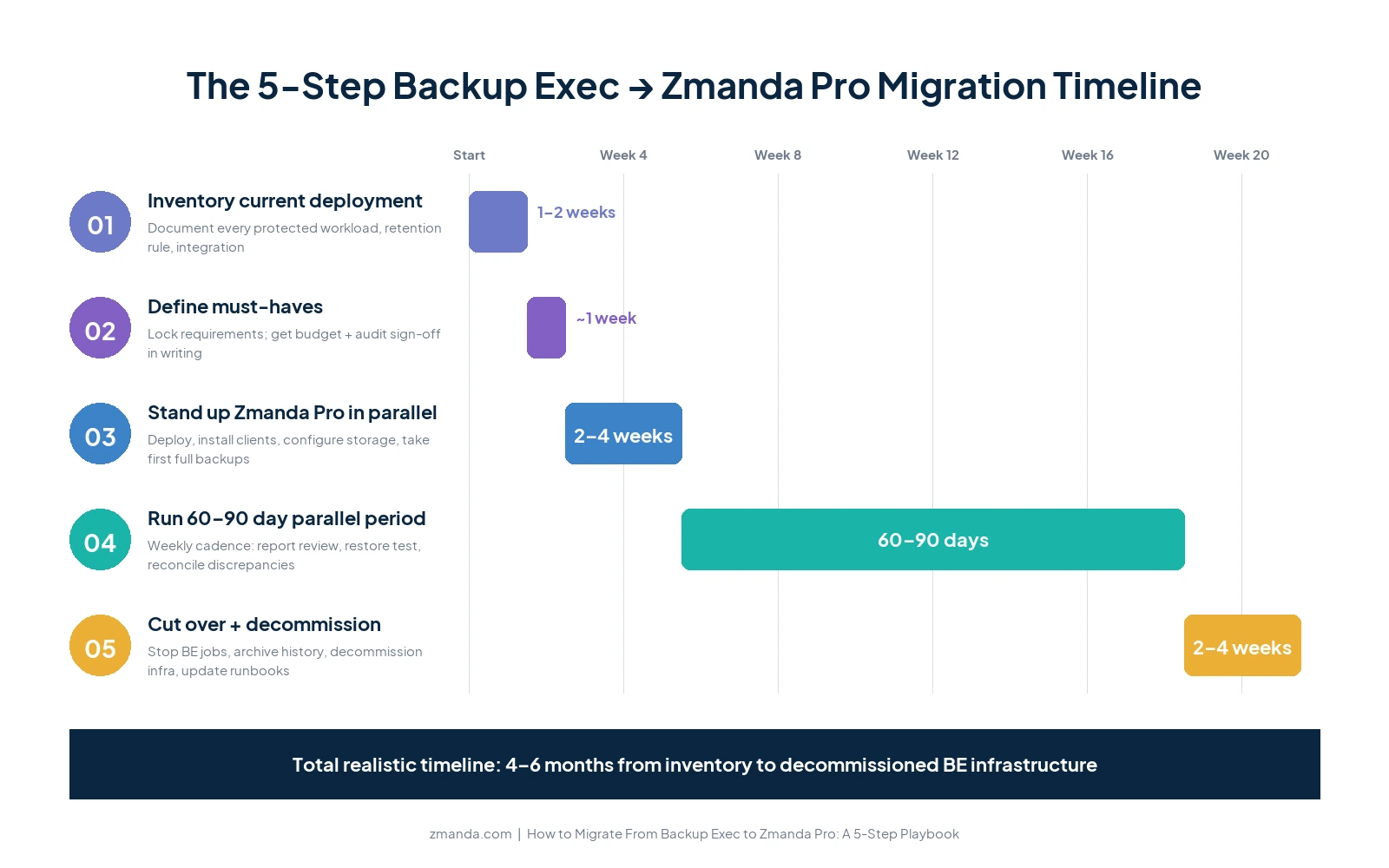
You keep Backup Exec in read-only mode for your retention window, start fresh in Zmanda Pro, run both in parallel, then decommission. The main cost is running two systems during that window, not a heavy data-conversion project, and if you don’t need continuous parallel backup, even that is modest. Plan for 60 to 90 days of parallel operation, dedicate an internal owner (one person who keeps the runbook), and build in time for the gotchas at the end of this guide. Treat the timeline as compressible if you have a small environment and expandable if you have compliance retention requirements or complex storage integrations.
Start a free Zmanda Pro trial to scope your migration
Before You Start: Why Migration is Actually a Transition
Three realities shape every Backup Exec migration, regardless of which replacement you choose.
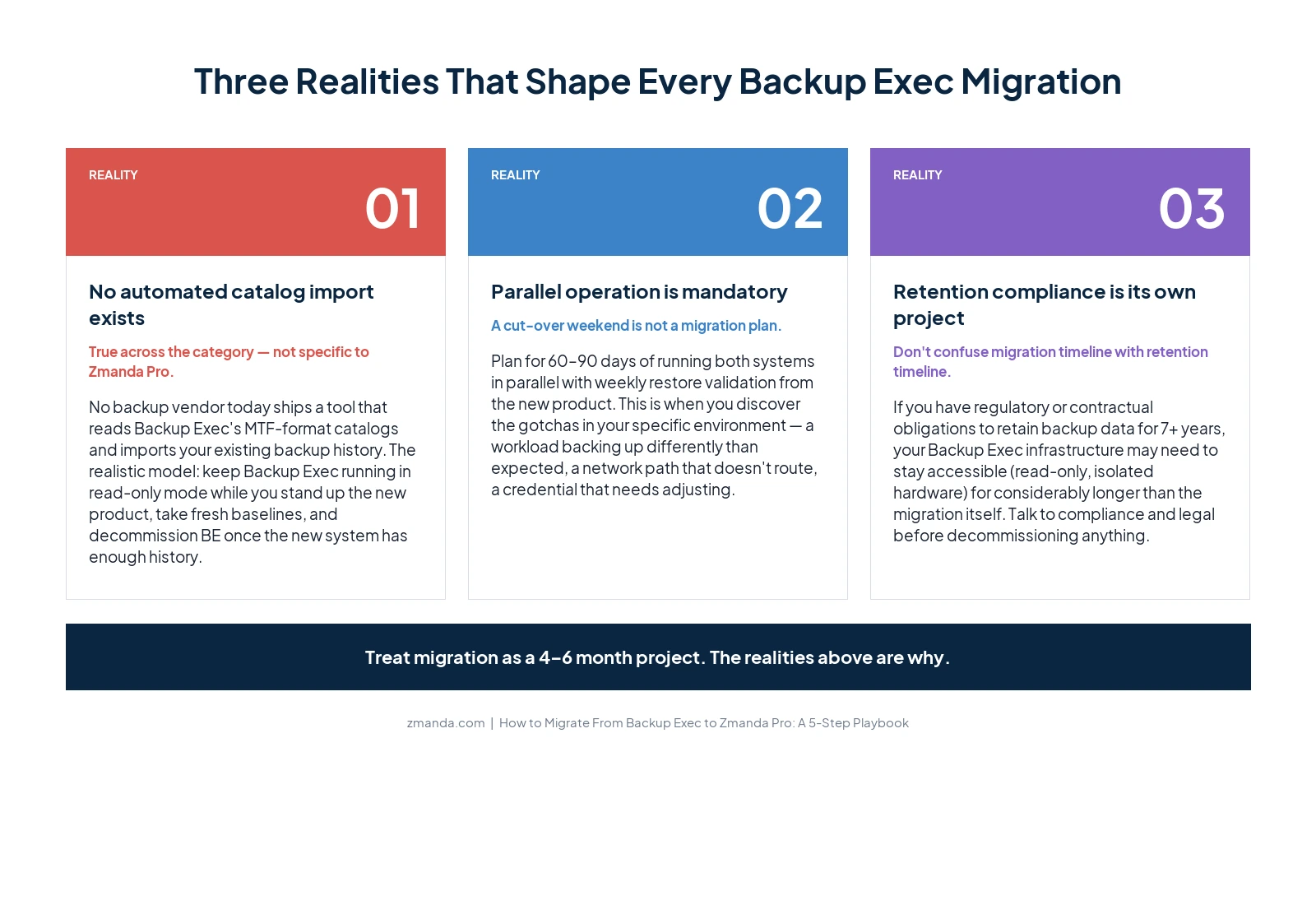
- There is no automated catalog import. No backup vendor today ships a tool that reads Backup Exec’s MTF-format catalogs and imports your existing backup history into the new product. This is not specific to Zmanda Pro; it’s true across the category. The realistic Backup Exec migration model is: keep Backup Exec running in read-only mode while you stand up the new product, take fresh baselines in the new product, and decommission BE once the new system has enough history to satisfy your restore requirements.
- Parallel operation is mandatory, not optional. A cut-over weekend is not a migration plan. Plan for 60 to 90 days of running both systems in parallel, with weekly restore validation from the new product. This is the period when you’ll discover the gotchas in your specific environment (a workload that backs up differently than you expected, a network path that doesn’t route the way you assumed, a credential that needs adjustment).
- Historical retention compliance matters separately from the migration. If you have regulatory or contractual obligations to retain backup data for 7 years, 10 years, or longer, your Backup Exec infrastructure may need to stay accessible (in read-only mode, on isolated hardware) for considerably longer than the Backup Exec migration itself. Talk to your compliance and legal teams about retention requirements before you decommission anything.
Step 1: Inventory Your Current Backup Exec Deployment
The output of this step is a single source-of-truth document. Don’t skip it. You will refer back to it constantly throughout the Backup Exec migration.
Document, for each protected system:
- Workload type (Windows Server, Linux server, VMware VM, Hyper-V VM, SQL database, Exchange mailbox, M365 user, file share, etc.)
- Retention requirements (how long backups must be kept, broken down by tier if you have multiple retention policies)
- Backup schedule (full, differential, incremental cadence)
- Storage destination (local disk, NAS, tape library, cloud, with capacities)
- Restore SLA / RTO requirements
- Any application-aware settings (VSS writers, log truncation, agentless vs in-VM agent)
- Backup window timing (when the backup actually runs, in case it conflicts with other operations)
Beyond the per-system inventory, document the deployment-level details:
- Integrations with monitoring (SCOM, Nagios, PRTG, etc.) or ticketing (ServiceNow, Jira) tools
- Tape libraries (model, slot count, current media inventory, rotation schedule, off-site rotation if any)
- Scripted automation (PowerShell jobs, scheduled tasks, custom retention scripts)
- Existing service contracts and renewal dates with Arctera or your reseller
- Compliance documentation requirements (audit logs, retention attestations, etc.)
Time investment: 1 to 2 weeks for a typical mid-market environment. Worth every hour.
Step 2: Define Your Must-Haves and Nice-to-Haves
Use the inventory from Step 1 to decide what’s non-negotiable for your replacement, versus what’s preferable but not essential. This step exists because requirements creep is the leading cause of failed migration projects. If you don’t lock the must-haves up front, every team in the organization will eventually propose adding one, and the project will stall.
Common must-have categories include workload coverage (every system in your inventory must be supported), recovery SLAs (the replacement must meet your existing RTO), compliance attestations (the vendor must have the documentation your auditors need), deployment model (on-prem only, SaaS, or hybrid), and pricing predictability (you may require a published price calculator, no quote-gating).
If tape is a non-negotiable requirement for your environment, note that Zmanda Pro does not natively support tape backup. Your options are to plan a tape-to-disk transition as part of the Backup Exec migration (using Zmanda Pro’s air-gapped offline deployment as a substitute for tape’s offline isolation) or to keep tape on a separate dedicated solution alongside Zmanda Pro.
Get sign-off on the must-haves and nice-to-haves from whoever holds budget authority (typically the CFO or VP IT) and whoever holds audit authority (typically compliance, internal audit, or the security team). The sign-off should be in writing and pasted into your project document.
Step 3: Deploy Zmanda Pro in Parallel With Backup Exec
The goal at this step is a working Zmanda Pro deployment that backs up your environment alongside your existing Backup Exec setup, not in place of it. You’re aiming for “both systems running, both taking backups” so you can validate the new product before you cut over.
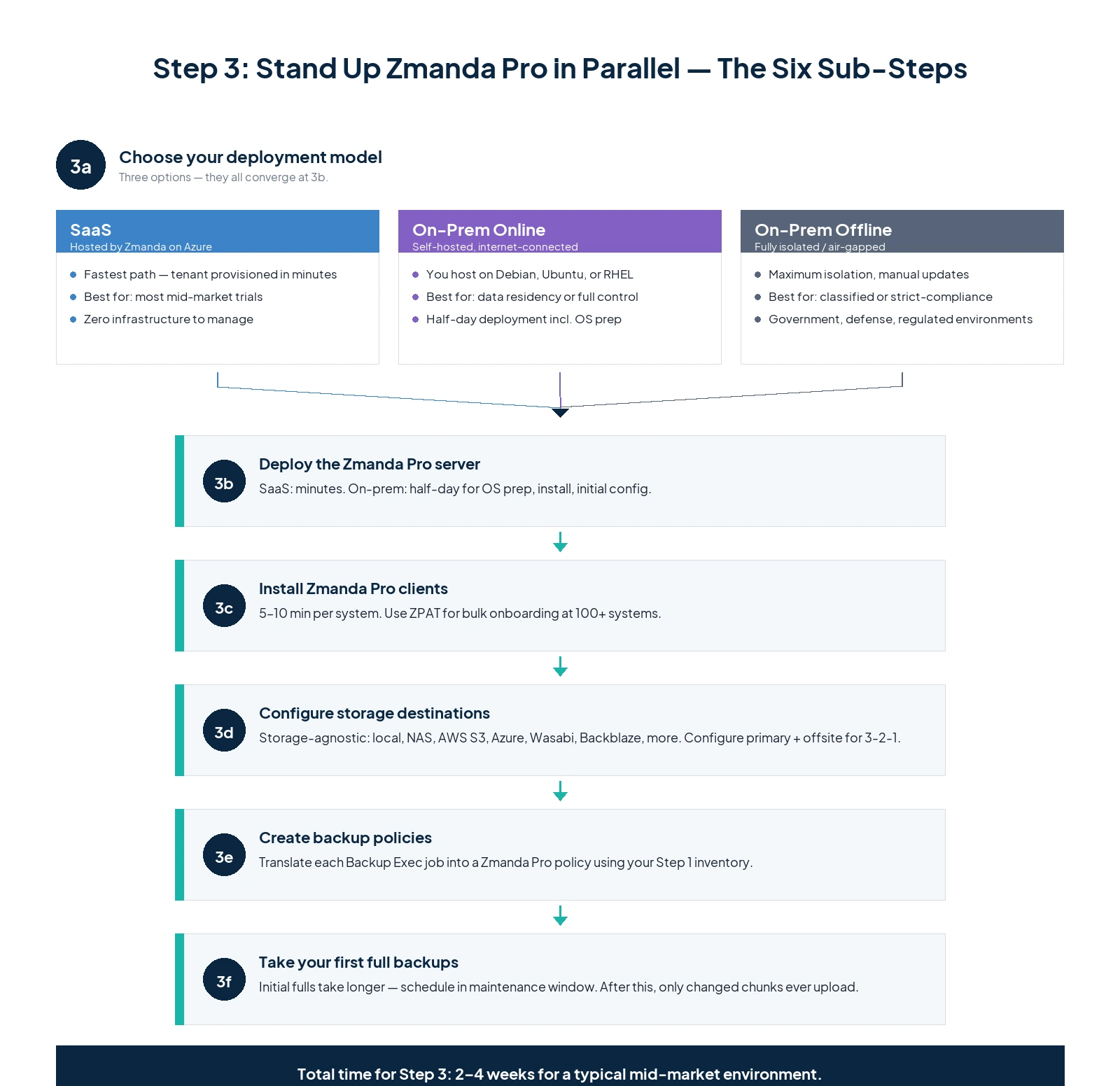
The deployment sequence:
3a. Decide on deployment model. Zmanda Pro is available as SaaS (hosted by us on Azure), on-prem online (you host on Linux: Debian 12, Ubuntu, or RHEL-family), or on-prem offline / air-gapped (fully isolated, for classified or strict-compliance environments). For most mid-market customers, SaaS is the fastest path to a working trial; on-prem makes sense if you have data residency requirements or want full control over the backup server.
3b. Deploy the Zmanda Pro server. If SaaS, your tenant is provisioned within minutes of trial signup. If on-prem, plan a half-day for server deployment including OS prep, package install, and initial configuration. Documentation walks through both paths.
3c. Install Zmanda Pro clients on protected systems. The client install is small (under 100 MB) and uses standard package managers (MSI for Windows, .deb/.rpm for Linux, .pkg for macOS). Plan 5 to 10 minutes per system for the initial install, plus your usual change-management overhead. For environments with 100+ protected systems, use the ZPAT (Zmanda Pro Automation Tool) for bulk onboarding.
3d. Configure storage destinations. Zmanda Pro is storage-agnostic and supports local disk, SFTP, NAS (SMB/CIFS/NFS), Zmanda Cloud Storage, AWS S3, Azure Blob, Google Cloud Storage, Wasabi, Backblaze B2, Storj, DigitalOcean Spaces, and any S3-compatible storage. Most customers configure two destinations in parallel: one primary (typically local disk or NAS for speed) and one offsite (typically cloud for the 3-2-1 backup rule).
This is also the step where you’d configure immutable storage if you want Object Lock Compliance Mode on S3 or Wasabi.
3e. Create backup policies that mirror your existing Backup Exec schedule. Use the inventory from Step 1 to translate each Backup Exec job into a Zmanda Pro policy. For most workloads this is straightforward (file backup, system state, database, M365). For workloads that used specific Backup Exec features (advanced VSS writer configurations, custom retention scripts), expect to spend more time getting the equivalent behavior in Zmanda Pro.
3f. Take your first full backups. Run an initial full backup of each protected system. Zmanda Pro’s forever-incremental architecture means this initial full is the only full backup you’ll ever take; subsequent backups capture only changed chunks. The initial full will take longer than subsequent runs (often significantly longer), so schedule it during a maintenance window.
Time investment for Step 3: 2 to 4 weeks for a typical mid-market environment, depending on workload count and storage complexity. The first full backups account for a significant chunk of this.
Want our team to scope your Backup Exec migration deployment?
Free 30-minute call to map your Backup Exec environment to a Zmanda Pro deployment plan.
Step 4: Run a 60- to 90-Day Parallel Period During Backup Exec Migration
This is where most failed migrations actually fail, and where this guide spends the most time. Don’t skip the parallel period, and don’t shorten it just because the first few backups looked clean.
During the parallel period, both Backup Exec and Zmanda Pro are running. Both systems take their scheduled backups. You actively validate Zmanda Pro and let Backup Exec keep running as your fallback.
The weekly cadence:
- Monday: Review the previous week’s backup completion reports from both systems. Investigate any failures in Zmanda Pro.
- Wednesday: Run at least one restore test from Zmanda Pro. Rotate which system you restore (week 1: a file server; week 2: a SQL database; week 3: a VM; week 4: an M365 mailbox). Restore to an alternate location to avoid affecting production.
- Friday: Reconcile any discrepancies. If Backup Exec backed something up that Zmanda Pro didn’t (or vice versa), document why and decide whether the gap is acceptable, fixable in configuration, or a blocker.
Common discoveries during the parallel period:
- A workload you forgot to include in Step 1’s inventory (often a service account-only database or a single-purpose VM that nobody owns)
- An application-aware backup that worked silently in Backup Exec because of a pre-installed VSS writer, and needs explicit configuration in Zmanda Pro
- Network paths that route differently from Zmanda Pro’s server compared to Backup Exec’s (firewall rules, NAT, VPN segments)
- Storage performance differences (a cloud destination that’s faster or slower than your existing tape or NAS, affecting your backup window)
- Credentials that need adjustment (different service accounts, different LDAP groups, different M365 OAuth scopes)
Each discovery should result in either a configuration change or a documented exception. Keep the running list. By end of parallel period, you should have zero open discoveries and at least 8 successful restore tests across different workload types.
Step 5: Cut Over and Decommission to Migrate From Backup Exec
Once parallel-run has validated Zmanda Pro against your existing Backup Exec deployment, you’re ready to formally cut over. This is not the moment for celebration; it’s the moment for discipline.
The cutover sequence:
5a. Stop scheduling new Backup Exec jobs. Existing scheduled jobs are paused, not deleted. The Backup Exec server stays up, in read-only mode, for the duration of your historical-restore retention requirement (typically 30 to 90 days minimum; longer if compliance dictates).
5b. Document your Backup Exec catalog state. Export the job history and catalog metadata. This is what you’d reference if you needed to restore a backup from before the cutover. Keep this documentation alongside the BE server itself.
5c. Archive any historical backup data you’re required to retain. Consult your compliance and legal teams on retention requirements. For regulated industries, this can mean keeping the original Backup Exec server bootable but offline for years. For most organizations, 90 to 180 days of read-only access is sufficient.
5d. Decommission Backup Exec infrastructure on a defined schedule. The schedule should include: when the BE server gets powered off, when the underlying hardware gets repurposed or disposed, when storage attached to BE gets repurposed or wiped, when the BE licenses get formally terminated with Arctera or your reseller. Each date should have an owner.
5e. Update your runbooks, monitoring, and disaster recovery documentation. Anywhere your organization documents “how we back up X” should reference Zmanda Pro. Monitoring dashboards should be updated to alert on Zmanda Pro job failures, not Backup Exec. Disaster recovery plans should reference Zmanda Pro restore procedures.
Time investment for Step 5: 2 to 4 weeks of active work, plus the historical retention period during which Backup Exec stays in read-only standby.
Common Gotchas to Watch For During Your Backup Exec Migration
Issues that commonly surface during Backup Exec migrations, regardless of which replacement vendor you choose:
The “forgotten workload” problem. Almost every migration discovers at least one workload that was backed up by Backup Exec but wasn’t in anyone’s inventory. Often it’s a service account-only database, a one-off VM created during a project years ago, or a file share that someone enabled backup on without telling IT. Plan extra parallel-run time to discover these.
Tape-only data. If you have tape backups containing data that doesn’t exist anywhere else (often older historical archives), you have a separate decision to make: extract the data to disk before decommissioning the tape library, or keep the tape library running long enough to satisfy your retention obligations. Zmanda Pro cannot read existing Backup Exec tapes; this is a one-way bridge you need to plan independently.
Application-aware backups that worked silently in BE. Backup Exec has many years of accumulated VSS writer integrations and application-specific helpers. Some of these were configured by previous admins and have been running silently for years. Don’t assume the same workload will back up identically in Zmanda Pro without explicit configuration. Use Step 4’s restore tests to verify application-level recoverability, not just file-level.
Licensing-cycle timing. If your Backup Exec service contract renewal is approaching, time the migration so you’re not paying for both products simultaneously longer than necessary. But also don’t compress the migration timeline just to save a renewal payment; the cost of a failed migration exceeds the cost of a partial-overlap renewal.
Audit and compliance documentation gaps. Your auditors are used to seeing Backup Exec reports. They’ll need to see Zmanda Pro reports going forward. Brief your audit team during Step 4 so the transition isn’t a surprise at next audit cycle. Zmanda Pro exports audit logs in standard formats and supports SIEM integration if your security team requires it.
Ready to start your Backup Exec migration?
Start a free Zmanda Pro trial. Run real backups in parallel with your existing setup.
What Success Looks Like
By the end of the Backup Exec migration, you should have: a documented Zmanda Pro deployment with verified restore tests across every workload type in your environment; updated runbooks and monitoring; a decommissioned (or read-only standby) Backup Exec infrastructure with documented historical-restore procedures; a defined storage destination strategy that meets your compliance requirements; and a five-year cost number you can take to your CFO and not have to re-negotiate.
You should not have: leftover BE servers running unused; orphaned backup data on tapes that nobody knows what to do with; gaps in your backup coverage you discover during an actual restore emergency; or a vendor relationship that requires you to repeat this exercise in 2029.
Want extra set of eyes to help you with your Backup Exec migration? Talk to our backup experts.