Backup Exec System Recovery, the image-based backup and bare-metal recovery product that started life as Symantec LiveState Recovery in the early 2000s and has been sold under five different brand names since, is on its Last Time Buy. Arctera, the current owner, announced end-of-sale alongside Backup Exec itself on January 8, 2026. New licenses ended March 31, 2026. Full support ends April 30, 2029. After that, the product is unmaintained.
Most image-based backup products end with a tidy upgrade path: the vendor ships the next version, you migrate, life continues. Arctera doesn’t have one. There’s no Backup Exec System Recovery 2027, no spiritual successor product, no in-family migration. The official guidance to existing customers is to evaluate alternatives. That’s a polite way of saying “you’re on your own.”
If you’re running System Recovery today, most likely for fast bare-metal disaster recovery, scheduled image backups of physical servers, or set-and-forget desktop and laptop protection, this affects you. And it’s a slightly different conversation than the one Backup Exec proper customers are having, because image-based backup is its own category with its own evaluation criteria.
This guide walks through what’s actually happening with System Recovery specifically, how it differs from Backup Exec proper, what image-based backup customers should evaluate in a replacement, and where Zmanda Pro fits in that picture.
See how Zmanda Pro handles bare-metal recovery
What Backup Exec System Recovery is, and How it Differs from Backup Exec
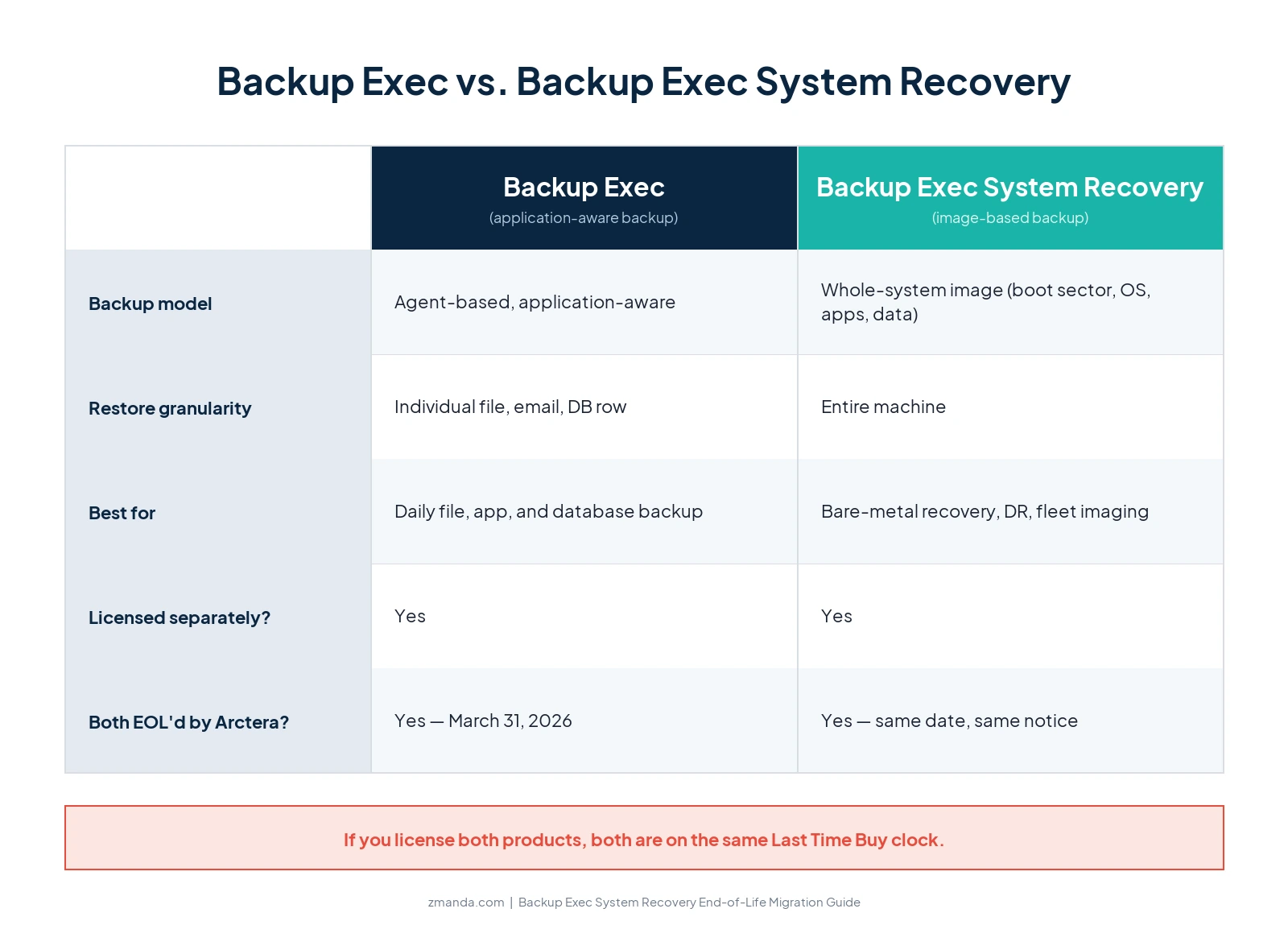
Backup Exec System Recovery and Backup Exec are two distinct products from the same vendor lineage. They are licensed separately, deployed separately, and serve different jobs, which is why they merit separate migration conversations.
Backup Exec is application-aware backup software. It uses agents on protected systems to back up specific workloads: SQL databases with transaction-log awareness, Exchange mailboxes with item-level granularity, file systems with VSS integration. It’s the right tool when you need to restore individual things: a specific email, a specific database row, a specific file from three weeks ago.
Backup Exec System Recovery is image-based backup. It captures the entire system as a single recoverable image (boot sector, operating system, applications, configurations, all data) and stores it as a portable file. It’s the right tool when you need to restore the entire machine: bare-metal recovery onto new hardware, fast disaster recovery, physical-to-virtual conversion, or set-and-forget desktop and laptop protection.
The product itself has had an unusual brand history. It started as Symantec LiveState Recovery in 2002, became Symantec Backup Exec System Recovery in 2006, was renamed to Symantec System Recovery, then to Veritas System Recovery after Veritas split from Symantec in 2014, and is now Arctera System Recovery following the December 2024 and December 2025 ownership changes that moved it to its current owner. The product code is largely continuous through all those name changes, which is why customers and search traffic still refer to it as “Backup Exec System Recovery” even though that branding hasn’t been current for years.

The End-of-Life Timeline: Same Arctera Announcement, Same Dates
System Recovery is being end-of-life’d under the same January 8, 2026 Arctera portfolio announcement that affects Backup Exec and the Desktop and Laptop Option (DLO). The dates are identical across all three products.
| Milestone | Date | What it means for customers |
|---|---|---|
| Promotional discounts ended | January 2026 | All software promotional offers discontinued. |
| Services End of Sale | Immediate (per Arctera channel notice) | Professional services SKUs were discontinued ahead of the product itself. Implementation and migration services from Arctera are already gone. |
| End of Sale (EOS) | March 31, 2026 | No new licenses, no license renewals, no extensions can be purchased through normal procurement. |
| End of Life (EOL) | April 30, 2029 | All support, maintenance, patches, and security updates cease. |
Three facts about this announcement matter operationally for System Recovery customers.
1. It’s a “Last Time Buy.” This is the language Arctera reps are using internally, a recognized industry term that signals you have one final chance to extend your support contract, then you are on a clock to migrate. The dates above are also published in Arctera’s own legally-binding Product Use Rights documentation, which states verbatim: “Please note that no new purchases of this Product will be available following March 31, 2026.” The April 30, 2029 End-of-Life date is independently confirmed on Veritas’s own End of Standard Life page.
2. Multi-year renewals must be paid upfront. Per Arctera’s reseller-channel communication, customers who want to maintain support through the April 30, 2029 EOL date must pay the full multi-year renewal as a single 2026 invoice. The smoothed annual payment most System Recovery customers were planning around is gone. For a mid-sized customer running System Recovery across 50 to 100 protected systems, that’s a single five-figure-plus check, not an annual line item.
3. There was no public announcement. Arctera distributed the EOL notice only as a partner-channel PDF. There is no press release, no announcement on the System Recovery product website, no email to existing customers. If you haven’t already heard about this from your reseller, you may not yet know your product is being discontinued. We’re flagging this in the guide because we think backup vendors should be transparent about end-of-life events.
What Image-Based Backup Customers Should Know About the Landscape in 2026
Image-based backup has consolidated significantly since System Recovery’s heyday. Several products that defined the category in the 2010s have either been acquired into broader platforms or wound down entirely. The remaining options break into three rough buckets.
- Modern image-based backup integrated into a broader backup platform. Most current enterprise and SMB backup products now include image-based backup as one capability among many. The image-based backup is positioned alongside file-level backup, virtual machine backup, database backup, and SaaS backup, all managed from a single console. This is the dominant model now, and it’s what most System Recovery customers end up choosing when they migrate. The trade-off is that you’re buying a broader product than you may technically need.
- Standalone image-based backup vendors. A smaller set of vendors continue to focus specifically on image-based backup and bare-metal recovery, usually with an emphasis on speed of recovery (instant boot from backup image, P2V on the fly) or specific use cases like desktop and laptop fleet management. If your sole reason for running System Recovery is high-volume desktop image management, these vendors are worth a look.
- Cloud-native disaster recovery as a service (DRaaS). A subset of the System Recovery use case (fast disaster recovery onto alternative infrastructure) has been absorbed into DRaaS offerings. If what you were really using System Recovery for was a “we can be back up and running in an hour after a site failure” insurance policy, modern DRaaS may be a better fit than a like-for-like image-based backup replacement.
The first category, broader backup platform with image-based as a capability, is the realistic path for most System Recovery customers. That’s the lens this guide uses for the rest of the evaluation framework.
Not sure which image-based backup model fits your environment?
Spend 30 minutes with our team. We'll help you map your System Recovery use case to the right replacement.
Five Things to Evaluate in a Backup Exec System Recovery Replacement
A backup product migration is not a like-for-like swap, and image-based backup specifically has some non-obvious failure modes. Use this framework to evaluate replacements.
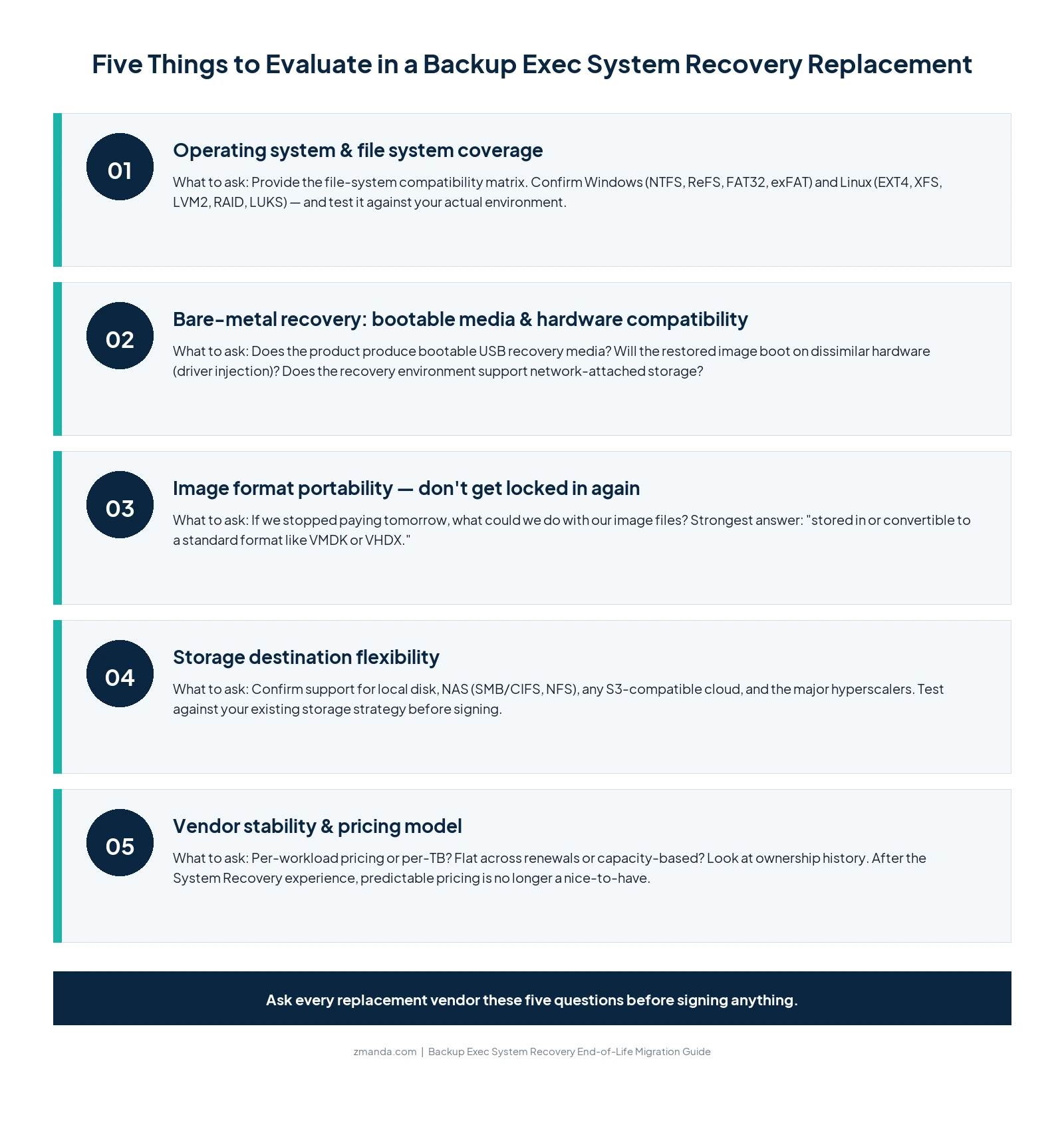
1. Operating system and file system coverage. System Recovery has historically been Windows-strong, with newer Linux support added over time. Modern image-based backup needs to handle the operating systems and file systems you actually run: Windows Server (NTFS, ReFS, FAT32, exFAT) and Linux (EXT4, XFS, LVM2, RAID, LUKS-encrypted volumes) at minimum, plus the hypervisors if you’re imaging VMs. Don’t assume coverage. Ask explicitly for the file-system compatibility matrix and test it against your actual environment.
2. Bare-metal recovery: bootable media and hardware compatibility. System Recovery’s image format is proprietary. So is the image format of most competing products. The question worth asking your replacement vendor: if you stopped paying for the software tomorrow, what could you do with your existing image files? The strongest answer is “they can be restored to a standard format like VMDK or VHDX.” Weaker answers leave you at the new vendor’s mercy at every renewal. Image-format portability is an underrated piece of long-term replacement evaluation.
3. Image format portability. Know your way out. System Recovery’s image format is proprietary. So is the image format of most competing products. The question worth asking your replacement vendor: if you stopped paying for the software tomorrow, what could you do with your existing image files? The strongest answer is “they’re stored in or convertible to a standard format like VMDK or VHDX.” Weaker answers leave you at the new vendor’s mercy at every renewal. Image-format portability is an underrated piece of long-term replacement evaluation.
4. Storage destination flexibility. Where can the image files actually go? System Recovery handled local disk, network shares, and cloud destinations across its various versions. A modern replacement should at minimum support local disk, NAS over SMB/CIFS or NFS, any S3-compatible cloud storage, and the major hyperscale clouds. If you have an existing storage strategy (Wasabi, Backblaze B2, Storj, an on-prem object store, your own AWS S3 buckets), make sure the replacement supports it natively before you commit.
5. Vendor stability and pricing model. Especially given the System Recovery experience. System Recovery customers have lived through five brand changes and three ownership changes in twenty years. The product is now ending under an owner that doesn’t sell a replacement. That’s a long lesson in why vendor stability matters for backup software. Look at ownership history, financial stability, and (critically) pricing model. Per-workload pricing that’s flat across renewals is dramatically more predictable than per-TB or capacity-based pricing models that can reprice with data growth. After the multi-year-renewal-upfront experience with Arctera, predictable pricing is no longer a nice-to-have.
Where Zmanda Pro Fits, and Where it Doesn’t for Image-Based Backup
Zmanda Pro is a broader backup platform with image-based backup as one capability, which puts it in the first bucket from earlier in this guide. Here’s an honest read on where it fits the System Recovery use case.
It fits when you want image-based backup as part of a broader backup story. Zmanda Pro includes disk image backup for Windows and Linux file systems (NTFS, ReFS, FAT32, exFAT on Windows; EXT4, XFS, LVM2, RAID, LUKS on Linux), plus bootable USB recovery media for bare-metal restoration. Image backups can be restored to standard VMDK, a standard, portable format that’s not proprietary to Zmanda. The same console manages your image backups alongside file-level backup, database backup (SQL Server, MySQL, MariaDB, PostgreSQL, MongoDB, Oracle), Microsoft 365 backup, and hypervisor backup (VMware, Hyper-V, Proxmox VE), with direct hypervisor restore to all three. For System Recovery customers consolidating onto a unified platform, that’s a clean fit.
It fits when predictability matters. Zmanda Pro is priced per workload, not per protected data volume. A protected server with 500 GB of system image and a protected server with 5 TB of system image cost the same. Renewals are flat. There’s no Last Time Buy clock, no multi-year-renewal-upfront requirement, no support cliff in 2029. For a customer who just lived through the System Recovery ownership and renewal experience, that contrast is worth being explicit about. You can see the actual pricing on our pricing calculator. No quote required.
It fits when you carry compliance load. Zmanda Pro is a BETSOL product. BETSOL maintains SOC 2 Type II attestation (audited annually by QRC), ISO 27001 certification, and PCI DSS compliance. Zmanda Pro supports HIPAA-regulated environments with AES-256 encryption at rest and TLS 1.3 in transit, role-based access controls, immutable backups, and detailed audit logging. Zmanda also executes BAAs with healthcare customers. Immutable backup is supported through Object Lock Compliance Mode on Amazon S3 and Wasabi. All compliance documentation is linked from the Zmanda Trust Center.
Be just as direct about where Zmanda Pro doesn’t fit the System Recovery use case.
There is no automated System Recovery catalog or image-file import. Your existing System Recovery image files cannot be opened, mounted, or restored from inside Zmanda Pro. The realistic migration model is: keep your existing System Recovery infrastructure running in read-only mode for as long as you need historical-restore access (consult your compliance and legal teams on retention requirements), and start fresh image baselines in Zmanda Pro alongside it. Plan a 60 to 90-day parallel-run period before fully decommissioning System Recovery.
Zmanda Pro is not specifically optimized for high-volume desktop and laptop image management. System Recovery has historically been popular for fleet-imaging desktops and laptops at scale (the same parent product line gave us the Desktop and Laptop Option). Zmanda Pro is workload-oriented and primarily server-focused. It can protect endpoints, but if your dominant System Recovery use case is image-managing 500+ desktops or laptops as a fleet, you should evaluate vendors that specifically position around that workflow.
True boot-from-backup is not a Zmanda Pro capability today. Some image-based backup products offer the ability to boot a VM directly from an image file in the backup repository, without a full restore first. Zmanda Pro offers direct restore to hypervisor (VMware, Hyper-V, or Proxmox), which is faster than a manual restore but still performs a data copy. If zero-copy boot-from-image is a hard requirement, raise it in your evaluation.
Our position, stated plainly: for most System Recovery customers running image-based backup alongside other workloads, and especially for those who carry compliance load or want a predictable five-year cost they can plan against, Zmanda Pro is a workable replacement. For pure desktop-fleet imaging or specialized zero-copy DR use cases, evaluate more narrowly-focused vendors.
Want to test Zmanda Pro image-based backup against your actual environment?
Start a free trial. Run image backups and a real bare-metal restore on your hardware. No quote required.
What to Do Next
You have a defined window, somewhere between now and the practical decision deadline of late 2027 or mid-2028, to evaluate, select, and migrate to a System Recovery replacement before the April 30, 2029 EOL date materially affects your operational and compliance posture. That window is enough to do this well, but not enough to leave on the back burner.
The most useful single action you can take this quarter is to inventory what System Recovery actually does in your environment: how many systems are imaged, on what schedule, where the images are stored, what retention you keep, and most importantly what scenario you’re really protecting against. Some System Recovery deployments are insurance against catastrophic disasters; others are everyday change-management safety nets; others are compliance-driven retention archives. The right replacement depends heavily on which of those you’re solving for.
If you’d like a second pair of eyes on it, our team is happy to walk through your specific System Recovery deployment and tell you honestly whether Zmanda Pro is the right fit before you spend time on a trial. Book a meeting with our experts.
For the broader Backup Exec end-of-life context (ownership chain, full timeline, replacement vendor landscape), see our companion guide: Backup Exec End of Life: The Complete Migration Guide (2026).