Most “X vs Y vs Z” comparisons are written by one of the vendors involved. They’re useful for what they tell you (which features exist) and untrustworthy for what they imply (which product is best). This one is written by Zmanda, so you can apply the appropriate skepticism. We’ll try to earn it back by being direct about where each product wins and where Zmanda Pro itself is not the right choice.
Backup Exec is on its Last Time Buy (end-of-sale March 31, 2026; end-of-life April 30, 2029) and the vendor has no replacement product to sell its customers. Veeam customers are increasingly facing renewal pressure as the Veeam Universal License model rolls out, with real-customer reports of renewal quotes in the 2.85x range. And a new generation of backup products (Zmanda Pro among them) has matured into credible alternatives that didn’t exist before.
This guide compares the three: Backup Exec vs Veeam vs Zmanda Pro, across features, pricing, migration complexity, and decision fit, then ends with a decision tree that points to the right product based on your environment. Including the answer “stay on Veeam” or “look at a fourth vendor” if that’s where the logic leads.
Backup Exec vs Veeam vs Zmanda Pro: 3 Products at a Glance
Backup Exec (now owned by Arctera, formerly Veritas) is application-aware backup software that has been the SMB and mid-market workhorse since the 1990s. Strong in Windows-server environments, deep tape support, and large installed base. Currently end-of-sale, with full end-of-life April 30, 2029. The product itself still works; the vendor has signaled it has no future. If your Backup Exec footprint includes the image-based System Recovery product, it sits on the same EOL clock, see our System Recovery migration guide.
Veeam is the market-leading modern backup platform, particularly strong in VMware-heavy enterprise environments. Backed by 550,000+ organizations including a documented share of the Fortune 500. The product is widely considered best-in-class for VM backup specifically, with capabilities like SureBackup verification, YARA-based threat scanning, and instant VM recovery from backup storage.
Zmanda Pro is a unified backup platform from BETSOL, built for organizations that want predictable per-workload pricing, cross-platform coverage, and a documented compliance posture without enterprise complexity. It has a smaller install base than Veeam, but it scales from small deployments to large mixed environments, and it’s a natural fit for the segment where Backup Exec made its name.
Feature-by-Feature: Where Each One Wins and Loses
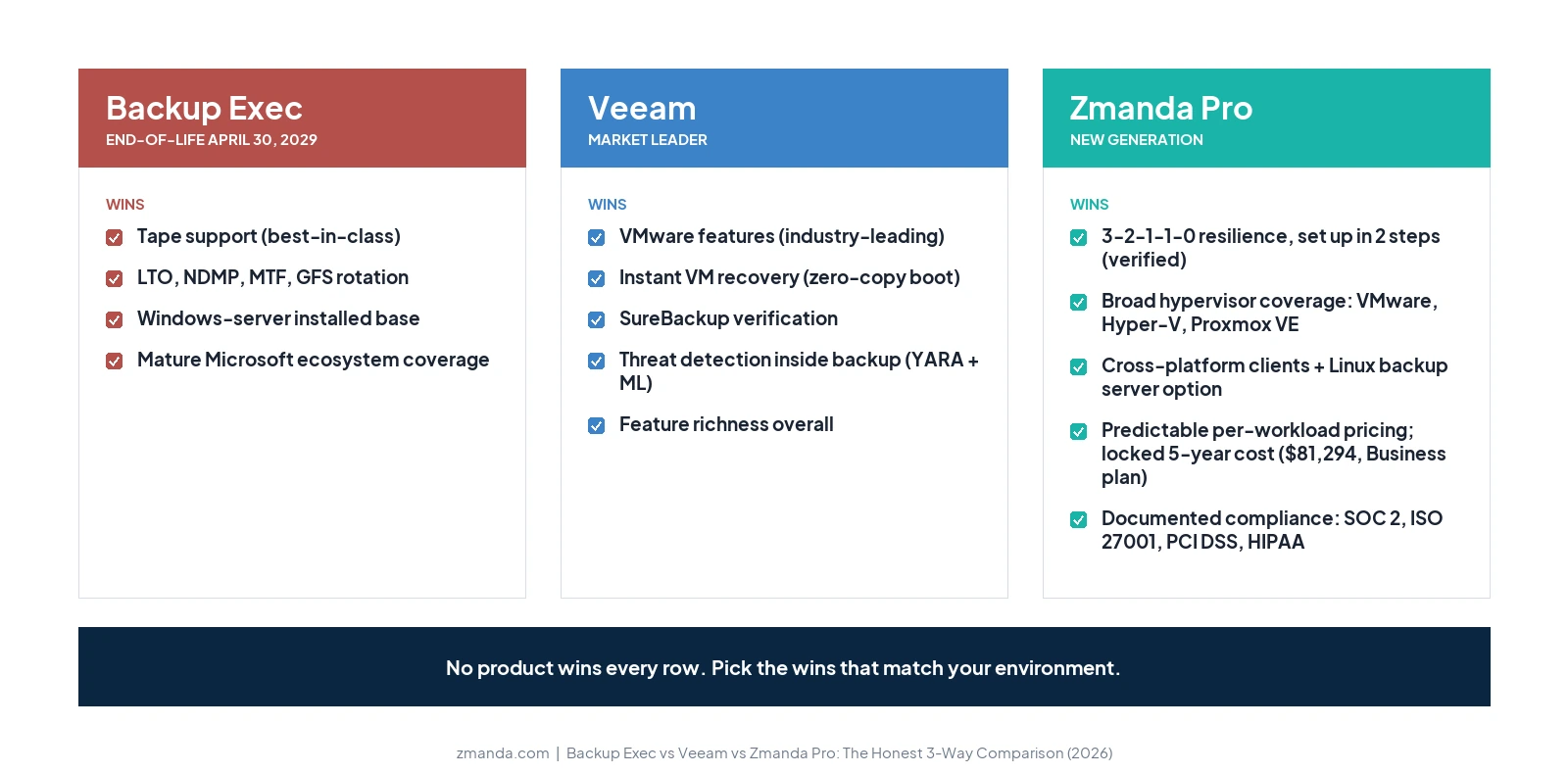
The honest read is that no product wins every row. Use the table below to identify which capabilities matter most for your environment, then weight accordingly.
| Capability | Backup Exec | Veeam | Zmanda Pro |
|---|---|---|---|
| Backup server OS | Windows Server only | Windows Server (primary), Linux for some components | Linux (Debian, Ubuntu, RHEL-family) or SaaS |
| VMware vSphere | Yes (image-based + agentless) | Industry-leading. SureBackup, instant VM recovery, replication, CDP | Yes, CBT + direct restore to ESXi + granular file restore |
| Hyper-V | Yes | Strong | Yes, 3 backup modes + granular file restore |
| Proxmox VE | No | Recently added | Yes, agentless snapshot-based with direct restore |
| Tape support | Best-in-class (LTO, NDMP, MTF, GFS rotation) | Strong | Not natively supported. Disk and cloud workflows only. |
| Threat detection inside backup | Limited | YARA + entropy analysis + ML-based detection | Architectural defense (Object Lock immutability, zero-knowledge encryption) — no scanning |
| “Instant VM Recovery” (zero-copy boot) | Yes (VMware + Hyper-V) | Industry-defining | Not supported. Direct restore copies data first. |
| Immutable backups | Limited | Hardened repositories, Object Lock | Object Lock Compliance Mode on S3 and Wasabi (admin credentials cannot override) |
| Cross-platform clients | Windows-strong, Linux limited | Windows + Linux + Mac | Windows + Linux + Mac, first-class |
| Microsoft 365 backup | Yes (v20+) | Strong, with native granular recovery | Yes (Exchange, SharePoint, OneDrive, Teams) |
| Databases (SQL, Oracle, MySQL, Postgres, Mongo) | Strong on Microsoft + Oracle | Strong | Native coverage of all six with PITR |
| Compliance documentation | Available | SOC 2, ISO 27001, etc. | BETSOL SOC 2 Type II (audited annually by QRC), ISO 27001, PCI DSS, HIPAA-supported with BAAs |
| Vendor stability | 3 owners in 3 years; EOL 2029 | Stable, market-leading scale | BETSOL-owned since 2023; 30+ years backup heritage |
| Mandatory certification | None | VMCE for many advanced features ($3K+, 3-day course) | None |
| 24/7 support included | Tiered/paid | Paid add-on (~27% additional) | Included on Business Plus and Enterprise plans |
The honest summary: Veeam wins the feature-richness comparison, particularly for VMware-heavy enterprise environments and customers who want threat detection inside the backup tool. Backup Exec wins tape, by a large margin, and has the strongest installed base in SMB Windows shops. Zmanda Pro wins cross-platform breadth, predictability, and compliance documentation, particularly for organizations that don’t need the VMware-specific features Veeam leads on.
Pricing and Total Cost of Ownership: Backup Exec vs Veeam vs Zmanda Pro
This is the section that tends to surprise people, because the three pricing models are genuinely different and the headline number rarely matches the multi-year reality.
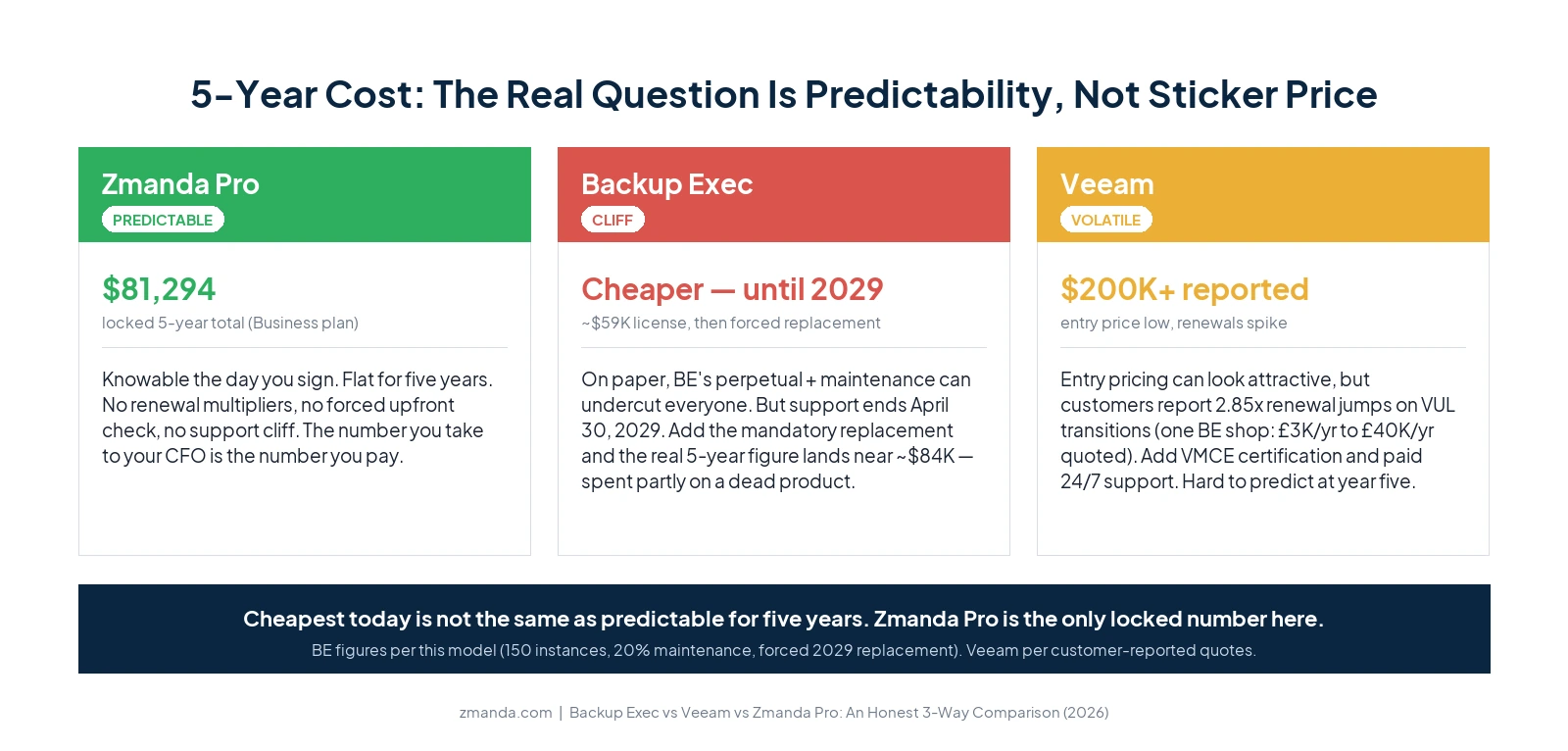
Backup Exec historically used a mix of per-server, per-VM (V-Ray socket), and capacity-based licensing. Real-customer data from a public Reddit thread (October 2025) shows one mid-sized admin paying about £3,000/year for a 500 TB / 40 VM environment. On raw sticker price, a Backup Exec perpetual-plus-maintenance deal can genuinely look cheaper than the alternatives, right up until support ends in 2029. The catch: that number is no longer buyable going forward, because Backup Exec is end-of-sale. Existing customers who wanted to maintain support through the April 2029 EOL had to pay all remaining multi-year renewals upfront, per Arctera’s official channel communication.
For a typical mid-market BE customer paying around $33,000/year, that was a single ~$99,000 invoice in 2026. The vendor has confirmed there is no extension path, and there is no supported BE past 2029.
Veeam pricing is more complex. Veeam Universal License (VUL) is per-workload, but customers report renewal pricing that can spike substantially when transitioning from older license models. A system admin on Reddit running Backup Exec at £3,000/year received a Veeam quote at £40,000/year for the equivalent environment, a 13x jump. Veeam customers also frequently report renewal increases in the 2.85x range during VUL transitions. Add VMCE certification (mandatory for many advanced features, $3,000+ per admin) and 24/7 support as a paid add-on (around 27% of license cost), and the all-in number can differ significantly from the headline.
Zmanda Pro pricing is per-workload, flat across renewals, and published on the calculator. For a mid-market environment with 100 protected workloads and 500 Microsoft 365 users, Year 1 totals $19,128 on the Business plan, with a five-year total locked at $81,294. Most customers choose Business Plus, which adds 24/7 support, at $22,128 in year one and $94,044 over five years. No renewal multipliers, no certification requirements, no support add-on. The five-year number is the number your CFO signs a contract against.
Entry quotes are the easiest number to compare and the easiest to be misled by. What matters is the number you’ll actually live with over five years. Zmanda Pro’s is knowable at year one and unchanged at year five: no renewal cliff, no forced upfront commitment, no support deadline forcing a second migration. That predictability is the advantage, and on five-year cost it pulls ahead of higher-tier Backup Exec editions and Veeam’s renewal repricing. The right question isn’t “who’s cheapest this quarter” but “whose five-year number can you actually trust.”
Want to model your environment against all three?
Spend 30 minutes with our team. We'll build the comparison against your actual workload count.
Migration Complexity: What it Actually Takes to Switch
Switching backup products is always a project, never an upgrade. The complexity differs across the three. One reassurance up front: moving off Backup Exec is a transition, not a data migration. No vendor can read Backup Exec’s proprietary catalog format, so for all of them the model is the same: keep Backup Exec read-only for your retention window, take fresh baselines in the new product, run both in parallel, then decommission.
Backup Exec to Veeam: the complexity is largely on the Veeam side, licensing-model translation, a VMware-first architecture if you’re coming from a more general BE deployment, and the certification investment for whichever admin will run it.
Backup Exec to Zmanda Pro: stand up Zmanda Pro alongside the existing BE deployment, take fresh baselines in Zmanda, run a 60 to 90-day parallel period, and cut over once you’ve validated. See our step-by-step migration guide for the full playbook.
Veeam to Zmanda Pro is usually triggered by VUL renewal pressure or a deliberate consolidation move. Veeam customers who switch typically do so because they want pricing predictability and don’t need Veeam’s most advanced VMware-specific capabilities. The migration mechanics are similar to BE to Zmanda: parallel period, fresh baselines, cut over.
The common thread: no vendor today ships a one-click migration tool from any of these products to any other. Plan the move as a structured project, allow 60 to 90 days of parallel-run time, and validate restores weekly during that period before decommissioning the old product.
Which One is Right for You?
A decision tree, with the answer “stay on Veeam” included where it applies.
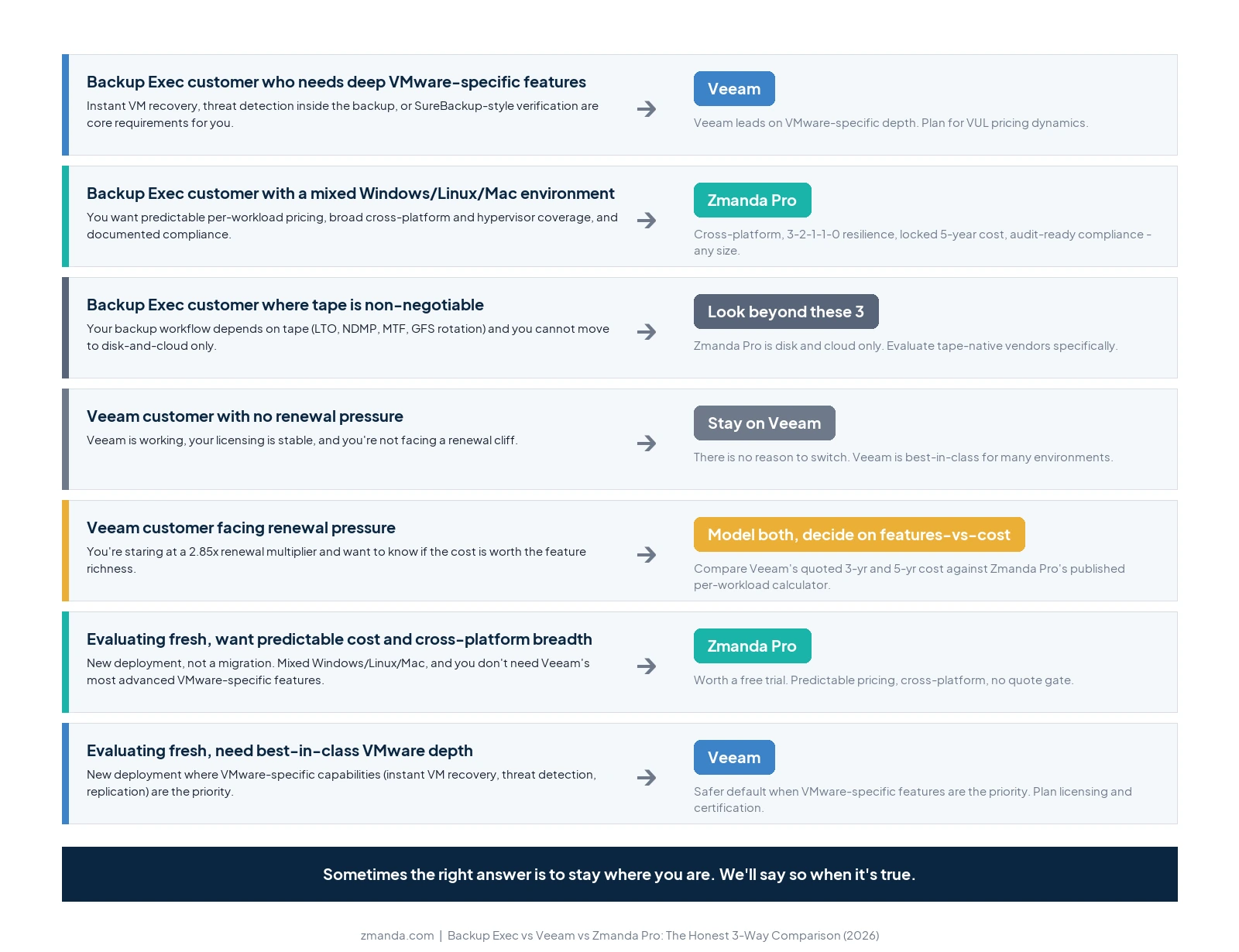
If you’re a current Backup Exec customer: the question is not whether to migrate, only when. The product is end-of-sale, for the full EOL context (ownership chain, timeline, what auditors and insurers will ask), see our complete migration guide. Your evaluation comes down to which replacement fits your environment. If you need Veeam’s deep VMware-specific features (instant VM recovery, threat detection), you’re likely to land on Veeam. If you run a mix of Windows and Linux and want pricing predictability with broad coverage, look at Zmanda Pro. If tape is non-negotiable for your workflow, you have a narrower set of options and should treat tape as a primary evaluation criterion (Zmanda Pro is disk and cloud only).
If you’re a current Veeam customer not facing pressure: there is no reason to switch. Veeam is the best-in-class product for many environments, particularly VMware-heavy enterprises and customers who value threat detection inside the backup tool. Stay where you are.
If you’re a current Veeam customer facing renewal pressure: the conversation is usually about pricing predictability rather than feature gaps. Model your three-year and five-year cost under both Veeam’s current quoted pricing and Zmanda Pro’s published per-workload pricing. The Veeam features you’d give up (YARA detection, instant VM recovery, etc.) are real. Make sure they’re worth the renewal premium in your specific environment.
If you’re evaluating from scratch (new deployment, not a migration): for mixed Windows/Linux/Mac environments that don’t need Veeam’s most advanced VMware-specific features, Zmanda Pro is worth a free trial. If best-in-class VMware depth is the priority, Veeam is the safer default. Backup Exec is not a recommendation today for any new deployment, given the EOL timeline.
If You’re Likely to Pick Zmanda Pro, Here’s What Comes Next
Three concrete next steps.
1. Model your actual environment in the calculator. Our pricing page includes a self-serve calculator (no quote gate) so you can run your workload count, M365 users, and storage volume and see Year 1, Year 3, and Year 5 totals against the Business and Business Plus plans. Compare that against your current Backup Exec or Veeam contract.
2. Run a free trial against your actual workloads. Don’t trial in a vendor-provided sandbox. Trial in your real environment with your real systems, your real network constraints, and your real RTO requirements. A 30-day trial gives you enough time to run multiple backup-restore cycles, including at least one full disaster-recovery test.
3. Talk to our team before committing. We will tell you honestly whether Zmanda Pro is the right fit for your environment before you spend trial time on it. Book a consultation with one of our backup experts and our team has explicit permission to recommend a different vendor if that’s what your environment needs.
Run Zmanda Pro against your actual workloads
Start a free trial. Real backups, real restores, no quote required.