Even with substantial investments in backup solutions, 68% of IT leaders report significant gaps in their recovery capabilities when faced with real-world disasters. The problem isn’t inadequate backups—it’s incomplete resilience architecture.
As you evaluate solutions to protect your critical data assets, understanding the difference between basic backup and true data resiliency becomes essential. While some focus on single-point solutions, Zmanda Pro delivers a comprehensive resilience framework that addresses the entire threat landscape.
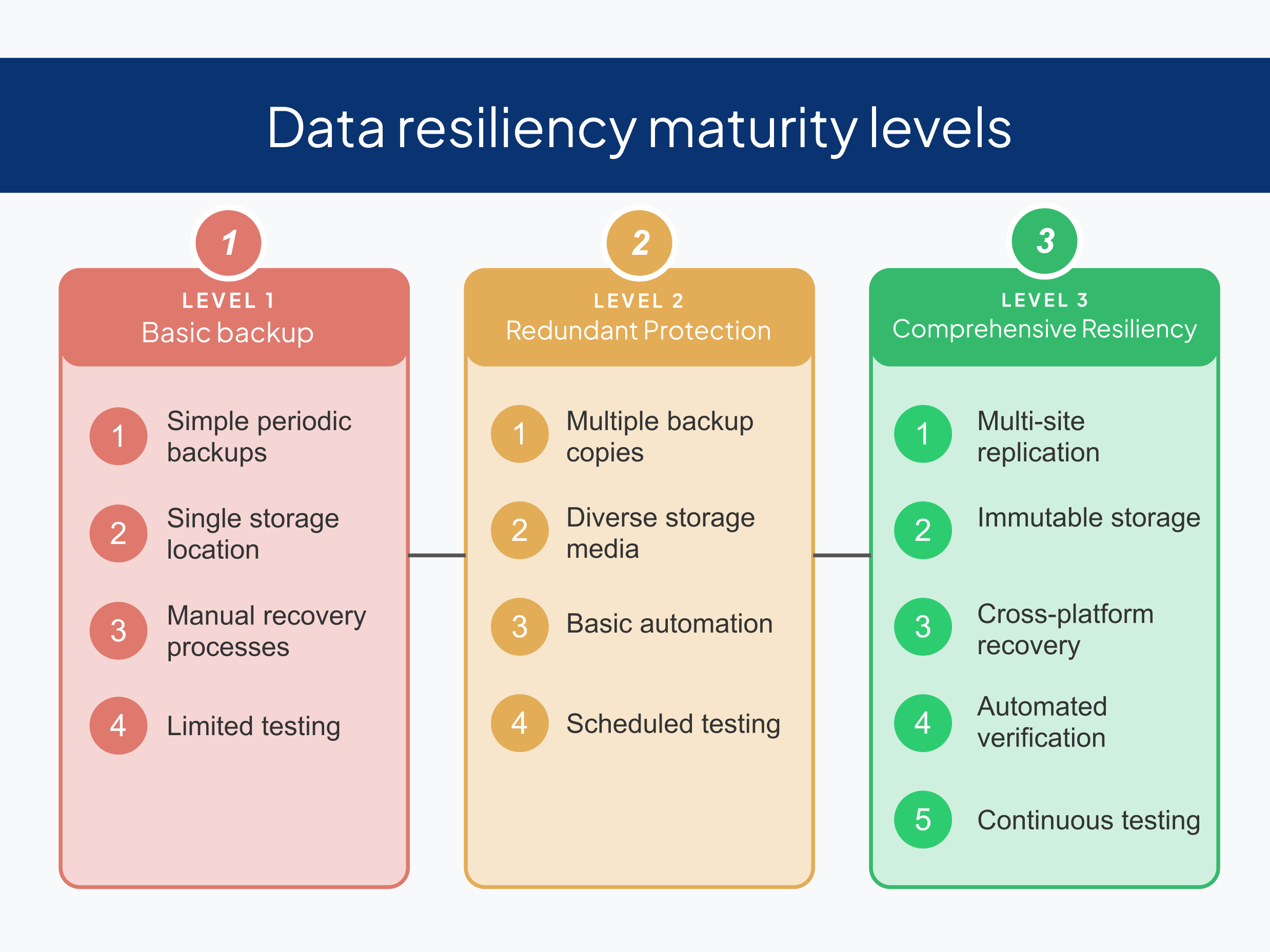
This guide outlines the 10 essential steps to implement complete data resiliency with Zmanda Pro—a practical roadmap that has helped organizations achieve 99.99% recovery success rates while reducing recovery time by up to 73% compared to traditional backup solutions.
Let’s dive in.
Step 1. Implement the 3-2-1-1-0 Backup Rule
Modern data protection demands a structured approach. The 3-2-1-1-0 rule provides the foundation:
- Maintain 3 copies of your data (production + 2 backups)
- Store backups on 2 different media types
- Keep 1 copy offsite
- Store 1 copy in immutable storage that cannot be altered
- Ensure 0 errors in your recovery testing
Zmanda Pro simplifies the implementation of this industry-standard framework through flexible storage options and automated verification processes.
Step 2. Deploy Strategic Server Replication
Single-point failures represent the greatest vulnerability in most backup architectures. Zmanda Pro’s distributed architecture enables:
- Backup server replication across on-premise and cloud environments to maintain accessibility, enable failover capabilities,
- Automatic failover during primary server outages
- Geographic distribution to mitigate regional disasters
- Meeting strict RTO and RPO objectives even if primary systems fail.
Step 3. Implement Immutable Storage
Ransomware attacks increased 37% in 2023, with attackers now specifically targeting backup infrastructure.
Protect your recovery options with Zmanda Pro’s immutable storage capabilities spanning Zmanda Cloud Storage, S3-compatible solutions, and ZFS local storage with object locking and governance capabilities that prevent unauthorized modifications.
| Storage Type | Immutability Method | Protection Level |
|---|---|---|
| Zmanda Cloud | WORM Object Storage | Enterprise-grade |
| S3-Compatible | Object Lock with governance | Configurable retention |
| ZFS Local | Snapshot locking | Hardware-level protection |
Implementation Tip: Configure variable retention periods based on data criticality, with a minimum 14-day immutability for business-critical systems.

Step 4. Maximize Storage Replication
High availability demands redundancy. Zmanda Pro’s storage replication capabilities automatically provide:
- Configurable prioritization for critical systems
- Backup duplication across multiple storage targets simultaneously
- Successful replication verification with integrity checking
- Dynamic routing of recovery operations to the fastest available source
This capability proved crucial for a manufacturing firm that maintained operations despite a five-day storage system outage that would have crippled traditional backup implementations.
Step 5. Enable Cross-Platform Recovery with Air-Gapped Archival
When disaster strikes, hardware limitations can’t dictate recovery timelines. Zmanda Pro enables efficient restoration with:
- OS-independent restoration capabilities
- Hardware-agnostic recovery procedures
- Physical-to-virtual (P2V) and virtual-to-physical (V2P) conversion
- Air-gapped archival integration with disconnected storage
Implementation Sequence:
- Identify critical systems requiring the fastest recovery
- Define alternate recovery platforms for each system
- Test cross-platform restoration monthly
- Document platform-specific recovery procedures
This cross-platform flexibility combines with air-gapped archival options to provide comprehensive protection against even the most sophisticated threats.
Step 6. Leverage Multicloud Portability
The average enterprise now uses 2.3 public clouds, making single-environment solutions increasingly inadequate. Zmanda Pro’s multicloud capabilities enable seamless data movement across diverse cloud environments:
- AWS
- Azure
- Google Cloud
- Other private environments
This builds resilience against provider-specific disruptions while optimizing for both cost and performance.
Step 7. Integrate with Security Monitoring
Detection speed determines remediation effectiveness. By integrating Zmanda Pro with your existing SIEM and monitoring tools, you create a unified security posture that proactively identifies potential threats to both production and backup environments, dramatically reducing response times during security incidents.
Step 8. Implement Advanced Data Integrity Verification
Corrupted backups are worse than no backups—they create a false sense of security. Zmanda Pro employs multi-layered verification through both software-level (SHA-256 hash) and storage-level (high-speed ZFS checksum) corruption checks, identifying integrity issues before they impact recovery operations.
Step 9. Automate DR Testing with Restore Simulation
43% of organizations never test their disaster recovery capabilities—a critical gap that Zmanda Pro addresses through:
- Scheduled, automated recovery testing
- Isolated test environments that don’t impact production
- Detailed reporting for compliance documentation
- Performance metrics against established RTOs/RPOs
Recommended Testing Schedule:
- Supporting systems: Quarterly
- Critical systems: Weekly validation
- Important systems: Monthly validation
Zmanda Pro helps perform automated DR drills to validate resilience without disrupting production environments, providing documented performance metrics and compliance evidence.
Step 10. Implement API-Driven Automation
Manual processes introduce human error and delay response during critical incidents. Zmanda Pro’s APIs and webhooks enable bulk automation for deployment, management, and restoration processes, ensuring consistent execution of resilience procedures while eliminating manual steps that could compromise recovery time objectives.
Building Your Resilience Roadmap
Complete data resiliency represents a journey rather than a destination. The most effective implementations begin with a critical assessment of your current environment and identification of the most significant protection gaps.
Start by addressing any existing single points of failure in your infrastructure—whether in server deployment, storage architecture, or recovery capabilities—and gradually implement these ten steps to build a comprehensive resilience strategy.
Organizations that follow this structured approach typically see:
- 73% reduction in unplanned downtime
- 82% improvement in recovery time objectives
- 91% increase in successful recovery testing outcomes
- Substantial improvements in regulatory compliance posture
Data Resiliency with Zmanda Pro: Get Started!
Zmanda Pro (A BETSOL product) delivers enterprise-class data resilience capabilities in both SaaS and self-hosted deployments, offering flexible implementation options designed to meet the specific needs of organizations ranging from growing mid-market companies to established enterprises.
Our approach combines technical sophistication with implementation simplicity, allowing IT teams to deploy robust data resilience without the operational overhead traditionally associated with enterprise backup solutions.
Ready to strengthen your organization’s resilience posture?
Book a consultation with one of our data protection experts to develop a tailored implementation plan based on your specific business requirements and existing infrastructure, or get started with our 14-day Free trial