When critical Linux servers fail unexpectedly, the difference between swift recovery and prolonged downtime often comes down to a single factor: the quality of your backup system and data backup strategy.
For organizations whose infrastructure runs on Linux systems, selecting the right backup software isn’t merely a technical decision—it’s a business continuity imperative that directly impacts operational resilience and data security.
If you’re exploring reliable Linux backup software, this guide will walk you through the best Linux backup tools and utilities available to help you make an informed decision about which backup solution best fits your infrastructure needs.
Why Linux Backups Matter for Modern Businesses
Linux powers a substantial share of the world’s digital infrastructure, from cloud-native platforms and web servers to embedded systems and enterprise-grade databases. Its performance, flexibility, and open-source foundation make it the operating system of choice for running mission-critical workloads across industries.
Despite its robustness, Linux systems are not immune to risk. Organizations face a wide range of threats, including:
- Hard disk failures and hardware malfunctions
- Ransomware and malware attacks targeting system files and user files
- Accidental deletion of critical backup files or accidentally deleted system configurations
- Corrupted updates affecting the file system
- Natural disasters impacting backup drive storage
- Human error during backup operations
In these high-stakes environments, backup strategies must go beyond ad hoc solutions. Many IT teams still rely on custom scripts and manual processes that become increasingly complex when managing backup files across multiple Linux systems..
Key challenges include:
- Script maintenance: Custom solutions often lack consistency, scalability, and long-term support for automated regular backups.
- Backup scheduling: Balancing performance impact with scheduled backups frequency requires precise configuration
- Data growth: Increasing volumes demand efficient storage and optimized transfer methods for backup files.
- Recovery confidence: Backup solutions must enable easy recovery and be routinely verified
- Security compliance: Backup files in transit and at rest must be encrypted, access-controlled, and auditable
To meet modern business demands, Linux backup software must deliver:
- Automation: Fully scheduled, hands-off operations to reduce administrative burden. Modern solutions enable automatic backups without manual intervention.
- Incremental backups: Capture only modified data to improve efficiency and save storage space. Full or incremental backups can be configured based on specific needs.
- Cloud compatibility: Support for public, private, and hybrid cloud integrations for off-site redundancy.
- Enterprise-grade security: Strong encryption, role-based access, and compliance readiness.
- Reliable restoration: Fast and consistent recovery processes that ensure minimal downtime and easy recovery.
- Ongoing support: Access to documentation, updates, and expert technical assistance.
A well-designed Linux backup strategy is not just about data backup protection; it’s a critical component of business continuity and operational resilience. Remote backup capabilities add an additional layer of protection against local disasters.
Types of Linux Backup Software
Linux backup software tools generally fall into several categories, each with distinct characteristics that make them suitable for different organizational needs:

- Command-line tools: Powerful, scriptable utilities accessed through the command line that offer granular control but may require significant Linux expertise. These backup tools excel in automation scenarios and are ideal for experienced administrators who need precise control over backup processes. They typically integrate seamlessly with other Linux components and can be incorporated into larger automation frameworks regular backups at regular intervals.
- GUI-based solutions: More accessible options with a graphical user interface or web interface for configuration and monitoring. These tools lower the barrier to entry for organizations with limited Linux expertise while still providing robust functionality. Their intuitive dashboards simplify complex backup operations and offer visual confirmation of backup status and history.
- Open-source tools: Free or community-supported backup software with varying feature sets and support options. These backup solutions leverage collective development efforts, often resulting in innovative features and rapid security updates. While they may lack commercial support, they benefit from extensive community documentation and forum-based assistance, making them cost-effective for organizations with sufficient in-house expertise to manage backup files and system files.
- Enterprise-grade/commercial tools: Premium backup solutions with advanced features, dedicated support, and service-level agreements for enterprise systems. These backup tools are designed for mission-critical environments where downtime has a significant financial impact. They typically offer enhanced reliability, simplified management at scale, and specialized features for regulatory compliance, image backup capabilities, and complex recovery scenarios involving backup files and system files. These solutions support both full or incremental backups depending on your recovery requirements and storage constraints. They often deliver lower total cost of ownership for large organizations through reduced administrative overhead, optimized storage utilization, and the ability to meet recovery point objectives with greater precision.
Top Linux Backup Tools Compared
Choosing the right Linux backup software depends on your environment, data protection needs, and scalability goals. In this section, we provide a comparison of leading tools, highlighting their core strengths and potential trade-offs.
| Tool | Type | UI Type | Pros | Cons | Ideal Use Case |
|---|---|---|---|---|---|
| Zmanda | Commercial (Free Trial) | Web GUI + CLI | Enterprise-grade, hybrid cloud support, centralized management, secure, scalable | Requires commercial license for full enterprise features | Ideal for enterprises seeking scalable, secure, and reliable Linux backup across hybrid environments |
| Bacula | Open-source / Commercial | CLI + optional GUI | Highly configurable, broad OS support | Steep learning curve, requires expert configuration | SMBs wanting a proven open-source tool with a commercial upgrade path through Zmanda |
| Timeshift | Open-source | GUI + CLI | Easy to use, great for system snapshots and quick restores | Not suitable for full data backups or enterprise use | Individual Linux users or developers wanting desktop-level recovery |
| Amanda | Open-source | CLI (Web via Zmanda) | Scalable, tape/disk support, cross-platform | CLI-based, minimal out-of-the-box automation | Limited features in the free tier, Windows-centric ecosystem |
| Duplicity | Open-source | CLI (Deja Dup GUI) | Encrypted backups, cloud-compatible, incremental support | Command-line usage can be a barrier | Budget-conscious users with moderate backup needs and cloud preferences |
| Veeam Agent for Linux | Commercial (Free Tier) | GUI + CLI | Incremental backups, reliable, commercial-grade support | Businesses already using Veeam for Windows are extending coverage to Linux | No encryption, lacks a GUI or cloud integration |
| Rsnapshot | Open-source | CLI | Fast, efficient, based on rsync, minimal resource usage | No encryption, lacks a GUI, or cloud integration | Simple local backup tasks on Linux systems with low overhead needs |
For an in-depth breakdown of each tool’s performance, setup complexity, and real-world applications, check out our detailed guide: Best Backups for Linux
Key Considerations When Choosing Linux Backup Software
Selecting the right Linux backup software requires careful evaluation of several critical factors that go beyond basic feature comparisons. These considerations will help ensure that your chosen solution can meet both your current and future requirements.
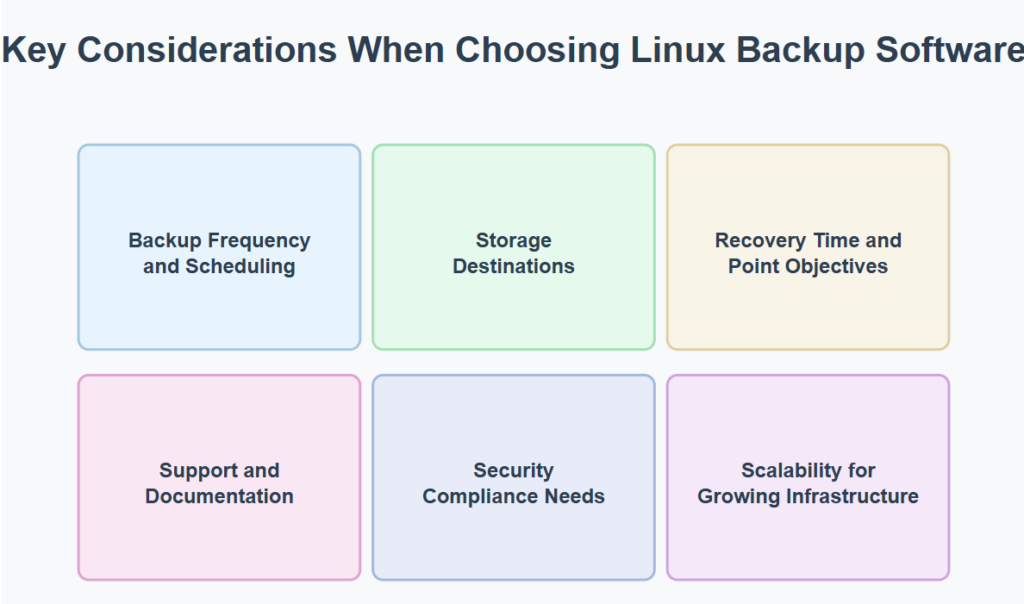
Backup Frequency and Scheduling
The timing and frequency of your backups directly impact data protection and system performance. Organizations must balance the need for current recovery points against resource utilization and operational disruption. Modern Linux systems typically require flexible scheduling options that can accommodate varying backup windows for different systems and data classifications. Consider whether your solution allows for granular scheduling control and whether it can intelligently manage resource allocation during backup operations to minimize impact on production workloads. Solutions that offer policy-based automation with conditional triggers can provide an optimal balance, enabling more frequent backups for business-critical systems while reducing backup frequency for less volatile data stores. The initial backup process should be carefully planned to minimize network impact.
Storage Destinations
Data protection strategies often leverage multiple storage tiers and locations. On-premises solutions offer direct control and potentially faster recovery, while cloud-based options provide geographic redundancy and often greater scalability. Many organizations find that hybrid approaches deliver the best combination of performance, protection, and cost-effectiveness. Your backup solution should support your current infrastructure while providing flexibility to adapt as your storage strategy evolves. Consider not just compatibility with various storage targets but also features like bandwidth management, compression, and deduplication that optimize storage usage.
Recovery Time and Point Objectives
Every system and application in your environment has specific recovery requirements. Mission-critical enterprise systems may demand RTOs measured in minutes with minimal data loss (RPO), while less critical systems might tolerate longer recovery times and greater potential data loss. Your backup solutions must be capable of meeting your most stringent recovery objectives for essential system files while allowing more cost-effective approaches for less critical user files.
Modern backup tools should provide easy recovery options for both individual files and entire backup restoration scenarios, ensuring you can restore individual files when needed without affecting the entire file system. Some solutions also offer image backup functionality for complete system restoration.
Support and Documentation
The quality of support and documentation can dramatically impact the success of your backup implementation. Open-source solutions may offer extensive community resources but lack guaranteed response times, while commercial products typically provide professional support with defined service levels. Evaluate whether the available support channels align with your team’s expertise and your systems’ criticality.
Well-documented solutions with active communities or responsive vendor support can significantly reduce implementation time and troubleshooting efforts when issues arise. File manager integration and comprehensive documentation can streamline daily operations.
Zmanda’s comprehensive knowledge base and detailed user guide walk administrators through both common and advanced backup scenarios.
Security Compliance Needs
Regulatory requirements increasingly dictate how backup data must be protected, stored, and managed. Solutions must provide appropriate controls for data at rest and in transit, including encryption, access management, and audit logging. If your organization operates in regulated industries, ensure your backup solution can support specific compliance requirements like GDPR‘s right to be forgotten or HIPAA‘s patient data protections. The ability to demonstrate compliance through comprehensive reporting and verification mechanisms is increasingly essential for avoiding potential penalties and maintaining customer trust.
Scalability for Growing Infrastructure
Backup solutions must adapt to rapidly evolving infrastructure without requiring complete replacement or significant redesign. Consider how the solution handles increasing data volumes, additional servers, and more complex environments. Look for evidence that the solution can scale both technically and economically—some solutions that work well for smaller environments become prohibitively complex or expensive at scale. The most effective solutions maintain performance and manageability as your Linux environment grows, with predictable resource requirements and costs.
Pay particular attention to how backup tools manage container environments and orchestration platforms, as these dynamic workloads present unique challenges for traditional backup approaches. The ability to intelligently detect and protect data for new instances as they spin up without manual intervention becomes increasingly valuable in modern deployments. Linux Mint users and other desktop distributions may have different scalability needs compared to server environments.
Additionally, solutions with modular architectures often provide the flexibility needed to accommodate growth patterns that weren’t anticipated during initial implementation, allowing you to add components or capabilities without disrupting existing backup operations. Software update compatibility and directory tree preservation become important considerations as environments evolve.
By thoroughly evaluating these considerations in the context of your specific environment, you can select a Linux backup solution that not only addresses immediate needs but continues to deliver value as your infrastructure evolves. Consider whether you need a backup program that can handle single file recovery or time machine tool functionality for seamless restoration.
Open-Source vs. Commercial Linux Backup Tools
The decision between open-source and commercial Linux backup solutions represents a significant strategic choice for organizations. Understanding the distinctions of each approach can help you align your backup strategy with both technical requirements and business objectives.
| Criteria | Open-Source Tools | Commercial Tools |
|---|---|---|
| Cost | Free to use | Licensing or subscription fees apply |
| Customization | High – full access to source code | Limited – depending on vendor policies |
| Support | Community-driven | Dedicated professional support with SLAs |
| Ease of Use | Command-line interfacehigher learning curve | User-friendly easier deployment and management |
| Features | Modular- requires manual scripting/configuration | Full-featured out of the box – automation, scheduling, encryption |
| Compliance | May lack built-in compliance tools | Designed to support regulatory compliance (HIPAA, GDPR, etc.) |
| Deployment Time | Longer setup and tuning process | Faster deployment with vendor documentation and tools |
| Scalability | Requires manual scaling solutions | Built for enterprise scalability and centralized control |
| Vendor Lock-in | No lock-in; fully portable | Potential for lock-in depending on licensing and storage architecture |
| Documentation | May be fragmented or outdated | Comprehensive and regularly updated |
Ultimately, the right choice depends on your specific requirements, in-house expertise, and risk tolerance.
Final Thoughts: Which Linux Backup Tool Is Right for You?
The ideal Linux backup software depends on your organization’s size, expertise, and requirements:
- Small environments with Linux expertise: Open-source tools tools offer excellent functionality without licensing costs for regular backups.
- Mid-sized organizations: Hybrid solutions provide a balance of comprehensive data backup protection and reasonable complexity.
- Enterprise environments: Commercial backup solutions often deliver the best value through reduced overhead, dedicated support, and specialized features for secure backup operations
Choose backup solutions that match both your technical capabilities and operational needs, ensuring they can handle your Linux installation requirements and provide reliable protect data capabilities.
Ready to Protect your Linux Systems?
If you’re considering a reliable enterprise Linux backup software, explore Zmanda’s Linux Backup capabilities—with hybrid cloud storage support, advanced scheduled backups, and secure automated restores.
Start your free trial or request a demo
FAQs
1. What is Linux backup software?
Linux backup software helps you protect and restore data on Linux systems by automating backups and ensuring data availability in case of failure.
2. Why should I use Linux backup software?
It safeguards your files, applications, and system configurations against data loss due to crashes, hardware failure, or cyberattacks.
3. Can Linux backup software handle automated backups?
Yes, most Linux backup software tools support scheduled and automated backups, making it easy to maintain consistent data protection.
4. Is open-source Linux backup software reliable?
Many open-source Linux backup software tools are reliable, widely used, and offer robust features like encryption, compression, and cloud support.