When it comes to Linux system administration, backups aren’t just a safety net—they’re a critical component of operational continuity. From essential configuration files in /etc to dynamic logs in /var and user data in /home, Linux systems require thoughtful linux backup strategies that address their unique characteristics. Linux admins must carefully choose between diverse filesystems, use powerful tools like rsync and tar, and integrate automation to keep systems secure and recoverable.
Unlike other operating systems, Linux is often managed via the command line, where scripting, precision, and customization are vital. Whether you’re managing a single server, containerized workloads, or large-scale enterprise environments, having a resilient and customized Linux backup strategy is crucial.
This guide aims to equip system administrators with the knowledge, tools, and understanding of types of backups in Linux needed to implement effective backup strategies
Linux Backup Fundamentals
Before exploring specific linux system backup methods, it’s essential to understand what makes Linux backup unique from other operating systems. The open-source nature, diverse filesystem options, and command-line-centric management create both opportunities and challenges that require a tailored approach.
1. System Architecture Considerations: Linux’s file hierarchy presents unique backup challenges. Critical system settings in the /etc directory contain configurations that define how the system operates. Different directories change at different rates—/var logs may update constantly while /etc files rarely change. Meanwhile, the /home directory typically contains user files that represent the most irreplaceable content on the system.
2. Filesystem Diversity: Linux supports multiple filesystem types, each needing specialized backup approaches: Ext4, the default filesystem for many distributions, provides journaling capabilities but lacks built-in snapshots. Advanced filesystems like Btrfs and ZFS offer native snapshot capabilities that revolutionize Linux backup efficiency. XFS, designed for high-performance workloads, requires special handling for its extended attributes during backup operations.
3. Deployment Environment Factors: Traditional servers with direct storage access allow straightforward disk-level backups. Cloud infrastructure based on Linux introduces abstracted storage layers that change the backup paradigm. Containerized workloads represent the newest evolution in Linux deployment, requiring strategies that distinguish between replaceable containers and persistent data that must be preserved. Physical storage backups remain important for on-premises deployments where direct hardware access is available.
Essential Components of Linux Backup Strategies
Following proven linux backup best practices and mastering these essential components enables system administrators to build strong backup defense mechanisms that shield valuable information from threats ranging from simple user errors to devastating system failures.

1. Critical Assets Identification
The first step in any effective backup strategy is identifying what needs protection based on both technical importance and business value. This includes:
- System configuration files that define how your Linux system operates
- User data in /home directory representing irreplaceable work
- Personal files and documents stored across various folders
- Database content requiring special handling to ensure consistency
- Application data in /var, /opt, and /srv directories
- System image backups are ideal for disaster recovery
Prioritize your backup efforts by categorizing assets according to their criticality, change frequency, and restoration requirements.
2. Scheduling and Retention Policies
Effective scheduling balances protection with resource usage. A practical schedule typically includes daily incremental backups that capture recent changes efficiently, weekly full backups that establish reliable restoration points, and monthly archives stored long-term for compliance requirements. Scheduled backups ensure consistent data protection without manual intervention.
When implementing your first backup, start with a full system backup to establish a complete baseline. This initial backup takes longer but provides a solid foundation for subsequent incremental or differential backups.
Retention policies determine how long different backup sets remain available, balancing regulatory requirements against storage limitations.
3. Backup Destinations
Follow the industry-standard 3-2-1 backup rule to protect against different failure scenarios: keep three copies of important data (the original plus two backups), store these copies on at least two different storage types, and maintain at least one copy offsite or in the cloud. Local backup destinations offer speed and convenience for everyday recovery, while remote and cloud storage protect against site-level disasters.
Consider multiple backup target options:
- Local hard disk arrays for fast recovery
- Network-attached storage (NAS) devices
- External hard drive rotation for offline protection
- Cloud repositories for geographic redundancy
4. Process Automation
Automated backups eliminate human error and ensure consistency. Without automation, backups often become irregular or neglected during busy periods. Create comprehensive scripts that handle the entire process from preparation to verification, including pre-backup tasks, execution with appropriate parameters, integrity verification, and cleanup operations. Schedule these processes during low-activity periods to minimize impact on production systems.

Types of Backups in Linux
Understanding different backup types helps you design an efficient strategy tailored to your Linux system’s needs. Each type serves specific backup purposes and recovery scenarios.

1. Full Backup: A full backup creates a complete copy of all selected files and directories. It provides the simplest recovery path since everything needed for restoration exists in a single backup set, but requires substantially more storage space and time to complete than other methods.
Best Use Case: Weekly or monthly baseline backups, before major system changes.
2. Incremental Backup: Incremental backups capture only changes made since the last backup of any type. This approach minimizes both backup size and duration, but recovery requires the last full backup plus all subsequent incremental backups in the correct sequence.
Best Use Case: Daily protection in environments with frequent data changes.
3. Differential Backup: Differential backups capture all changes made since the last full backup. Recovery requires only the last full backup plus the most recent differential backup, eliminating the vulnerability of long dependency chains.
Best Use Case: Systems requiring balance between storage efficiency and recovery speed.
Want to understand the key differences? Read our comprehensive analysis: Incremental vs Differential Backup — What’s the Difference?
4. Mirror Backup: Mirror backups create an exact replica of the original data. They provide immediately usable copies without requiring restoration procedures, making them invaluable for disaster recovery scenarios where system availability is critical.
Best Use Case: Disaster recovery scenarios where minimal downtime is critical.
5. Snapshot-Based Backup: Snapshot backups capture the state of the system at a specific point in time using filesystem features. They can be created almost instantaneously, reducing backup windows from hours to seconds and enabling frequent protection points without disrupting system operations.
Best Use Case: Databases and critical systems where continuous uptime is mandatory.
These backup types form the foundation of effective linux backup strategies and can be combined based on your specific environment requirements and recovery objectives.
Proven Linux System Backup Methods for System Administrators
After establishing your backup strategy, implementation requires selecting the right tools for the job. Linux provides several powerful built-in utilities that form the foundation of effective backup solutions:
1. Archival with tar
The venerable tar utility creates portable archives that preserve permissions and ownership:

This command creates a compressed archive named with the current date, containing critical system directories. The time-tested tar approach offers several advantages:
- Creates self-contained, portable backup files that are easy to transport
- Preserves Linux file attributes, permissions, and ownership information
- Combines with compression (gzip, bzip2, xz) for efficient storage
- Works predictably across virtually all Linux distributions
- Can archive entire folders or specific backup files based on your needs
2. File Synchronization with rsync
For incremental backups and efficient remote transfers, rsync provides unmatched capabilities:
Real-world scenario: When backing up /user/files without disrupting user access, rsync is the optimal choice because it’s specifically designed for this type of live backup operation.
bash
# Backup /user/files without disrupting access
rsync -avz –progress /user/files/ /backup/user-files/
This powerful utility offers distinct benefits for Linux backup scenarios:
- Transfers only changed data, significantly reducing backup time and bandwidth
- Creates mirror backups when used with the –delete flag
- Preserves file permissions, timestamps, and extended attributes
- Works efficiently over networks with built-in compression options
- Supports secure transfers over SSH for remote backups
3. Scheduled Automation with cron
Regular, automated backups are essential for a reliable Linux backup strategy:
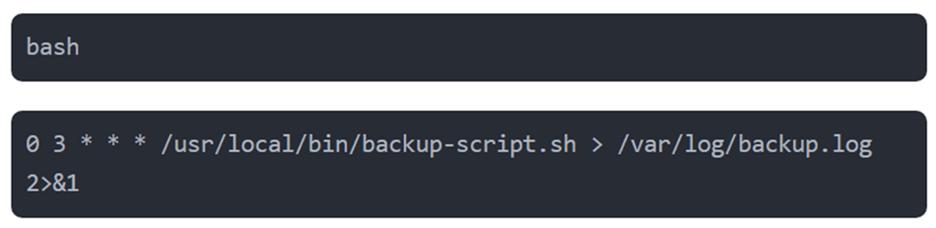
This cron entry runs a backup script at 3 AM daily, with these benefits:
- Ensures scheduled backups run consistently without human intervention
- Allows scheduling during low-usage periods to minimize impact
- Provides logging capabilities for verification and troubleshooting
- Can be combined with other tools like tar and rsync in comprehensive scripts
- Scales from simple backups to complex, multi-stage operations
These three fundamental tools can be combined to create sophisticated Linux backup solutions tailored to your specific needs. For example, a comprehensive Linux backup script might use tar to archive configuration files, rsync to efficiently back up large data directories, and cron to ensure the entire process runs automatically at optimal times.
Open-Source Solutions
For more complex environments, dedicated open-source backup tools offer integrated solutions:
Amanda excels in enterprise environments with multiple Linux servers through its client-server architecture that provides centralized management of backups across heterogeneous systems.
Bacula offers a robust, enterprise-grade solution designed for complex environments with a modular architecture that separates backup functions into distinct components.
Restic focuses on security and simplicity with built-in encryption and deduplication, supporting multiple backend storage options including local disks and cloud providers.
BorgBackup specializes in storage efficiency through sophisticated deduplication that can reduce storage requirements by 80-90% compared to traditional backup methods.
Why Many Enterprises Prefer Commercial Linux Backup Solutions
While open-source tools provide powerful options, many enterprises choose commercial backup solutions for several compelling reasons:

- Enterprise-Level Support delivers peace of mind through dedicated assistance when it matters most. When critical systems need restoration during a business crisis, having guaranteed response times and access to backup specialists can significantly reduce downtime costs.
- Application-Aware Backups ensure data consistency for critical enterprise applications. These specialized agents create transactionally consistent copies that can be restored without corruption or data loss.
- Centralized Management simplifies administration across large Linux deployments through unified control interfaces, reducing operational overhead when managing hundreds or thousands of systems.
- Compliance Features address industry-specific regulatory requirements through built-in capabilities like data immutability, comprehensive audit logs, and automated retention management.
Installing and Configuring Backup Solutions
To install backup software on Linux systems, you’ll typically use your distribution’s package manager. Here’s how to install popular backup tools:
Installing Command-Line Tools
For Debian/Ubuntu systems:
# Install rsync and tar (usually pre-installed)
sudo apt-get update
sudo apt-get install rsync tar

# Install advanced backup tools
sudo apt-get install borgbackup restic amanda-client
For Red Hat/CentOS systems:
# Install basic tools
sudo yum install rsync tar

# Install from EPEL repository
sudo yum install epel-release
sudo yum install borgbackup restic
Desktop Backup Solutions
To install Deja Dup on Ubuntu:
sudo apt-get install deja-dup
After you install the software, you’ll need to configure it for your specific needs. Most tools can be configured through config files in /etc or through their respective web interface if available.
Specialized Backup Strategies for Containerized Environments
Containerized workloads require specialized backup approaches due to their ephemeral nature. While containers themselves are disposable, the data they manage must be preserved carefully.
For Docker environments, focus on three critical components: First, maintain Docker configuration files (Compose files, Dockerfiles) in version control systems; second, prioritize backing up persistent Docker volumes that contain valuable application data; and third, use database-specific tools rather than simple volume backups to ensure data consistency for containerized databases. For more information on Docker volume backup best practices, refer to the official Docker documentation on volumes.
Kubernetes clusters require protecting both configuration and data elements. Back up the etcd database regularly as it contains your complete cluster state, store YAML focuses on version control, and implements reliable backup solutions for Persistent Volumes. With these strategies in place, your valuable data remains protected even when containers or clusters fail.
Recovery Techniques and Security Considerations
Even the best backups are worthless if you can’t restore from them effectively. When restoring, follow a methodical sequence: start with the boot environment, restore system configuration and network settings, bring up services in dependency order, and finally restore user data with integrity verification. Define Recovery Time Objectives (RTOs) and Recovery Point Objectives (RPOs) based on business requirements and regularly test recovery procedures under realistic conditions. For a clear understanding of RPO vs. RTO differences, check out Zmanda’s comprehensive guide on RPO vs. RTO.
Protecting your backups is as important as creating them. Encryption provides essential protection for backup data both at rest and in transit, while access control restricts who can create, modify, or restore from backups. Implement immutability through write-once-read-many (WORM) storage and retention locks, and confirm backup integrity through regular test restores and automated verification procedures.
The Bottom Line on Linux Backup
By following these Linux backup best practices and understanding the unique aspects of Linux systems, system administrators can build resilient data protection that forms the foundation of reliable operations. The most successful backup strategies evolve with your environment, adapting to new technologies like containerization while maintaining fundamental principles like systematic testing and verification. Remember that the ultimate measure of a backup strategy isn’t how well it stores data, but how effectively it restores functionality when needed.
Investing time in designing robust Linux backup solutions will save countless hours during recovery situations and protect your organization’s most valuable digital assets.
Ready to Protect your Linux Backup?
If you’re considering a reliable enterprise Linux backup software, explore Zmanda’s Linux Backup capabilities—with hybrid cloud support, advanced scheduling, and secure automated restores.
If you’re still unsure of which solution to choose for your organization, get a 30-minute free consultation with our data protection experts. They will help you make this decision easier by analyzing your needs for a Linux Backup solution.

Frequently Asked Questions
Why are Linux backups uniquely challenging compared to other operating systems?
Linux backup operations must handle the system’s distributed configuration files, diverse filesystem types, and complex permission structure. The command-line focus of many Linux environments creates opportunities for highly scriptable and customizable backup solutions not available in GUI-centric operating systems.
What essential components should every Linux backup strategy include?
An effective Linux backup strategy requires identifying critical assets, establishing appropriate scheduling, implementing strategic redundancy through the 3-2-1 rule for backup destinations, and automating the entire backup process with comprehensive monitoring.
Which Linux backup type provides the best balance for most environments?
The ideal Linux backup approach typically combines multiple types tailored to your specific requirements. Many environments implement weekly full backups supplemented with daily incremental or differentials to balance storage efficiency, backup speed, and recovery simplicity.
How should Linux backup strategies adapt to containerized environments?
When designing Linux backup solutions for containers, focus on backing up persistent data volumes and configuration definitions rather than the containers themselves. For Docker, maintain container definitions in version control while implementing dedicated backup procedures for volume data. For Kubernetes, protect both the cluster state stored in etcd and the Persistent Volumes containing application data.
What security measures ensure Linux backup integrity against compromise?
Implement comprehensive Linux backup security through strong encryption for data both at rest and in transit, formal key management procedures, restricted access controls, and backup immutability. Regularly verify your Linux backups through test restores to ensure both integrity and security.