When it comes to backing up data on Linux systems, the choices are plenty, but not all of them are built with Linux at their core. Unlike other operating systems, Linux environments demand backup solutions that can navigate native file systems, respect granular permissions, handle open-source flexibility, and integrate seamlessly with tools like rsync, LVM snapshots, cron jobs, and SSH tunnels. If you are serious about protecting your Linux infrastructure—whether it’s a single server, a complex multi-node setup, or a cloud-native deployment, you need a solution built for Linux, not just compatible with it.
In this guide, we break down exactly what to look for in a Linux backup service, so you can make a choice that’s reliable, efficient, and ready for the demands of real Linux environments.
What to Look for in a Linux Backup Solution
Before diving into specific solutions, let’s establish the essential criteria for evaluating enterprise-grade Linux backup service offerings:
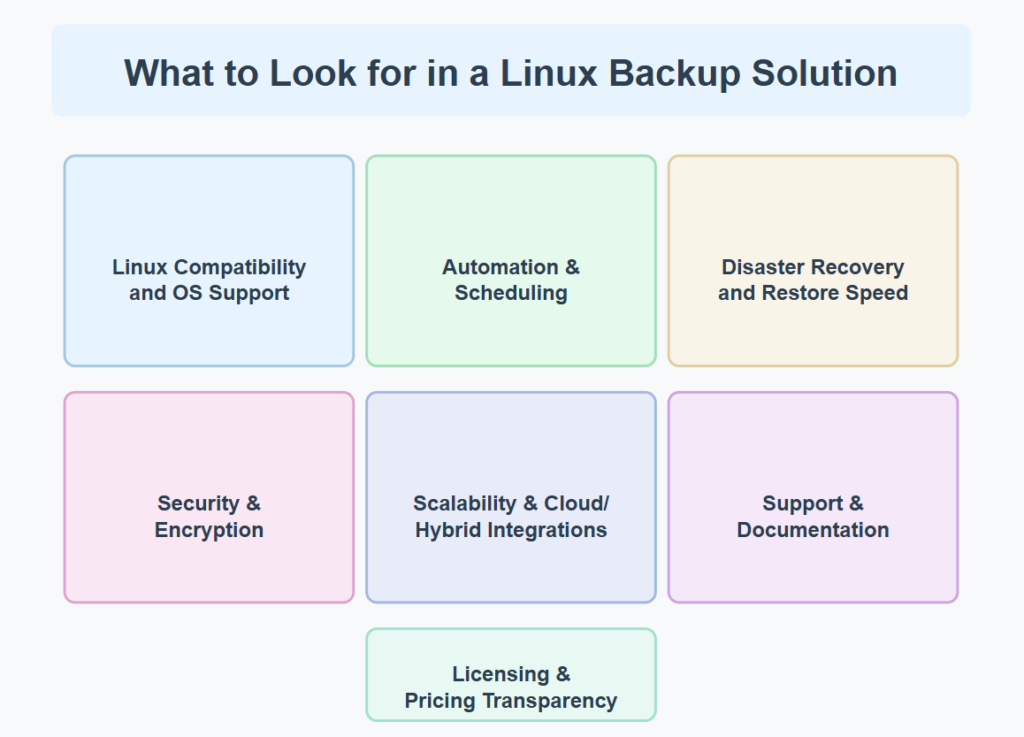
1. Linux Compatibility and OS Support: A top-tier Linux backup service should support various Linux distributions (RHEL, Ubuntu, SUSE, Debian, CentOS, etc.) and kernel versions. Cross-platform capability for backing up heterogeneous environments is also valuable for most enterprises.
2. Automation & Scheduling: Look for Linux backup service products that offer flexible scheduling options, intelligent automation, and policy-based management to minimize manual intervention and ensure consistent protection.
3. Disaster Recovery and Restore Speed: The true measure of any Linux backup service is how quickly it can restore operations after a failure. Evaluate recovery time objectives (RTOs), recovery point objectives (RPOs), and whether the solution offers bare-metal recovery options.
4. Security & Encryption: With data breaches on the rise, your Linux backup service must implement robust encryption (both in-transit and at-rest), access controls, and immutable backup capabilities to protect against ransomware and other threats.
5. Scalability & Cloud/Hybrid Integrations: As your data footprint grows, your Linux backup service should scale accordingly. Evaluate solutions based on their ability to handle increased volumes and integrate seamlessly with cloud platforms (AWS, Azure, Google Cloud) for hybrid backup strategies.
6. Support & Documentation: Enterprise-grade support is critical for any Linux backup service. Consider the quality of documentation, availability of technical assistance, and the vibrancy of the user community when evaluating options.
Zmanda stands out with its extensive knowledge base and responsive technical support that includes comprehensive implementation guides and case studies.
7. Licensing & Pricing Transparency: The best Linux backup service providers offer clear, predictable pricing models. Watch out for hidden costs related to capacity, agents, or specific functionality that might impact your total cost of ownership.
Now, let’s explore the top 10 enterprise Linux backup solutions that have established themselves as industry leaders.
Top 10 Enterprise Linux Backup Solutions
1. Zmanda
Zmanda represents an excellent bridge between open-source foundations and enterprise-grade support. Built on the proven restic-based, open-source backup foundation, Zmanda has evolved into a comprehensive Linux backup service that combines reliability with cost-effectiveness.
Key Features:
- Native integration with MySQL, PostgreSQL, and other Linux-based databases
- Cloud storage support for AWS, Azure, and Google Cloud
- Centralized management console with role-based access control
- A forever incremental backup strategy to minimize backup windows
- Comprehensive API for custom integrations
- Flexible deployment options: self-hosted or fully managed Zmanda-hosted service
Pros and Cons:
- Cost-effective compared to many enterprise solutions
- Excellent MySQL/MariaDB backup capabilities
- Straightforward deployment and management
- The user interface feels dated compared to newer solutions
- Advanced features require the Enterprise edition
Ideal Use Case: Zmanda is perfectly suited for mid-sized businesses with a hybrid IT infrastructure who need a reliable Linux backup service without the enterprise price tag. Organizations with significant MySQL deployments will particularly benefit from Zmanda’s specialized database backup capabilities.
Pricing: Starting at $5.99/workload/month
For a solution that understands Linux environments inside and out, explore how Zmanda’s Linux Backup tools can protect your critical systems.
| Tool | Enterprise Support | Cloud Integration | Ideal For | Price |
| Zmanda | ✅ | ✅ | SMBs, MySQL environments | Starts at $5.99/month |
| Bacula Enterprise | ✅ | ✅ | Large enterprises, MSPs | Custom enterprise licensing |
| Veeam | ✅ | ✅ | Virtualized environments | ~$14/month |
| Acronis Cyber Protect | ✅ | ✅ | Security-focused organizations | ~$85/workload/year |
| Commvault | ✅ | ✅ | Large enterprises, compliance-heavy | Enterprise licensing model based on capacity and features. |
| Amanda | ❌ | ✅ | Educational, technical teams | Free open-source software. |
| IBM Spectrum Protect | ✅ | ✅ | Large enterprises, regulated industries | Custom enterprise licensing |
| Duplicity | ❌ | ✅ | Developers, technical teams | Free open-source software. |
| Storware | ✅ | ✅ | Containerized environments | Subscription-based licensing with per-VM and per-node options. |
| ReaR | ❌ | ❌ | Disaster recovery scenarios | Free open-source software. |

2. Bacula Enterprise
Bacula Enterprise stands out as one of the most customizable Linux backup service platforms available. Its modular architecture allows enterprises to precisely tailor their backup strategy while maintaining enterprise-grade security and performance.

Key Features:
- Extensive OS support (over 20 Linux distributions)
- Advanced deduplication and compression
- Automated backup verification
- Bare-metal recovery options for Linux systems
- Container and virtual environment backup
Pros and Cons:
- Highly customizable with extensive configuration options
- Superior security features and compliance capabilities
- Excellent scalability for large environments
- Steeper learning curve than some competitors
- Premium pricing model
Ideal Use Case: Bacula Enterprise excels as a Linux backup service for large enterprises and managed service providers requiring granular control, scalability, and advanced security features. Organizations in regulated industries will appreciate its robust compliance capabilities.
Pricing: Custom enterprise licensing based on data volume and required modules.
3. Veeam Backup & Replication
While historically known for virtualization backup, Veeam has expanded to become a comprehensive Linux backup service with strong support for physical Linux servers alongside virtual environments.
Key Features:
- Agentless and agent-based Linux backup options
- Instant VM recovery and Linux file-level restore
- Integration with major storage vendors
- SureBackup verification technology
- Immutable backup repository options
Pros and Cons:
- Excellent performance in virtualized environments
- Intuitive user interface with strong reporting
- Reliable recovery workflows with verification
- Physical Linux server backup requires agents
- Best features require higher-tier licensing
Ideal Use Case: Veeam shines as a Linux backup service for organizations with heavily virtualized infrastructure that requires high-performance backup and quick recovery options. Particularly valuable for enterprises running VMware or Hyper-V alongside Linux physical servers.
Pricing: Subscription-based licensing starting at approximately $14 per month.
4. Acronis Cyber Protect
Acronis Cyber Protect delivers an innovative approach to linux backup service by integrating cyber protection directly into the backup solution, creating a unified platform for data protection and cybersecurity.

Key Features:
- Integrated anti-malware and antivirus protection
- Blockchain-based backup certification
- AI-based ransomware detection
- Vulnerability assessment for Linux systems
- Remote desktop capabilities for quick troubleshooting
Pros and Cons:
- Unified security and backup reduce management complexity
- Strong ransomware protection capabilities
- Competitive pricing for feature set
- Some advanced features are still maturing
- Can be resource-intensive on older hardware
Ideal Use Case: Acronis is an ideal Linux backup service for organizations seeking to consolidate backup and security tools. Companies concerned about ransomware threats will benefit from its integrated approach to cybersecurity and data protection.
Pricing: Per-workload licensing starting around $85/year per workload.
5. Commvault
Commvault delivers an enterprise-grade Linux backup service with exceptional breadth and depth of features. Known for reliability in complex environments, it offers comprehensive data management for organizations with demanding compliance and recovery requirements.
Key Features:
- End-to-end data management platform
- Industry-leading deduplication technology
- Comprehensive Linux support across distributions
- Advanced automation and orchestration
- Strong compliance and governance capabilities
Pros and Cons:
- Comprehensive feature set covering virtually all scenarios
- Excellent handling of large-scale environments
- Strong analytics and reporting capabilities
- Higher cost than many competitors
- Complex implementation may require professional services
Ideal Use Case: Commvault excels as a Linux backup service for large enterprises with complex environments and stringent compliance requirements. Organizations needing a comprehensive data management solution rather than just backup will find particular value in Commvault’s breadth of capabilities.
Pricing: Enterprise licensing model based on capacity and features.
6. Amanda (Advanced Maryland Automatic Network Disk Archiver)
Amanda represents one of the most established open-source Linux backup service options, with a long history of reliable performance and a strong community. While lacking some enterprise polish, it delivers core functionality reliably.
Key Features:
- Native tape and disk backup support
- Client-server architecture
- Backup encryption and compression
- Intelligent scheduling and media management
- Zero commercial licensing costs
Pros and Cons:
- Completely free open-source solution
- Mature, stable codebase with a long track record
- Strong community support
- Limited commercial support options
- Less polished user interface than commercial alternatives
Ideal Use Case: Amanda works well as a Linux backup service for educational institutions, small businesses, and organizations with technical teams comfortable with open-source solutions. It’s particularly appropriate for budget-conscious operations with in-house Linux expertise.
Pricing: Free open-source software. Commercial support is available through third parties.
7. IBM Spectrum Protect
IBM Spectrum Protect (formerly Tivoli Storage Manager) delivers an enterprise-class Linux backup service designed for large, complex environments. With decades of development behind it, it offers exceptional reliability and scalability.

Key Features:
- Incremental forever backup methodology
- Extensive storage hardware integration
- Policy-based data management
- Advanced retention management
- Integration with IBM Cloud and hybrid environments
Pros and Cons:
- Exceptional scalability for large enterprises
- Proven reliability in mission-critical environments
- Strong regulatory compliance capabilities
- Higher cost than many alternatives
- Complex administration requires specialized knowledge
Ideal Use Case: IBM Spectrum Protect is the ideal Linux backup service for large enterprises with significant data protection requirements, particularly those in regulated industries or with existing IBM infrastructure investments. Organizations with long-term retention requirements will appreciate its sophisticated policy management.
Pricing: Enterprise licensing based on protected capacity. Contact IBM for custom quotes.
8. Duplicity
Duplicity takes a different approach as a Linux backup service, focusing on encrypted, incremental backups through a command-line interface. This lightweight tool is popular with developers and technically savvy teams.

Key Features:
- Strong GPG encryption of backups
- Bandwidth-efficient incremental backups
- Support for numerous backends (S3, Google Cloud, SFTP, etc.)
- Scriptable command-line operation
- Low resource requirements
Pros and Cons:
- Strong security through GPG encryption
- Extremely flexible deployment options
- Free and open-source
- No graphical interface
- Requires technical knowledge to implement effectively
Ideal Use Case: Duplicity works best as a Linux backup service for technical teams, developers, and organizations that prefer script-based automation. Startups and smaller companies with Linux expertise will appreciate its flexibility and cost-effectiveness.
Pricing: Free open-source software.
9. Storware Backup and Recovery
Storware has emerged as a specialized Linux backup service focusing on virtualized and containerized environments. Its modern architecture makes it particularly well-suited for cloud-native operations.
Key Features:
- Kubernetes and container backup
- Virtual machine protection
- Agentless operation where possible
- Flexible recovery options, including instant recovery
- Multi-tenancy support for service providers
Pros and Cons:
- Excellent container and Kubernetes support
- Modern, intuitive interface
- Good balance of features and usability
- Less established than some competitors
- Smaller support organization
Ideal Use Case: Storware is ideally positioned as a Linux backup service for organizations embracing containerization and cloud-native architectures. Companies running Kubernetes in production will particularly benefit from its specialized container protection capabilities.
Pricing: Subscription-based licensing with per-VM and per-node options.
10. ReaR (Relax-and-Recover)
ReaR (Relax-and-Recover) provides a focused Linux backup service specifically designed for disaster recovery scenarios. While not a comprehensive backup solution alone, it excels at system recovery, often complementing other backup tools.

Key Features:
- Bare-metal disaster recovery
- Automated recovery media creation
- Support for major Linux distributions
- Integration with various backup solutions
- Minimal resource requirements
Pros and Cons:
- Specializes in system recovery scenarios
- Free and open-source
- Excellent for disaster recovery planning
- Not a complete backup solution on its own
- Limited management interface
Ideal Use Case: ReaR works best as a complementary Linux backup service focused on disaster recovery. Organizations concerned with rapid system recovery after catastrophic failures will find it valuable alongside more traditional backup tools.
Pricing: Free open-source software.
Final Thoughts: How to Choose the Best Linux Backup Solution
Selecting the right Linux backup service for your enterprise requires careful consideration of your specific needs, technical environment, and business priorities. Here are some key factors to guide your decision-making process:
- Match Your Needs to Solution Strengths: Each Linux backup service has distinct advantages in particular use cases. Identify your most critical requirements—whether that’s database backup, container protection, ease of use, or compliance features—and prioritize solutions that excel in those areas.
- Consider Budget, Team Expertise, and Infrastructure Complexity: Your available budget will naturally narrow options, but also consider your team’s technical capabilities. A highly technical team might leverage cost-effective open-source solutions, while organizations with limited Linux expertise might benefit from more user-friendly commercial options with strong support.
- Evaluate Total Cost of Ownership: When comparing Linux backup service pricing, look beyond initial licensing to understand the complete financial picture. Consider storage costs, maintenance requirements, necessary hardware investments, and the potential cost of downtime if recovery processes are complex or unreliable. To simplify your process, try the Zmanda Pricing Estimator, where you can enter your environment details to calculate your precise pricing and licensing needs.
- Test Before Committing: Most enterprise Linux backup service providers offer free trials or proof-of-concept deployments. Take advantage of these opportunities to test solutions in your actual environment before making substantial investments.
- Plan for Future Growth: The Linux backup service you choose should accommodate your anticipated growth. Consider future scalability needs, emerging technologies you plan to adopt, and how the solution will adapt to evolving compliance requirements.
By thoroughly evaluating these factors against our list of top Linux backup service solutions, you’ll be well-positioned to select the option that best aligns with your organization’s requirements and constraints.
For a more comprehensive understanding of Linux backup support considerations, check out this detailed blog post Best Backups for Linux.


