Most enterprises can point to a disaster recovery plan. Far fewer can prove it works. That gap, between a plan that exists on paper and a plan that has actually been tested against real conditions, is what enterprise recovery measures, and it’s usually invisible until the moment an organization needs it most.
According to Disaster Recovery Journal’s 2026 State of Disaster Recovery Preparedness report, more than 75% of organizations report having a formal disaster recovery program, with another 16% planning to implement one within the next year. On paper, that looks like near-universal readiness. What the same research doesn’t confirm is whether those programs have been tested under the kind of multi-system, multi-site failure that actually defines an enterprise-scale incident.
This piece breaks down what separates a documented enterprise recovery plan from a tested one, how enterprise recovery actually works, what typically breaks first when an untested plan meets real enterprise complexity, what to look for in enterprise recovery solutions, and a practical checklist to find out which kind of plan you actually have.
Backup, disaster recovery, and enterprise recovery are not the same
These three terms get used interchangeably, and that’s part of why the gap goes unnoticed. Backup and recovery is the mechanism: do you have a usable copy of your data, and can you restore it? Disaster recovery is the plan: the documented process, failover strategy, and recovery time and recovery point targets for restoring IT systems after a disruptive event, what most people mean by disaster recovery for enterprises. Enterprise recovery is the outcome: whether the business can actually resume operating at the scale and complexity of a real enterprise, across multiple sites, workloads, and teams, not just in a clean tabletop exercise.
Consider a mid-size enterprise that backs up every night, has a written failover procedure for its primary data center, and has never tested what happens if its secondary site loses power during the same regional event that took down the primary. That organization has backup and a disaster recovery plan. It does not yet have enterprise recovery, because nobody has confirmed the plan survives the scenario that actually matters both sites affected at once.
Most vendors use disaster recovery and enterprise recovery as near-synonyms. But the practical difference matters here: an enterprise recovery plan can satisfy the first two definitions and still fail the third one, and that’s exactly where most organizations get caught. For a full breakdown of what disaster recovery covers on its own, see what disaster recovery actually means.
Documented vs. tested recovery plan
The Disaster Recovery Journal figure above describes program existence, not program performance. It doesn’t measure whether a given enterprise recovery plan has been proven under real, compounding failure conditions, multiple systems down at once, not a single clean failover.
The stakes for getting this wrong are well documented. Splunk’s 2026 research, developed with Cisco ThousandEyes, puts the aggregate cost of unplanned downtime across the Global 2000 at $600 billion annually, with the average cost of an incident reaching $15,000 per minute. At the enterprise tier specifically, ITIC’s Hourly Cost of Downtime survey found that more than 90% of mid-size and large enterprises lose over $300,000 per hour to downtime, with 41% reporting losses between $1 million and $5 million or more per hour.
None of these figures answer the question that actually matters for a specific organization: not what downtime costs in general, but whether that organization’s specific plan, at its specific scale, will hold.
| Aspect | Documented plan | Tested plan |
|---|---|---|
| Failover | Assumed to work | Verified under simulated multi-system failure |
| Recovery time | Stated as a target | Measured against the actual target |
| Scope | Covers a single system or site | Validated across real workload and site complexity |
| Ownership | Written by IT | Verified by an independent test or certification |
A four-hour recovery time objective written into a disaster recovery plan is a target, not a result. If that target has only ever been exercised in a tabletop walkthrough, where a facilitator narrates what would happen rather than a team actually executing a restore, there is no evidence it holds once real dependencies, real data volumes, and real human error are in play. The gap between the two only becomes visible at the worst possible moment, during an actual incident.
How enterprise recovery actually works
Enterprise recovery is a sequence, and most of the value sits in the last step, the one most plans skip.
- Protect and encrypt. Data is backed up and encrypted at the source, creating the recovery points a restore will draw from.
- Prioritize. Recovery priorities are set in advance, so the systems that matter most to the business are restored first, not whichever system happens to be easiest.
- Restore and test. Restore testing verifies that a recovery point actually produces a working system, not just a file that exists in storage.
- Validate. Post-incident validation documents what worked and what didn’t, so the next test, or the next real incident, starts from a better baseline than the last one.
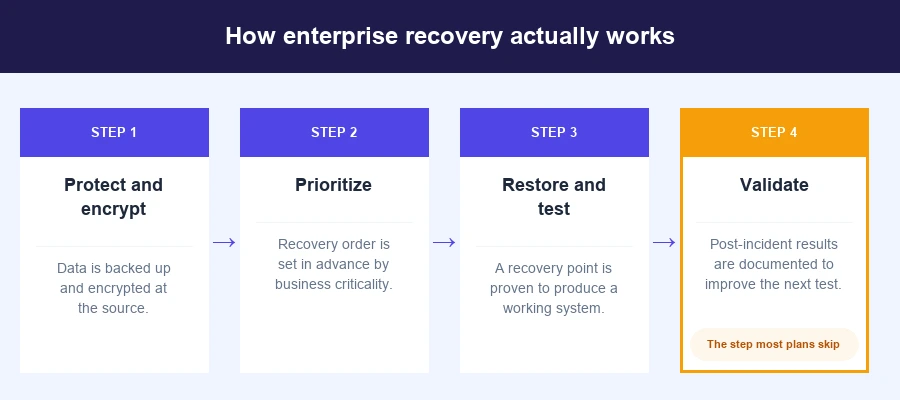
That last step, post-incident validation, is what separates enterprise data recovery that’s genuinely proven from a process that’s only ever been assumed to work. Skip it, and every step before it is still just documentation, no matter how well the first three steps were executed.
What breaks first at enterprise scale
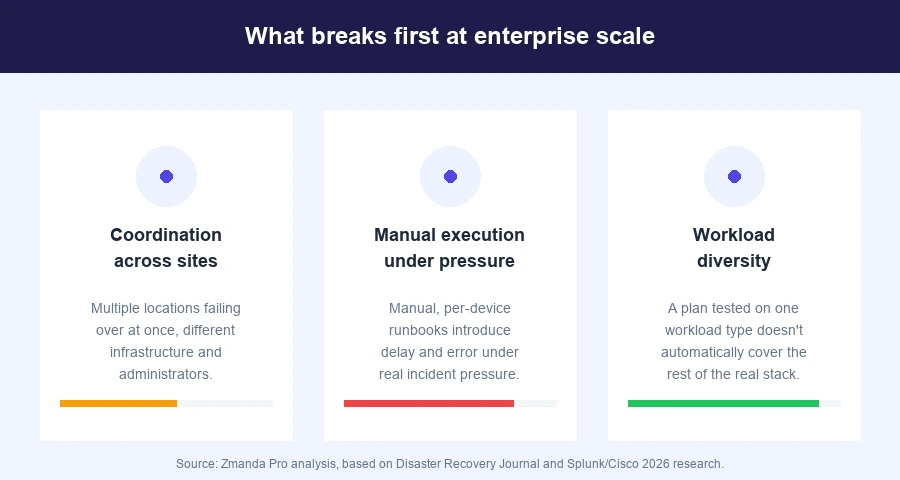
A recovery plan built and tested against a single system rarely holds up once real enterprise complexity is introduced. Three things tend to break first.
Coordination across sites: A plan that assumes one data center rarely accounts for what happens when multiple locations need to fail over at once, each with different infrastructure, different administrators, and different dependencies.
Manual execution under pressure: Recovery runbooks that rely on a person manually working through dozens of steps introduce delay and error exactly when speed matters most. This is where automation, not documentation, becomes the differentiator, tools built for bulk recovery operations across large device counts remove the dependency on a single administrator executing everything by hand during an incident.
Workload diversity: A plan tested against one database engine or one virtualization platform doesn’t automatically extend to the other twenty types of workloads a real enterprise runs.
Put these together and the pattern is consistent: a plan that works in isolation, one site, one administrator, one workload type, is not the same plan once an enterprise’s actual scale is introduced. An organization running three regional data centers, a dozen application teams, and a mix of virtualized and physical infrastructure is not testing the same thing as an organization with one site and one system, even if both technically have a documented plan.

The capabilities a tested plan actually depends on
An enterprise recovery plan is only as strong as the capabilities underneath it. Two matter more than the rest, and they work together rather than independently. Encryption applied client-side, before data ever leaves its source, means the data is protected the moment it’s created rather than after it reaches a server that could itself be compromised. Immutability, enforced through mechanisms like Object Lock, means that even if an attacker gains administrative access, the recovery copies themselves cannot be deleted or altered. Together, these two capabilities are what allow a recovery plan to survive the scenario that increasingly defines enterprise-scale incidents: an attacker who specifically targets backup infrastructure to prevent recovery, not just the production systems, the core threat that dedicated ransomware protection is built to withstand.
The rest of the underlying capability stack supports that same goal from different angles.
- Access control that limits who can alter recovery data. Role-based access, single sign-on, and multi-factor authentication reduce the chance that one compromised account can affect recovery capability.
- Recovery speed that doesn’t degrade with data age. Chunk-level restore indexing means the oldest backup restores at the same speed as the newest one, since only the required chunks are pulled.
- Storage that scales without forcing a redesign. A storage-agnostic architecture with deduplication reduces the operational cost of scaling recovery capacity as data grows.
- Hybrid-cloud support across deployment models. On-premises, cloud, and air-gapped infrastructure need to be covered by the same recovery approach, not three separate ones.
- Monitoring that surfaces failures before they become incidents. Automated reporting and webhook-based monitoring catch a failed or skipped backup job long before it’s needed for a restore.
None of these capabilities individually make a plan tested. What they do is remove the excuses, the technical reasons a validation exercise might fail that have nothing to do with whether the underlying strategy is sound.
What to look for when evaluating enterprise recovery solutions
Whether you’re validating your current setup or evaluating a change, these six criteria separate an enterprise recovery capability that holds up at scale from one that only looks complete on paper.
| Criterion | What to check | Why it matters |
|---|---|---|
| Deployment model | Does it support SaaS, self-hosted, and fully air-gapped deployment, or does it lock you into one | Multi-site enterprises rarely run one infrastructure model end to end |
| Workload coverage | Does it cover your actual mix, physical servers, VMs, databases, SaaS apps, or only some of them | A plan with gaps in coverage isn’t tested, it’s partial |
| Security controls | Is encryption applied client-side before data leaves its source, and is immutability supported against compromised admin credentials | Determines whether recovery data itself can survive a ransomware event |
| Recovery objectives | Can the stated recovery point or recovery time be independently verified or tested, not just documented | This is the entire distinction this article is built on |
| Management complexity | Can bulk operations and mass restore be automated across large device counts, or does recovery depend on manual, per-device steps | Manual execution is one of the three failure points covered above |
| Total cost of ownership | Is pricing predictable per workload, or does it scale unpredictably with data volume or egress | Cost surprises during a real incident compound an already bad situation |
A solution that scores well on every other criterion but still requires a human to manually configure recovery for each of a thousand devices has effectively reintroduced the manual execution problem described earlier, just at the evaluation stage instead of the incident stage.
Enterprise recovery in hybrid environments
Hybrid infrastructure is where enterprise recovery plans most often reveal their gaps. An organization running on-premises servers, cloud workloads, and in some cases fully air-gapped systems needs a single, tested approach to hybrid infrastructure support, not three separate plans that were never tested together.
The coordination problem described earlier gets worse in hybrid environments specifically, because failover between an on-premises system and a cloud-hosted one involves different tooling, different network paths, and often different teams. A recovery capability that covers SaaS, self-hosted, and air-gapped deployment from a single platform removes one entire category of untested handoff, the point where two different tools have to work together correctly during an actual incident, not just individually.
This matters more, not less, as the cost of downtime climbs. When an incident is already running at $15,000 a minute in aggregate industry terms, the added delay of two teams discovering mid-incident that their on-premises and cloud recovery tools don’t coordinate the way anyone assumed is not a minor inefficiency, it’s the difference between a contained event and a prolonged one.
How Zmanda Pro supports enterprise recovery
Zmanda Pro has provided backup, recovery, and disaster recovery for one of the world’s largest national cybersecurity organizations since 2019, across 7 data centers and more than 500 physical and virtual servers, in a fully air-gapped, classified environment. That’s sustained operation under continuous real conditions, not a one-time test, and it’s the kind of environment where the coordination and manual-execution failure points described earlier would surface immediately if the underlying platform couldn’t handle them.
Three design decisions make that possible. Deployment matches the environment rather than forcing one architecture onto it, Zmanda Pro supports SaaS, self-hosted, and fully air-gapped deployment from the same platform, so a hybrid or classified estate doesn’t need separate tools for separate infrastructure. Recovery at scale runs through automation rather than manual steps, ZPAT, the Zmanda Pro Automation Tool, manages bulk device onboarding, policy creation, and mass restore across deployments of 1,000 or more devices. And recovery data is protected independently of who has administrative access, encrypted client-side with AES-256 before it ever leaves its source, with Object Lock support on AWS S3 and Wasabi providing immutability against compromised credentials.
- Deployment options span every model. SaaS, self-hosted, or fully air-gapped, all from a single platform.
- Automation runs recovery at scale. ZPAT handles bulk onboarding, policy management, and mass restore via a single operator console.
- Data protection is layered. Client-side AES-256 encryption is combined with Object Lock immutability.
- Recovery point objective stays under one hour. A forever-incremental backup architecture makes that possible.

A checklist to find out which one you actually have
You don’t need a third-party certification to start finding your own gaps. These six questions separate a documented enterprise recovery plan from a tested one.
- Has this plan been tested under production load, not just a tabletop walkthrough?
- Does the documented recovery time hold when multiple systems fail at once, not just one?
- Has failover been tested across your actual site and workload complexity, not a simplified test environment?
- When was the last full restore actually verified, rather than just checking that the backup job completed successfully?
- Does recovery depend on one specific administrator’s knowledge, or can it be executed by automation or a different team member?
- Have immutability and access controls been tested against a scenario where administrative credentials are compromised, not just against accidental deletion?
If more than one of these gets an honest “we assume so” instead of “we’ve verified it,” that’s the gap this article opened with.
What to do once you know the answer
A documented plan is the necessary first step. But treating it as the finish line is exactly what leaves most organizations exposed. The next step is validation: testing the plan against the kind of compounding, multi-system failure that actually defines an enterprise-scale incident, not the clean, single-system scenario most tabletop exercises cover.
Enterprise recovery isn’t a feature you buy or a document you file. It’s the proof, tested and repeatable, that an organization can actually resume operating after a real disruption. Most organizations have the first two pieces, backup and a documented enterprise recovery plan. Few have the third.
FAQs