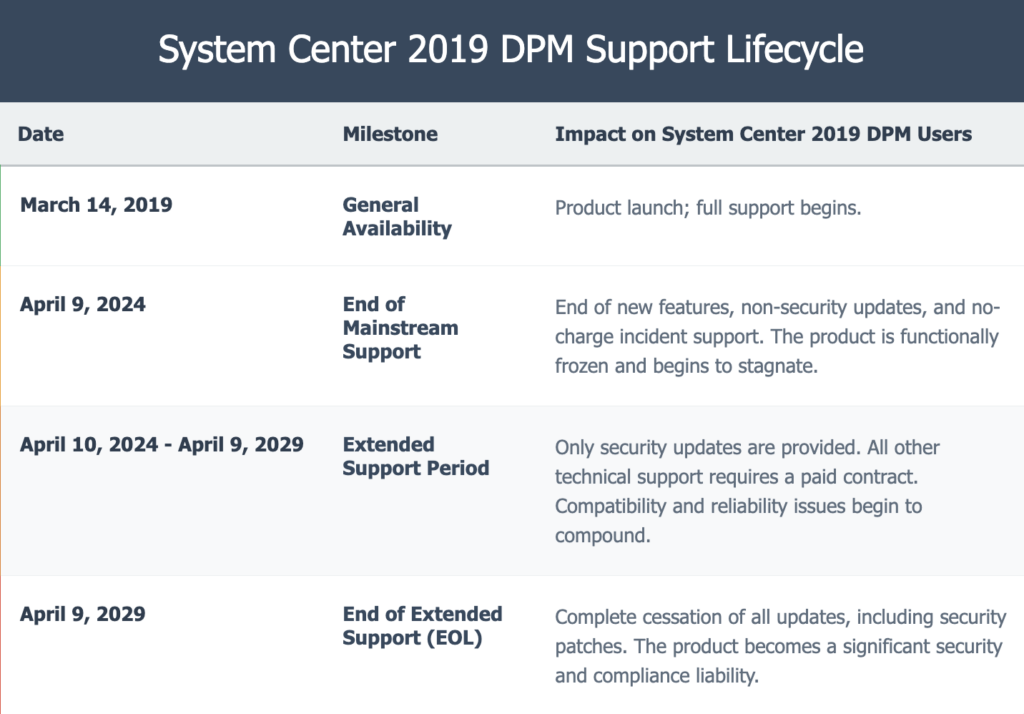
Microsoft’s System Center 2019 Data Protection Manager reached mainstream end-of-life on April 9, 2024, marking the conclusion of nearly two decades as the go-to backup solution for Microsoft-centric organizations. For the thousands of enterprises currently running DPM, this transition represents a fundamental shift in backup strategy that demands careful analysis.
Why Does the End of Data Protection Manager Matter Now?
With extended support available until April 2029 at premium pricing, organizations face a critical decision window. The question isn’t whether to migrate, but how to optimize the transition for maximum operational and financial benefit.
What’s Changing with Data Protection Manager—and Why Should You Care?
System Center Data Protection Manager earned its reputation through deep integration with Microsoft’s server ecosystem. Organizations appreciated its application-aware backup capabilities for SQL Server, Exchange, and SharePoint, along with its ability to protect both physical and virtual environments seamlessly.
But the computing landscape has evolved dramatically since DPM’s initial release.
Today’s enterprises operate multi-cloud environments with diverse platform requirements. The Microsoft-centric backup approach that once seemed comprehensive now appears limiting. Organizations need solutions that protect Windows Server alongside Linux workloads, on-premises infrastructure alongside cloud-native applications, and traditional databases alongside containerized services.
Consider the typical mid-market organization currently running Data Protection Manager. They’re likely managing:
- 500-2,000 endpoints across multiple locations
- Windows Server environments with growing cloud adoption needs
- Growing data volumes expanding 25-40% annually
- Increasing compliance requirements demanding sophisticated retention policies
- Budget pressures requiring demonstrable ROI from technology investments
DPM’s architecture wasn’t designed for this complexity.
How Much Will It Really Cost to Stick with Data Protection Manager?
Microsoft’s extended support pricing model creates escalating financial pressure. Organizations maintaining Data Protection Manager through 2029 face annual cost increases of 15-25%, compounded by underlying infrastructure licensing requirements.
Consider this analysis of a typical deployment:
- Current DPM licensing: $25,000 annually
- Extended support premium (2025-2029): +$6,250 annually
- DPM-specific administrative overhead: $8,000 annually (backup management tasks)
- Total DPM-specific costs: $39,250 annually
This calculation doesn’t include the opportunity cost of maintaining aging infrastructure or the technical debt accumulated through extended support arrangements. Organizations choosing this path essentially commit to five years of increasing costs for decreasing functionality.
Why Is Migrating from DPM So Complex?
DPM migrations present unique challenges that distinguish them from typical backup solution transitions. The solution’s deep integration with Microsoft’s ecosystem creates dependencies that must be carefully unwound.
Database Migration Requirements DPM 2022 setup allows database migration to different SQL Servers during upgrades, but this process requires extensive planning. Organizations must ensure SQL Server compatibility, coordinate backup and restore procedures, and manage potential cluster configurations. The complexity multiplies for organizations running multiple Data Protection Manager servers or those with distributed infrastructures.
Volume-to-Volume Migration Challenges Data migration represents perhaps the most complex aspect of DPM transitions. Larger data sources or data sources with numerous recovery points require significantly more time to migrate. The process impacts production systems, demands careful scheduling, and requires comprehensive testing to ensure data integrity.
Operational Continuity Concerns The upgrade process itself can lead to extended periods of system downtime or reduced performance, impacting end users. Organizations must balance migration timelines against business continuity requirements, often resulting in complex phased approaches that extend transition periods.
What Are Your Options Beyond DPM—and Are They Worth It?
Organizations evaluating DPM alternatives consistently prioritize three critical capabilities: simplified deployment, comprehensive platform support, and predictable economics. Solutions like Zmanda Pro address these requirements through cloud-native architecture designed for hybrid environments.
- Simplified Deployment Model Agent-based deployment eliminates the infrastructure dependencies that make Data Protection Manager migrations so complex. Organizations can deploy comprehensive backup protection in 48-72 hours rather than the 3-6 week windows required for Microsoft alternatives. This approach maintains data continuity while minimizing operational disruption.
- Comprehensive Platform Support Modern backup solutions support the full spectrum of contemporary IT environments. Windows Server protection integrates seamlessly with Linux, Unix, and macOS support. Physical and virtual machine backup capabilities extend to cloud-native workloads and containerized applications. This comprehensive approach eliminates the platform limitations that increasingly constrain DPM users.
- Predictable Economics SaaS-based pricing models eliminate the licensing complexities that characterize Microsoft’s approach. Organizations gain predictable costs that scale with data growth rather than infrastructure requirements. The typical result: 40-60% cost reduction compared to Microsoft’s extended support path.
How Do Today’s Backup Solutions Stack Up Against Each Other?
The backup market has evolved significantly during DPM’s lifecycle. Organizations evaluating alternatives encounter several viable options, each with distinct advantages and limitations.
Zmanda Pro delivers comprehensive Data Protection Manager replacement capabilities with transparent per-device pricing starting at $5.99/month per endpoint. The solution provides simplified deployment, multi-platform support beyond Windows, and cloud-native architecture that eliminates Microsoft licensing dependencies.
Veeam Backup & Replication maintains market leadership through strong VMware integration and comprehensive features. However, pricing typically runs 35-45% higher than most alternatives, and the solution’s complexity can overwhelm organizations seeking operational simplification.
Acronis Cyber Protect combines backup with cybersecurity capabilities, addressing ransomware concerns that didn’t exist during Data Protection Manager’s initial development. Pricing remains competitive with Zmanda Pro, though feature complexity can increase administrative overhead.
Commvault provides enterprise-scale capabilities but typically costs 60-80% more than Zmanda Pro. The solution’s complexity makes it better suited for large enterprises rather than the mid-market organizations that constitute Data Protection Manager’s primary user base.
Is It Worth Migrating? Let’s Look at the Economics
The economic argument for migration becomes compelling when viewed across the extended support period. Organizations maintaining DMP through 2029 commit to escalating costs for declining functionality.
The economic case for migration depends on your specific environment size and current DPM licensing costs. Organizations should evaluate:
Extended Support Considerations:
- Microsoft has increased System Center 2025 pricing by 10% over the 2022 version
- Extended support typically involves premium pricing above standard licensing
- Core-based licensing model may increase costs as infrastructure grows
Zmanda Pro Pricing (Based on Environment Size):
- 500 endpoints: $35,940-$41,940 annually
- 1000 endpoints: $71,880-$83,880 annually
Organizations facing steeper escalations or additional infrastructure requirements will see even greater savings potential.
Why Zmanda Pro Is the Smartest Next Step for DPM Users
The economics favor migration: continuing with DPM means accepting escalating costs for diminishing functionality. Microsoft increased System Center 2025 pricing by 10%, with extended support typically involving additional premiums. Organizations face growing infrastructure dependencies and licensing complexity as Microsoft phases out DPM.
Zmanda Pro vs. System Center 2019 DPM
| Feature | System Center 2019 DPM | Zmanda Pro | The Zmanda Advantage |
|---|---|---|---|
| Deployment Models | On-Premises Server Only | Self-Hosted (On-Prem/Cloud), Cloud-Hosted (SaaS), Self-Hosted Offline (Air-Gapped) | Unmatched flexibility to meet any security, sovereignty, or operational requirement. |
| OS Support | Primarily Windows-focused; limited Linux support | Extensive support for Windows, numerous Linux distributions (RHEL, Ubuntu, etc.), and macOS | Unified protection for truly heterogeneous environments, eliminating backup silos. |
| VM Support | Hyper-V, VMware | Hyper-V, VMware, KVM | Broader hypervisor support ensures future-proofing as virtualization strategies evolve. |
| Database Support | MS SQL, SharePoint, Exchange | MS SQL, Oracle, PostgreSQL, MySQL, MariaDB, MongoDB | Comprehensive support for both commercial and open-source databases enables application modernization. |
| Storage Targets | Disk, Tape, strongly integrated with Azure Cloud Storage | Disk, NAS/SAN, Any S3-Compatible Cloud (AWS, Azure, GCP, Wasabi, etc.) | Complete storage freedom avoids vendor lock-in and allows for significant cost optimization. |
| Ransomware Protection | Offsite copies to Azure; no native immutability | Immutable Backups, Air-Gapped Deployment Option, End-to-End Encryption | A modern, multi-layered defense designed to defeat sophisticated ransomware attacks. |
| Disaster Recovery | Relies on secondary DPM server or Azure Site Recovery | Self-Hosted DR Server Plan, Managed Disaster Recovery as a Service (DRaaS) | Offers both self-managed and fully-managed DR options to meet different RTO/RPO and budget needs. |
| Management | DPM Console; some integration with Azure Log Analytics | Centralized Web Console, Bulk Automation Tools, REST APIs | Modern, scalable management simplifies administration and reduces operational overhead. |
| Security | Role-based access; relies on Active Directory | Role-Based Access Control (RBAC), SSO/LDAP Integration, Customer-Managed Encryption Keys | Granular, modern security controls that integrate with enterprise identity systems. |

Zmanda Pro represents the strategic alternative: proven DPM replacement capabilities with modern architecture designed for future growth.
Quantifying the Savings: A 3-Year TCO Model
To illustrate the financial impact, the following table presents a sample 3-year TCO analysis for a hypothetical organization migrating from SCDPM 2019 to Zmanda Pro. This model demonstrates the “up to 50% TCO savings” that Zmanda consistently delivers.

Scenario: A mid-sized enterprise with 100 protected workloads (VMs, physical servers, databases) and 50 TB of backup data.
| Cost Component | Path | Year 1 | Year 2 | Year 3 | 3-Year Total |
| Software Licensing/Subscription | SCDPM 2019 (Paid Support) | $15,000 | $15,000 | $15,000 | $45,000 |
| Zmanda Pro (100 workloads @ $6.99/mo) | $8,388 | $8,388 | $8,388 | $25,164 | |
| Cloud Storage (50 TB) | Azure GRS ($0.0448/GB/mo) | $27,525 | $27,525 | $27,525 | $82,575 |
| Competitive S3 ($0.006/GB/mo) | $3,686 | $3,686 | $3,686 | $11,058 | |
| Admin Overhead (Labor) | SCDPM 2019 (Higher) | $20,000 | $20,000 | $20,000 | $60,000 |
| Zmanda Pro (Lower due to automation) | $10,000 | $10,000 | $10,000 | $30,000 | |
| Risk-Adjusted Cost of Breach | SCDPM 2019 (Higher Risk) | $5,000 | $7,500 | $10,000 | $22,500 |
| Zmanda Pro (Lower Risk) | $500 | $500 | $500 | $1,500 | |
| Total Annual Cost | SCDPM 2019 Path | $67,525 | $70,025 | $72,525 | $210,075 |
| Zmanda Pro Path | $22,574 | $22,574 | $22,574 | $67,722 | |
| TCO Savings with Zmanda Pro | $142,353 (68%) |
Note: Figures are illustrative estimates based on public pricing data and industry averages for administrative overhead and risk modeling. Actual costs will vary. SCDPM costs assume a paid support contract is maintained. Risk cost is modeled as a small probability of a breach with a higher financial impact on the legacy system.
This analysis makes it clear that migrating to Zmanda Pro is not an expense but a significant cost-reduction initiative. The investment pays for itself quickly through direct savings on licensing and storage, while also reducing soft costs related to administration and mitigating the enormous financial risk of a security breach on an unsupported platform.
Zmanda Pro Capabilities in-detail
Flexible Deployment & Storage Options:
- Fully managed SaaS, self-hosted on-premises, or hybrid configurations
- Storage targets: Zmanda Cloud Storage, local disk, AWS S3, Azure Blob, Google Cloud Storage
- Immutable backup capabilities with intelligent tiering optimizing costs
- Universal restore capabilities to dissimilar hardware and cloud platforms
The solution protects comprehensive workloads including:
- VMware vSphere and Microsoft Hyper-V virtual systems
- Linux/Windows/Mac server instances and endpoints
- critical applications like Active Directory, MS Exchange, SharePoint, and Microsoft 365
- databases including MariaDB and MySQL.
- File system support spans CIFS, NFS, ISCSI, and Lustre environments that extend far beyond DPM’s Microsoft-centric limitations.
Advanced Enterprise Capabilities:
- Application-consistent backup with universal compatibility matrix
- Global deduplication reducing storage consumption by 40-60%
- Incremental forever technology eliminating full backup windows
- Policy-driven automation with compliance reporting
- Integrated ransomware protection with rapid recovery orchestration
This modern architecture serves enterprises and SMBs across industries including SaaS, manufacturing, healthcare, government, finance and insurance, education and research facilities, supercomputing labs, and franchises with retail chains. Organizations managing 100-5,000 endpoints across distributed locations benefit from unified platforms that consolidate multiple backup tools while scaling elastically with business growth and providing granular cost control.
Take a comprehensive 14-day free trial including migration assessment, architecture design consultation, and proof-of-concept deployment. Professional services ensure seamless transition from legacy platforms with minimal disruption, while flexible pricing accommodates specific deployment preferences and budget requirements.
Ready to migrate from Data Protection Manager?
Schedule a 30-minute migration readiness assessment to see how Zmanda Pro compares in your specific environment. Our team can demonstrate the 48-72 hour deployment process and provide detailed TCO analysis for your current DPM configuration.