Why should you store backup media offsite? Because disasters, whether digital or physical, don’t wait for a convenient moment. Offsite backups remove the single point of failure, shielding your data from local disruptions, targeted malware, and everyday accidents.
Nearly half of businesses now put their trust in offsite strategies for a reason: it’s fast becoming the gold standard for real resilience and business continuity.
This guide gets straight to the point. You’ll discover exactly why offsite backup isn’t just another IT box to check, but a critical move that could save your organization. Dive in to know the real reasons and strategies you need to keep your data safe.
What is Offsite Backup Storage?
Offsite backup storage involves creating copies of your data and storing them at a location physically separated from your primary data center or office. Unlike onsite backups, which reside on the same premises as your original data, offsite backups provide geographical redundancy that protects against location-specific disasters.
The concept follows the industry-standard 3-2-1 backup rule: maintain three copies of your data, store them on two different media types, and keep one copy offsite. This rule has evolved to address modern threats, with some experts now recommending the 3-2-1-1-0 rule, which adds an additional offsite copy and emphasizes zero unverified backups.
Modern offsite backup solutions range from cloud-based services to physical media stored at remote facilities. The key distinction is that offsite backups remain accessible even when your primary location becomes unavailable, ensuring business continuity during critical situations.
Why Should You Store Backup Media Offsite? 7 Critical Reasons
1. Defense Against Ransomware and Cyberattacks
Ransomware remains one of the most significant threats to businesses worldwide. Many organizations experience critical data loss during such cyberattacks because traditional onsite backups often connected to production networks can also become compromised, encrypted, or deleted by malware, making recovery difficult or impossible without secure offsite backups. Storing backup media off-site often entails using air-gapped or immutable backup solutions, where backup copies are isolated from network connections and are immutable. This effectively protects backups from malware encryption or tampering, offering a reliable recovery option after a cyberattack.
The cost of ransomware incidents continues to climb: the average cost of recovering from a ransomware attack now exceeds $5 million globally, including downtime, lost revenue, and mitigation expenses. Offsite backups significantly reduce recovery time and financial impact by ensuring clean, uncompromised data copies are available.
2. Business Continuity and Disaster Recovery
Offsite backups are a cornerstone of any robust business continuity and disaster recovery (BCDR) plan. They allow organizations to maintain critical operations even after local system failures or disasters by enabling remote data access and rapid recovery from any location.
Additionally, offsite backup solutions help businesses meet stringent regulatory compliance requirements such as GDPR and HIPAA, which mandate reliable data protection and recovery capabilities. Knowing that recovery time objectives (RTO) and recovery point objectives (RPO) can be met efficiently through offsite media empowers organizations to meet legal mandates and avoid costly fines.
3. Protection from Human Error and Accidental Deletion
Human error remains a significant cause of data loss, contributing to about 32% of data loss incidents in 2025. This includes accidental deletion, overwriting files, or misconfigured systems. Local backups that are not version-controlled or offsite may be equally vulnerable if corruption or mistakes replicate across backups.
Offsite backup systems support version control and point-in-time recovery, allowing businesses to restore files or databases to states before the error occurred. This quick restoration capability minimizes downtime and prevents permanent loss resulting from user mistakes.
4. Hardware Failure and System Crashes
Hardware malfunctions, including server crashes or disk failures, are among the top contributing factors to data loss, accounting for around 44% of incidents. Storing backup data only onsite means any physical failure can simultaneously hit production and backup systems, risking irretrievable data loss.
Offsite backup media provide protection against simultaneous failures by isolating backups from onsite hardware problems. Given that downtime can cost small businesses on average $1,410 per minute, investing in offsite backups is a cost-effective hedge against hardware failure-induced downtime and lost productivity.
5. Cost-Effectiveness and Scalability
Offsite backup storage, especially cloud-based, offers lower upfront costs compared to building extensive onsite infrastructure. It eliminates maintenance overhead, allowing businesses to scale storage capacity on-demand based on growth or changing needs.
When analyzed, the return on investment (ROI) from offsite backups can be substantial—avoiding millions in lost revenue, fines, and recovery costs far outweighs ongoing storage service fees. Scalability also means businesses only pay for what they need, making offsite backups a sustainable solution as data volume expands.
6. Enhanced Security and Access Control
Professional offsite backup providers implement advanced security measures, including encryption during data transmission and at rest, robust access controls, and comprehensive audit trails. These practices protect backup data not only from physical threats but also from unauthorized access and insider risks.
Many providers comply with industry and government security standards such as ISO 27001, SOC 2, and HIPAA, assuring customers that stored data meets rigorous confidentiality and integrity requirements.
7. Protection from Natural Disasters and Physical Threats
Natural disasters such as fires, floods, earthquakes, and hurricanes pose devastating risks to onsite data storage. When backup media is stored only at a single physical location, these catastrophes can destroy both the original data and its backups simultaneously, creating a single point of failure. Offsite backup storage introduces geographic redundancy, where backups reside in a physically separate location, dramatically reducing this risk.
For example, Hurricane Katrina (2005) destroyed entire data centers, forcing businesses without offsite backups into permanent closure. More recently, floods in Southeast Asia and wildfires in California have caused catastrophic data losses for companies that neglected offsite backups. This geographic diversification acts as an insurance policy, safeguarding against localized disasters so business operations and data integrity remain intact.
In summary, storing backup media offsite is no longer optional but essential in 2025. It safeguards against diverse, high-impact threats—from natural disasters and ransomware to human error and hardware failures—while ensuring business continuity, compliance, and cost-effective scalability. The overwhelming data loss statistics underline that companies without offsite backup strategies risk severe financial loss or even closure, making offsite storage a foundational pillar of modern data protection.

Types of Offsite Backup Storage Solutions
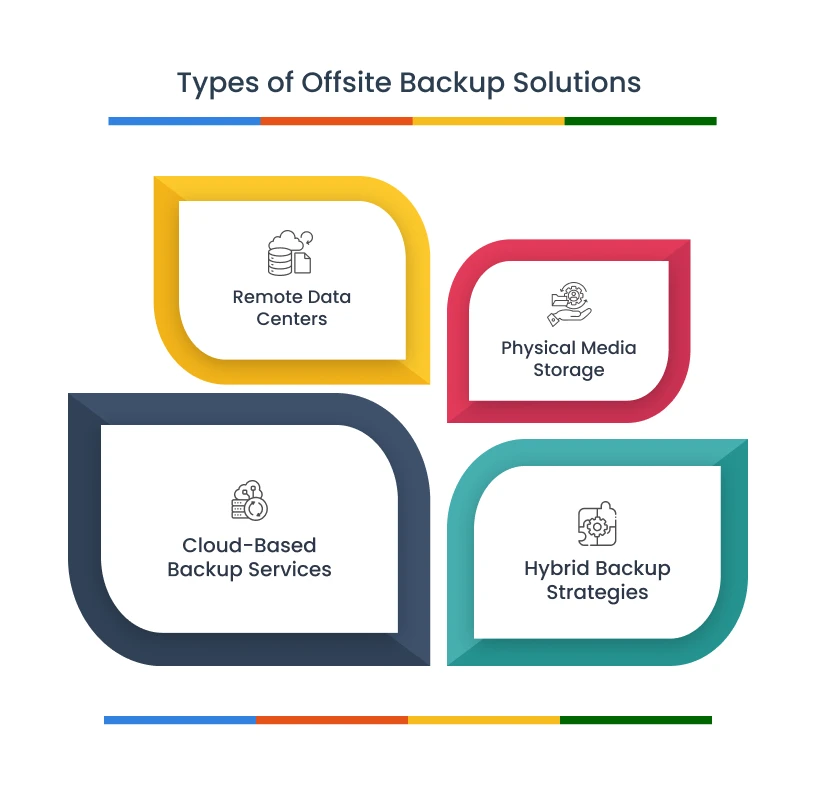
Choosing the right offsite backup solution depends on your business needs, budget, and technical requirements. Here are the four main types of offsite backup solutions available today:
1. Cloud-Based Backup Services
Cloud backup represents the most popular and accessible offsite storage option. Services like Amazon S3, Microsoft Azure, and Google Cloud provide scalable, automated backup solutions with global redundancy.
Key Benefits:
- Automatic scaling without hardware investments
- Pay-as-you-use pricing models
- Built-in redundancy across multiple data centers
- Professional management and maintenance
- Quick implementation and deployment
Best For: Small to medium businesses seeking cost-effective, hands-off backup solutions with minimal IT overhead.
2. Physical Media Storage (Tape and External Drives)
Traditional tape backups and external hard drives stored at offsite facilities provide air-gapped protection against cyber threats. Tapes offer exceptional capacity and long-term durability, with modern LTO-9 tapes storing up to 18TB of data.
Key Benefits:
- Complete air-gap security from cyberattacks
- Cost-effective for large data volumes
- Long-term data retention (up to 30 years)
- Immutable storage with WORM (Write-Once-Read-Many) capability
- Lower ongoing costs for archival storage
Best For: Enterprises with massive data volumes, strict compliance requirements, or industries requiring long-term data archival.
3. Remote Data Centers
Dedicated offsite servers housed in professional data centers provide maximum control and customization. Organizations can replicate their entire infrastructure at remote facilities for comprehensive disaster recovery.
Key Benefits:
- Complete control over hardware and software
- Customizable security and access controls
- High-performance connectivity options
- Dedicated resources without sharing
- Advanced disaster recovery capabilities
Best For: Large enterprises with complex IT environments, specific compliance needs, or organizations requiring guaranteed performance levels.
4. Hybrid Backup Strategies
Hybrid solutions combine multiple offsite backup methods to optimize cost, performance, and protection levels. Common approaches include local-to-cloud replication or combining tape archives with cloud storage for different data tiers.
Key Benefits:
- Balanced approach to cost and performance
- Multiple recovery options for different scenarios
- Automated data tiering based on age and importance
- Reduced single-point-of-failure risks
- Optimized storage costs through intelligent placement
Best For: Organizations wanting to balance quick local recovery with comprehensive offsite protection, or businesses with diverse data types requiring different storage strategies.
Best Practices to Implement Offsite Data Backup
Successful offsite backup implementation requires following proven methodologies that ensure data integrity, security, and recoverability. These best practices provide a framework for building robust backup systems that can withstand various threats.
The 3-2-1 Backup Rule Implementation
The 3-2-1 backup rule remains the gold standard for data protection, providing a simple framework for ensuring data availability through redundancy and geographic distribution.

- Three copies of data include your primary working copy plus two additional backups. This redundancy protects against single points of failure that could result in complete data loss.
- Two different media types ensure backup copies aren’t vulnerable to the same failure mechanisms. For example, combine hard drives with cloud storage and tape media to protect against media-specific failures or ransomware targeting network-accessible drives.
- One offsite location provides geographic redundancy that protects against location-specific disasters including natural disasters, fires, theft, or local infrastructure failures.
- Modern variations like the 3-2-1-1-0 rule address contemporary threats by adding an additional offsite copy and emphasizing zero unverified backups. The extra offsite copy protects against cloud provider failures, while zero unverified backups ensures all copies are regularly tested and recoverable.
Security and Encryption
Data security becomes critical when storing sensitive information at offsite locations. Comprehensive encryption strategies protect data throughout its entire lifecycle.
- End-to-end encryption requirements ensure data remains protected during transmission and storage. Implement AES-256 encryption as minimum standard, with encryption occurring at the source before data leaves your premises.
- Key management best practices include storing keys separately from backup data, using hardware security modules (HSMs) when possible, establishing clear key rotation schedules, and maintaining secure key escrow procedures to prevent permanent data loss.
- Data transmission security requires TLS 1.3 or higher protocols, certificate pinning to prevent attacks, and VPN tunnels for additional protection when transmitting to private offsite locations.
- Access control implementation should follow least privilege principles, implement multi-factor authentication for all system access, maintain detailed audit logs, and regularly review access permissions as roles change.
Backup solutions like Zmanda Pro implement comprehensive security measures, including end-to-end AES-256 encryption, immutable WORM (Write-Once-Read-Many) backups that prevent tampering or deletion, and air-gapping capabilities that isolate backup data from network-based threats like ransomware. These features ensure offsite backups remain secure and recoverable even during sophisticated cyberattacks.
Testing and Validation
Regular testing ensures backup systems function correctly when needed most. Comprehensive testing validates both backup creation and data recovery processes.
- Regular backup testing procedures should verify data integrity daily through automated verification systems, perform hash verification to detect corruption, and maintain logs of all verification activities.
- Recovery testing schedules include quarterly full system recovery tests focusing on different failure scenarios and monthly partial recovery tests for individual files and databases. Document recovery times to identify potential bottlenecks.
- Monitoring and alerting systems should track backup completion status, storage capacity utilization, and data transfer speeds. Configure alerts for failed backups, unusual patterns, or performance issues with clear escalation procedures.
- Documentation and procedures must include current backup configurations, step-by-step recovery guides, emergency contact information, and regular updates as systems evolve.
Retention Policies and Compliance
Effective retention policies balance storage costs with business requirements while ensuring legal and regulatory compliance. Well-designed policies automate data lifecycle management.
- Data retention requirements vary by industry and data type. Develop retention schedules considering legal requirements, business needs, and storage costs. Implement tiered strategies that move older data to cost-effective storage while maintaining accessibility.
- Legal and regulatory compliance requires understanding industry-specific requirements. GDPR mandates specific data handling for European subjects, HIPAA requires healthcare record retention, and financial services must comply with SOX and SEC requirements.
- Storage optimization strategies include data deduplication to reduce requirements, compression algorithms for efficiency, and automated policies moving older data to lower-cost tiers. Regular analysis identifies further optimization opportunities.
- Automated policy enforcement ensures consistent retention rule application through automated deletion of expired data, automatic data movement between storage tiers, and audit trails of all policy actions for compliance reporting.
How to Choose the Right Offsite Backup Solution?
Selecting an appropriate offsite backup solution requires careful evaluation of multiple factors that align with your organization’s specific needs, constraints, and growth objectives.
- Business Size Considerations: Small businesses typically benefit from cloud-based solutions like Microsoft 365 or Google Workspace backup that provide enterprise-grade capabilities without significant upfront investments or IT overhead. Medium-sized enterprises often require hybrid approaches combining local backup for quick recovery with cloud storage for disaster protection, having enough data volume to justify dedicated infrastructure but lacking resources for complex implementations. Large enterprises may need custom solutions with dedicated infrastructure, specific compliance requirements, and complex multi-site implementations, justifying higher costs for maximum control and customization options.
- Industry-Specific Requirements: Healthcare organizations need HIPAA-compliant solutions with encrypted storage, detailed audit trails, specific retention periods, and mandatory business associate agreements with backup providers. Financial services require solutions meeting SOX, SEC, and banking regulations with immutable storage, specific retention periods, and detailed compliance reporting capabilities. Manufacturing and retail organizations typically focus on business continuity with rapid recovery capabilities, often prioritizing speed over long-term archival features to minimize operational disruption.
- Budget Constraints and ROI: Total cost of ownership evaluation should include initial setup, ongoing storage, bandwidth, support, and recovery costs, with backup typically representing 2-5% of IT budget while preventing losses that could exceed 100% of annual revenue. ROI calculations compare backup costs against potential downtime expenses, with most organizations finding significant positive returns. Cloud solutions typically scale more cost-effectively than on-premises infrastructure for growing organizations, and planning for 3-5 year growth projections helps avoid costly migrations or capacity limitations.
- Scalability and Growth Planning: Planning for future growth requires evaluating solutions that can accommodate 3-5 year data volume projections and geographic expansion requirements. Cloud providers offer virtually unlimited scalability with pay-as-you-grow models, while physical solutions require capacity planning and hardware refresh cycles that can become costly. Multi-region cloud providers support expansion into new markets more easily than solutions requiring physical infrastructure deployment, making them ideal for organizations with growth ambitions.
- Vendor Evaluation Criteria: Security certifications should match industry requirements including SOC 2 Type II, ISO 27001, and industry-specific certifications like FedRAMP or HIPAA compliance. Service level agreements must guarantee uptime, recovery times, and support response times meeting business requirements, with clear penalties for violations and escalation procedures. Financial stability evaluation includes vendor financial health, customer references, and market position to ensure service continuity, while support quality assessment through trial periods or reference calls validates availability, response times, and technical expertise critical during disaster recovery situations.
How Zmanda Addresses Offsite Backup Needs
Zmanda Pro represents a comprehensive answer to the question “why should you store backup media offsite” by providing an enterprise-grade platform that automates, secures, and manages offsite backup operations across hybrid environments. As organizations seek reliable offsite backup solutions, Zmanda delivers:
✓ Multi-Cloud Integration: Seamless connectivity with AWS, Azure, Google Cloud, Wasabi, and S3-compatible providers for automated offsite storage
✓ Advanced Security: End-to-end encryption, immutable WORM backups, and air-gapping techniques that protect against ransomware and tampering
✓ Automated Operations: Scheduled backups with granular recovery options, reducing human error and ensuring consistent offsite protection
✓ Compliance Support: Audit-ready reporting, retention policy automation, and data sovereignty controls for regulatory requirements
✓ Centralized Management: Single console for managing backup jobs across multiple locations and cloud providers, ideal for enterprise and MSP environments
✓ Hybrid Flexibility: Support for local backup, cloud replication, and tape integration in unified backup strategies
For organizations implementing the recommendations in this guide, Zmanda Pro offers a proven platform that addresses the critical need for reliable, secure, and automated offsite backup storage, supporting both business continuity and compliance objectives.
Frequently Asked Questions (FAQ)
- How often should you back up offsite?
-Back up offsite at least once daily for most businesses. Increase backup frequency for critical data or high-change environments and automate processes whenever possible. - What are the safest offsite backup methods?
-Cloud backups with end-to-end encryption and multi-factor authentication are the most widely used and secure.
-Air-gapped physical media (like tape storage stored in secure facilities)
-Hybrid approaches (combining onsite and offsite) provide added resilience against cyber threats and disasters. - How do you ensure compliance?
-Store backups in regions that meet your industry’s regulatory standards (e.g., GDPR, HIPAA).
-Implement encryption, access controls, audit logging, and adhere to required retention policies.
-Regularly test restore procedures and maintain up-to-date documentation for audits. - Is cloud backup safe enough?
Yes, if you use reputable providers with strong encryption, redundancy, and compliance certifications (such as ISO 27001 or SOC 2). Always enable security best practices: encryption, access controls, and regular security updates.