Why backup a server? Server form the core of any technology infrastructure. So, it’s important to have a backup of your server data and point-in-time recovery.
Protecting data against loss, disasters (human-caused or natural), and corruption is one of the top priorities for IT organizations. Ideas are, but implementing an efficient and effective set of backup operations can be difficult. Enterprise backup software lessens the complexity of performing backup and recovery operations. Data backup is only one part of a disaster recovery plan. It may not deliver the level of data and disaster recovery capabilities desired without careful design and testing.
Best Methods to Backup Server Data
Now that we understand why server backups are critical, let’s explore the four primary backup methods that organizations can implement. These various types of server backups offer distinct advantages and potential drawbacks, making them suitable for different environments and requirements. By understanding these methods, you can select the backup strategy that best aligns with your organization’s specific needs.
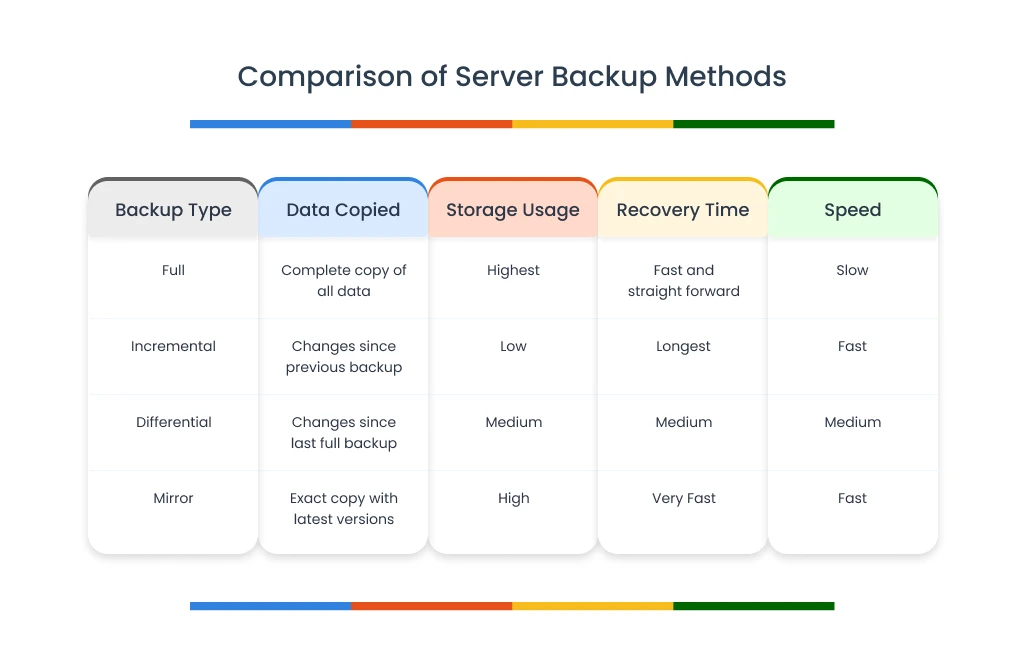
Figure: Comparison of server backup methods
1. Full Server Backups
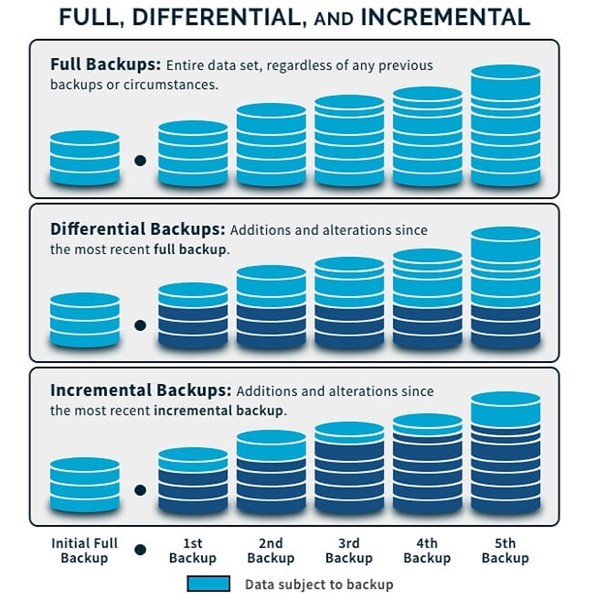
A full server backup creates a comprehensive copy of all data to another storage medium, such as disk or tape. This backup method ensures a complete copy of all data is available with a single set of media, minimizing recovery time objective (RTO). During this process, every selected file, folder, database, application, and system state component is copied in its entirety, regardless of whether it has changed since the previous backup. The result is a complete point-in-time snapshot of your server environment that stands alone as a self-contained recovery source without dependencies on other backup sets.
Most organizations implement full server backups on a regular schedule, often weekly, to establish reliable recovery points. While storage requirements can be substantial due to the comprehensive nature of full backups, they provide the fastest recovery speeds because restoration requires accessing only a single backup set. This becomes particularly valuable during disaster recovery scenarios when minimizing downtime is critical. Modern enterprise backup solutions address the storage challenge through compression and deduplication technologies, which can significantly reduce the actual storage footprint while maintaining complete data protection. Configuring your backup server with sufficient storage capacity is essential for this type of backup.
Full Server Backups Advantages
- Complete copy of all data in a single backup set
- Simplifies restoration process (only one backup set needed)
- Offers fastest recovery time among all backup methods
- Reduces dependency risks with self-contained backups
Full Server Backups Disadvantages
- Takes longer to perform than other backup methods
- Requires significantly more storage space
- May impact server performance during backup windows
- Higher storage costs for frequent backups
Most organizations run full server backups periodically rather than daily. Data centers with minimal data may perform daily full backups, but most operations combine full backups with either incremental or differential backups for an efficient backup configuration.
2. Incremental Server Backups
An incremental server backup copies only the data that has changed since the last backup operation of any type. Backup applications track file modification timestamps to identify changes since previous operations, creating a highly efficient backup process that minimizes both backup windows and storage consumption. This efficiency makes incremental backups particularly valuable for organizations with large data volumes, limited backup windows, or restricted storage capacity. By capturing only the delta changes, incremental backups can typically complete in minutes rather than the hours often required for full backups, allowing for more frequent protection points throughout the business day. This is one of the most storage-efficient types of backups available for servers.
The primary consideration with incremental server backups is their dependency chain during restoration. To recover data to a specific point in time, the backup software must apply the initial full backup and then each subsequent incremental backup in chronological sequence. This process can extend recovery times compared to full backups, especially when restoring from numerous incremental sets.
Incremental Server Backups Advantages
- Fastest backup method (only copies changed data)
- Minimal storage requirements compared to other methods
- Reduces network bandwidth for cloud backup implementations
- Can run frequently with minimal performance impact
- Ideal for limited backup windows
Incremental Server Backups Disadvantages
- Requires all previous backup sets (full + all incremental) for restoration
- Longer restore time than full or differential backups
- Higher risk if any backup set becomes corrupted
- More complex restoration process requiring multiple media sets
Incremental backups can run as frequently as needed, making them ideal for organizations with limited server backup resources. They complete faster and require less storage space than full backups.
3. Differential Server Backups
A differential server backup initially resembles an incremental backup by copying changed data since the previous backup. However, each subsequent operation continues to copy all data that has changed since the previous full backup, storing more data than incremental but less than full server backups. This approach creates a middle ground in the backup spectrum, where each differential backup grows progressively larger throughout the backup cycle until the next full backup resets the reference point. Organizations typically implement differential backups in weekly cycles – starting with a full backup on weekends, followed by differential backups on weekdays that capture all changes since that weekend’s full backup. Many server backup software solutions provide built-in support for these types of backup strategies.
The key advantage of differential backups lies in their streamlined recovery process compared to incremental backups. Restoration requires only two backup sets: the most recent full backup plus the latest differential backup. This simplified recovery chain significantly reduces restoration time and complexity while eliminating the cascading dependency risks inherent to incremental backups.
Differential Server Backups Advantages
- Faster than full server backups
- Requires only two backup sets for restoration (full + latest differential)
- More reliable restoration than incremental backups
- Balances backup speed and restoration simplicity
- Less complex recovery process than incremental
Differential Server Backups Disadvantages
- Requires more space and time than incremental backups
- Backup size grows until the next full backup
- May become resource-intensive by the end of the backup cycle
- Higher storage requirements than incremental backup methods
A typical server backup strategy might include weekly full backups with daily differential backups, providing an optimal balance between storage efficiency and recovery reliability. This approach requires at most two media sets to restore data from any particular day, resulting in faster recovery times and reduced risk compared to incremental strategies.
4. Mirror Server Backups
A mirror backup creates an exact replica of the source data set, storing the latest version in the backup server repository without version tracking. This method essentially mirrors your source data, with each backed-up file stored separately. Unlike other backup methods that typically compress and package data into proprietary formats, mirror backups maintain files in their native format and directory structure, making them immediately accessible without formal restoration processes. This approach is particularly valuable for mission-critical systems where minimizing downtime is paramount, as it enables near-instantaneous failover capabilities when implemented with the right infrastructure.
The distinguishing characteristic of mirror backups is their focus on current data states rather than historical versions. When a mirror backup runs, it synchronizes the backup repository with the source, adding new files, updating changed files, and potentially removing files that no longer exist in the source. This synchronization approach makes mirror backups ideal for disaster recovery scenarios requiring rapid system restoration but creates vulnerability to certain data loss situations.
Mirror Server Backups Advantages
- Fastest recovery time of all server backup methods
- Easy access to individual files without complex restoration
- Provides immediate data availability
- Excellent for critical systems requiring minimal downtime
- Simple to implement and manage
Mirror Server Backups Disadvantages
- Extensive storage requirements (essentially doubles storage needs)
- Higher implementation and maintenance costs
- Mirrors source data problems (corruption or deletion)
- No versioning or point-in-time recovery capabilities
- Limited protection against logical errors or malicious actions
One specific implementation, disk mirroring (RAID 1), replicates data across multiple disks for high availability and immediate failover capability. While mirror server backups offer comprehensive protection, they should be combined with other backup types to follow the 3-2-1-1-0 rule: The 3-2-1-1-0 backup rule means maintain three total copies of data on two different media types with one copy stored offsite, one copy kept offline (air-gapped), and zero errors in recovery testing.
Explore Zmanda’s Full and Incremental Backup Solutions

Choosing the Right Server Backup Approach
Selecting the optimal server backup method requires balancing several factors: your organization’s size, budget constraints, recovery time objectives (RTO), recovery point objectives (RPO) (RPO vs. RTO — what’s the difference?), and IT resource availability. Here’s a more detailed breakdown to help you make the right choice:
1. Small Business Solutions
Small businesses typically operate with limited IT resources and more modest data volumes. For these organizations, daily full server backups often provide the ideal approach. With data volumes under 1TB, the storage requirements remain manageable, while the simplified restoration process (requiring only the most recent backup) minimizes recovery complexity. This approach is particularly valuable when IT expertise is limited, as it removes the complexity of managing multiple backup sets during recovery operations.
2. Medium to Large Organization Strategies
For mid-sized to large organizations managing multiple servers and larger data volumes, a hybrid approach offers the best balance. Implementing weekly full backups combined with daily incremental or differential backups optimizes both storage efficiency and recovery capabilities. The choice between incremental and differential depends on your priorities:
- Choose incremental backups when storage space is at a premium and you can accept slightly longer recovery times
- Opt for differential backups when faster recovery is essential and you can accommodate the additional storage requirements
Many organizations in this category also implement different backup schedules for different systems based on data criticality, with mission-critical systems receiving more frequent backups than less essential servers.
Explore Our Small & Midsize Business Backup Solutions →
3. Enterprise-Grade Protection
Enterprises with strict uptime requirements and mission-critical systems need a multi-tiered approach. Combining mirror backups for immediate recovery capabilities with scheduled full and incremental/differential backups provides both instant failover options and point-in-time restoration abilities. This comprehensive strategy addresses both sudden system failures (through mirroring) and data corruption or accidental deletion scenarios (through traditional backups). While this approach requires the most resources, it delivers the resilience that enterprise environments demand.
When selecting your backup strategy, also consider your recovery objectives: how quickly you need systems restored (RTO) and how much data loss is acceptable (RPO). These metrics should guide your final decision, as even the most storage-efficient backup method is inadequate if it can’t meet your organization’s recovery requirements.
Essential Security for Your Backup Strategy
While implementing the right backup method is crucial, securing those backups is equally important. Here are key practical security measures for your backup strategy:
1. Encryption Protection
Implement strong encryption for your backups both in transit and at rest. Configure TLS 1.3 or SSH for data transfers and enable AES-256 encryption for stored backups. Store encryption keys separately from your backups, ideally in a hardware security module or secure password manager.
2. Access Control
Create dedicated backup administrator accounts with specific permissions and enable multi-factor authentication for all backup system access. Configure automatic logging of backup activities and review these logs weekly to detect unusual patterns before they become security incidents.
3. Ransomware Defense
Schedule regular offline backups to media that’s physically disconnected after completion. For critical data, maintain at least one backup copy in immutable storage that prevents any modification for a set period (typically 30+ days). This approach creates a true air-gap that ransomware cannot cross.
4. Regular Testing
Verify backup integrity by restoring random files monthly. Perform quarterly full restoration tests to a separate environment and conduct an annual disaster recovery simulation. Without testing, you can’t be certain your backups will work when needed most.
Final Thoughts
Implementing the right server backup strategy requires balancing protection, performance, and security. Small organizations may achieve adequate protection with daily full backups, while larger enterprises typically benefit from weekly full backups combined with daily differentials. For mission-critical systems, consider implementing mirror backups alongside your regular backup schedule to enable near-instant recovery when downtime isn’t an option.
Remember that even the most thorough server backup strategy requires robust security measures. Encryption, access controls, air-gapped backups, and regular testing are essential components of any comprehensive solution, particularly given the rising threat of ransomware. The investment in the right server backup safeguards your organization’s data, operational continuity, reputation, and future.

Server Backup FAQs
What different types of backup are available for servers?
The most common types of backup include full, incremental, differential, and mirror backups. Each offers different advantages in terms of storage efficiency, backup speed, and recovery time, allowing you to choose the right backup server configuration for your needs.
How often should I perform server backups?
Backup frequency depends on how much data you can afford to lose. Critical systems should be backed up daily or continuously, while less critical servers might use weekly backup schedules.
What’s the difference between on-site and off-site server backups?
On-site server backups provide faster recovery but are vulnerable to site-wide disasters. Off-site backup solutions protect against local disasters but may have slower recovery times. A complete strategy typically includes both.
How do I test my server backup solution?
Schedule quarterly recovery tests where you restore from your backups to a test environment. This verifies both the server backup data integrity and your recovery procedures.
Can I automate my server backup process?
Yes, most enterprise backup solutions offer scheduling, automation, and verification features that minimize manual intervention while ensuring consistent protection.