According to Stealth Agents’ 2026 remote work data, more than 35% of knowledge workers globally now work remotely at least part of the time remotely, and for small businesses, that means business data no longer lives in one place. It’s spread across laptops, cloud applications, home offices, and remote locations that a single on-site backup system cannot reliably cover.
Remote backup solutions for small business environments have evolved to match this reality. The current platforms offer automated protection, multi-cloud flexibility, and recovery capabilities that work regardless of where your team or data is located, without requiring a dedicated IT department to manage them.
This guide compares seven leading remote backup solutions for small businesses, covering the features that matter most, how each option compares across real-world criteria, and how to select the right fit for your specific requirements.
Why Small Businesses Need Remote Backup Solutions
Small businesses often operate with limited IT resources and budgets, making them particularly vulnerable to data loss from cyber threats like ransomware attacks. Unlike large enterprises with dedicated IT departments, small businesses need remote backup solutions that are both effective and manageable. Furthermore, safely configuring and monitoring these dispersed backup systems requires a reliable framework for secure remote access to prevent unauthorized network entry.
The right remote backup solution offers several critical benefits:
- Automated Protection: Set-it-and-forget-it functionality ensures consistent backups without manual intervention
- Cost-Effectiveness: Pay only for the storage you need with scalable pricing models
- Quick Recovery: Minimize downtime with rapid data restoration capabilities
- Security: Enterprise-grade encryption protects sensitive business information
- Compliance: Meet industry regulations for data retention and protection
Now that we understand the critical importance of remote backup, let’s explore the must-have features that separate effective solutions from inadequate ones.
Essential Features for Effective Remote Backup Solutions
When evaluating remote backup solutions for small business needs, consider these essential features:

1. Remote Access and Management
The solution should allow you to manage backups and initiate restores from anywhere with an internet connection, crucial for remote work scenarios.
2. Bandwidth Optimization
Look for features like deduplication and compression that reduce the amount of data transferred, saving bandwidth and speeding up remote backups.
3. Multi-Site Replication
Your remote backup solution should store data in multiple geographic locations to ensure availability even if one data center experiences issues.
4. Granular Recovery Options
The ability to restore individual files, folders, or entire systems remotely without downloading complete backup sets.
5. WAN Acceleration
Technologies that optimize data transfer over wide area networks, essential for efficient remote backup operations.
With these essential features in mind, let’s see how today’s leading solutions stack up against these criteria.
Quick Comparison: Top Remote Backup Solutions for Small Businesses
Before diving into individual reviews, here’s how all seven solutions compare across the criteria that matter most for small business environments:
| Solution | Best For | Storage Model | Server Support | Starting Price |
|---|---|---|---|---|
| Zmanda Pro | Mixed workloads, compliance | Hybrid (local + multi-cloud) | Yes | $5.99/workload/month |
| Acronis Cyber Backup | Technical teams, security-focused | Acronis Cloud (14 data centers) | Yes | Varies by plan |
| Veeam for Microsoft 365 | Microsoft 365 environments | Your choice of storage | Microsoft 365 only | Per user/month |
| Carbonite Safe | Basic needs, limited IT expertise | Carbonite Cloud | Limited | Per computer/month |
| Backblaze Business Backup | Desktop/laptop environments | Backblaze Cloud | No | $99/computer/year |
| MSP360 | Flexibility in storage choice | 20+ cloud providers | Yes | Varies by storage |
| IDrive Business | Multi-device, budget-conscious | IDrive Cloud | Yes | Per storage tier/year |

Top Remote Backup Solutions for Small Business: Detailed Comparison
Let’s examine the leading remote backup solutions for small business operations, comparing their features, pricing, and suitability for different business needs.
1. Zmanda Pro
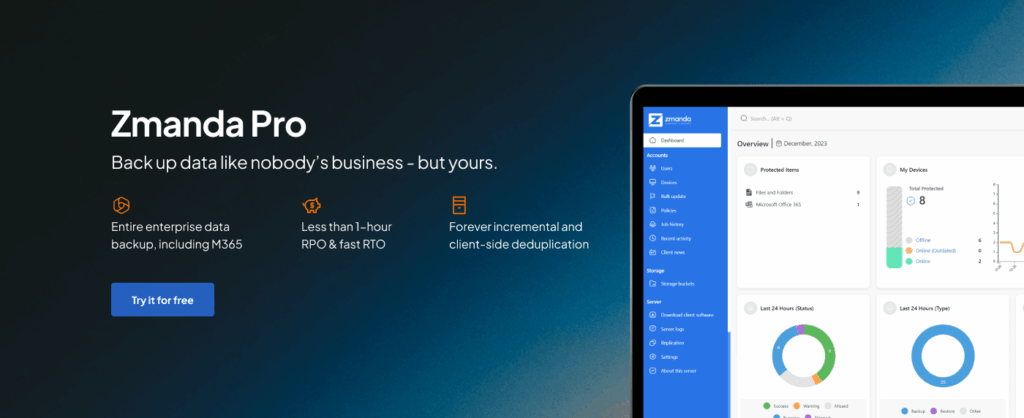
Zmanda Pro delivers enterprise-grade remote backup capabilities specifically designed for small businesses through its sophisticated hybrid architecture. The platform combines local backup storage for rapid recovery with automatic replication to remote cloud locations, ensuring data protection against both local incidents and site-wide disasters.
The solution supports multiple cloud destinations including AWS, Azure, Google Cloud, and Zmanda’s own secure data centers, providing flexibility in storage choices while maintaining centralized management through an intuitive web console accessible from anywhere.
Key Remote Backup Features:
- Advanced WAN Optimization: Intelligent bandwidth throttling and scheduling ensures remote backups don’t interfere with business operations
- Global Deduplication: Reduces remote backup data by up to 80%, significantly decreasing storage costs and transfer times
- Multi-Cloud Support: Seamlessly backs up to AWS, Azure, Google Cloud, and Zmanda’s own cloud infrastructure
- End-to-End Encryption: Military-grade AES-256 encryption during transit and at rest, with customer-controlled encryption keys
- Centralized Management: Web console accessible from anywhere with mobile app support
- Real-time Monitoring: Instant backup status notifications and remote restore capabilities
Limitations:
- Limited brand recognition compared to established vendors
- Some advanced features may be unnecessary for very small deployments
- Subscription-based model (though cost-effective in the long run)
Best for: Small businesses seeking a comprehensive, user-friendly remote backup solution with excellent support and competitive pricing
2. Acronis Cyber Backup
Acronis provides remote backup through its global network of 14 data centers with geo-redundant storage. The platform uses incremental backup technology to minimize bandwidth consumption during remote transfers, while blockchain-based authentication ensures backup integrity. It supports universal restore to dissimilar hardware directly from remote storage and offers bandwidth throttling for controlled data transfers. However, the complex pricing structure and technical interface can be challenging for smaller businesses.
Key Remote Backup Features:
- Remote backup to Acronis Cloud with 14 global data centers
- Blockchain-based authentication for backup verification
- Universal restore capability to dissimilar hardware
- Bandwidth throttling controls for remote transfers
Limitations:
- Complex pricing structure with multiple add-ons required for full functionality
- Remote management interface can be overwhelming for non-technical users
- Limited cloud storage options compared to competitors
Best for: Businesses with technical expertise seeking integrated security features
3. Veeam Backup for Microsoft 365
Veeam specializes in remote backup for Microsoft 365 environments, creating independent copies of Exchange, SharePoint, OneDrive, and Teams data. The solution allows automated daily backups to any remote storage location of your choice, whether on-premises, public cloud, or service provider infrastructure. It maintains unlimited retention periods and offers a self-service portal for end-user restores. While excellent for Office 365 protection, it requires separate storage subscriptions and doesn’t cover non-Microsoft systems.
Key Remote Backup Features:
- Remote backup of Exchange, SharePoint, OneDrive, and Teams data
- Self-service restore portal for end users
- RESTful API for automation and integration
- Backup to any location: on-premises, cloud, or service provider
Limitations:
- Only covers Microsoft 365 data, requiring separate solutions for other systems
- No built-in cloud storage – must provide your own remote storage
- Limited retention policy flexibility for remote backups
Best for: Organizations heavily invested in Microsoft 365 ecosystem
4. Carbonite Safe
Carbonite delivers remote backup through continuous data protection that automatically transmits file changes to secure cloud servers in real-time. The system maintains synchronized copies across multiple data centers with automatic failover capabilities. It offers both local and cloud backup options with WAN acceleration for optimized transfers, plus a courier recovery service for large data sets. The platform is HIPAA and GLBA compliant but lacks advanced features like image-based backups and comprehensive server support.
Key Remote Backup Features:
- Continuous data protection with automatic remote backup
- Local backup option with automatic cloud replication
- Courier recovery service for large data sets
- HIPAA and GLBA compliant remote storage
Limitations:
- Limited server backup capabilities
- No image-based backups for bare metal recovery
- Slower restore speeds compared to enterprise solutions
- Mac support lacks some features available on Windows
Best for: Small businesses with basic remote backup needs and limited IT expertise. When evaluating such trade-offs, many businesses also consult SaaS software developers to build scalable, cloud-ready solutions that complement backup needs.
5. Backblaze Business Backup
Backblaze offers unlimited remote backup storage through its distributed data center architecture, automatically discovering and backing up all connected drives without restrictions. The service uses continuous backup technology to detect and upload file changes within minutes, employing proprietary Reed-Solomon erasure coding for redundancy. Remote access is available through web and mobile interfaces, and the platform includes unique features like hard drive shipping for large restores. However, it only supports desktop operating systems and provides limited version history without upgrades.
Key Remote Backup Features:
- Unlimited data backup per computer
- Continuous and scheduled remote backup options
- Web-based restore and mobile app access
- Locate computer feature for theft recovery
Limitations:
- No server OS support (Windows Server, Linux)
- 30-day version history only (extended versions cost extra)
- No network drive or NAS backup support
- Limited business-specific features
Best for: Small businesses with primarily desktop/laptop environments
6. MSP360 (CloudBerry) Managed Backup
MSP360 provides flexible remote backup by integrating with over 20 cloud storage providers, allowing businesses to choose their preferred destination. The platform performs synthetic full backups on the storage side to minimize data transfers and supports hybrid configurations with both local and remote copies. It offers cross-platform support for Windows, Mac, and Linux systems with customizable retention policies and lifecycle management. The solution requires separate cloud storage subscriptions and has a steeper learning curve for initial configuration.
Key Remote Backup Features:
- Support for 20+ cloud storage providers
- Hybrid backup with local and remote copies
- Synthetic full backups reduce remote transfer requirements
- Cross-platform support (Windows, Mac, Linux)
Limitations:
- Requires separate cloud storage subscription
- Steeper learning curve for configuration
- Limited phone support on lower tiers
- No built-in disaster recovery options
Best for: Businesses wanting flexibility in choosing remote storage providers
7. IDrive Business

IDrive enables remote backup through continuous data protection and scheduled backup options to its own cloud infrastructure. The platform supports unlimited computers and servers under a single account with true archiving capabilities where deleted files remain in storage indefinitely. It offers an Express Backup service that ships physical drives for initial data seeding, reducing upload times for large datasets. The solution includes snapshot-based versioning for point-in-time recovery but suffers from a dated interface and limited automation capabilities.
Key Remote Backup Features:
- Backup unlimited computers and servers
- Snapshots and versioning for point-in-time recovery
- Express backup service for initial large data transfers
- True archiving for compliance requirements
Limitations:
- Interface feels dated compared to modern alternatives
- Limited automation options for complex backup scenarios
- Slower backup speeds during peak hours
- Basic reporting capabilities
Best for: Budget-conscious businesses needing to backup multiple devices
Having reviewed the strengths and limitations of each solution, here’s how to determine which one aligns best with your specific business needs.
Choosing the Right Remote Backup Solution for Small Business
Selecting the right data backup for small business operations depends on several factors specific to your environment:
Business Size and Data Volume: Consider how much data you need to protect and how quickly it grows. Some solutions offer scalable options that grow with your business, while others may require costly plan upgrades as data increases.
Technical Expertise: Evaluate your team’s technical capabilities. Some platforms provide intuitive interfaces suitable for non-technical users, while solutions like MSP360 require more configuration expertise.
Recovery Time Objectives (RTO): RTO defines the maximum acceptable time between a system failure and restoration of normal operations. For businesses requiring minimal downtime, features like instant VM recovery or universal restore capabilities become crucial.
Budget Considerations: Factor in both initial costs and long-term expenses. Some solutions appear affordable initially but become expensive as storage needs grow. Look for transparent pricing models that help avoid unexpected costs.
Compliance Requirements: If your business operates in regulated industries, ensure your remote backup solution meets specific compliance standards. Many solutions offer HIPAA, GDPR, or SOC 2 compliance, but verify these meet your exact requirements.
Once you’ve selected your remote backup solution, following these implementation best practices will ensure you maximize its effectiveness from day one.
Best Practices for Implementing Remote Backup Solutions
To maximize the effectiveness of your chosen remote backup solution for small business operations:
- Test Restores Regularly: Don’t wait for a disaster to discover backup issues. Schedule monthly restore tests to verify your remote backups work correctly.
- Implement the 3-2-1 Rule: The 3-2-1 rule defines keeping 3 copies of important data, on 2 different media types, with 1 copy stored remotely.
- Monitor Backup Reports: Review backup logs and reports regularly to catch failures before they become critical.
- Document Your Backup Strategy: Create clear documentation outlining what’s backed up, when, and how to perform restores.
- Train Your Team: Ensure multiple team members understand how to manage and restore from your remote backup solution.
With the right solution and proper implementation, you’re ready to protect your business data effectively.
Final Thoughts on Remote Backup Strategy
Choosing the best remote backup solution for small business is more than just a technical decision. Whether you’re protecting customer data, financial records, or critical systems, the right solution should provide automated protection, enterprise-grade security, and rapid recovery when disaster strikes.
Your remote backup solution must align with your business operations, compliance requirements, and growth plans. Modern solutions do more than store offsite copies, they ensure business continuity through intelligent WAN optimization, multi-cloud flexibility, and instant recovery capabilities.
While Zmanda Pro offers an exceptional balance of features and simplicity, the best choice depends on your specific needs. Test the solutions that match your requirements and choose one that delivers the reliability and peace of mind your business deserves.
FAQs