The main NAKIVO alternatives are Veeam Data Platform, Acronis Cyber Protect, MSP360 Backup, Zmanda Pro and N-able Cove. NAKIVO Backup & Replication is well rated and inexpensive, so for many teams the real question isn’t whether NAKIVO is good. It’s whether it will still fit as your storage, recovery and growth needs change.
A few practitioners on Reddit describe specific places where this solution needs care, such as backups to some cloud storage targets and bare-metal recovery of physical servers, and NAKIVO’s own pricing page shows that some features only arrive in higher editions.
This guide helps you check those points before you look for an alternative or renew. It shows where teams report limits, which alternative addresses each one, how each option is licensed, and what a typical environment would cost.
NAKIVO alternatives at a glance
If you want the answer before the detail, start here. NAKIVO is in the last row as the baseline.
| Option | Best fit for | Pricing model | Starting price (USD) | Watch out for |
|---|---|---|---|---|
| Veeam Data Platform | Virtualized estates with in-house skills that want the broadest feature set | Per workload | Essentials about $475 a year per 5 workloads (reseller); free edition for 10 workloads | Complexity and cost for small teams; Microsoft 365 is a separate product |
| Acronis Cyber Protect | Teams that want backup and endpoint security in one agent | Per device, by edition | $85 per workstation, $595 per server a year (Standard) | Highest cost per server and host in this list |
| MSP360 Backup | Hands-on teams that want their own storage and dependable bare-metal recovery | Per machine or per host, plus storage | $109.99 per Windows Server, $379.99 per VM host a year | No central console in Backup Pro; storage billed separately |
| Zmanda Pro | Mixed estates that want one console for VMs, servers and Microsoft 365, and a choice of storage | Per workload, with add-ons | $5.99 per workload per month; 10-workload minimum | Some backup types and storage connectors are add-ons |
| N-able Cove | MSPs that want multi-tenant SaaS with storage included | Flat rate per server or workstation, storage included | Not published; MSPs on Reddit report about £17 to $71 per server or VM a month | Storage in N-able’s cloud only; Proxmox not stated |
Where do teams hit limits with NAKIVO?
The points below come from practitioner discussions on Reddit and from G2’s review summary. They’re individual experiences, and NAKIVO has responded to several of them, but each is worth testing before you commit.
1. Backups to some cloud storage targets
In a r/msp thread on NAKIVO for MSPs, an MSP who trialled it said “they could not get the Wasabi backup to work reliably.” A long-time NAKIVO user in the same thread said “Nakivo is by no means perfect,” but found their Wasabi problems disappeared after moving to Synology C2 storage, and saw the same speed gap with Veeam customers. Storage limitations also come up 13 times in G2’s review summary.
Options that address this: Test your exact storage target during any trial, whichever tool you choose. MSP360 and Zmanda Pro both let you choose your own storage, including Wasabi, S3 and Backblaze B2. Acronis and Cove include their own cloud storage if you’d rather not manage a provider.
2. Bare-metal recovery and application restores
Another MSP concern was “unable to do BMR and gave up on it. MSP360 worked fine for this.” On G2, 11 review mentions point to a missing integrated option for SQL Server transaction-log backup.
Options that address this: Zmanda Pro’s bare-metal recovery takes a full disk image of Windows or Linux servers, builds bootable USB or ISO recovery media with storage and network drivers you can add, and restores to any physical, virtual or cloud machine. MSP360 and Acronis also offer bare-metal recovery. For SQL Server, test point-in-time restores in any trial.
3. Features that arrive in higher editions
NAKIVO’s pricing page shows that backup to cloud, native backup to tape and multi-tenant mode start at Enterprise Essentials, while role-based access control, the HTTP API and the Federated Repository are in Enterprise Plus, which is quote-only. Perpetual and subscription licences can’t be combined in one deployment.
Options that address this: Zmanda Pro and Veeam license per workload, so check what each edition includes at the size you expect in two years, not just today.
4. Setup details and advanced features
G2’s summary lists “backup issues” with missing advanced features (19 mentions) and sensitivity in handling transporters, NAKIVO’s data-transfer components (13 mentions). Neither is a reason to rule NAKIVO out, but both suggest leaving time in a trial for configuration.
What should you look for in a NAKIVO alternative?
These six checks come straight from the points above. We use them for every option in this guide, including Zmanda Pro.
- Storage target reliability. Back up to the exact cloud or NAS target you’ll use, at full size, during the trial.
- Bare-metal recovery. Restore a physical server to different hardware before you buy.
- Application restores. Test SQL Server, Exchange or Active Directory restores to a point in time.
- Edition fit at twice your size. Check which features and caps apply when your workload count doubles.
- Multi-tenancy and permissions. For MSPs, confirm tenant separation and customer self-service restores.
- Total cost including storage. Add the storage bill, add-ons and renewal terms to the licence price.
The 5 best NAKIVO alternatives compared
Let’s take a look at how NAKVO compares to each of the alternatives that customers are usually discussing.
1. Veeam Data Platform vs NAKIVO
Backup software for virtual, physical and cloud workloads, licensed per workload. It’s the tool NAKIVO is compared with most.
How it differs from NAKIVO: Veeam is broader and deeper, with more repository and recovery options, but it asks more of the people running it.
Strongest signal: Breadth. Veeam supports VMware, Hyper-V, Nutanix AHV and Proxmox VE, agents for Windows, Linux and Mac, and tape from LTO3 to LTO10, with immutable hardened repositories and S3 Object Lock. Veeam Data Platform Essentials covers up to 50 workloads, and a free Community Edition covers 10.
Watch out for: Microsoft 365 backup is a separate product. Veeam doesn’t publish list prices; one reseller lists Essentials at $475 a year per five workloads .
When to pick it: Your estate is mostly virtualized, you have the skills in-house, and you want the deepest feature set.
2. Acronis Cyber Protect vs NAKIVO
Backup combined with anti-malware and patch management in one agent, licensed per device.
How it differs from NAKIVO: NAKIVO is a backup product. Acronis adds endpoint security, so it can replace two tools, at a higher price per server.
Strongest signal: One agent for backup and security. The Standard edition includes image and file backup to local and cloud storage, VMware and Hyper-V VM backup, bare-metal recovery, immutable storage, antivirus and patch management, with Acronis Cloud storage included (250 GB per server or host).
Watch out for: Cost rises quickly with servers and hosts: on the Advanced edition, recommended above five devices, a server is $925 a year and a virtual host $1,175. Microsoft 365 backup needs the Backup Advanced edition.
When to pick it: You want backup and endpoint security from one vendor and the per-device cost fits your budget.
3. MSP360 Backup vs NAKIVO
Backup software licensed per machine, sending data to the storage you choose. MSP360 Managed Backup adds a central console for MSPs.

How it differs from NAKIVO: Both are low-cost and flexible on storage. MSP360 licenses per machine, with VM backup per host, and is often chosen for physical servers.
Strongest signal: Bare-metal recovery and storage choice. In the r/msp NAKIVO thread, the MSP who gave up on NAKIVO’s bare-metal recovery said “MSP360 worked fine for this,” and another MSP wrote “Using MSP360 for software and Wasabi for storage – works well.” Backup Pro covers VMware, Hyper-V and Proxmox VE at $379.99 per host a year, and works with S3, Wasabi, Backblaze B2 and Azure.
Watch out for: Backup Pro has no centralized web console; that’s in Managed Backup. Storage is billed separately, and Proxmox support is listed for versions 7 and 8. One MSP who has used it with Backblaze B2 for six years said the “Interface feels dated and could use some love, but it works“.
When to pick it: You protect physical servers as well as VMs, want to choose your storage, and are comfortable managing per-machine setups.
4. Zmanda Pro vs NAKIVO
Zmanda Pro is backup and recovery software that runs as SaaS, self-hosted, or fully offline, sending encrypted backups to the storage you choose.
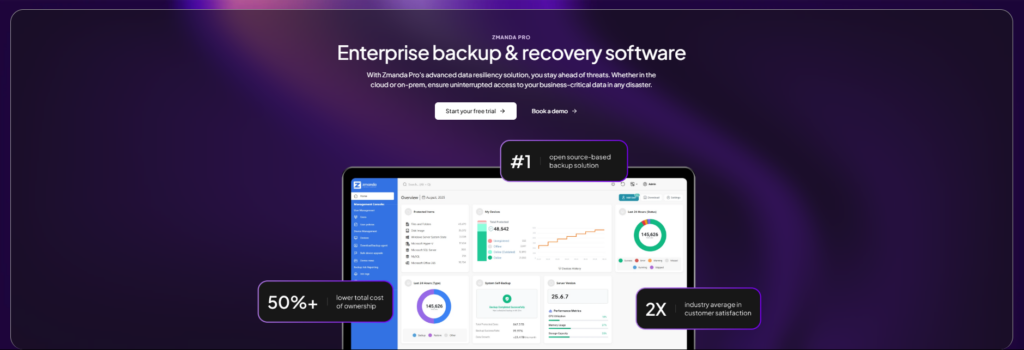
How it differs from NAKIVO: Both cover VMware, Hyper-V and Proxmox. Zmanda Pro puts VMs, physical servers, databases, NAS shares and Microsoft 365 in one console, with no edition tiers to step through as you grow.
Strongest signal: Recovery and storage choice in one place. Zmanda Pro backs up VMware, Hyper-V and agentless Proxmox VE, plus databases and Microsoft 365. Its bare-metal recovery restores full Windows or Linux server images to any physical, virtual or cloud machine. You can use Zmanda Cloud Storage or your own storage, including Wasabi and S3 with Object Lock, and Zmanda lists full tape library integration for air-gapped copies. Data is encrypted with AES-256 before it leaves the machine.
Watch out for: Zmanda Pro costs $5.99 per workload per month on Business, with a 10-workload minimum. Disk-image (bare-metal) and database backups are $2 per workload per month add-ons on Business, Zmanda Cloud Storage is $7.99 per TB per month, and connecting your own cloud storage is a $79 per month add-on on Business.
When to pick it: Your estate mixes VMs with physical servers and Microsoft 365, and you want one console, dependable bare-metal recovery and control over where backups are stored, at a higher price than NAKIVO.
5. N-able Cove vs NAKIVO
Cloud-first backup as a service for MSPs and IT teams, with storage included.
How it differs from NAKIVO: NAKIVO is software you run. Cove is a service with storage included and a multi-tenant dashboard from the start.
Strongest signal: MSP operations. “Cove is excellent at multi tenant,” one MSP wrote, and another with more than 400 clients said monitoring it “only takes about 30 minutes” a day. Pricing is a flat rate per server or workstation, with cloud storage included.
Watch out for: Storage is N-able’s cloud: one MSP noted Cove is “not supporting backing up M365 data to your own S3 bucket.” Cove’s pages name VMware and Hyper-V but not Proxmox, and spinning up servers in the cloud needs a separate Azure setup, according to another MSP. Prices aren’t published.
When to pick it: You’re an MSP that wants a multi-tenant service with storage included and no backup servers to run.
Technical comparison of NAKIVO alternatives
For IT teams who want the detail, we have made it easy for you to compare these alternatives side by side:
| Veeam Data Platform | Acronis Cyber Protect | MSP360 Backup Pro | Zmanda Pro | N-able Cove | NAKIVO | |
|---|---|---|---|---|---|---|
| Deployment | Software or hardened appliance | Agent, cloud or on-premises management | Software on each machine | SaaS, self-hosted or fully offline | SaaS | Software, including on a NAS |
| Hypervisors | VMware, Hyper-V, Nutanix AHV, Proxmox VE | VMware, Hyper-V, Virtuozzo; more in higher editions | VMware, Hyper-V, Proxmox VE 7 to 8 (per host) | VMware, Hyper-V, Proxmox VE (agentless) | VMware, Hyper-V | VMware, Hyper-V, Nutanix AHV, Proxmox VE |
| Bare-metal recovery | Through agents | Yes | Yes | Yes (disk-image add-on) | Not checked | Yes (vendor states) |
| Microsoft 365 | Separate product | Backup Advanced edition | Separate product | Yes, per user | Yes, per user | Yes |
| Tape | Yes, LTO3 to LTO10 | Not checked | Not checked | Tape library integration | Not stated | Enterprise Essentials and up |
| Storage | Your choice: disk, NAS, object storage, tape | Acronis Cloud (allowance included) or local | Your choice: S3, Wasabi, B2, Azure, local | Zmanda Cloud Storage or your own, including Wasabi and S3 | N-able cloud, with an optional local copy | Your choice: S3, Azure, B2, Wasabi, NAS, tape |
| Immutability | Hardened repository; S3 Object Lock | Immutable storage | Object Lock, including B2 | Object Lock on Amazon S3 and Wasabi | Immutable copies | Immutable storage |
| Licensing | Per workload | Per device, by edition | Per machine or host | Per workload | Flat per server or workstation | Per workload or per socket |
How much do NAKIVO alternatives cost?
NAKIVO is the lowest list priced and here is a quick pricing comparison.
| Option | Published starting price | Pricing unit | Storage | Source |
|---|---|---|---|---|
| NAKIVO | Subscription $2.35 (Pro Essentials) or $3.05 (Enterprise Essentials) per workload per month; perpetual $275 or $395 per socket; Enterprise Plus by quote | Per workload or per CPU socket | Your own | NAKIVO pricing |
| Veeam Data Platform Essentials | About $475 a year per 5 workloads (reseller-listed); Community Edition free for 10 workloads | Per workload | Your own | StoneFly |
| Acronis Cyber Protect | Standard: $85 per workstation, $595 per server a year. Advanced: $129, $925, and $1,175 per virtual host | Per device, by edition | Acronis Cloud allowance included | Acronis purchasing |
| MSP360 Backup Pro | $29.99 per Windows computer, $109.99 per Windows Server, $379.99 per VM host a year | Per machine or host | Your own | MSP360 Backup Pro |
| Zmanda Pro | $5.99 per workload per month (Business); 10-workload minimum; add-ons for disk-image and database backup | Per workload | Zmanda Cloud Storage $7.99 per TB per month, or your own | Zmanda pricing |
| N-able Cove | Not published | Flat rate per server or workstation | Included | Cove pricing |
How do you move off NAKIVO without losing your backup history?
Backups don’t transfer between vendors, so plan the move around your retention rules.
- Map your retention needs. List which NAKIVO backups you must keep, and for how long.
- Keep a way to restore old backups. Keep the NAKIVO repository and enough licence to restore from it until those retention periods end. Check with NAKIVO what restore access a lapsed subscription allows. [Verify]
- Run both in parallel. Protect the same workloads in the new tool and test VM, bare-metal and application restores.
- Cut over in waves. Start with less critical VMs, then move production once restores are proven.
The final decision matrix: Which NAKIVO alternative fits your business?
- Choose Veeam Data Platform if your estate is mostly virtualized and you have the skills for the deepest feature set.
- Choose Acronis Cyber Protect if you want backup and endpoint security from one vendor.
- Choose MSP360 Backup if you protect physical servers, want your own storage and are comfortable with per-machine setup.
- Choose Zmanda Pro if you want VMs, physical servers and Microsoft 365 in one console, with bare-metal recovery and control over where backups are stored.
- Choose N-able Cove if you’re an MSP that wants multi-tenant SaaS with storage included.
- Stay with NAKIVO if your VMs back up reliably to your storage target and your edition covers what you need. It’s the lowest-cost option here.
What to do next
Before you buy or renew, run the six checks above on your two strongest options, starting with a full backup to your real storage target and a bare-metal restore of one physical server. Those two tests tell you more than any feature list.
If you need assistance to finalize your options our team is here to help you.
Book a meeting
FAQs