The main Bacula alternatives for small and mid-sized teams are Veeam Data Platform, NAKIVO Backup & Replication, Acronis Cyber Protect, Zmanda Pro and Commvault Cloud.
If you’re an IT manager or sysadmin running Bacula Community, looking for Bacula alternatives, across a mix of Linux and Windows servers, VMs and databases, this guide will help you decide whether to switch or stay. It covers why teams look for Bacula alternatives, what each option does well, how each is licensed, and when staying is the better call.
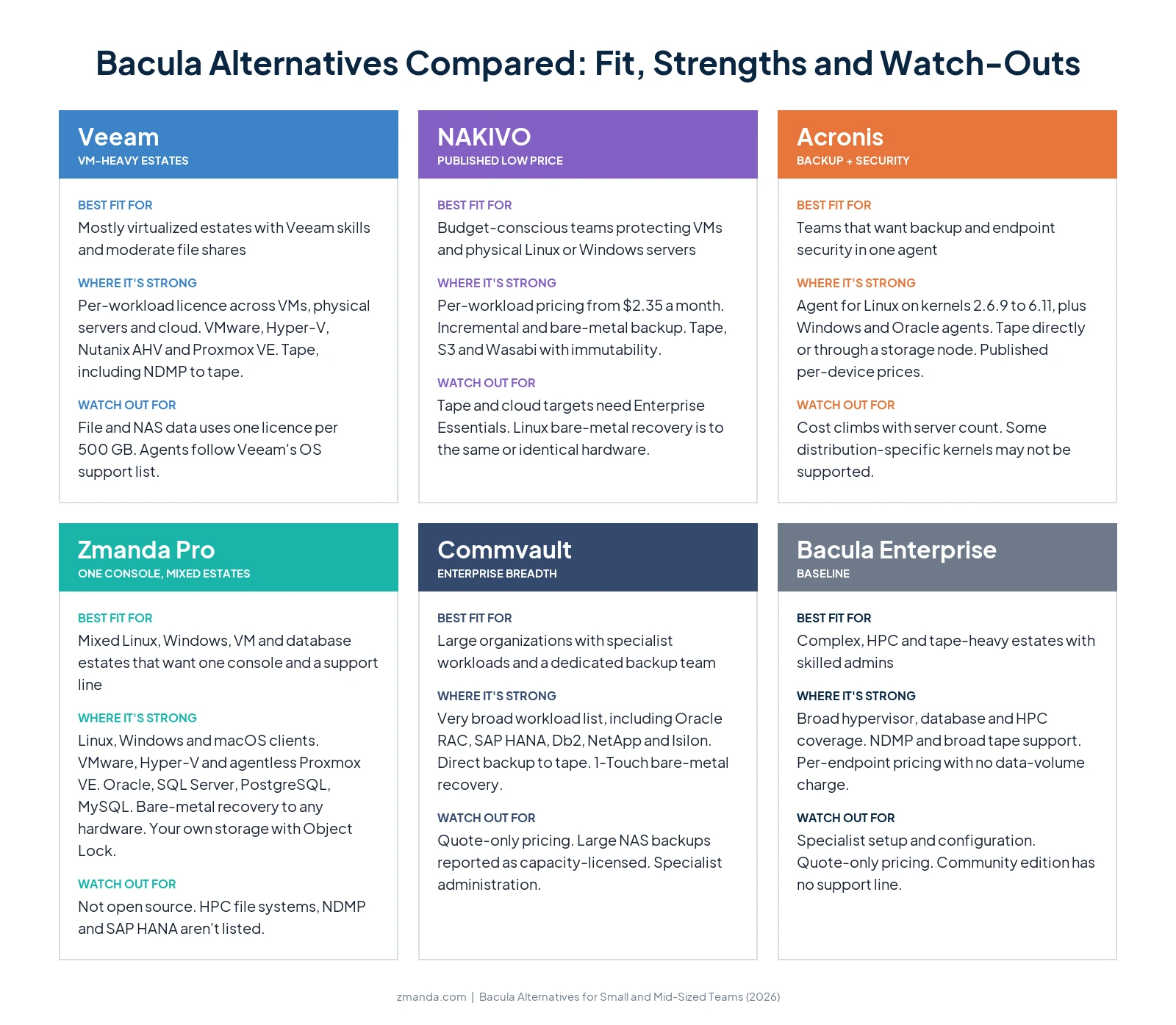
Bacula alternatives: A quick decision matrix
Why are teams considering Bacula alternatives?
Four reasons come up MSP discussions and one means Bacula doesn’t work; cost and fit for smaller teams is the main concern.
1. It takes specialist skills to set up and run
An admin who connected Bacula to a tape library said its options “can be paralyzing for a inexperienced admin who just wants it to work”. Another called it “one of the most convoluted/overcomplicated tools I have ever used.” Once it’s configured, users report it’s stable, so the cost is mostly skills and setup time.
Options that address this: Veeam, NAKIVO, Acronis and Zmanda Pro, which are run from a graphical or web console.
2. Key features sit in paid modules, and Enterprise pricing is quote-only
One MSP evaluating Enterprise found “It has a free component but the modules I require are all for-profit.” One of the admins comparing options wrote that “Bacula seems to be on the expensive side”.
Options that address this: NAKIVO, Acronis and Zmanda Pro, which publish their prices.
3. Tape jobs can run slower than the drive allows
An admin backing up 450 TB to LTO-9 said Bacula’s spooling “doesn’t support a circular buffer function on the tape spool drive so my expensive LTO9 drive is idle half the time and my full backup jobs take twice as long as they should”. That’s one large deployment, not a benchmark, but it’s a reason to test tape throughput with any tool. Many teams keep tape because it’s “harder for ransomware to come in and encrypt” once it’s out of the library.
Options that address this: Veeam, NAKIVO (Enterprise Essentials and above), Acronis and Commvault document tape support. If your goal is an offline copy rather than tape itself, immutable cloud storage and air-gapped deployments are also worth comparing.
4. Running open-source backup costs more than the licence
With the free version, “If a problem arises, you won’t be able to call someone” says a sysadmin. Supoport issues were also discussed: “no official support you could call in an emergency”. And an MSP who has run several open-source tools warned that across many clients “it gets messy fast. Dashboards aren’t always great, alerts get buried”
Options that address this: commercial tools with a support line and central alerting: Veeam, NAKIVO, Acronis, Zmanda Pro, Commvault, or Bacula Enterprise itself.
What should you look for in a Bacula alternative?
- How it’s licensed. Per endpoint, per workload, per device or per TB makes a big difference with large file shares.
- Linux depth. Check your distributions, kernels and file systems, and bare-metal recovery for Linux servers.
- Day-to-day effort. Can someone other than your Bacula expert run a restore from a console?
- Support and alerting. Is there a support line, and will failed jobs reach you?
- Storage and offline copies. Disk, NAS, S3-compatible cloud, immutability, and tape if you need it.
- Databases and VMs. Application-aware backup for the databases and hypervisors you run.
CTA banner 2 (Placement 2):
Bring your Bacula setup, leave with a shortlist Book a 30-minute review of your servers, databases and storage. We'll tell you if Bacula is still the better fit.
The 5 best Bacula alternatives compared
1. Veeam Data Platform

Where it fits: Veeam is “metered per workload” with a portable licence across VMs, physical servers and cloud. It has agents for Linux and Windows, covers VMware, Hyper-V, Nutanix AHV and Proxmox VE, supports tape, and is run from a graphical console.
What it costs: By quote or reseller. Under its licensing policy, NAS, file shares and object storage use one licence per 500 GB.
Watch out for: That 500 GB rule makes large file estates costly. An admin sending about 50 TB to tape said “Veeam wants 20 extra licenses to do that, otherwise I have to store it on local disk before sending to tape” (r/sysadmin, 2024). Agents also follow Veeam’s OS support list: one team’s modified Debian 9 server was refused as unsupported.
Best for: Mostly virtualized estates with Veeam skills and moderate file-share volumes.
2. NAKIVO Backup & Replication

Where it fits: NAKIVO backs up VMs and Linux and Windows servers, with incremental backups, bare-metal recovery, physical-to-virtual recovery, and targets including tape, Amazon S3 and Wasabi with immutability. It’s run from a web console.
What it costs: Its pricing page lists subscriptions from $2.35 per workload per month on Pro Essentials and $3.05 on Enterprise Essentials, or perpetual licences from $275 per CPU socket. It’s the lowest published price in this list.
Watch out for: Tape and backup to cloud come with Enterprise Essentials, not the entry edition. NAKIVO says Linux bare-metal recovery restores “to the same or identical hardware.” On Reddit, one MSP “was unable to do BMR and gave up on it,” though NAKIVO replied that many businesses use it.
Best for: Budget-conscious teams protecting VMs and physical servers.
3. Acronis Cyber Protect
Where it fits: One agent for backup, anti-malware and patch management. Acronis’s Agent for Linux covers x86 and x86_64 distributions with kernels from 2.6.9 to 6.11, with tested versions of Red Hat Enterprise Linux, Ubuntu, Debian, SUSE, Oracle Linux and CentOS, and there are agents for Windows and Oracle. “Protection agents can back up data to a tape device directly or through a storage node.”
What it costs: Published per device: on Standard, $85 per workstation and $595 per server a year; on Advanced, $129, $925 and $1,175 per virtual host.
Watch out for: Cost climbs with server count.
Best for: Teams that want backup and endpoint security from one vendor with a modest number of servers.
4. Zmanda Pro
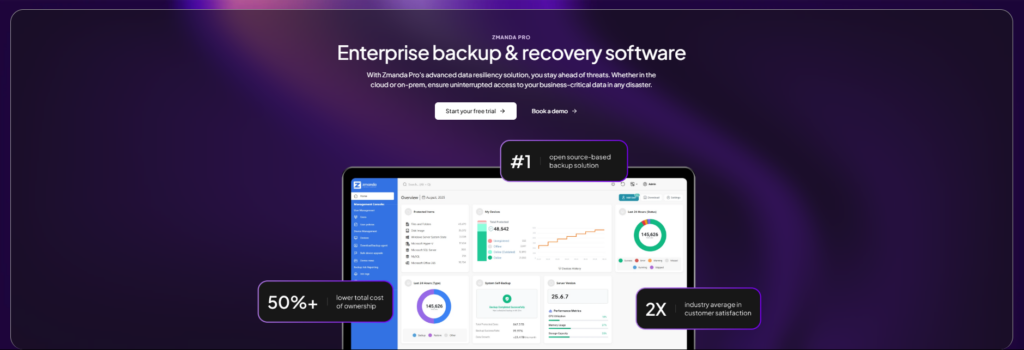
Zmanda Pro is backup and recovery software that runs as SaaS, self-hosted, or fully offline and air-gapped. Backup data goes directly from each client to the storage you choose, never through Zmanda’s servers.
Where it fits: It has clients for Linux, Windows and macOS; backs up VMware, Hyper-V and agentless Proxmox VE; and protects Oracle (through RMAN), PostgreSQL, MySQL, MariaDB, MongoDB, SQL Server and Microsoft 365. Its bare-metal recovery restores Windows and Linux server images to any physical, virtual or cloud machine, across more than 30 Linux distributions. Backups go to local disk or NAS, Zmanda Cloud Storage, or your own cloud, including Amazon S3 and Wasabi with Object Lock, and are encrypted with AES-256 on the client. Everything is run from one web console, with a support team behind it.
What it costs: $5.99 per workload per month on Business and $6.99 on Business Plus, with a 10-workload minimum. Database and disk-image backups are $2 per workload per month add-ons on Business, Zmanda Cloud Storage is $7.99 per TB per month, and connecting your own cloud storage is a $79 a month add-on on Business.
Watch out for: Zmanda Pro isn’t open source, and it costs more than NAKIVO at list price.
Best for: Mixed Linux, Windows, VM and database estates that want one console, a support line, published pricing and a choice of storage.
5. Commvault Cloud

Where it fits: One of the broadest workload lists available, including UNIX and Linux file systems, Oracle RAC, SAP HANA, IBM Db2, many hypervisors, NetApp and Isilon NAS, and Microsoft 365. Its documentation covers tape storage, including direct backup to tape.
What it costs: By quote.
Watch out for: A storage admin said large NAS backups with NDMP, NetBackup or Commvault “are by capacity”. Its breadth also means more planning and specialist administration than most small and mid-sized teams want.
Best for: Organizations that have outgrown a mid-sized toolset and have a dedicated backup team.
Technical comparison of Bacula alternatives
Here is a side-by-side comparison of the alternatives we discussed.
| Veeam | NAKIVO | Acronis | Zmanda Pro | Commvault | Bacula Enterprise | |
|---|---|---|---|---|---|---|
| Client platforms | Linux, Windows | Linux, Windows | Linux (x86, x86_64), Windows | Linux, Windows, macOS | UNIX, Linux, Windows | Linux, UNIX, Windows |
| Hypervisors | VMware, Hyper-V, Nutanix AHV, Proxmox VE | VMware, Hyper-V, Nutanix AHV, Proxmox VE | VMware, Hyper-V; more on higher editions | VMware, Hyper-V, Proxmox VE (agentless) | VMware, Hyper-V, Nutanix AHV, others | VMware, Hyper-V, KVM, Proxmox, Nutanix AHV, others |
| Databases | Application-aware processing | Not checked | Agent for Oracle | Oracle, SQL Server, MySQL, PostgreSQL, MariaDB, MongoDB | Oracle RAC, SQL Server, SAP HANA, Db2 and more | Oracle, SQL Server, PostgreSQL, MySQL, SAP HANA and more |
| Bare-metal recovery | Through agents | Same or identical hardware (Linux) | Yes | Any physical, virtual or cloud machine | Not checked | Enterprise plugins |
| Cloud and immutability | Object storage, hardened repository | S3, Wasabi, immutability | Acronis Cloud or local; immutable storage | S3, Azure, Google, Wasabi, B2; Object Lock on S3 and Wasabi | Major clouds | AWS, Azure, Google, Oracle Cloud |
| Offline or air-gapped deployment | Not checked | Not checked | On-premises management | Yes, fully offline | Not checked | Self-managed, on-premises |
| HPC file systems and NDMP | Not stated | Not stated | Not stated | Not listed | NAS and HPC coverage; NDMP not stated on workloads page | Yes |
| Licensing | Per workload; 500 GB per licence for file data | Per workload or per socket | Per device, by edition | Per workload | Quote | Per endpoint; no data-volume charge |
A quick pricing comparison of the Bacula alternatives?
| Option | Published price | What’s counted | Source |
|---|---|---|---|
| Bacula Enterprise | Not published. One MSP’s sales quote shared on Reddit (about 2020): nearly $60,000 a year for 500 endpoints | Protected endpoints and support level; no data-volume charge | Bacula subscriptions; r/msp thread |
| Veeam Data Platform | By quote or reseller | Per workload; 500 GB of file or object data per licence | Veeam licensing policy |
| NAKIVO | $2.35 (Pro Essentials) or $3.05 (Enterprise Essentials) per workload per month; perpetual from $275 per socket | Per workload or per CPU socket | NAKIVO pricing |
| Acronis Cyber Protect | Standard: $85 per workstation, $595 per server a year. Advanced: $129, $925, and $1,175 per virtual host | Per device, by edition; Acronis Cloud allowance included | Acronis purchasing |
| Zmanda Pro | $5.99 (Business) or $6.99 (Business Plus) per workload per month; 10-workload minimum | Per workload; storage separate (Zmanda Cloud Storage $7.99 per TB per month, or your own) | Zmanda pricing |
| Commvault Cloud | By quote | Varies by package [verify] | Commvault |
.
How do you move off Bacula without losing restore history?
- Map retention and legal holds. List which jobs and volumes you must keep, and for how long.
- Keep a way to restore old backups. Keep a Bacula Director, catalog and storage daemon (or a documented rebuild) that can read your old volumes until their retention ends, along with the encryption keys.
- Run both in parallel. Protect the same servers in the new tool and test file, bare-metal and database restores.
- Cut over in waves. Start with less critical servers, then move production once restores are proven.
Which Bacula alternative fits your business?
- Choose Veeam Data Platform if most of your estate is virtual and your file shares are moderate.
- Choose NAKIVO if the lowest published price matters most and you protect VMs and physical servers.
- Choose Acronis Cyber Protect if you want backup and endpoint security from one vendor.
- Choose Zmanda Pro if you run mixed Linux, Windows, VMs and databases and want one console, a support line and published pricing.
- Choose Commvault Cloud if you’re a large organization with specialist workloads and a dedicated team.
- Stay with Bacula if it runs reliably and you have the skills in-house, or you need its HPC, NDMP or deep tape coverage.
What to do next
Before you switch or renew, test your two strongest options with a full backup and restore of one Linux server, one database and one VM. Those tests tell you more than any feature list. If you’d like a second opinion, our team will walk through your environment with you, and help you make a decision.
FAQs