Proxmox VE powers a growing share of self-managed virtualization infrastructure — from lean SMB server rooms to mid-market data centers running hundreds of KVM-based VMs. After Broadcom’s VMware acquisition, thousands of teams accelerated their Proxmox migration. Most found an excellent hypervisor. Many found the same gap: extending VM backups into cloud object storage — to AWS S3, Wasabi, Backblaze B2, or any S3-compatible endpoint — requires a backup architecture purpose-built for that path.
For a complete overview of how Proxmox Backup Server works and where it hits its limits, see the Proxmox Backup Server complete guide
The storage math is what makes this a real engineering problem, not just a configuration question. A Proxmox environment with 40 VMs averaging 200GB each carries 8TB of raw VM data. Shipping full snapshots to S3 weekly generates cloud storage costs that compound faster than most teams budget for. The architecture that makes proxmox backup server S3 integration viable at scale is one that deduplicates at the source before upload, encrypts on the client before data leaves the Proxmox host, and after an initial full backup, sends only changed data chunks — not complete VM images — on every subsequent job. Without those three properties, cloud backup for Proxmox becomes a cost problem as fast as it becomes a capability.
This guide covers how to evaluate S3, Wasabi, Backblaze B2, and Zmanda Cloud Storage as Proxmox backup destinations; how Zmanda Pro manages the complete backup server architecture from VM snapshot to encrypted cloud storage; how to configure immutable Object Lock protection against ransomware and accidental deletion; and what storage efficiency looks like in a production Proxmox environment when deduplication, compression, and forever-incremental architecture work together.
See how Zmanda Pro connects Proxmox to S3-compatible cloud storage
What your Proxmox backup server needs from cloud storage
Proxmox VE’s KVM-based virtualization supports agentless, snapshot-based backup at the hypervisor level — the backup client operates on the Proxmox host and captures VM state without requiring agents inside guest VMs. This is a meaningful advantage for operational overhead, but it places specific requirements on the backup server and how it connects to cloud storage. Three architectural properties determine whether a proxmox backup server S3 configuration is viable in production rather than just technically functional:
- Client-side deduplication, compression, and encryption before upload. Data processing must happen on the Proxmox host before anything leaves the network. This prevents redundant data from reaching S3 on every job — two VMs running the same Windows base image share chunk hashes across their backups, so only unique data is stored. Encryption at the client also means your data is protected before it reaches the storage provider, not just in transit to it.
- Forever-incremental architecture. After one initial full backup, subsequent jobs upload only new and changed data chunks. A VM with a 3% daily change rate uploads 3% of its processed chunk set — not the full 200GB raw disk — every day. Over a 90-day retention window, the cumulative cloud storage requirement is dramatically lower than any full-plus-incremental strategy.
- Direct-to-storage data path. Backup data should flow directly from the Proxmox host to the configured S3 destination, without routing through a backup server intermediary. This improves throughput, reduces latency, and eliminates a single point of failure between your VM and your recovery data.
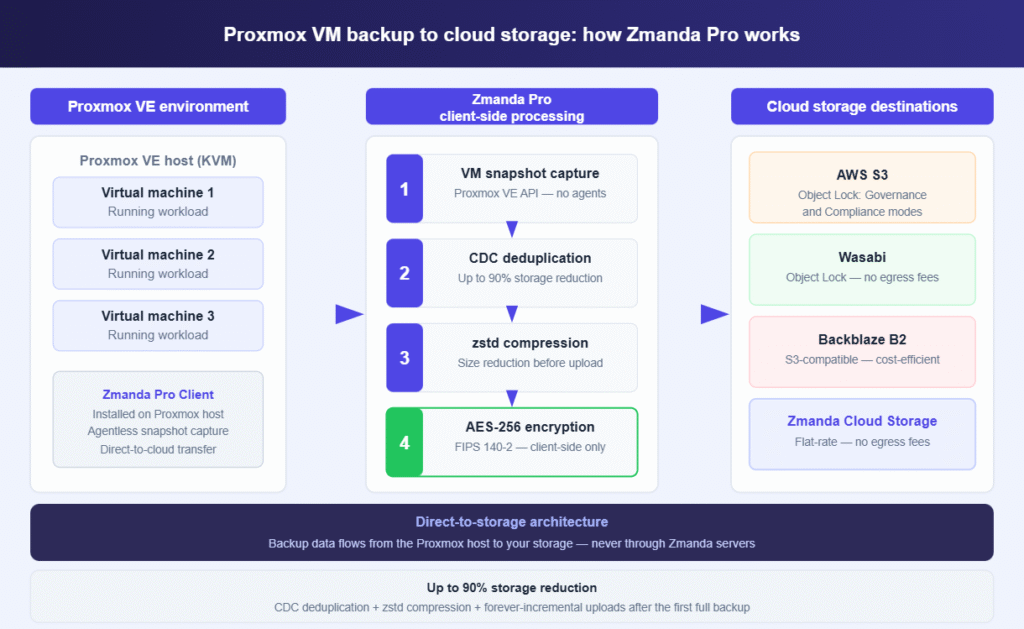
The Zmanda Pro architecture separates the management plane from the data plane. The Zmanda Pro Server — available as SaaS hosted on Azure or self-hosted on your own infrastructure — handles scheduling, policy enforcement, monitoring, and reporting. The Zmanda Pro Client, installed on the Proxmox VE host, handles all data operations: agentless snapshot capture via the Proxmox VE API, Content Defined Chunking (CDC) deduplication, zstd compression, AES-256 encryption, and direct transfer to your configured cloud storage destination. Backup data never passes through Zmanda’s infrastructure. The server orchestrates; the client and the storage do all the work.
Comparing cloud storage destinations for Proxmox backup: S3, Wasabi, Backblaze B2, and Zmanda Cloud
Every S3-compatible provider makes different trade-offs on pricing structure, egress fees, Object Lock support, and geographic availability. For Proxmox VM backup workloads, the right choice hinges on three variables: your retention requirements, how frequently you actually run restores (which drives egress cost), and whether immutability is a compliance requirement or a ransomware-protection preference. Here is how the primary destinations compare on the attributes that matter for proxmox backup to cloud:
| Provider | S3-compatible | Object Lock / immutability | Egress fees | Approx. cost | Best fit |
|---|---|---|---|---|---|
| AWS S3 | Native S3 | Yes — Governance & Compliance modes | Yes (~$0.09/GB) | ~$23/TB/month [VERIFY CURRENT PRICING] | Enterprise, AWS-native environments, strict compliance requirements |
| Wasabi | S3-compatible | Yes — Governance & Compliance modes | No egress fees | ~$6.99/TB/month [VERIFY CURRENT PRICING] | Cost efficiency with immutability; no egress surprises on recovery |
| Backblaze B2 | S3-compatible | Yes — Object Lock supported | Partial (free via CDN partners) | ~$6/TB/month [VERIFY CURRENT PRICING] | SMB and cost-primary workloads; smallest storage budgets |
| Zmanda Cloud Storage | S3-compatible | [VERIFY — contact Zmanda for current support status] | No egress fees | $20,340/year for 250TB [VERIFY CURRENT PRICING] | Simplest setup; bundled with Zmanda Pro; fully predictable flat-rate pricing |
Wasabi consistently surfaces as the leading choice for Proxmox environments where immutability is a requirement and cost discipline is a priority. No egress fees mean every restore operation — whether a routine file recovery or a full-incident VM restore — incurs no incremental cost. Governance and Compliance mode Object Lock is confirmed supported with Zmanda Pro, giving you both operational flexibility and compliance-grade immutability in the same destination. AWS S3 suits enterprise environments with deep AWS ecosystem integration and regulatory requirements that demand native AWS tooling. Backblaze B2 is the cost-minimal option for smaller Proxmox deployments where storage budget per TB is the controlling variable.

How Zmanda Pro handles Proxmox VE backup to S3-compatible storage
Zmanda Pro’s Proxmox VE backup is agentless — the Zmanda Pro Client installed on the Proxmox host captures VM state via the Proxmox VE snapshot API, without requiring OS-level agents inside each guest. This means your VMs don’t need guest-level changes to be protected, backup operations don’t depend on guest VM health, and the backup workload stays entirely at the hypervisor layer where it belongs.
Once the snapshot is captured, the Zmanda Pro Client processes backup data locally on the Proxmox host before a single byte leaves the network:
- Content Defined Chunking (CDC) deduplication. VM disk data is divided into variable-sized chunks — typically 512KB to 8MB — based on content fingerprinting rather than fixed block offsets. Two VMs running the same Windows Server or Linux base will share chunk hashes across their respective backups. Only unique chunks are stored and uploaded. This cross-VM deduplication is what produces the 10:1 storage ratio in production environments with similar-OS workloads.
- zstd compression. Chunks are compressed before upload, adding a second layer of storage reduction on top of deduplication. For typical VM workloads, the combined deduplication and compression pipeline reduces cloud storage consumption by up to 90% compared to raw backup data size.
- AES-256-CTR encryption with Poly1305 AEAD, FIPS 140-2 compliant. Encryption happens entirely on the Proxmox host client. The key hierarchy is designed so that Zmanda’s servers — or any intermediary — cannot decrypt your data. Your backup data arrives at S3 or Wasabi already encrypted at rest, encrypted in transit, and with zero-knowledge architecture at the service layer.
After client-side processing, deduplicated, compressed, encrypted chunks transfer directly from the Proxmox host to your configured destination — whether AWS S3, Wasabi, Backblaze B2, Zmanda Cloud Storage, or any other S3-compatible storage endpoint. No data passes through Zmanda’s infrastructure. The management server coordinates scheduling and policy; the Proxmox host client and your cloud storage do all the data work.
On the restore side, Zmanda Pro’s chunk-level indexing means the system knows exactly which chunks belong to any specific recovery point. Restoring a VM from a 90-day-old backup takes the same time as restoring from yesterday’s — because restore speed depends on chunk count and network throughput, not on traversing a chain of full and incremental jobs. Proxmox VMs protected with Zmanda Pro can be restored to Proxmox VE or cross-platform to Hyper-V and VMware vSphere, preserving your options in a disaster scenario.
Configuring immutable cloud backup for Proxmox with Object Lock on Wasabi and S3
Ransomware actors have evolved specifically to target backup infrastructure. The typical attack sequence attempts to corrupt or delete backup data before executing the main encryption event — eliminating the clean recovery path and maximizing pressure for ransom payment. Object Lock addresses this at the storage layer: once a backup object is written with an Object Lock retention policy, it cannot be modified or deleted for the retention period by any actor — not the application, not an administrator, and in Compliance mode, not the storage provider itself.
Zmanda Pro supports Object Lock on AWS S3 and Wasabi in both Governance and Compliance modes. The distinction between these modes has direct operational implications for how you structure your proxmox backup server Wasabi configuration:
- Governance mode. Objects are protected from deletion or modification, but a privileged IAM user can override the lock if genuinely necessary. This is the right setting for environments that need ransomware protection but also need the operational flexibility to remove backups before their retention period expires — for example, when a VM is decommissioned and storage reclaim is needed immediately rather than at retention expiry.
- Compliance mode. No user, no administrator, and no storage provider action can delete or modify a locked object before the retention period expires. The AWS root account cannot override a Compliance mode lock. This is the correct setting for regulated industries where backup integrity is an audit requirement — HIPAA, PCI DSS, SOC 2 — rather than just a security preference.
A practical approach for most Proxmox environments is to run short-retention operational backups (7–30 days) in Governance mode — preserving storage reclaim flexibility — and configure longer-term archive copies in Compliance mode for retention periods that map to compliance requirements. Zmanda Pro’s policy engine supports multiple retention schedules per protected item, so this dual approach does not require separate backup jobs or separate tooling.
Object Lock works alongside Zmanda Pro’s broader immutable backup strategy — which includes snapshot protection that prevents backup users from deleting recovery points, and storage access restrictions at the vault level. For complete ransomware protection, the combination of client-side encryption (attackers can’t read your data even if they access the bucket), Object Lock (attackers can’t delete your backups even with storage credentials), and snapshot protection (attackers can’t remove recovery points through the backup console) creates defense-in-depth across all three attack vectors.
Storage efficiency for Proxmox VM backups: what the numbers look like in practice
The “up to 90% storage reduction” figure comes from production deployments — Zmanda Pro’s 10:1 deduplication ratio has been validated in environments with diverse VM workloads. The combination of Content Defined Chunking, zstd compression, and forever-incremental architecture produces this outcome. Understanding what drives it helps set realistic storage projections for your Proxmox environment before you commit to a cloud storage tier.
Deduplication ratios are not uniform across workload types. Proxmox clusters with 20+ Windows Server VMs running the same base OS image see the highest ratios — the shared OS chunks are stored once, and only application-specific and data-volume chunks are unique per VM. Linux environments with standardized distributions behave similarly. Mixed environments with diverse workloads, heterogeneous base images, and high-entropy data (databases, compressed files, encrypted volumes) will see ratios closer to 5:1 to 7:1, which is still a substantial reduction from raw backup data size.
The forever-incremental model compounds the efficiency. After the initial full backup — which is itself deduplicated and compressed — subsequent jobs process and upload only new and changed chunks. A VM with a 3% daily change rate uploads roughly 3% of its deduplicated storage footprint per day, not 3% of its raw disk size. Over a 90-day retention window, total cloud storage consumption for that VM is a fraction of what any full-plus-incremental strategy would generate, because deduplication operates globally across the entire storage vault rather than per-job.
Before sizing cloud storage, ensure your PBS hardware is correctly provisioned — see the Proxmox Backup Server requirements and sizing guide for RAM, CPU, and storage estimates by VM count.
For Proxmox environments sizing a cloud storage budget, the conservative planning estimate is 5:1 deduplication for mixed workloads. Apply that against your raw VM disk footprint, factor in your change rate and retention requirements, and the resulting cloud storage number is what Zmanda Pro’s client-side deduplication is designed to deliver against. Upload bandwidth scales with the same ratios — you’re not shipping 8TB of raw VM data to S3, you’re shipping the deduplicated, compressed fraction of that figure.
Proxmox cloud backup strategy: combining local and cloud storage destinations
Cloud object storage should be part of a multi-destination strategy, not a single point of backup reliance. The 3-2-1 backup rule — three copies of data, on two different media types, with one copy offsite — remains the operational standard.
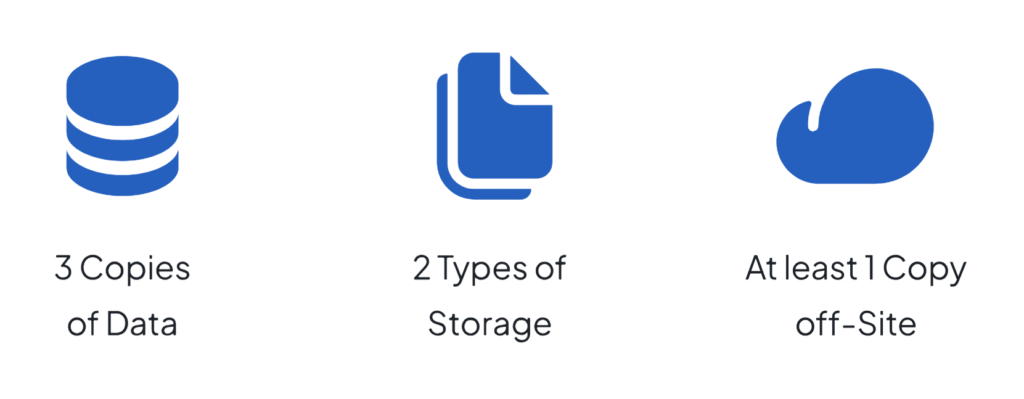
For Proxmox environments handling regulated workloads or ransomware-exposed infrastructure, adding a fourth copy with immutability produces the 3-2-1-1-0 model: three copies, two media types, one offsite, one immutable, zero errors verified on recovery tests. A practical Proxmox implementation of this strategy:
- Local storage vault. Fast, low-latency recovery path for day-to-day restores — single file recovery, development environment rollbacks, routine incidents. NAS, local disk, or on-premises object storage. This is your primary recovery path for most operational events.
- S3-compatible cloud destination with Object Lock. Primary offsite copy for disaster scenarios where on-premises storage is unavailable. AWS S3, Wasabi, or Backblaze B2 configured with Zmanda Pro. Object Lock retention policy aligned to your compliance and ransomware-protection requirements.
- Second cloud destination or Zmanda Cloud Storage. For geographic redundancy or account-level isolation. Zmanda Cloud Storage at $20,340/year for 250TB provides predictable flat-rate pricing without egress fees — practical for environments where recovery frequency makes per-GB egress costs unpredictable at budget time.
Zmanda Pro’s storage-agnostic architecture lets you configure all three destinations from a single management console and policy engine, without managing separate backup tools per storage tier. One Zmanda Pro deployment covers your Proxmox VMs alongside physical servers, databases, and Microsoft 365 workloads — all targeting local and cloud destinations simultaneously under a unified policy and monitoring layer.
For teams managing multiple Proxmox clusters who need centralized management beyond what PBS provides natively, see Enterprise Proxmox Backup with Zmanda Pro.
What to do next
Cloud backup for Proxmox VE comes down to getting three things right: a backup server architecture that handles snapshot capture, client-side processing, and direct S3 transfer; a storage destination matched to your cost, egress, and immutability requirements; and a retention policy that delivers both operational flexibility and compliance-grade protection. Wasabi delivers the best balance of flat-rate pricing, no-egress-fee restores, and confirmed Object Lock support for most Proxmox environments. AWS S3 is the right choice for enterprise environments where AWS ecosystem depth and compliance tooling justify the cost. Backblaze B2 is the cost-minimal path for smaller environments where storage budget per TB controls the decision.
Zmanda Pro deploys in 15 minutes — SaaS or self-hosted — with no mandatory training or certification. Install the Zmanda Pro Client on your Proxmox hosts, configure your S3 destination, set your Object Lock policy, and your VM backups run with client-side AES-256 encryption, up to 90% storage reduction through CDC deduplication and compression, and data flowing directly to your chosen cloud storage without touching any third-party infrastructure between the Proxmox host and the bucket.
FAQs