Backup Exec is no longer for sale. On March 31, 2026, Arctera (the company that has owned Backup Exec since late 2024) stopped accepting new licenses, license extensions, and renewals. Backup Exec end of life is until April 30, 2029, after which the product is unmaintained. If you’re an IT leader reading this, you have roughly 35 months to plan, evaluate, and execute a migration off one of the most widely-deployed backup products in the SMB and mid-market segment.
Most product sunsets come with an obvious next move: the vendor sells you the upgrade. Arctera doesn’t have one. There’s no Backup Exec 26, no Backup Exec Cloud Edition, no in-family migration path. Customers are being told, by the vendor itself, to evaluate “alternative solutions.”
This guide walks through what actually happened, who owns Backup Exec now, what the practical implications are for your environment, and how to think about a migration. We’ll cover a five-point evaluation framework, an honest survey of the leading replacement vendors, and where Zmanda Pro fits in that picture (and where it doesn’t).
See how Zmanda Pro replaces Backup Exec
What’s Actually Happening: Backup Exec is on its Last Time Buy
On January 8, 2026, Arctera issued a formal portfolio change notice to its authorized distributors announcing end-of-sale and end-of-life dates for three products in the former Veritas portfolio: Backup Exec, Desktop and Laptop Option (DLO), and System Recovery (the image-based backup product formerly known as Symantec System Recovery).
All three follow the same calendar. Internally, Arctera reps are using the phrase “Last Time Buy,” a recognized industry term that signals customers have one final chance to extend their support contract, then they are on a clock to migrate.
The dates are also published in Arctera’s own legally-binding Product Use Rights documentation, which states verbatim: “Please note that no new purchases of this Product will be available following March 31, 2026.” The April 30, 2029 End-of-Life date is independently confirmed on Veritas’s own End of Standard Life page, which lists EOSL 2029-04-30 for both Backup Exec 25.0 and 25.1.
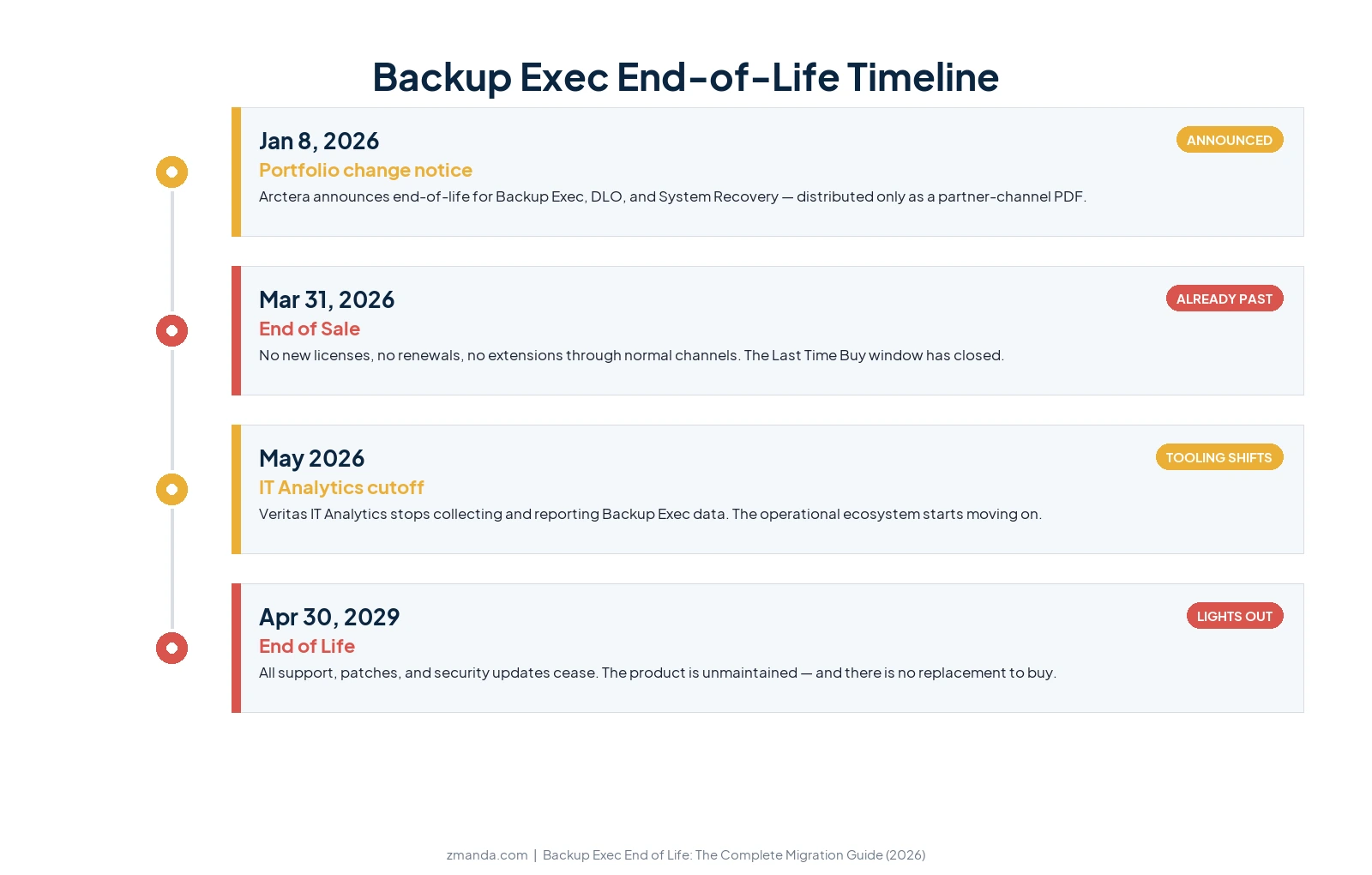
For customers reading this in 2026, the most important fact is that the EOS date has already passed. You cannot purchase new Backup Exec licenses today through any authorized channel. If you need to expand your existing deployment (add servers, add VMs, increase your protected capacity), the legitimate purchase path no longer exists.
You can renew or extend a remaining service contract through your reseller in limited circumstances, but it’s not the standard “buy more, scale up” relationship that defined the product for the last two decades.A separate Veritas support notice confirms that IT Analytics will stop collecting and reporting Backup Exec data as of May 2026, fully consistent with the EOS timeline and a useful operational signal: your monitoring story is changing whether you migrate or not.
The 35-month gap between EOS and EOL is your window. The move itself is short, a 60-to-90-day parallel run, not a heavy data migration. No vendor can import Backup Exec’s catalogs, so every replacement works the same way: keep Backup Exec read-only, start fresh in the new product, run both in parallel, then decommission. What actually takes time is evaluating, selecting, and validating a replacement, especially with long retention requirements or tape lineage in play. Give yourself enough lead time and the practical decision deadline lands between mid-2027 and late 2028, depending on the complexity of your environment.
Who Owns Backup Exec Now? The Ownership Chain Explained
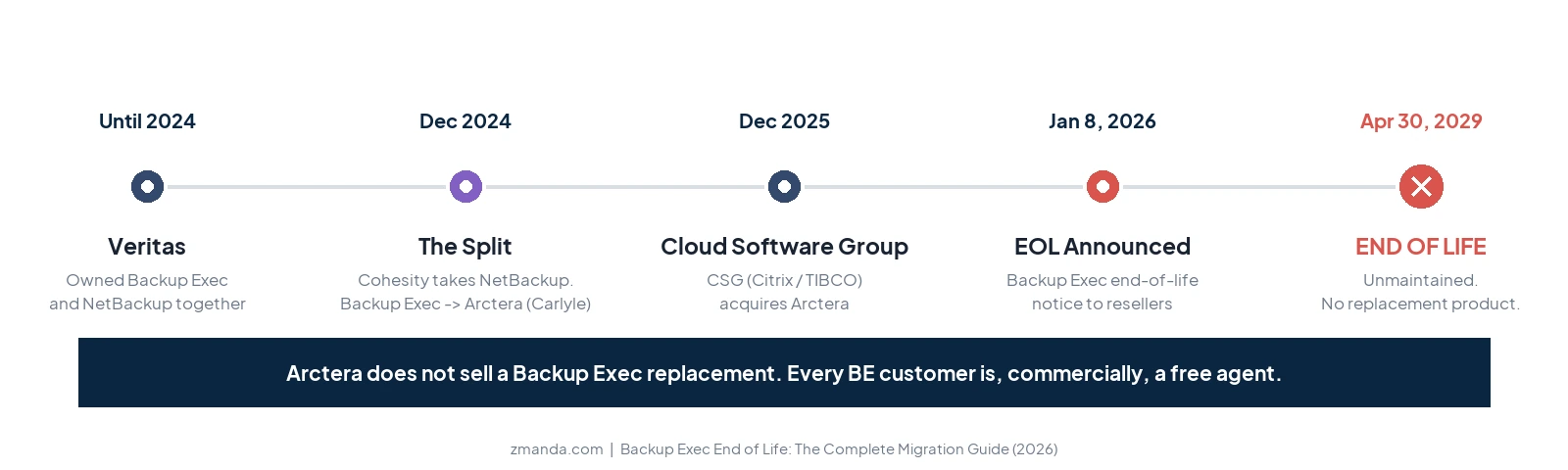
Backup Exec is not owned by Veritas anymore. It is also not owned by Cohesity. To understand the EOL decision, you have to understand the three-step ownership chain that brought us here.
1. December 2024: Cohesity acquires Veritas’ Enterprise Data Protection business. This was the big headline at the time. Cohesity, the cloud-native backup vendor backed by SoftBank and others, combined with Veritas Technologies’ enterprise data protection unit to become, as Cohesity’s own press release put it, “the world’s largest data protection provider.” But the deal explicitly excluded Backup Exec. Cohesity took NetBackup and Alta. Backup Exec, InfoScale, and Veritas Data Compliance were spun out into a new, separate company owned by Carlyle. That company is called Arctera.
2. August to December 2025: Cloud Software Group acquires Arctera. Cloud Software Group is the holding company that owns Citrix, TIBCO, and NetScaler. In August 2025 they announced intent to acquire Arctera. The deal closed December 19, 2025, and within days Cloud Software Group reorganized Arctera into three standalone business units running on separate domains: backupexec.com, infoscale.com, and arctera.com.
3. January 8, 2026: the portfolio change notice. Three weeks after the Cloud Software Group acquisition closed, Arctera notified its distribution channel that Backup Exec, DLO, and System Recovery would all enter end-of-sale on March 31, 2026, with full end-of-life on April 30, 2029.
What matters more than the names and dates: Arctera does not sell a Backup Exec replacement. NetBackup, the natural in-family upgrade path for years, now belongs to Cohesity, a different company. Arctera’s own announcement to its partners directs them to “offer renewal or transition plans to alternative solutions.” In other words, Arctera is not retaining its Backup Exec customers. It is releasing them.
That makes this end-of-life structurally different from how Zmanda, Commvault, or Cohesity itself would handle a sunset. Most vendors EOL a product by migrating customers onto a newer SKU they still own. Arctera doesn’t have one to offer. Every Backup Exec customer is, commercially speaking, a free agent.
Backup Exec End-of-Life:What This Means for Your Environment
If you’re running Backup Exec today, three things change with the EOS date already past.
Your scaling path is closed. You can still run what you own, but you cannot legitimately buy more. That has immediate implications for any infrastructure project on your 2026–2028 roadmap. New hypervisor clusters, new database servers, new branch offices, and new M&A integrations cannot be added to a Backup Exec deployment through normal procurement. You can keep operating the existing footprint, but you cannot grow it inside the product. Workarounds exist (third-party reseller inventory, multi-year renewals committed before the cliff) but they are workarounds, not strategies.
Your vendor relationship is built around a product with a public end date. Once a product has a posted EOL date, the conversation with your auditors, your insurance underwriters, and your internal risk committee changes. They will ask what your replacement plan is, when you’ll execute it, and what controls bridge the gap in the meantime. None of those questions have good answers if the migration is on the back burner. The earlier you have a documented plan, the easier those reviews go.
Your renewal became a single upfront check, not an annual payment. Arctera’s EOL communication to its reseller channel stated that all multi-year renewals had to be paid upfront. For a typical mid-market BE customer paying around $33,000 a year, securing support through April 2029 meant writing a roughly $99,000 single check in 2026. If you already wrote that check, the money is spent, but the migration it was meant to postpone is still coming. If you didn’t, that runway is no longer for sale. Either way, the lesson worth carrying into your replacement decision is the same: don’t sign up for another vendor that can put you on a pricing cliff.
Your vendor told its resellers about this, not the public. There is no Arctera press release. There is no announcement on the Backup Exec website. The end-of-life notice was distributed exclusively as a partner-channel PDF. We’re flagging this in this guide because we think backup vendors should be transparent about end-of-life events, and because if you haven’t already heard about this from your reseller, you may not yet know your product is being discontinued.
Your cyber-insurance carrier already asks about this. Chubb, Travelers, and most major cyber-insurance carriers now ask on their renewal questionnaires whether your backup software is currently supported, whether you have a documented plan to retire end-of-life systems, and how you’ve tested your restore procedures. Travelers’ published underwriting controls list names “recognizing and replacing unsupported software” explicitly. In Travelers v. International Control Services, a single misrepresentation on a cyber-insurance application was enough for a court to rescind the entire policy after a ransomware attack, leaving the customer to absorb millions in losses on their own. Running backup software that’s no longer being sold isn’t just a technical risk. It’s a question with a wrong answer on a form that’s coming up at your next insurance renewal.
Your monitoring and operational tooling story is already changing. IT Analytics’ May 2026 support cutoff for Backup Exec data is the most concrete early signal: even the in-family operational ecosystem is moving on. Expect that pattern to continue. Third-party tools that previously integrated with Backup Exec will deprioritize compatibility as the install base shrinks.
These changes are not catastrophic if you start planning now. They are catastrophic if you wait until 2028.
Five Criteria for Choosing Your Backup Exec Replacement
A backup migration is not a like-for-like swap. The product you bought ten or fifteen years ago is a different product than the one you actually need today. Your environment, your threat landscape, and your buyer expectations have all changed. Use this evaluation framework to think about your replacement, not just to find a Backup Exec clone.
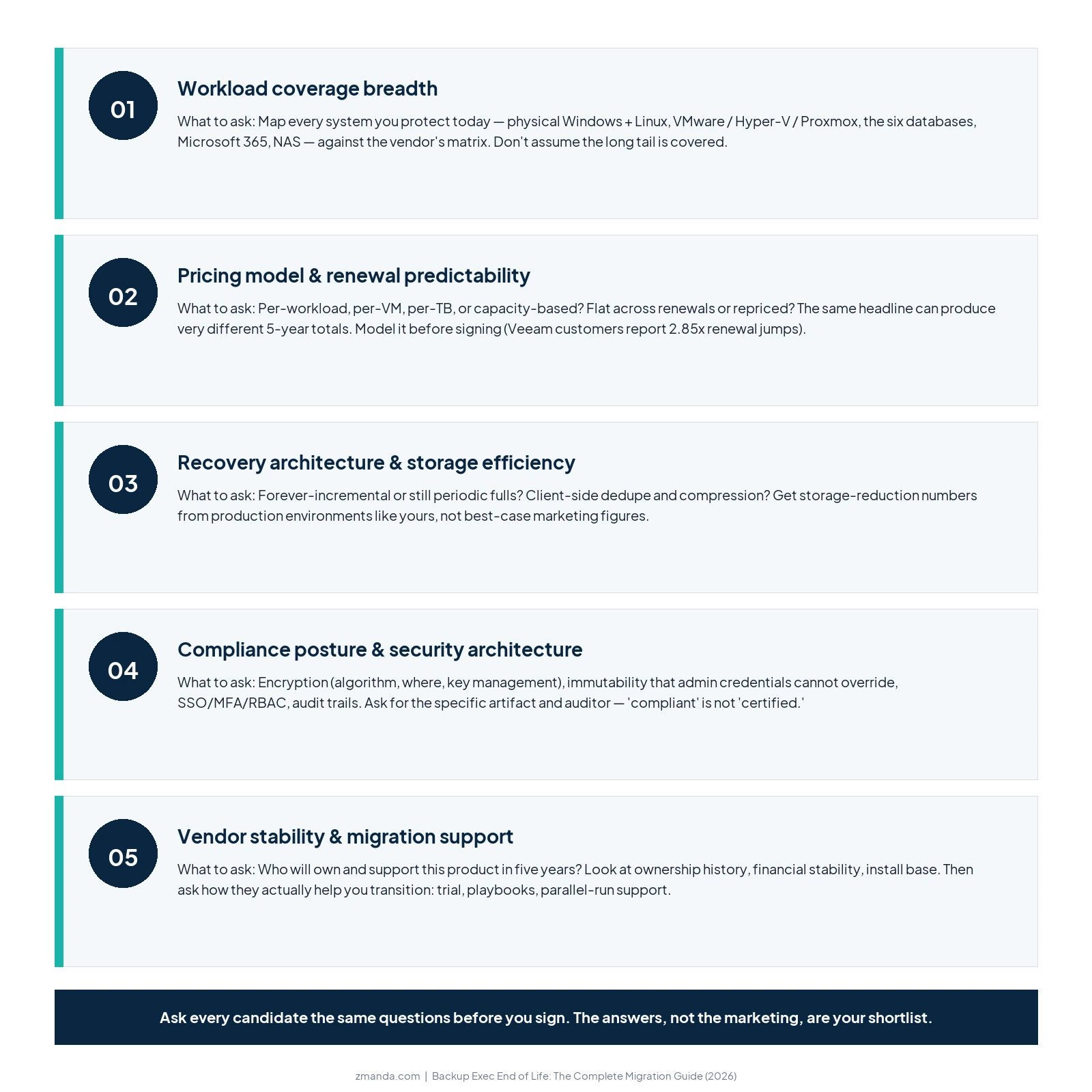
1. Workload coverage breadth. Backup Exec was designed in a Windows-heavy, on-premises world. Modern backup decisions need to account for what you protect now and what you’ll protect in three years: physical servers (Windows and Linux), virtual machines across multiple hypervisors (VMware, Hyper-V, Proxmox VE, sometimes more), databases (SQL Server, Oracle, MySQL, PostgreSQL, MongoDB, MariaDB), Microsoft 365 (Exchange Online, SharePoint, OneDrive, Teams), endpoints, NAS file shares, and increasingly some level of cloud-native workload protection. Map every system you back up today against the candidate vendor’s matrix. If anything important is missing, ask explicitly. Vendor marketing pages often paper over coverage gaps in their long tail.
2. Pricing model and renewal predictability. This is the variable most underweighted in Backup Exec replacements, and the one most likely to surprise you in year two. Backup Exec used a mix of per-server, per-VM (V-Ray socket), and capacity-based licensing depending on edition. Many replacement vendors use very different models: per-VM, per-socket, per-TB protected, consumption-based credits, or per-workload subscriptions. The same nominal headline price can produce dramatically different three-year and five-year costs depending on how you grow. Veeam customers, for example, frequently report renewal spikes in the 2.85x range during transitions to the Veeam Universal License model. That kind of post-purchase repricing is a real risk in this category, so model it explicitly before signing.
3. Recovery architecture and storage efficiency. Backup Exec’s architecture predates most of the storage-efficiency thinking that defines modern backup. Modern systems use forever-incremental architectures (one initial full, only changed-block backups after that), client-side deduplication (data is deduplicated and compressed before it leaves the source), and chunk-based indexing (restores pull only the chunks they need, regardless of which backup point you restore from). These have direct implications for your storage costs, your backup window length, and your RTO. A vendor still requiring periodic full backups is fundamentally a different product than one that doesn’t. Ask for storage-reduction numbers in production environments comparable to yours, not best-case marketing figures.
4. Compliance posture and security architecture. Ransomware moved backup from an infrastructure category into a security category. Your replacement vendor needs documented, current answers on encryption (algorithm, where it happens, key management), immutable backups (Object Lock, retention enforcement that admin credentials cannot override), access control (SSO, MFA, role-based access), and audit trails. Compliance attestations and certifications (SOC 2 Type II, ISO 27001, support for HIPAA-regulated environments, PCI DSS alignment) should be documented and linkable. “Compliant” is not the same as “certified.” Ask for the specific artifact and the auditor.
5. Vendor stability and migration support. Backup Exec has had three owners in three years. That’s an unusual story, but it points to a real question: who will be selling and supporting your replacement product five years from now? Backup is a multi-year commitment by definition (the data you back up today is the data you’ll restore in 2031), and a vendor that gets acquired, divested, or restructured in that window is a problem. Look at ownership history, financial stability, install base scale, and the breadth of the channel ecosystem. Then ask how the vendor will actually help you transition: free trial that accommodates production-like workloads, transition playbooks, parallel-run support, professional services availability, and what their reseller and integrator network looks like in your region.
Not sure how to evaluate a Backup Exec replacement?
Spend 30 minutes with our team. We'll help you map your environment to the right model.
How the Major Backup Exec Replacement Vendors Compare
The vendors actively competing for Backup Exec customers in 2026 fall into a small number of recognizable buckets. Here’s an honest read of where each sits, and what their published positioning is telling you about their priorities.
| Vendor | Lead angle | Best fit for | Watch out for |
|---|---|---|---|
| Zmanda Pro | Predictable per-workload pricing, cross-platform, documented compliance posture | SMB and mid-market customers wanting flat renewal pricing, Linux/Windows/Mac coverage, and a compliance posture their auditors already know how to evaluate | Disk and cloud-based workflows only; customers with active tape retention requirements should evaluate migration timelines (see honest gaps section below) |
| Veeam | Capability gap / modern hybrid-cloud backup | VMware-heavy environments, enterprise scale, customers comfortable with Veeam Universal License pricing | Licensing complexity; renewal repricing; mandatory certification (VMCE) for many features; 24/7 support is a paid add-on |
| Acronis | “Modernize, don’t just replace” — integrated cybersecurity + backup | SMBs wanting a single tool for backup + antivirus + EDR | Reliability and support quality flagged in customer reviews; dual per-GB and per-workload pricing models can be confusing |
| BackupAssist | SMB-focused, founder-voice, anti-lock-in | Small-business Windows shops, single-site, modest budgets | Smaller product footprint; mostly Windows-centric; less suited to multi-hypervisor or large multi-site environments |
| Backblaze | Storage-layer modernization (Backblaze B2 as cloud target) | Organizations keeping a primary backup product but moving cloud copies to lower-cost storage | It’s a storage vendor, not a backup application; you still need a backup product on top of it |
Where Zmanda Pro Fits, and Where It Doesn’t
For most of the rest of this guide, we’ve kept the framing vendor-neutral. Here’s the part where we’re direct about our own product, because we’d rather give you an honest read than make you reverse-engineer it.
Zmanda Pro fits the Backup Exec replacement conversation cleanly in 3 places.
1. It fits when predictability matters more than the lowest sticker price.
Zmanda Pro is priced per workload: one license, one monthly rate, regardless of how much data that workload generates. A Windows file server with 500 GB of data and a Windows file server with 50 TB of data cost the same. Renewal pricing is flat. There is no per-gigabyte metering on the workload license itself, and there are no surprise multipliers on contract renewal. For Backup Exec customers who are tired of licensing-model shifts (Backup Exec went through several over the years) and who want a five-year cost they can plan against, that model maps cleanly.
To put concrete numbers on it: a typical mid-market environment (100 protected workloads and 500 Microsoft 365 users) totals $19,128 in year one on the Business plan, with a five-year cost locked at $81,294. Most customers choose Business Plus, which adds 24/7 support, at $22,128 in year one and $94,044 locked over five years. Either way, that five-year figure is the number you can take to your CFO today, sign a contract against, and not have to re-negotiate at year two or year four. There is no Last Time Buy clock, no forced upfront renewal, and no support cliff in 2029. You can see the actual numbers on our pricing page and run your own scenario in the calculator. There’s no quote-gate.
An honest note on how that compares to Backup Exec itself: on raw sticker price, a Backup Exec perpetual-plus-maintenance deal can look cheaper than Zmanda Pro on paper, right up until support ends in 2029. The Zmanda Pro argument is not “we are cheaper than Backup Exec.” It is that your five-year number is knowable and fixed, with no cliff, no forced upfront renewal, and no scramble for a replacement before the support deadline. Where Zmanda Pro does win clearly on cost is against the higher-tier Backup Exec editions and against Veeam’s renewal repricing.
2. It fits when your environment is mixed.
Backup Exec assumed a Windows-first world. Zmanda Pro doesn’t. The backup server itself runs on Linux or as SaaS and our deployment models spans cloud-hosted, on-prem and secure private cloud. Clients run on Windows, Linux, and macOS. Hypervisors covered include VMware vSphere, Microsoft Hyper-V, and Proxmox VE, with direct hypervisor restore to all three. Databases covered include SQL Server, Oracle (via RMAN), MySQL, MariaDB, PostgreSQL, and MongoDB, most with point-in-time recovery. Microsoft 365 protection covers Exchange Online, SharePoint Online, OneDrive, and Teams. If you carry a Backup Exec deployment partly because nothing else easily covered your full footprint, the breadth conversation is worth having directly.
3. It fits when you carry compliance load.
Zmanda Pro is a BETSOL product, and BETSOL maintains SOC 2 Type II attestation (audited annually by QRC), ISO 27001 certification, and PCI DSS compliance. Zmanda Pro supports HIPAA-regulated environments with AES-256 encryption at rest and TLS 1.3 in transit, role-based access controls, immutable backups, and detailed audit logging.
Zmanda also executes BAAs with healthcare customers. Immutable backup is supported through Object Lock Compliance Mode on Amazon S3 and Wasabi (where even admin credentials cannot override the retention lock), with infrastructure-level immutability also available when using a ZFS-based storage destination.
Bring-your-own-key (BYOK) is supported through a zero-knowledge architecture, ensuring Zmanda never has access to your unencrypted data. Air-gapped, fully offline deployment is supported as a software-only mode, with no proprietary appliance required. All compliance documentation is linked from our Trust Center.
We should be just as direct about where Zmanda Pro doesn’t fit.
1. If tape is a non-negotiable part of your workflow, Zmanda Pro is disk and cloud only. Backup Exec’s deepest legacy strength was tape: LTO library support, NDMP for filer backups, complex GFS rotation schemes, and MTF format continuity. Zmanda Pro does not natively back up to tape. Customers with active tape retention requirements should evaluate their migration timeline accordingly, including whether to keep tape on a separate solution or to plan a tape-to-disk transition as part of the migration.
That said, one of the most common reasons organizations carry tape is for the offline / air-gap copy that compliance regimes and disaster-recovery best practices effectively require. If that’s what your tape investment is really protecting against (not the physical medium itself, but the offline isolation it provides), Zmanda Pro’s air-gapped offline deployment is a direct substitute. It’s software-only (no proprietary appliance), supports the same isolation profile tape gives you, and is one of the more commonly cited reasons customers move from tape to Zmanda Pro rather than running both. For customers in this category, “no tape” is often a feature, not a gap.
2. If you want YARA-based or machine-learning malware detection inside the backup tool itself, Zmanda Pro is not the right pick. Some vendors (Veeam, Acronis) have moved toward integrated threat detection inside the backup product. Zmanda Pro’s ransomware story is architectural rather than scanning-based: Object Lock Compliance Mode immutability, snapshot protection, zero-knowledge encryption, and access controls that survive credential compromise. That model has real strengths, but it is a different model. Be clear about what you’re buying.
3. If Backup Exec’s named “Instant VM Recovery” feature is critical, note the distinction. Backup Exec (and Veeam) offer the ability to boot a VM directly from backup storage without a full restore first. Zmanda Pro offers direct hypervisor restore to VMware, Hyper-V, or Proxmox, which is faster and more streamlined than a manual restore but still performs a full data copy. If zero-copy boot from backup is a hard requirement, this is worth raising in your evaluation.
4. If you have a heavy Citrix XenServer footprint or rely on Backup Exec’s granular Active Directory object recovery, your replacement options are narrower in general and Zmanda Pro is not currently in that list. Backup Exec did support Citrix natively and offered item-level AD recovery via in-VM agents. Zmanda Pro covers Active Directory via Windows Server System State (full DC restore, not individual user / GPO / OU recovery). These are smaller niches than they once were, but if they’re your environment they matter.
Our position, stated plainly: you don’t have to start over. You can move to a vendor that respects predictability: clear pricing, documented compliance posture your auditors already know, broad workload coverage, and a stable ownership story. For most Backup Exec environments that aren’t tape-dominant, that’s a workable description of where Zmanda Pro fits.
Building Your Migration Plan Before Backup Exec End of Life
A backup migration is a structured project, not a software install. One reassurance before the steps: moving off Backup Exec is a transition, not a data migration. No backup vendor can read Backup Exec’s proprietary catalog format, so the universal model (Zmanda Pro included) is to keep Backup Exec in read-only for your retention window, start fresh in the new product, run both in parallel, then decommission. The main cost is running two systems during that window, not a heavy data-conversion project. Here’s a practical sequence.
Step 1: Inventory your current Backup Exec deployment. Document every workload type protected, the retention requirements per workload, your storage destinations and capacities, integrations with monitoring or ticketing tools, any tape libraries and their rotation policies, your scripted automation, and your backup window timing. The output of this step is a single source-of-truth document. Don’t skip it. You will refer back to it constantly.
Step 2: Define your must-haves and nice-to-haves. Working from the five evaluation criteria above, decide what’s non-negotiable for your environment. Tape support, native NetApp ONTAP integration, hypervisor breadth, compliance attestations, deployment model, and regional support availability all vary by organization. What’s non-negotiable for a regulated healthcare provider isn’t the same as what’s non-negotiable for a four-site logistics company. Get sign-off from whoever holds budget and audit authority.
Step 3: Shortlist and trial. Pick two or three vendors that meet your must-haves. Run real trials, not vendor-demo environments. Use your actual workloads under your actual constraints. Most reputable vendors offer 14 to 30-day trial periods sufficient to run multiple backup-restore cycles. Treat the trial like a procurement evaluation, not a sales meeting: ask for specific RTO numbers, restore tests, verified deduplication ratios in your environment, and a documented quote with renewal terms.
Step 4: Plan a parallel-run period. Don’t cut over from Backup Exec in a single weekend. Run the new product alongside Backup Exec for 60 to 90 days, taking real backups in both systems, validating restores from the new product weekly, and reconciling any operational gaps. This is the time to discover your runbook problems, not after Backup Exec is decommissioned.
Step 5: Cutover and decommission. Once parallel-run has validated the new product against the existing one, formally cut over: stop new backup jobs in Backup Exec, archive any historical backup catalog you’re required to retain (consult your legal and compliance teams on retention requirements), and decommission the Backup Exec infrastructure on a defined schedule. Keep the Backup Exec server bootable but offline for as long as compliance requires you to be able to access historical backups.
Want to test Zmanda Pro against your actual Backup Exec workloads?
Start a free trial. Run real backups, real restores, on your real systems. No quote required.
What to Do Next
You have somewhere between 18 and 30 months to make and execute a Backup Exec replacement decision before the support cutoff arrives. That’s enough time to do this well, but not enough to leave it on the back burner.
The most useful single action you can take this quarter is to inventory what Backup Exec actually does in your environment and decide which of the five evaluation criteria above are non-negotiable for you. That conversation, internal to your IT team and your compliance stakeholders, is the foundation for every later vendor discussion. If you’d like a second pair of eyes on it, our team is happy to walk through your specific environment, book a meeting with us. There’s no quote, no obligation, and we’ll tell you honestly whether Zmanda Pro is the right fit before you spend time on a trial.
Backup Exec served the SMB and mid-market backup category well for a long time. It’s not coming back. But the conversation it forces (what does a modern, predictable, compliance-ready backup product look like for your environment) is one worth having on your own timeline, not the EOL clock’s.
FAQs