If you’re comparing enterprise backup platforms on total cost of ownership, the backup deduplication ratio is where Zmanda Pro’s architecture produces a measurable, documented advantage.
On database workloads, Zmanda Pro delivers 10:1 to 30:1+ combined deduplication and compression ratios, meaning 30 days of daily backups on a 5TB MySQL database consumes under 1TB of actual storage, not the 150TB a naive estimate produces. These numbers come from:
– content-dependent chunking
– cross-snapshot deduplication spanning the entire Storage Vault
– and configurable compression applied to unique chunks before they reach the backup target.
That architecture is what separates Zmanda Pro’s storage efficiency from fixed-block approaches at the implementation level.This is a reference for IT teams in active procurement evaluation: Zmanda Pro’s tested backup deduplication ratio by workload type, a worked storage estimation example, and a direct explanation of why implementation choices.
Note: Results vary by change rate, retention depth, and configured compression level.
How Zmanda Pro Applies Deduplication and Compression
How Zmanda Pro Applies Deduplication and Compression
Zmanda Pro’s deduplication pipeline runs in a fixed sequence on every backup job. The sequence is what makes the backup deduplication ratio achievable in production, not just in benchmarks.
Step 1: Content-dependent chunking
- Source data is divided into variable-sized chunks based on data content, not fixed block sizes
- Fixed-block approaches break when data is inserted mid-file — every subsequent boundary shifts and deduplication matches are destroyed
- Content-dependent chunking shifts boundaries only around the changed region; the rest of the file’s chunks remain identical to existing chunks in the vault and are never re-uploaded
Step 2: Chunk matching against the Storage Vault
- Each chunk is checked against what already exists in the vault
- Existing chunks contribute zero additional storage and zero network transfer
- Only genuinely new chunks proceed to the next stage
Step 3: Compression of unique chunks
- Configurable compression is applied to new unique chunks only
- Already-compressed data types are not re-compressed — no wasted overhead
- Compressed chunks are encrypted before reaching the backup target
Cross-snapshot deduplication
- Retaining 30 daily snapshots does not produce 30× the Day 1 storage footprint
- The vault’s deduplication index covers the entire snapshot history, not individual jobs
- Day 30 costs only the genuinely changed unique data from that day — making long retention windows economically viable.
Scope boundary: deduplication operates within a single Storage Vault — data across separate vaults does not deduplicate against each other.
Why Zmanda Pro’s storage efficiency is different
- Content-dependent (variable-block) chunking — not fixed-block. Chunk boundaries follow the data, so inserts and updates don’t shift boundaries and invalidate the deduplication cache. Fixed-block deduplication loses matches any time data is inserted before existing blocks.
- Cross-snapshot deduplication spans the entire Storage Vault. Retained snapshots share a single deduplication index. Day 30 of retention costs only the genuinely changed data from Day 30 — not a new copy of the unchanged 98%.
- Configurable compression levels (0–5). Tune CPU overhead against storage reduction per backup job — from no compression to ultra compression — without changing the deduplication pipeline.
Backup Deduplication Ratio by Data Type: Zmanda Pro’s Reference Table
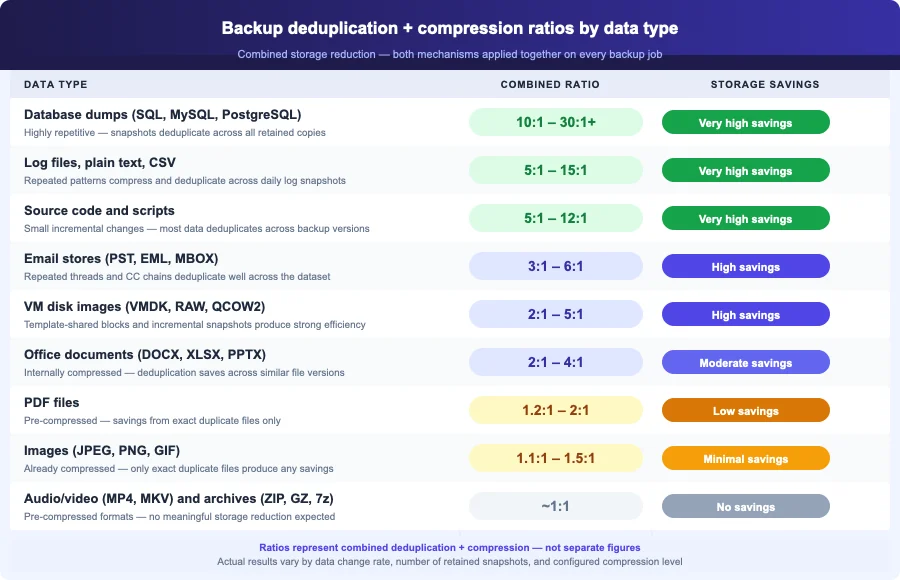
These are Zmanda Pro’s tested ratios on representative workloads — not theoretical maximums or industry averages.
The backup deduplication ratio figures below represent combined storage reduction after both deduplication and compression are applied. Do not add these to a separate compression ratio figure. A 15:1 ratio means the backup target stores roughly 1 GB for every 15 GB of source data, with both mechanisms factored in. Ratios improve progressively as cross-snapshot deduplication accumulates across retained snapshots.
| Data type | Combined ratio (stored vs. original) | Notes |
|---|---|---|
| Database dumps (SQL, MySQL, PostgreSQL) | 10:1 – 30:1+ | Highest savings. Repeated snapshots of the same database deduplicate extremely well. Real-world benchmark: 605 GB reduced to ~20 GB stored |
| Log files, plain text, CSV | 5:1 – 15:1 | Highly compressible. Repeated log patterns deduplicate effectively across snapshots. |
| Source code and scripts | 5:1 – 12:1 | Small incremental changes mean most data deduplicates across backup versions. |
| Email stores (PST, EML, MBOX) | 3:1 – 6:1 | Mix of text and attachments. Repeated email threads and CC chains deduplicate well. |
| VM disk images (VMDK, RAW, QCOW2) | 2:1 – 5:1 | VMs built from the same template share large data blocks. Incremental snapshots are highly efficient. |
| Office documents (DOCX, XLSX, PPTX) | 2:1 – 4:1 | Formats are already internally compressed. Deduplication provides savings across similar file versions. |
| PDF files | 1.2:1 – 2:1 | Mostly pre-compressed. Savings come primarily from duplicate files within the dataset. |
| Images (JPEG, PNG, GIF) | 1.1:1 – 1.5:1 | Already compressed formats. Gains come only from exact duplicate files. |
| Audio and video (MP4, MP3, MKV) | ~1:1 | Pre-compressed media. No meaningful storage reduction expected. |
| Archives (ZIP, GZ, 7z, TAR.GZ) | ~1:1 | Already compressed and packed. No further reduction expected. |
Want to know what these ratios mean for your specific workload?
Book a 30-minute call — we'll estimate your actual storage footprint from your data profile.
How to Estimate Your Storage Savings with Zmanda Pro
The table gives you Zmanda Pro’s backup deduplication ratio for each workload type. This section shows how to apply those numbers to a real capacity planning scenario — substitute your actual change rate and data mix for the estimates below.
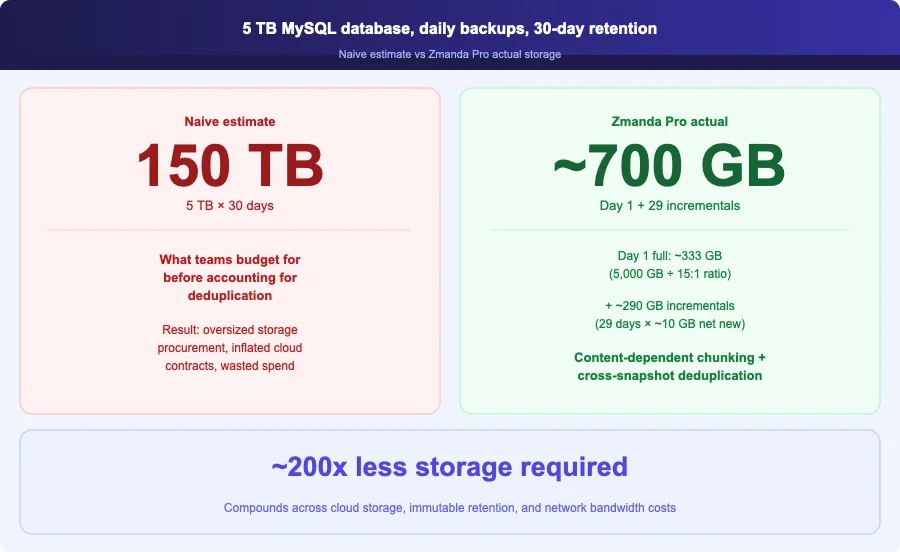
Scenario: 5 TB MySQL database, backed up daily, 30-day retention.
Naive storage estimate:
- 5 TB × 30 days = 150 TB — the number most teams start with before accounting for deduplication
With Zmanda Pro deduplication and compression (conservative estimate):
- Day 1 full backup: 5,000 GB ÷ 15 (conservative mid-range database ratio) = ~333 GB stored
- Daily change rate assumption: ~2% per day = ~100 GB of changed data
- Changed data after cross-snapshot dedup + compression: ~5–15 GB net new per incremental
- 29 incremental days at ~10 GB/day median = ~290 GB additional
- Total storage at day 30: approximately 600–700 GB
That is roughly 200× less than the naive estimate. For a mixed environment — say, 2 TB of databases, 2 TB of VM images, and 1 TB of archived media — weight the ratios by data type. The media and archive portion contributes near-zero benefit and pulls the blended backup deduplication ratio down toward 4:1 to 6:1 overall.
What Affects Your Actual Backup Deduplication Ratio
Four variables determine where your environment lands within — or outside — the ranges in the table.
- Daily change rate. The backup deduplication ratio improves dramatically as change rate falls — a database changing 0.5% per day accumulates far more cross-snapshot matches across 30 retained backups than one with 10% daily churn. Write-heavy OLTP databases see different results than read-heavy reporting databases, even at the same source size.
- Snapshot retention depth. Backup storage efficiency improves over time. A 90-day retention window produces better blended ratios than a 7-day window because more unchanged data from older snapshots has already been deduplicated. Day 1 is your worst-case ratio — it improves as the vault accumulates cross-snapshot deduplication opportunities.
- Configured compression level. Zmanda Pro supports compression levels 0 through 5 — none to ultra — letting you tune CPU overhead against storage reduction per backup job. For storage-constrained targets or expensive cloud storage, higher compression levels produce meaningful additional savings on text-heavy workloads. For CPU-constrained backup servers or pre-compressed data types, lower levels reduce overhead without significantly affecting the storage footprint on workloads that already deduplicate well.
- Data type mix. A single-purpose database server sees dramatically different results than a file server with a mix of documents, images, and archives. Know the proportion of pre-compressed data in your backup scope before sizing a new storage target or estimating cloud storage costs.
How Zmanda Pro’s Backup Deduplication Ratio Translates to Real Costs
These ratios apply at the source, before data leaves the backup client. Because Zmanda Pro uses a direct-to-storage architecture — data flows from the client directly to the storage target without transiting Zmanda’s infrastructure — the backup deduplication ratio reduces both the storage footprint on the target and the network bandwidth consumed during each backup job. You are not paying to move or store data the vault already holds.
Three scenarios where this matters most:
- Cloud storage cost. When the backup target is Zmanda Cloud Storage, S3, or Wasabi, storage cost scales with actual bytes stored — not source data size. A backup deduplication ratio of 15:1 on a database workload translates directly to roughly a 93% reduction in cloud storage spend versus a solution without effective deduplication.
- Immutable retention budgeting. Immutable backup with S3 Object Lock in Compliance Mode holds data for the full retention window without deletion. A high backup deduplication ratio keeps the locked storage volume — and the non-deletable cost — as small as possible.
- Bandwidth-constrained sites. Only net-new unique chunks move across the wire on each incremental. For remote sites or bandwidth-metered cloud connections, this directly reduces backup window duration and transfer cost.
Using Zmanda Pro’s Backup Deduplication Ratio for Storage Procurement
The backup deduplication ratio is where the TCO gap between Zmanda Pro and alternatives becomes concrete. Both Veeam and Acronis implement deduplication, but the implementation differences — fixed-block versus content-dependent chunking, per-job versus cross-snapshot deduplication scope — produce materially different storage footprints on the same workloads. For a database-heavy environment, a 10:1 to 30:1 ratio versus a 3:1 to 5:1 ratio on a fixed-block approach means a 3× to 6× difference in backup storage infrastructure spend — before factoring in cloud storage costs, bandwidth, or retention depth.
Most procurement conversations for backup software focus on license cost and feature checklists. Storage efficiency is the number that compounds over the contract term. A three-year storage cost difference on a 10 TB database environment can exceed the license cost differential many times over. For a direct comparison, see how Zmanda Pro to Veeam and Zmanda Pro to Acronis across enterprise backup criteria.
See what Zmanda Pro's storage efficiency means for your environment
Book a free 30-minute assessment — we'll calculate your actual backup storage footprint.
FAQs