Selecting backup software that operates without internet connectivity is necessary for an air-gapped deployment — but it’s not sufficient. The software runs inside a network architecture, and if that architecture isn’t designed correctly, the isolation guarantee breaks down. Air-gapped backup architecture requires deliberate decisions about network topology, data flow directionality, management plane separation, and update ingestion pathways — decisions that vary significantly depending on the environment being protected and the compliance framework driving the isolation requirement.
This post presents three reference architecture patterns for air-gapped backup environments — fully isolated single-site, semi-isolated with IT/OT DMZ, and multi-site with media transfer — along with the key design decision points that determine which pattern applies to a given deployment scenario.
Core Principles of Air-Gapped Backup Architecture
Before examining specific patterns, three principles apply across all air-gapped backup architecture designs:
- Physical vs. logical isolation: True air-gapping requires physical network separation — no shared switches, no VLANs bridged to external networks, no wireless access points on the isolated segment. Logical isolation (firewall rules, VLANs) is not air-gapping; it is network segmentation. The distinction matters for compliance frameworks that specify air-gap requirements, because a misconfigured VLAN or firewall rule is an audit finding. Physical separation eliminates the class of risks that logical controls must guard against.
- Unidirectional data flow in semi-isolated designs: When some connectivity between isolated and non-isolated networks is required (for management visibility or data consolidation), it must flow in one direction only — from the isolated network outward, never inward. One-way data diodes or strict unidirectional firewall rules enforce this. Any design where bidirectional traffic is allowed into the isolated backup segment is not a true air-gapped design.
- Management plane separation: The backup management console and backup storage infrastructure should be on separate network segments from production systems — even within the isolated network. This limits the blast radius if a compromised endpoint gains access to the isolated backup segment, preventing lateral movement to the backup server itself.
Air-Gapped Backup Architecture Patterns
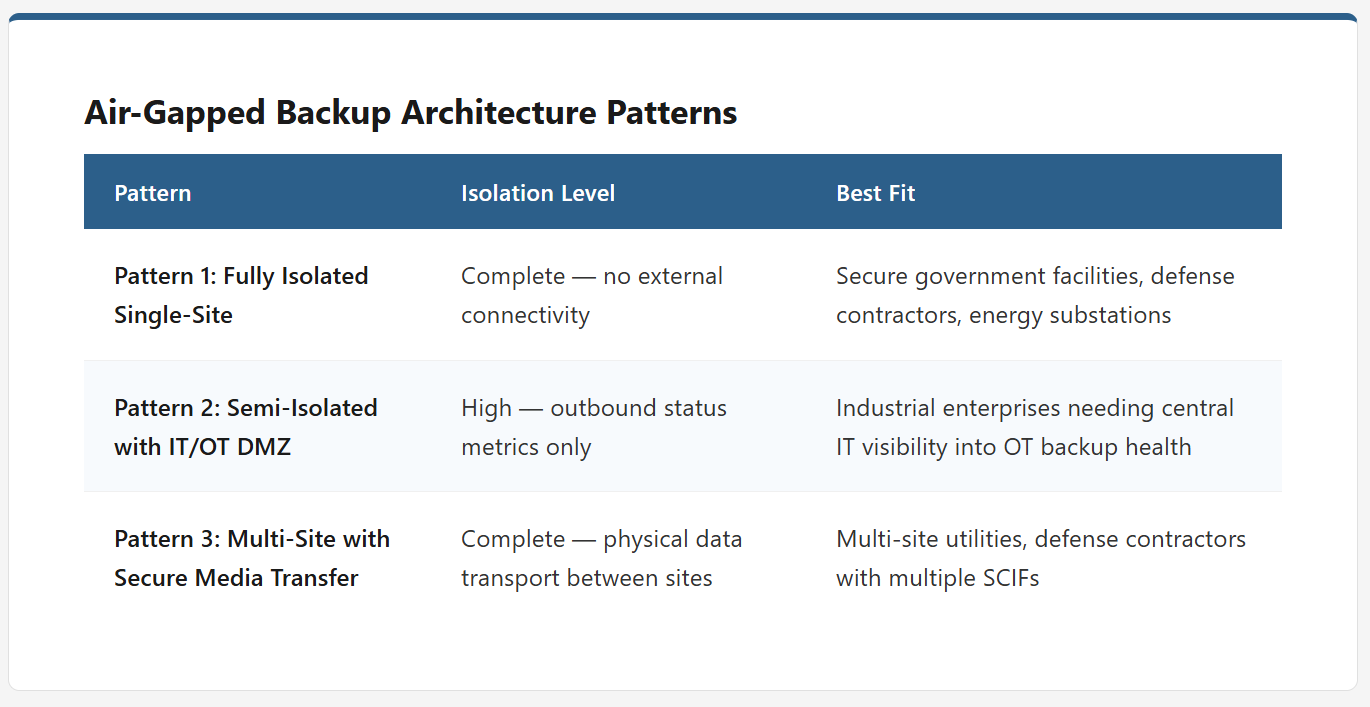
The right air-gapped backup architecture depends on your isolation requirements, site topology, and whether you need any visibility across network boundaries. The three patterns below cover the most common configurations — from fully isolated single-site environments to multi-site deployments requiring secure off-site consolidation.
Pattern 1: Fully Isolated Single-Site Architecture
This is the highest-assurance air-gapped backup architecture and the correct pattern for environments with strict isolation requirements: NERC CIP-covered bulk electric system assets, classified networks, defense contractor environments handling CUI under CMMC, and any deployment where regulatory compliance explicitly prohibits external connectivity.
- Topology: The isolated network contains: all client systems to be backed up (servers, workstations, databases, VMs); the Zmanda Pro backup server with attached backup storage; and a dedicated management workstation for administering backup jobs, reviewing reports, and managing the backup software. No network bridges, routers, or connections of any kind exist between this segment and any external network. The network is physically distinct — separate switches, separate cabling infrastructure, air-gapped from everything else.
- Update and License Ingestion: Software updates, license files, and any external data must enter the isolated network through a controlled media workflow: downloaded on an internet-connected machine, verified for integrity (checksum validation), transferred to the isolated network via removable media using a dedicated transfer workstation, and applied according to the documented update schedule. The transfer workstation should be used exclusively for this purpose and should not be a regular endpoint with broad network access.
- Best Fit: Single-site environments with a unified isolated network — manufacturing plants, energy substations, secure government facilities, defense contractor secure rooms. Works well for environments where all systems to be backed up are in the same physical location and on the same isolated network segment.
Pattern 2: Semi-Isolated Architecture with IT/OT DMZ
This pattern applies when organizations need some degree of management visibility across the IT/OT boundary — for example, to surface backup status in a centralized IT monitoring platform — while keeping the backup data and backup server strictly isolated from the corporate network.
- Topology: Three network zones exist: the isolated OT/secure network containing clients and the backup server; a DMZ containing a one-way relay or monitoring proxy; and the corporate IT network. Data flows outward (OT to DMZ to IT) only — never inward. The backup server has no connectivity to the DMZ; only status/health metrics are exported through the relay to IT monitoring. Backup data never crosses the DMZ boundary. The DMZ relay is a hardened system with a minimal attack surface and no persistent storage of backup data.
- Firewall Rules: The firewall between the OT network and the DMZ allows only specific outbound traffic on defined ports — backup status metrics, alert notifications, and health telemetry originating from the OT side. All inbound traffic from the DMZ to the OT network is blocked by default with no exceptions. The firewall between the DMZ and the corporate network similarly restricts traffic to the specific monitoring data flows defined in the design. Any rule that allows inbound traffic to the OT segment breaks the semi-isolated design and must be treated as a security finding.
- Best Fit: Organizations that need central IT visibility into OT backup health without allowing bidirectional network access. Common in large industrial enterprises where a central NOC monitors multiple OT environments, and where backup status must be visible to IT operations teams who don’t have physical access to the OT floor.
Pattern 3: Multi-Site Air-Gapped with Secure Media Transfer
For organizations with multiple isolated sites, multiple substations, multiple manufacturing plants, multiple secure facilities, each site needs its own local backup capability, but there may also be a requirement to consolidate backup data or maintain an off-site copy for disaster recovery purposes. This pattern addresses that scenario without compromising site-level isolation.
- Topology: Each site operates an independent, fully isolated backup environment (Pattern 1 at each site). Periodically — on a schedule defined by recovery requirements — encrypted backup data is exported to encrypted removable media or encrypted portable drives. These media are physically transported to a central secure facility or off-site vault, where they are ingested into an air-gapped consolidation system. No network connectivity exists between sites for backup purposes; all data movement is physical.
- Key Considerations: The RPO for consolidated backup is limited by the frequency of physical media transfer — if media is transported weekly, the off-site copy is up to 7 days behind. For sites where local recovery is the primary use case and the off-site copy is primarily for catastrophic site-loss scenarios, this RPO gap is typically acceptable. Encryption of all backup data at rest is non-negotiable for media transfer designs — media can be lost or intercepted in transit, and unencrypted backup data represents the entire content of the systems it protects.
- Best Fit: Multi-site utilities, defense contractors with multiple SCIFs or cleared facilities, and government agencies with multiple classified networks that require independent local backup at each site with periodic off-site consolidation for audit or disaster recovery purposes.
Key Architecture Decision Points
| Decision Point | Pattern 1: Fully Isolated | Pattern 2: Semi-Isolated DMZ | Pattern 3: Multi-Site Media |
|---|---|---|---|
| External network connectivity | None | Outbound-only metrics via DMZ | None (physical media only) |
| Central IT visibility | Not available | Available via relay | Not available |
| Update mechanism | Removable media only | Removable media only | Removable media at each site |
| Off-site backup copy | Requires physical media transfer | Requires physical media transfer | Built into design via consolidation |
| Compliance suitability | NERC CIP, CMMC, Classified | NERC CIP with monitoring exception | Multi-site NERC CIP, CMMC L3 |
Network Design Considerations
Regardless of which pattern applies, several network design details determine whether the backup architecture performs reliably under production loads:
- Backup traffic bandwidth: Size the network infrastructure for backup traffic volume, not just normal production traffic. A full backup of a 10TB environment over a 1Gbps LAN takes approximately 22 hours; over a 10Gbps LAN, that’s 2.5 hours. Incremental backups are significantly smaller, but initial seeding and periodic full backup windows must be factored into network capacity planning. Backup traffic on a shared LAN can saturate the network and impact production systems — consider a dedicated backup VLAN or dedicated physical switches for backup traffic in high-volume environments.
- Backup storage network segmentation: The backup server’s storage network should be separate from the client backup network. This prevents a client-side compromise from directly accessing backup storage, and it allows storage traffic (which can be high-bandwidth) to be isolated from client communication traffic.
- Management network separation: If the volume of managed systems justifies it, a dedicated management VLAN for backup administration — separate from the backup data network — provides an additional layer of access control. Administrative access to the backup console should require separate credentials from the credentials used by backup agents, and should be logged comprehensively.
Common Architecture Mistakes to Avoid
- Flat network deployment: Running the backup server on the same flat network segment as all production systems eliminates the management plane separation that contains blast radius. Even within an isolated environment, the backup server should be on its own segment with access controls.
- No defined update ingestion point: Designs that lack a defined, dedicated transfer workstation for media ingestion end up using ad hoc methods — and ad hoc methods introduce inconsistency and security gaps. Designate a specific transfer workstation for all external data ingestion, and apply controls to limit what it can do after a transfer session.
- Treating the backup network as a production extension: Backup clients need a route to the backup server. In some designs, this route inadvertently creates a path that bridges the isolated network to broader production segments. Review routing tables on backup clients to confirm that the backup network route doesn’t also create access paths to non-backup infrastructure.
From Architecture to Deployment
These three patterns cover the majority of air-gapped backup architecture scenarios, but the right architecture for a specific environment depends on the compliance framework, the number and location of systems being protected, and the organization’s tolerance for operational complexity. The pattern selection drives hardware procurement, network build-out, and the operational workflows that will govern the environment for its entire lifecycle.
Zmanda Pro is designed to operate within all three of these patterns — with air gap backup capabilities that include offline licensing, zero call-home architecture, and software-only deployment on commodity hardware. If you’re moving from architecture design to implementation, the air-gapped backup deployment guide covers hardware selection, agent deployment, backup job configuration, and the operational runbooks that keep the environment running reliably over time. If you’re still evaluating whether to migrate from an existing cloud-connected solution, see the migration guide for the four-phase transition framework and pre-migration assessment checklist.
The architecture decisions made at the design stage are difficult to undo once production systems are relying on the backup environment. Getting them right upfront — particularly physical isolation, data flow directionality, and management plane separation — determines both the security posture and the operational efficiency of the environment for years to come.