Modern business operations have quite a lot of data flow daily, and any amount of data loss can cause a hindrance to business activities. Data like customer orders, financial transactions, employee databases, client information, and sales orders are vital for any business. In case of disasters like floods, fires, ransomware attacks, and whatnot, a reliable backup solution can give you peace of mind. However, before strategizing the data backup plan, it is essential to know more about data that needs to be backed up. The right questions can help you devise a better data backup strategy for your business.
Essential Questions for Your Data Backup Strategy: Why Your Business Needs Comprehensive Backup and Recovery
Before diving into the critical questions, it’s important to understand why a robust backup and recovery strategy is essential. Most organizations underestimate the impact of data loss until it’s too late. Whether it’s due to accidental deletion, hardware failure, or a natural disaster, losing critical data can cost your business thousands of dollars per hour in downtime.
Data protection isn’t just about having backups—it’s about ensuring those backups are reliable, tested, and can be restored quickly when disaster strikes. A well-planned recovery strategy includes not just creating backups but also establishing recovery processes that minimize downtime and ensure business continuity.
Essential Components of a Modern Data Backup Strategy and Recovery System
For the best data backup strategy, you need to plan your questions around your business needs, goals, and requirements.
- Types of data you need to back up (including word documents, databases, and individual files)
- Storage space and capacity requirements
- Recovery Point Objective (RPO) and Recovery Time Objective (RTO)
- Data backup medium and backup software selection
- GDPR rules and regulatory requirements
- Future-proof solution for your entire system
The following set of questions is designed around these essential backup points.
1. What Is Your Data Backup Goal?
The ultimate goal for all enterprises is to protect, manage, and maintain their data. However, the goals may differ depending on the types and sizes of data to be handled. You need to identify which data is most critical for immediate recovery when a disaster strikes. Understanding how much historical data is required for daily operations helps define appropriate backup objectives for your data backup strategy.
Consider these factors when defining your goals:
- Operational requirements and dependencies
- Compliance and audit obligations
- Customer satisfaction and service level agreements
- Budget constraints and resource availability
2. What All Needs to Be Backed Up?
Once you set the goal, you need to determine what requires backup protection. A typical business environment includes laptops, desktops, mobile devices, and servers. Additionally, data from CRMs, databases, financial systems, and other applications needs regular backup. Understanding these requirements is crucial for developing an effective data backup strategy.
Types of Backups to Consider:
Full Back up: A complete copy of all selected data. While comprehensive, it requires significant storage and time.
Incremental Backups: Only backs up data changed since the previous backup, optimizing storage and time.
Differential Backups: Backs up all changes since the last full backup, balancing storage efficiency with restore speed.
Focus your backup efforts on:
- Critical data essential for operations
- Customer databases and transaction records
- Financial records and compliance documents
- Virtual machine configurations
- Operating system configurations and settings
3. When Will You Schedule the Backups?
Backup frequency depends on your RPO (Recovery Point Objective)—how much data your business can afford to lose. Some organizations require continuous replication, while others can tolerate daily backups. Different data types may require different schedules based on their criticality and change rate.
Backup Scheduling and Frequency Best Practices:
Include regular backup testing in your schedule to verify data integrity
Implement automated backup scheduling to ensure consistency
Schedule backups during off-peak hours to minimize performance impact
Adjust frequency based on data criticality and change rates
4. Where Will You Store the Backup?
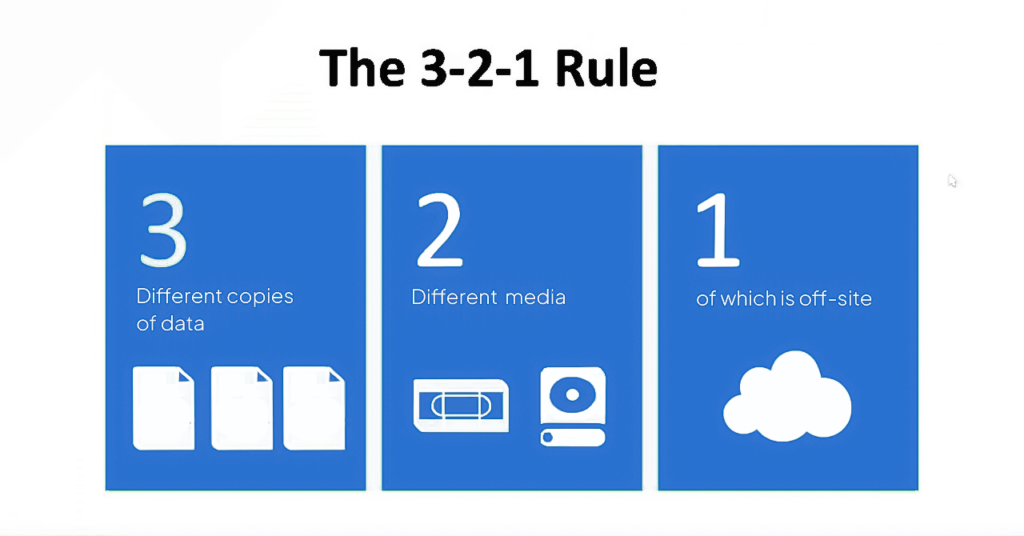
A comprehensive data backup strategy requires multiple storage locations. The 3-2-1 rule remains a gold standard: maintain three copies of your data, on two different media types, with one copy stored offsite. This approach protects against various failure scenarios.
Modern Storage Options:
Local Backups: Provide fast recovery for operational issues, typically stored on dedicated backup servers or network-attached storage.
Cloud Backups: Offer offsite protection against physical disasters with the flexibility of remote access.
Hybrid Backup Solutions: Combine local and cloud storage, providing both quick local recovery and offsite protection.
Consider geographic distribution of backups to protect against regional disasters, and ensure your chosen locations meet any data residency requirements for compliance.

5. What About Your Data Recovery Time and Process?
Your data recovery strategy should involve recovery time as well. A crashed hard drive usually doesn’t affect the data recovery time much – if you have another computer system in the office, you can quickly retrieve data from local backups.
However, during an event of a natural disaster such as a fire or flood, you will need new hardware. Consequently, you will have to reinstall applications, software, updates, and restore data from scratch. In such scenarios, cloud backups become invaluable as they allow you to access your data from anywhere, regardless of local hardware availability.
Consider having a robust backup and recovery solution ready to handle such events, as it will significantly reduce the data recovery time. The recovery time depends on several factors including data volume, available bandwidth, and the complexity of your systems. You also have an option to partner with an outsourced managed IT solutions provider that can create a customized data backup strategy
6. Will Your Backup Strategy Provide Business Continuity?
This question is directly related to data recovery time. The lesser the recovery time, the better your business continuity. If you can restore data and systems in minutes after a disaster, your business operations remain largely unaffected.
However, if it takes hours or days to recover, the downtime will cost your business a fortune. You need a data backup strategy with a solid recovery plan that can handle business continuity with ease. This includes having clear escalation procedures, documented recovery steps, and regular testing backups to ensure everything works when needed. Remember, an untested backup is just a hope, not a plan.
7. Are You Subject to Any Data Protection and Regulatory Requirements?
If your business is subject to compliance rules, there might be limitations to your backup options. For instance, there might be restrictions on offsite backups, or you may need to ensure specific data protection standards and encryption levels for saved backups.
If you reside in the EU or have a client base there, you’re likely familiar with GDPR and its strict retention policies. It’s crucial to address compliance early – discovering regulatory gaps after implementing your data backup strategy can result in hefty fines. Industries like healthcare (HIPAA) and finance (PCI-DSS) have their own specific requirements. Therefore, choose a data backup solution provider who is well-versed with all regulatory compliances relevant to your industry.
8. Is the Solution Future-Proof?
Your backup system should not only be ready for today but also for tomorrow. The continuously evolving technology landscape requires a data backup strategy that can adapt to change. Does your strategy support and manage hybrid storage? Is there native-cloud integration? Can it scale with your growing production data?
A future-proof solution should handle regular backup software updates, support backing up your entire operating system when needed, and integrate easily with new technologies as they emerge. Consider whether the solution offers APIs for integration and whether it can adapt to new application types and platforms that your business might adopt in the future.
Implementation Best Practices for Your Data Backup Strategy
With the core questions addressed, let’s examine the operational components that transform a good data backup strategy into an exceptional one.
1. Data Center and Infrastructure Planning
If you maintain on-premises infrastructure, your data center planning becomes crucial for backup success. Physical security, environmental controls, and power redundancy form the foundation of reliable backup infrastructure. Consider how geographic distribution can protect against regional disasters, and ensure your network has sufficient bandwidth to handle backup traffic without impacting daily operations.
Capacity planning deserves special attention – your infrastructure must accommodate not just current needs but anticipated growth. The integration between your backup systems and existing infrastructure should be seamless, allowing for efficient data flow and management across all components.
2. Optimizing Your Backup Process
An efficient data backup strategy reduces costs while improving reliability. Deduplication and compression technologies can dramatically reduce storage requirements, often cutting storage needs by 50% or more. However, optimization goes beyond just saving space.
Automation plays a key role in reducing manual errors and ensuring consistency. By automating routine tasks and monitoring backup performance, you can identify issues before they become problems. Remember to document your procedures thoroughly and review your backup strategy regularly – what works today may need adjustment as your business evolves.
3. The Critical Importance of Backup Testing
Here’s a sobering truth: Most organizations discover their backups are flawed only when they desperately need to recover data. Without regular testing, you won’t know if your last backup is corrupted, incomplete, or simply unusable until disaster strikes.
A comprehensive testing program should become part of your routine operations. Monthly restoration tests of critical systems help catch issues early. Quarterly partial disaster recovery exercises validate your procedures work under pressure. Annual full-scale recovery drills ensure your team can handle major incidents. Each test should validate both individual files restoration and entire system recovery capabilities.
Document every restore operation test, noting what worked well and what needs improvement. These lessons learned become invaluable when facing real emergencies. Remember, an untested backup is just data sitting on a disk – not a reliable data backup strategy you can count on.
Get Answers to All Your Data Backup Strategy Questions with Zmanda
Is your current data backup strategy answering all the above questions? If not, you need a change. You can opt for an enterprise backup solution that can help you address all your questions. Some tips can come in handy when you are choosing data backup and recovery software.
Zmanda pro can help you with a customized data backup strategy, as a one-size-fits-all solution is impossible when managing enterprise data. With Zmanda, you can have a 3-2-1 backup plan and a future-ready solution because it supports hybrid cloud environments. You can also set your RPO and RTO objectives to yield business continuity in case of disasters.
So, let’s get started with a free trial and strategize your data backup efficiently. If you have any questions regarding the backup solution, you can also get in touch with Zmanda’s customer support team.