Have you ever confronted a database crash? The database setup comprises the system server hardware and the software stack that runs the OS and the other required software packages. Modern database servers often utilize containerized environments and plugins to improve deployment flexibility and isolation. All these components connect to both internal systems and external networks through hardware and software like firewalls, switches, and routers.
It might look ideal if such a complex setup runs 24/7 without any issues or downtime, but that is not the case with a system or database administrator. The reason is simple, and the software and hardware networks are not 100 percent fault-proof.
There is a constant change in the internal and external environments. In essence, new software arrives, existing software gets updated. Database growth, memory being consumed, log files and caches, growing buffers, and all those challenges relevant to a dynamic environment are related to a database, too.
A database, its host system, and the network are expected to undergo quite a few security and maintenance routines and protocols that guarantee a 99.xx percent uptime. Even if something unexpected happens, the DBA must be able to restore the database as early as possible. In this article, let us discuss the reasons that can cause a db crash that affects the robustness of a database.
Why Do Databases Crash?
We often take database stability for granted until systems fail at the most inconvenient moment. But what exactly causes these critical systems to crash? Understanding the root causes is the first step toward creating truly resilient database environments.
1. Low Maintenance on Pre-Deployment Scripts
Databases become destabilized when there are no needed keys and indexes to eliminate redundancy and progress response time. This foundation-level issue often stems from poor initial design decisions that prioritize speed of deployment over long-term stability. Poor performance due to the latest upgrades of system software and the database not functioning well together can also lead to crashes. As your database evolves, what worked initially may become insufficient as data volumes grow. Mismanagement in the planning of your database configuration is another critical issue that can lurk undetected until a system is under stress, at which point it might be too late to make structural changes without downtime.
What To Do About It:
1. Regular schema reviews should be implemented to identify and address design weaknesses before they cause failures. These reviews should examine indexing strategies, normalization choices, and other structural elements that affect performance under load.
2. Testing protocols for database upgrades must verify compatibility with your specific configuration before deployment, including verification that committed transactions are properly handled during the upgrade process.
3. Documentation standards for your database configuration settings are essential, treating them as critical infrastructure code. This documentation creates consistency across environments and helps troubleshoot issues when they arise.
4. Performance optimization should be conducted regularly to identify areas where indexes could improve response times and ensure proper buffer pool configuration for optimal memory utilization. This proactive approach prevents gradual degradation that eventually leads to crashes.
5. Expert consultation If you’re experiencing recurring issues despite your best efforts, it may be time to seek help. Expert consultation may be necessary to diagnose complex problems. A database consultant can audit your schema design and identify optimization opportunities you might have missed.
To quickly assess if your server is appropriately sized for your current database, run this command to check I/O wait times – a key indicator of resource constraints. Monitoring these metrics helps prevent serious issues with your system. When this full db crash happens, it’s often because administrators missed early warning signs:
Look for consistent %iowait values above 10%, which often indicate your database needs more powerful storage or a larger server. Use this SQL command to identify your top 10 slowest queries, which often indicate areas needing indexing or optimization:
SQL:

(For PostgreSQL – similar commands exist for MySQL, SQL Server, and Oracle)
2. The Database Is on The Wrong Server
The race for server hosting is a new competition today! Many organizations seek cost savings by placing critical databases on underpowered infrastructure, creating a ticking time bomb for reliability.
Configuring the system or planning an upgrade might look tempting at a cheaper rate. But if you do not have a careful strategy, your database and information can wind up on shared servers, which can deny users when the network is full in shared resource usage.
Poor query or configuration, a faulty application config, or compromised application or database can be a few reasons for this to happen. As a result, the database is deficient in resources, including memory and processing power, precisely when it needs them most.
What To Do About It:
1. Capacity planning must account for peak loads, not just average usage. Examine historical patterns and project future growth to ensure your server can handle maximum expected demand plus a safety margin of at least 30%.
2. Dedicated servers should be considered for production databases with mission-critical workloads. While shared environments may reduce costs, the reliability benefits of dedicated resources often outweigh the savings, particularly for business-critical applications.
3. Resource monitoring implementations should identify when your database approaches capacity limits. Configure alerts at 70-80% thresholds to provide time for remediation before users experience problems.
4. Scaling strategies need to address both vertical growth (more powerful servers) and horizontal growth (distributed databases). Document these approaches before they’re needed during a crisis situation.
5. Resource guarantees from your hosting environment are essential rather than just shared resource pools. This is particularly important in virtualized and cloud environments where contention can affect performance.
To quickly assess if your server is appropriately sized for your current database, run this command to check I/O wait times – a key indicator of resource constraints that can lead to databases crash:

Look for consistent %iowait values above 10%, which often indicate your database needs more powerful storage or a larger server.
3. Unfriendly Application and Queries
Too many or slow queries are a result of your application’s data server not programmed correctly. Also, this might result in slow or too many queries being issued. These queries are made when there is under or overutilization of indexes and joining of bi-directional tables.
This, in turn, results in wasteful, faulty, and even absent indexes. It all comes down to worthless quality design, bad coding, poor optimization queries, and a lack of standards. The relationship between your application and database is critical – when one makes excessive demands, the other will eventually fail. These intense demands can crash database systems almost immediately.
What To Do About It:
1. Performance monitoring for queries should identify problematic operations before they affect overall stability. Tools like slow query logs and performance schema analysis provide early warning of issues that could eventually cause crashes. For teams working with PostgreSQL, using a modern PostgreSQL GUI can significantly simplify query optimization and monitoring.
2. Optimization processes should regularly review and improve resource-intensive database operations. This ongoing refinement prevents the accumulation of inefficiencies that eventually overwhelm the system.
3. Development standards must incorporate database performance considerations from the beginning. These standards should guide query writing, transaction handling, and connection management to ensure database-friendly applications.
4. Connection management through database proxies or pooling mechanisms can significantly reduce overhead, especially in high-volume environments. This approach prevents connection explosions during peak periods.
5. Caching implementation for frequently accessed relatively static data can dramatically reduce database load. Strategic caching at application, query, or object levels provides performance benefits that help prevent overload situations.
6. Execution plan analysis should become standard practice during development. Understanding how the database will process queries allows optimization before they cause production problems.
Identify and fix N+1 query problems, one of the most common causes of database overload. This pattern occurs when code retrieves a list of items and then makes a separate database query for each item’s details. For example:

Fixing N+1 query problems often provides the most dramatic performance improvements with minimal code changes.
4. Hardware and Software Failures
What happens if there is a host server hardware or power failure? Your database server crashes! Isn’t it a nightmare? It can be anything like a host server hardware failure (processor, memory disks, RAM, motherboard, network hardware, etc.) or power failure and succeeding server crash can be a reason for the database to stop abruptly, causing a data crash.
The case is similar to the software failure that affects the threads and dependency package processes of the database server. In order to avoid such kind of crashes, it is better to safeguard quality hardware, a power backup plan, and maintain a rigorous system administration.
What To Do About It:
1. Hardware redundancy should be implemented where possible for critical components. Redundant power supplies, RAID configurations, and duplicate network paths create fault tolerance that prevents single points of failure from causing database crashes.
2. Maintenance schedules should proactively replace aging components before they fail. Regular hardware diagnostics can identify subtle issues before they cause complete system failure.
3. Power protection through uninterruptible power supplies and generator backup is essential for critical systems. Power-related issues cause many preventable database crashes that proper electrical redundancy would eliminate.
4. Health monitoring for hardware components can catch early warning signs of failure. Automated checks for disk errors, memory integrity, and component temperatures provide advance notice of developing problems.
5. High-availability configurations for mission-critical databases provide automatic failover when individual components experience problems. These should always be complemented with appropriate backup types for your recovery needs.
Set up S.M.A.R.T. monitoring for your database servers’ disks to detect early warning signs of failure before they cause a db crash:
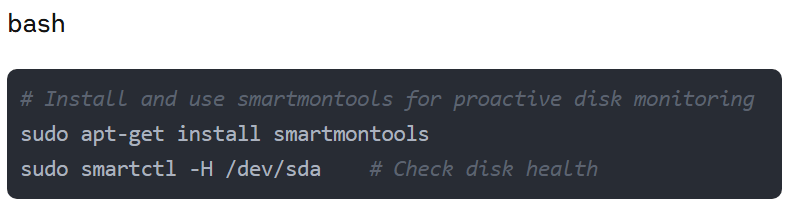
Disk failures are among the most common hardware issues that cause databases to crash, and proactive monitoring can provide days or weeks of warning before actual failure.

5. Running Out of Memory and Swap Space
From where does a database get and use memory?It’s caches, buffers, and log files like index and data files, as well as redo log files that track database changes. As the volume of data increases in the database, the information on the file system increases too.
In case if in-memory resources are not allocated with an equal amount of memory, the database will try to grab SWAP memory. Indeed, if there is no enough SWAP space available, then the database server might crash or stop operation due to a lack of memory.
What To Do About It:
1. Memory parameter configuration should be based on workload requirements and available server resources. Customized settings that account for your specific usage patterns prevent the default configurations that often lead to memory exhaustion.
2. Usage monitoring with alerts for approaching thresholds provides early warning of potential memory issues. Configure notifications at 75-80% utilization to allow time for intervention before crashes occur.
3. Log management policies should include rotation and archiving of transaction logs, including write ahead log files, to prevent log files from consuming all available space. Automated procedures ensure this critical maintenance happens consistently.
4. Swap configuration appropriate for your database needs provides a buffer that can prevent immediate crashes during temporary memory pressure. While not a substitute for adequate memory, proper swap settings create important breathing room.
5. Maintenance procedures should regularly clear cached data that may no longer be necessary. This housekeeping prevents gradual performance degradation that eventually leads to crashes.
For MySQL database, use this configuration setting to prevent the most common memory-related crashes:
# In my.cnf
innodb_buffer_pool_size = 70% of server RAM for dedicated database servers
                        or 50% of server RAM for multi-purpose servers
And set up this simple memory monitoring script:
#!/bin/bash
# memory_alert.sh - Run as a cron job
THRESHOLD=80
CURRENT=$(free | grep Mem | awk '{print $3/$2 * 100.0}')

if (( $(echo "$CURRENT > $THRESHOLD" | bc -l) )); then
  echo "WARNING: Memory usage at $CURRENT% exceeds threshold of $THRESHOLD%" |
  mail -s "Database Server Memory Alert" [email protected]
fi
6. Corruptions and File Permissions
Corrupted data, index files, or permission issues cause a significant number of database crashes. There are other reasons too: A database without accurate locking writes a data or index and other processes modify it. Database server processes use the same data directory in the host system that does not contain support for external file locking or proper file system locking. This might disable the database servers and lead to databases crash situations.
The database server might try to read or write from a data/index file that is already crashed or corrupted. A defective piece of hardware corrupts a data/index file, creating a cascade of failure that can affect even properly backed-up systems if the corruption isn’t detected quickly, often resulting in databases crash incidents.
What To Do About It:
1. Integrity checks should be performed regularly as part of your maintenance schedule. These checks can identify potential corruption before it affects critical operations or spreads to backup sets, preventing databases crash events.
2. Proper locking mechanisms supported by your file system prevent concurrent modifications that can lead to corruption. Ensure your database environment supports the locking requirements of your specific database platform to avoid databases crash scenarios.
3. Permission management with appropriate file ownership and access rights prevents issues that can trigger database crashes. Regular audits should verify these settings remain correct, especially after system changes.
4. File system monitoring can detect corrupted files before they cause database failures. Implement checksums or other validation mechanisms that flag integrity issues early before they result in databases crash situations.
5. Journaling file systems provide better corruption resistance, particularly for write-intensive workloads. These file systems maintain data integrity even during unexpected shutdowns, preventing many common corruption scenarios that lead to databases crash.
Implement regular database integrity checks using native tools to prevent database crashes due to corruption. For PostgreSQL:

Schedule these checks during low-usage periods but run them regularly – small corruptions can often be fixed before they cause crashes if caught early.
7. No Expert DBA On Board
Systems ought to fail when you do not have a proactive DBA on board who has foresight and planning solution skills. A DBA provider is believed to supervise everything for you. They can scale your system needs, check data integrity, catch problems, monitor the logs, and optimize performance space. This takes constant planning and critical organization to prevent system crashes that can seriously damage your database, as well as impact your business. The human element in database management cannot be overlooked – automated tools are valuable, but expert judgment remains essential.
What To Do About It:
1. Dedicated expertise through hiring a DBA or contracting with a managed database service provides specialized knowledge that prevents many common issues. This expertise becomes particularly valuable during complex troubleshooting scenarios.
2. Knowledge investment in existing staff through training improves database management skills and broadens your team’s capabilities. This approach works well for organizations that cannot justify a full-time DBA.
3. Documentation practices ensure critical information isn’t concentrated in a single person. Comprehensive documentation makes knowledge transfer more effective and supports consistent operations even during personnel changes.
4. Standard procedures for common database maintenance tasks create consistency and reliability. These procedures should cover routine operations like backups, index maintenance, and performance tuning.
5. Managed services for non-critical databases can reduce administration overhead while preserving internal resources for mission-critical systems. This balanced approach maximizes the impact of your database expertise.
Create a checklist for simple weekly maintenance for your IT team to catch common issues early.
24/7 Expert Database Support
24/7 Expert Database Support Don’t let database issues impact your business at any hour. Our team of database experts is available around the clock to help you prevent, diagnose, and resolve data crash incidents before they affect your operations.
Wrapping Up!
To avoid the database failures we’ve discussed, choose a management approach that provides immediate results while building long-term stability. A comprehensive strategy includes both preventative measures and recovery plans. Regular maintenance, robust monitoring systems, thorough documentation, regular testing, appropriate redundancy, and access to database expertise all contribute to a resilient database environment that can prevent most database crashes. This approach helps ensure that even when issues occur, they won’t crash database operations entirely.
For organizations seeking additional support, there are many excellent backup and recovery solutions available that simplify database administration across multiple operating systems. The key is selecting tools that match your specific database environment and business requirements.
Ready to Prevent Database Crashes?
If you’re looking for a reliable solution to protect your critical database environments, explore Zmanda Pro’s specialized database backup capabilities—with support for MySQL, PostgreSQL, Oracle, and SQL Server, plus features like point-in-time recovery and application-consistent backups designed specifically to prevent costly downtime.
Start your free trial

Frequently Asked Question
What are the most common causes of databases crash?
The most common causes include memory exhaustion during connection spikes, poorly optimized queries that lock critical tables, storage subsystem failures, configuration issues, and insufficient resources to handle production workloads. These factors often combine to trigger databases crash incidents.
How much does database downtime typically cost?
According to ITIC research, database downtime costs enterprises an average of $5,600 per minute or approximately $300,000 per hour, with costs varying based on business size and industry. When databases crash, these costs escalate rapidly.
Can most database crashes be prevented?
Yes, approximately 40% of databases crash outages occur due to recognizable, preventable patterns. With proper monitoring, maintenance, and preventative measures, most databases crash incidents can be avoided.
What monitoring tools should I implement to prevent database crashes?
Essential monitoring should track query performance, connection counts, memory usage, disk I/O, transaction logs, and table locks to prevent databases crash situations. Popular tools include Prometheus, Grafana, SolarWinds Database Performance Analyzer, and native monitoring tools for specific database platforms.
How often should database backups be performed?
Backup frequency depends on your recovery point objective (RPO), but most production databases should have daily full backups with more frequent incremental backups or transaction log backups to recover quickly when databases crash. Critical systems may require continuous backup solutions.
What’s the difference between high availability and disaster recovery for databases?
High availability focuses on preventing downtime through redundant systems that can immediately take over when databases crash or failures occur, while disaster recovery involves restoring service after a major disruption. A comprehensive strategy includes both approaches.