The decision to migrate to air-gapped backup solution from a cloud-connected deployment is rarely made lightly. It typically comes from one of three places: a compliance mandate that explicitly prohibits cloud connectivity for protected data, a security assessment that identified cloud backup as an unacceptable dependency, or a cost analysis showing that cloud storage and egress fees at scale are harder to justify than an owned on-premises infrastructure. Regardless of the driver, this migration involves more planning than most teams anticipate — because you’re changing the operating model, not just the software.
This guide walks through the process to migrate to air-gapped backup in four phases — assessment, architecture design, parallel deployment, and cutover — with practical guidance for IT Managers responsible for planning and executing the transition.
Migration Decision Checklist
| Migration Phase | Key Deliverable | Common Failure Point |
|---|---|---|
| Assessment | Complete backup inventory with all cloud dependencies mapped | Hidden dependencies in licensing, telemetry, or alerting missed |
| Architecture design | Hardware sizing and network topology documented and approved | Undersized storage; update workflow not defined before go-live |
| Software and licensing | Offline licenses procured and successfully imported | Offline licensing model not confirmed before contract signature |
| Parallel deployment | New environment validated with documented recovery test results | Validation period too short; recovery testing skipped |
| Cutover | All agents redirected; historical retention window preserved | Legacy cloud environment decommissioned before retention expires |
Why Organizations Using Cloud Backup Migrate to Air-Gapped Backup Solutions
The migration trigger matters because it shapes the requirements and the timeline. The three most common drivers produce different urgency levels and constraints.
Compliance mandates: Defense contractors pursuing CMMC 2.0 certification, critical infrastructure operators subject to NERC CIP, and organizations handling classified information must often eliminate cloud dependencies for covered data entirely. These migrations carry regulatory deadlines and require documented evidence of compliance — not just general best practice alignment.
Security risk reduction: Supply chain security reviews and incident response assessments increasingly flag cloud backup as a potential attack vector. If an adversary can access or manipulate a cloud backup repository — whether through compromised credentials, misconfigured storage permissions, or vendor-side incidents — the backup itself becomes a liability. Organizations that migrate to air-gapped backup eliminate that exposure entirely by removing the network path.
Total cost optimization: Cloud backup costs are frequently underestimated at initial deployment and grow unexpectedly. Storage costs accumulate with data growth, and egress fees for large-scale recovery operations can be substantial. For organizations with multi-terabyte environments and strict retention requirements, a software-defined on-premises model can deliver a 30–50% lower 3-year TCO compared to a cloud-first backup architecture.
How to migrate to an air-gapped backup solution: a four-phase approach
Migrating from cloud-dependent backup to an air-gapped environment is a well-defined process when approached as a structured project. Each phase builds on the previous one — work through them in order rather than jumping to hardware procurement before completing requirements documentation.
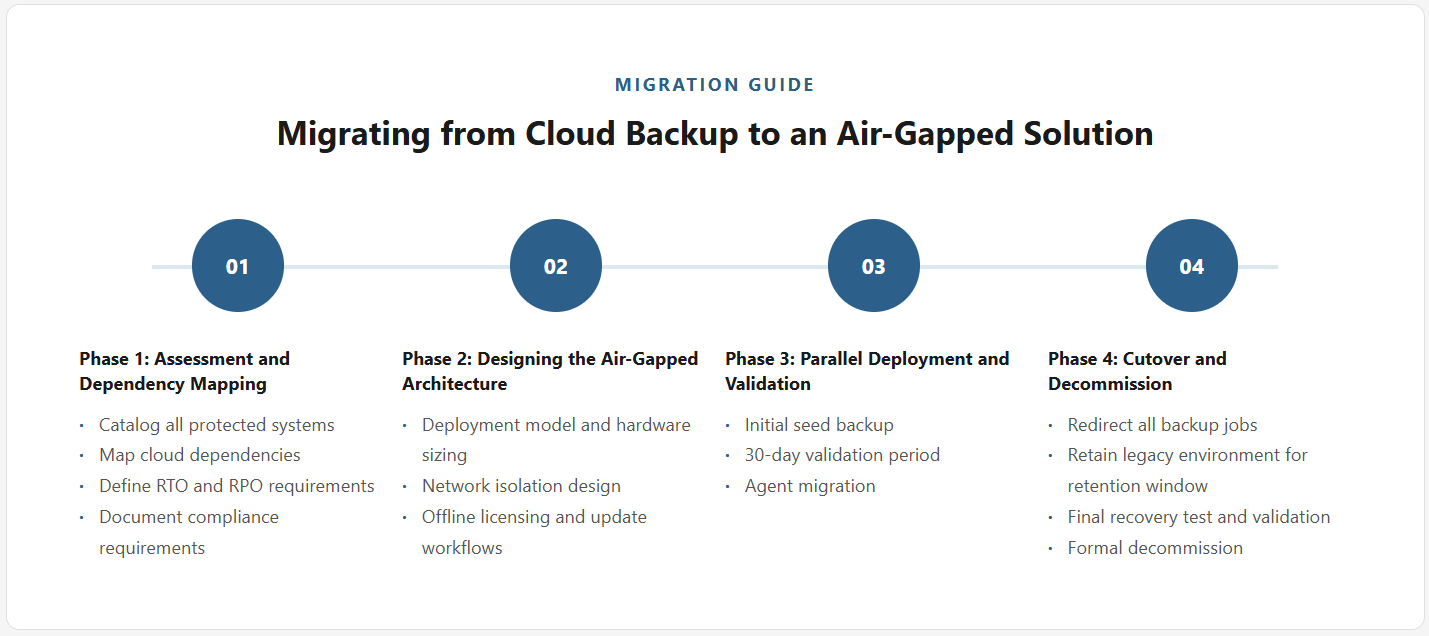
Phase 1: Assessment and Dependency Mapping
A successful migration begins with a thorough inventory of the current backup environment. Before any organization can effectively migrate to air-gapped backup, the assessment phase must answer four questions before any architecture decisions are made:
- What is being backed up? Catalog every protected system, its data classification, retention requirements, and current backup schedule. Identify workloads with special requirements such as databases requiring transaction log backup, VMs requiring application-consistent snapshots, or systems with vendor-mandated backup configurations.
- What cloud dependencies exist? Document every dependency on external connectivity in the current backup architecture — cloud storage endpoints, license validation calls, update mechanisms, reporting dashboards, and alerting services. Many backup solutions have cloud dependencies beyond the storage destination itself that will fail silently in an air-gapped environment if not identified upfront.
- What are the target RTO and RPO requirements? The new architecture must meet or exceed existing recovery time and recovery point objectives. In most cases, moving to local on-premises backup actually improves RTO because local restoration is faster than pulling data from cloud storage — which is a meaningful argument for the migration when presenting to stakeholders.
- What compliance requirements must the architecture satisfy? If the migration is compliance-driven, document the specific framework requirements — CMMC control identifiers, NERC CIP standard references, or equivalent — that the new architecture must demonstrably satisfy, with an eye toward what documentation and audit evidence will be required.
Phase 2: Designing the Air-Gapped Architecture
With the assessment complete, the architecture design phase establishes the blueprint for the new environment. Three areas require explicit decisions before procurement or deployment begins.
Deployment Model and Hardware Sizing
Software-only air-gapped backup on dedicated commodity hardware provides the best combination of flexibility, cost efficiency, and vendor independence. Avoid proprietary appliance lock-in if long-term cost control is a consideration. Size the backup server hardware against assessed data volume — provision 150–200% of current storage needs to account for data growth over the infrastructure lifecycle without requiring disruptive capacity expansions. The air-gapped backup architecture guide covers hardware sizing formulas and reference topologies for common isolated deployment scenarios.
Network Isolation Design
Define the network perimeter for the backup environment explicitly. In a pure air-gapped deployment, the backup server and all clients operate on a physically isolated network segment with no external connections. In a semi-isolated deployment with an IT/OT DMZ, define the one-way data flows and strict firewall rules that maintain security while allowing controlled backup traffic. Document this design formally — network topology is a core component of compliance evidence in frameworks like NERC CIP and CMMC.
Offline Licensing and Update Workflows
Procure software licenses for the new environment with explicit offline licensing terms confirmed before contract signature. Define the update workflow — how software patches and agent updates will be transferred into the isolated environment, verified for integrity, and applied on a scheduled basis. This workflow must be documented before go-live. For a detailed walkthrough of offline licensing models and renewal management, see the offline licensing guide for enterprise backup.
Phase 3: Parallel Deployment and Validation
The safest way to migrate to air-gapped backup is through parallel deployment: stand up the new air-gapped backup environment while keeping the existing cloud-connected environment running. This creates a validation period where the new system can be tested under production conditions without risking backup coverage gaps.
- Initial seed backup: For large environments, the first full backup in the new system can span multiple days, even over local LAN. Plan for this window explicitly — schedule it to start early enough that it completes before the validation period requires the new system to be operationally ready. Attempting to rush the initial full backup is the most common cause of parallel deployment delays.
- Validation period: Run both environments in parallel for at least 30 days. During that window, complete at least one full recovery test against each major workload category and document the results. This is not optional — it is the evidence that the new environment is production-ready. Organizations that skip or shorten the validation period consistently discover gaps during their first real recovery event.
- Agent migration: Where possible, configure backup agents to target the new backup server before removing them from the old one. This confirms agent connectivity and backup job behavior in the new environment without disrupting existing coverage. For workloads that cannot run dual-agent configurations, schedule agent cutover during a planned maintenance window with the old backup as fallback coverage.
Phase 4: Cutover and Decommission
Once the parallel environment has been validated, the cutover sequence is straightforward — but the sequencing matters:
- Redirect all active backup jobs to the new air-gapped backup server and confirm job completion for the first full backup cycle under the new configuration.
- Retain the cloud backup environment for a defined retention window — typically aligned with your longest retention policy — to preserve access to historical restore points that don’t yet exist in the new system.
- Complete a final recovery test against the new system covering all critical workload categories, and document the results as formal validation of the cutover.
- Formally decommission the cloud backup environment only after the retention window has expired and all historical data has been verified in — or is no longer required from — the legacy system.
Common Migration Pitfalls
- Underestimating the initial backup window: The first full backup of a large environment can take 2–5 days even over local LAN, depending on data volume and storage throughput. Failing to account for this in the migration timeline creates pressure to cut over before the new system is fully validated.
- Incomplete dependency inventory: Many backup solutions have cloud dependencies beyond the storage destination — license validation, update notifications, alerting through SaaS services, and management consoles that require outbound connectivity. Each of these must be identified and replaced or eliminated in the new architecture before the cloud environment is decommissioned.
- Skipping the retention overlap period: Decommissioning the cloud environment before the retention window expires means losing access to historical restore points. This is particularly risky for organizations with 90-day or longer retention requirements, where a premature decommission creates an irreversible data gap.
From Cloud-Dependent to Fully Isolated: A Manageable Transition
Migrating from cloud-dependent to air-gapped backup is a well-defined process when it’s approached as a structured project. The four-phase model — assess, design, parallel deploy, cut over — manages risk throughout the transition and ensures the new environment is fully validated before the old one is decommissioned. The most important investment is in the assessment phase: getting a complete picture of current dependencies, RTO/RPO requirements, and compliance obligations before touching infrastructure prevents the mid-migration discovery that derails timelines and creates coverage gaps.
Zmanda Pro is designed to support exactly this type of disconnected backup migration, with a deployment model that requires no cloud connectivity from day one. Software-only deployment on commodity hardware eliminates appliance constraints, and offline licensing means there are no hidden call-home dependencies that could compromise isolation requirements in the new environment. For teams ready to move from architecture design to execution, the air-gapped backup deployment guide provides a complete implementation walkthrough, including hardware selection, agent deployment, update workflow setup, and operational runbook development — the full stack of what you need to go from design to production.