Looking for the best way to back up your Mac in 2025? If your organization relies on macOS across departments, from creative teams to development environments, protecting them requires a proper backup plan and solution that ensures data security, business continuity, and compliance standards.
In this guide, we’ll evaluate the leading macOS backup solutions for 2025, examine must-have features like APFS optimization and Apple Silicon support, and provide a proven implementation roadmap that IT teams can follow.
To make an informed decision, let’s first understand what modern MacOS backup actually requires in today’s distributed work environment.
Understanding macOS Backup Software Requirements
Protecting Macs effectively requires more than basic tools. Modern macOS backup software must handle challenges like remote management, compliance, and integration that most consumer solutions can’t address. Let’s explore what modern users really need in backup software for Mac.
The Modern Mac Environment
Today’s Mac deployments look vastly different from even five years ago. Users typically work across distributed locations—home offices, co-working spaces, and traditional offices. Mixed device ownership models (personal devices with work data and company-owned machines) add complexity, while massive data volumes from creative workflows, development environments, and business operations strain traditional macOS backup software approaches.
Add compliance requirements spanning multiple jurisdictions and integration needs with existing infrastructure, and it’s clear that yesterday’s backup strategies won’t meet today’s demands. The right backup software for Mac must address these modern challenges while remaining simple to deploy and manage.
What Modern Users Actually Need
Before evaluating specific backup solutions, you need to understand what makes Mac environments unique—and why generic enterprise tools often fail. These requirements will guide your selection process.
Centralized Management – Single dashboard for all devices
Policy Automation – Set once, apply everywhere
Compliance Ready – Built-in audit trails & retention
Flexible Recovery – From single files to full systems
Hybrid Storage – Mix local/cloud for optimal ROI
Key Technical Considerations for macOS
Understanding Apple’s ecosystem is crucial for backup software for Mac. These technical factors directly impact backup performance, reliability, and compatibility:
Apple Silicon Architecture: M1/M2/M3 processors require native optimization for optimal performance. Rosetta 2 translation works but impacts battery life and backup speeds significantly. Modern macOS backup software should be built specifically for Apple Silicon.
APFS Features: Modern backup solutions should leverage APFS snapshots for efficient, point-in-time backups without duplicating unchanged data. This can reduce storage requirements by 50% or more when properly implemented.
Security Framework: System Integrity Protection (SIP), File Vault encryption, and notarization requirements affect how backup software for Mac accesses system files. Solutions must work within these constraints without compromising security.
MDM Integration: Enterprise macOS backup software should complement Mobile Device Management strategies for organizations. Look for solutions that can be deployed and managed through existing MDM platforms.
With these requirements and technical considerations in mind, let’s examine the specific features that distinguish professional Mac backup solutions from basic alternatives.
Now let’s examine the specific features that separate professional Mac backup solutions from basic tools.
Essential Features for macOS Backup Software
Building on the unique requirements of Mac environments, modern backup software for Mac must deliver capabilities that address both technical and practical needs. Here are the essential features for protecting Macs effectively:

Flexible Backup Types
Image-based backups enable complete system recovery after hardware failures. File-level backups provide granular restoration for accidentally deleted or corrupted files. Modern macOS backup software should support both, plus application-aware backups for databases and continuous data protection for critical files that change frequently.
Intelligent Scheduling
Policy-based automation eliminates manual intervention. Look for network-aware scheduling that avoids bandwidth conflicts, CPU and battery-conscious operation for laptops, and backup window enforcement for distributed users across time zones. The backup software for Mac should handle offline devices gracefully, resuming backups when they reconnect.
Hybrid Storage Architecture
Users need flexibility to balance cost, performance, and compliance requirements. Local storage enables rapid recovery, private cloud maintains control, public cloud (AWS S3, Azure, Google Cloud) provides scalability, and air-gapped storage protects against ransomware. The best macOS backup software supports all options simultaneously with intelligent tiering.
Enterprise-Grade Security
AES-256 encryption in transit and at rest is table stakes. Look for customer-managed encryption keys, zero-knowledge architecture options, and integration with existing key management systems. Immutability features like WORM storage and object locking prevent ransomware from corrupting backups.
Centralized Management
A single dashboard for all Mac backups transforms operational efficiency. Role-based access control (RBAC) ensures proper permissions, multi-tenant architecture supports MSPs or large organizations, and API access enables automation and integration with existing tools. Policy inheritance and device grouping simplify management at scale.
Compliance and Reporting
Built-in compliance support for GDPR, HIPAA, SOC 2, and other standards saves countless hours. Automated audit trail generation, configurable retention policies, data residency controls, and scheduled compliance reports ensure you’re always ready for audits.
Deployment Model Flexibility
The right backup software for Mac should adapt to your infrastructure, not the other way around. Consider these deployment options:
On-Premises: Complete control over data and infrastructure, ideal for users with strict compliance requirements or existing data center investments
Cloud-Based (SaaS): Rapid deployment with no infrastructure management, perfect for distributed teams and growing organizations
Private Cloud: Combines cloud flexibility with data sovereignty, suitable for users with specific security requirements
Hybrid: Mix on-premises and cloud deployments based on data sensitivity and recovery requirements
Understanding these deployment models helps you evaluate which macOS backup software aligns with your infrastructure strategy and needs.
Solutions like Zmanda Pro offer this deployment flexibility—allowing businesses to choose or mix models based on their operational and compliance needs.
Now that you understand what features to look for and the deployment options available, let’s examine how different backup software for Mac delivers these capabilities.

Evaluating macOS Backup Solutions
Now that you understand what features to look for and deployment options available, let’s examine how different backup software for Mac delivers these capabilities. The market includes everything from simple tools for individuals to enterprise platforms designed for thousands of devices.
macOS Backup Software Comparison
| Solution | Best For | Deployment Options | Standout Features |
|---|---|---|---|
| Zmanda Pro | SMBs to large organizations | On-premises, Private-cloud, Hybrid | Immutable backups, ransomware protection, centralized control, app-aware backups |
| Acronis Cyber Protect | Security-conscious businesses | SaaS, On-premises, Hybrid | AI-based ransomware defense, full disk & file-level backup, blockchain verification |
| Backblaze Business | Affordable cloud backup for teams | SaaS | Unlimited cloud storage, fast restores, centralized admin |
| Carbon Copy Cloner | Small teams needing bootable backups | Local (macOS only) | Bootable clones, APFS snapshots, smart updates |
| Veeam Agent for Mac | Companies already using Veeam tools | On-premises, Private-cloud | 3-2-1 strategy support, image-based backup, enterprise-grade recovery |
Want a deeper look at the top tools? Check out our full comparison of the best Mac backup software solutions for 2025—featuring feature breakdowns, pricing insights, and expert recommendations for both SMBs and enterprises.
With a clear understanding of available macOS backup software options, the next critical step is planning a successful implementation that minimizes disruption while maximizing protection.
Implementation Strategy
A well-planned implementation ensures smooth deployment and rapid time-to-value. This phased approach has proven successful across hundreds of deployments, from individual power users to large enterprises implementing backup software for Mac.
Phase 1: Assessment and Planning
Infrastructure Audit Begin by documenting current backup methods across all Macs, identifying gaps in protection. Map data repositories and critical applications to understand what needs protection. Calculate storage requirements with 3-year growth projections to ensure scalability. Finally, analyze network topology and bandwidth constraints that might impact backup windows.
Requirements Gathering Define Recovery Time Objectives (RTO) and Recovery Point Objectives (RPO) by data type and use case. Document compliance requirements and regulatory constraints if applicable. Identify stakeholder expectations and success criteria to ensure alignment.
Phase 2: Solution Selection
Proof of Concept Planning Select 2-3 macOS backup software solutions that meet your core requirements for hands-on evaluation. Define specific test scenarios that reflect real-world usage. Identify pilot users representing different use cases—developers, creatives, executives. Prepare an isolated test environment to avoid production impact.
Technical Evaluation Deploy agents on test systems and configure backup policies matching production needs. Test backup performance across various network conditions, including VPN and remote connections. Teams supporting remote users should ensure their VPN configuration is optimized for sustained data transfers, as backup windows over VPN can be significantly longer than LAN-based backups.
Validate all recovery procedures, especially bare-metal restore capabilities that are critical for disaster recovery.
Phase 3: Pilot Deployment
Initial Rollout Start with technically savvy users who can provide detailed feedback. Implement in phases: begin with 1-10 devices, expand to 50, then 100+. Document all configuration decisions and create runbooks for common procedures. This methodical approach identifies issues before they impact broader deployment.
Monitoring and Optimization Track backup success rates and investigate any failures. Measure impact on network bandwidth and endpoint performance. Gather user feedback on restore experiences and adjust policies based on learnings. This iterative refinement ensures optimal configuration before full deployment.
Phase 4: Production Deployment
Staged Rollout Deploy by department, user group, or geographic location to manage change effectively. Maintain 2-week intervals between stages to incorporate lessons learned. Provide training before each stage and maintain fallback procedures during transition. This measured approach ensures continuity throughout implementation.
Policy Implementation Configure device groups with inheritance to simplify management. Set retention policies based on data classification and compliance requirements. Implement automated testing schedules and enable compliance reporting. These policies form the foundation of your ongoing backup operations.
Successful implementation is just the beginning. Maintaining effective backup software for Mac requires ongoing attention to best practices and operational excellence.
Successful implementation is just the beginning. Maintaining effective backup software for Mac requires ongoing attention to best practices and operational excellence.
Best Practices for macOS Backup Software Management
Years of managing Mac backups have revealed patterns that separate successful macOS backup software implementations from those that struggle. These practices ensure your backup system remains reliable, efficient, and aligned with your needs.
Policy Design
Device Classification Create distinct policies that match how different users work with their Macs. Executive laptops require the highest protection levels with fastest recovery times. Developer machines need frequent backups with extended version retention for code rollback. Creative workstations demand special handling for large files and project archives. Standard business laptops can use balanced protection that optimizes for efficiency.
Retention Strategies Implement tiered retention that balances protection with storage costs: daily backups retained for 30 days, weekly backups for 12 weeks, monthly backups for 12 months, and annual backups for compliance (typically 7 years). This approach ensures you can recover from both recent mistakes and historical audit requests.
Operational Excellence
Automation First Reduce human error through policy-based device onboarding that automatically protects new Macs. Implement automated backup verification that confirms data integrity. Enable self-healing for common failures like network timeouts. Schedule compliance reports for regular delivery to stakeholders.
Monitoring Discipline Establish daily backup success reviews to catch issues early. Conduct weekly storage utilization analysis to prevent capacity surprises. Perform monthly recovery testing to validate your protection. Schedule quarterly strategy reviews to ensure alignment with evolving needs.
Security Hardening
Access Control Implement principle of least privilege for backup system access. Use SSO integration where available to simplify authentication. Enable MFA for all administrative access. Conduct regular access audits to remove unnecessary permissions.
Data Protection Encrypt all backup traffic using strong protocols. Generate unique encryption keys per device to limit breach impact. Implement key rotation policies that balance security with operational complexity. Maintain offline key backups in secure locations for disaster recovery.
These best practices mean nothing without regular testing and validation. Let’s explore how to ensure your macOS backup software works when needed most.
These best practices mean nothing without regular testing and validation. Let’s explore how to ensure your macOS backup software works when needed most.
Recovery Procedures and Testing
The true test of any backup software for Mac is its ability to restore data quickly and completely when disaster strikes. Regular testing and well-documented procedures ensure your investment delivers value during critical moments.
Recovery Scenarios
Understanding recovery types helps you prepare for the three most common data loss situations Mac users face:
File-Level Recovery: The most common scenario involves users needing specific files restored. Implement self-service portals that allow users to recover their own files, reducing complexity. Ensure granular file selection with point-in-time options for choosing the right version. Maintain permission preservation to avoid access issues after restoration.
System Recovery: Hardware failures and system corruption require complete restoration. Verify bare-metal restore capabilities work across different Mac models. Test recovery to dissimilar hardware to prepare for equipment unavailability. Document procedures for newer systems. Establish post-recovery validation checklists to ensure full functionality.
Disaster Recovery: Site or regional failures demand comprehensive response. Validate cloud-based recovery options for geographic redundancy. Implement priority-based restoration that brings critical systems online first. Optimize bandwidth usage to minimize recovery time. Integrate with business continuity plans for coordinated response.
Testing Protocols
Regular testing ensures your backups work when needed—here’s a proven testing schedule:
Monthly Tests: Select random files from 5% of devices for restoration. Verify both data integrity and permission preservation. Document actual recovery times for validation. Update runbooks based on test findings to improve procedures.
Quarterly Exercises: Conduct full system recovery drills on test hardware. Run disaster recovery simulations involving multiple stakeholders. Test coordination and communication procedures. Prepare reports on recovery readiness and identified gaps.
Testing provides valuable data, but measuring ongoing performance ensures your macOS backup software continues meeting your needs.
Measuring the Success of your macOS backup system implementation
Your backup system’s effectiveness shows through consistent measurement of both technical performance and practical impact. These metrics guide optimization efforts and demonstrate value.
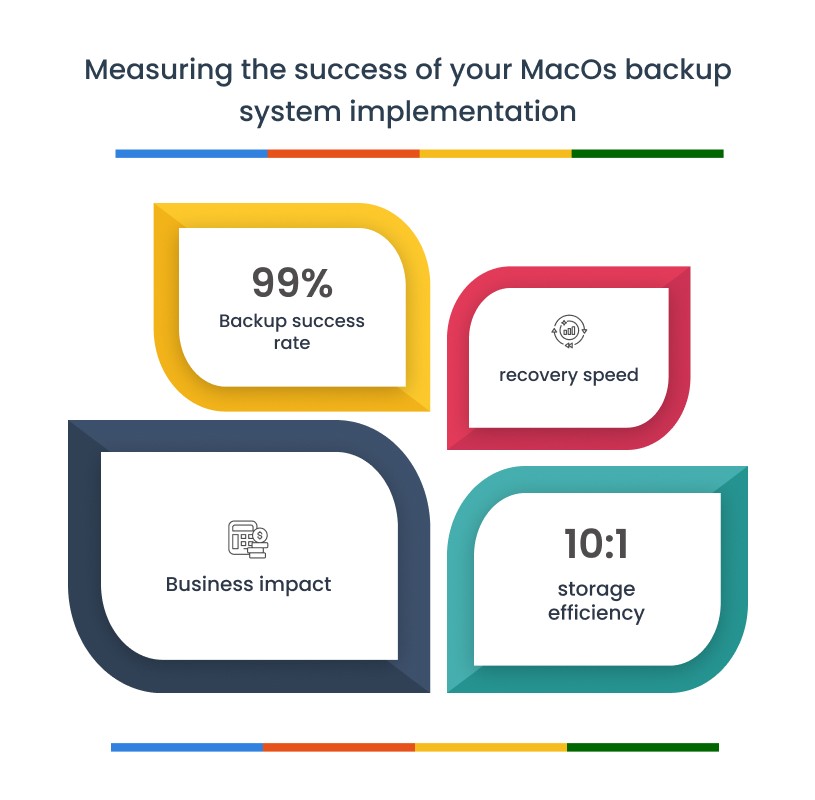
Backup Success Rate: Track completion rates across your Mac devices, targeting 99% or higher. More importantly, monitor why failures occur—network timeouts, locked files, or storage issues—to address root causes systematically. Modern backup software for Mac should provide detailed failure analysis.
Recovery Speed: Document actual restoration times for different scenarios. Single file recovery should complete in minutes, while full system restoration typically takes 2-4 hours depending on data volume. These metrics inform realistic expectations.
Storage Efficiency: Monitor deduplication ratios and compression effectiveness. Well-configured macOS backup software achieves 10:1 deduplication across similar Macs, directly reducing storage costs. Track usage trends to predict when expansion is needed.
Business Impact: Calculate prevented downtime hours and associated cost savings. Document time saved through self-service restores versus manual processes. For many users, automation alone—eliminating manual backup tasks—justifies the entire investment.
Conclusion
Protecting Mac devices requires purpose-built macOS backup software that goes beyond basic tools. The right platform combines robust technical capabilities with operational simplicity, enabling users to protect their Macs without unnecessary complexity.
Key considerations for evaluating backup software for Mac include scalability to support your growth trajectory, integration with existing infrastructure, compliance with any regulatory requirements, total cost of ownership beyond licensing, and vendor stability with quality support.
As you evaluate solutions, focus on platforms that understand the unique requirements of macOS. Look for native Apple Silicon support, APFS optimization, and security framework compatibility. Most importantly, choose macOS backup software that can grow with your needs while maintaining the reliability your data demands.
The investment in proper Mac backup infrastructure pays dividends through reduced downtime, faster recovery, and confidence that your data remains protected regardless of what challenges arise.
FAQs