Managing enterprise backup licenses shouldn’t require emails, quotes, and waiting periods. Your infrastructure needs change constantly—new servers spin up, projects scale down, storage requirements shift. Yet traditional software licensing forces you into rigid purchasing cycles that can’t keep pace with operational reality.
That’s why we built the Zmanda Pro Licensing Portal, a self-service platform that gives you complete autonomy over your backup infrastructure licensing.
Why Self-Service Licensing Matters for Modern IT Operations
The Zmanda Pro Licensing Portal fundamentally changes how IT teams manage data protection infrastructure.
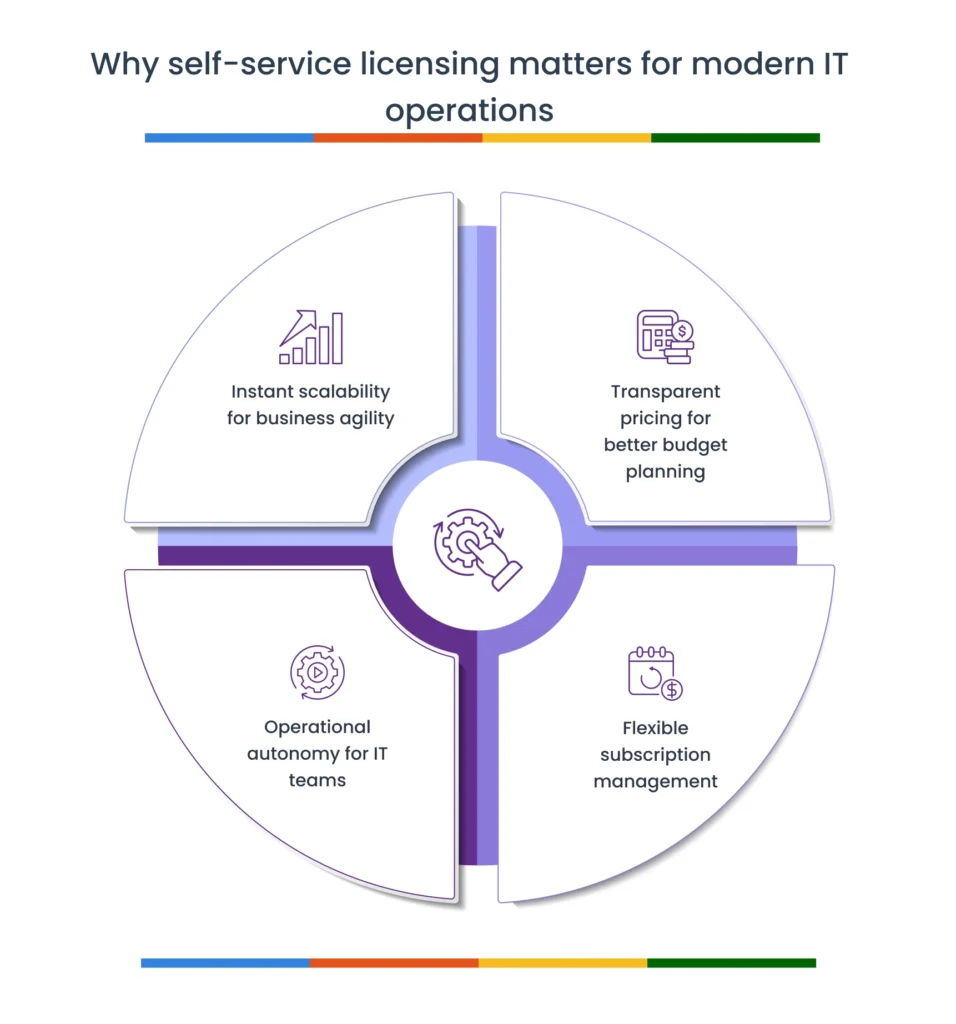
Here’s what this portal has to offer:
- Instant Scalability for Business Agility
When your development team spins up 20 new VMs for a product launch, you can’t wait three business days for license procurement. The portal eliminates bottlenecks by providing immediate license activation. Add capacity when you need it, remove it when you don’t—all without disrupting your deployment timeline. - Transparent Pricing for Better Budget Planning
No more opaque quote processes or surprise renewal costs. Real-time pricing across all Zmanda Pro products means you can model different scenarios, compare monthly versus annual commitments, and make informed decisions with complete cost visibility. Your finance team gets predictable line items. Your IT leadership gets defensible budget projections. - Operational Autonomy for IT Teams
IT administrators gain direct control over the tools they manage daily. Need to add database protection to five servers? Done in minutes. Want to test bare-metal recovery on a subset of workstations before full deployment? Purchase exactly what you need for your pilot. This autonomy accelerates infrastructure projects and reduces dependencies on procurement workflows. - Flexible Subscription Management
Infrastructure evolves. The portal’s prorated billing automatically calculates fair charges when you scale up mid-cycle, ensuring you only pay for what you use. Downgrading is equally straightforward; no contracts locking you into capacity you’ve outgrown.
Features of the Zmanda Pro Licensing Portal
The portal provides comprehensive control over your entire Zmanda Pro licensing lifecycle:
- Real-time pricing across all backup workload types, add-ons, and storage options
- Flexible billing options with monthly or annual subscription terms
- Multi-product purchasing enabling complete infrastructure builds in single transactions
- Instant license activation with immediate deployment capability
- Automated prorated billing for mid-cycle subscription changes
- Centralized dashboard displaying all active licenses, renewal dates, and billing history
- Self-service upgrades and downgrades without sales intervention
- Complete order history with downloadable invoices for financial tracking
Important: Your existing licenses, pricing agreements, and contract terms remain unchanged. The portal is available whenever you choose to use it—no migration required, no forced transitions.
How to Use the Zmanda Pro Licensing Portal
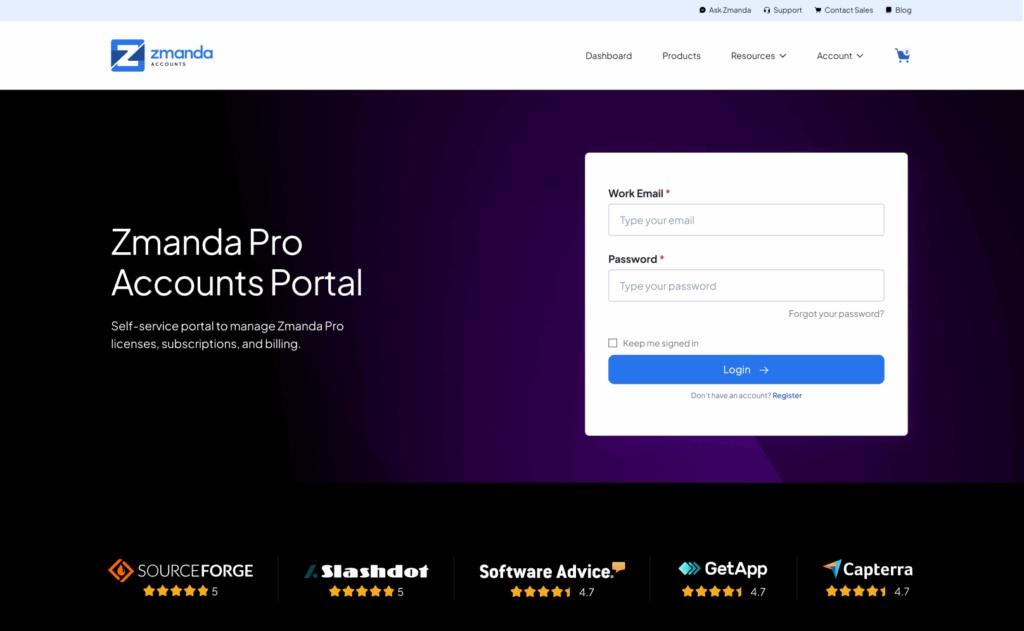
1. Getting Started: Registration and Access
Visit account.zmanda.com to create your account. Registration requires a valid business email domain and takes less than two minutes to complete. Once registered, you’ll have immediate access to the full Zmanda Pro product catalog.
2. Understanding the License Catalog
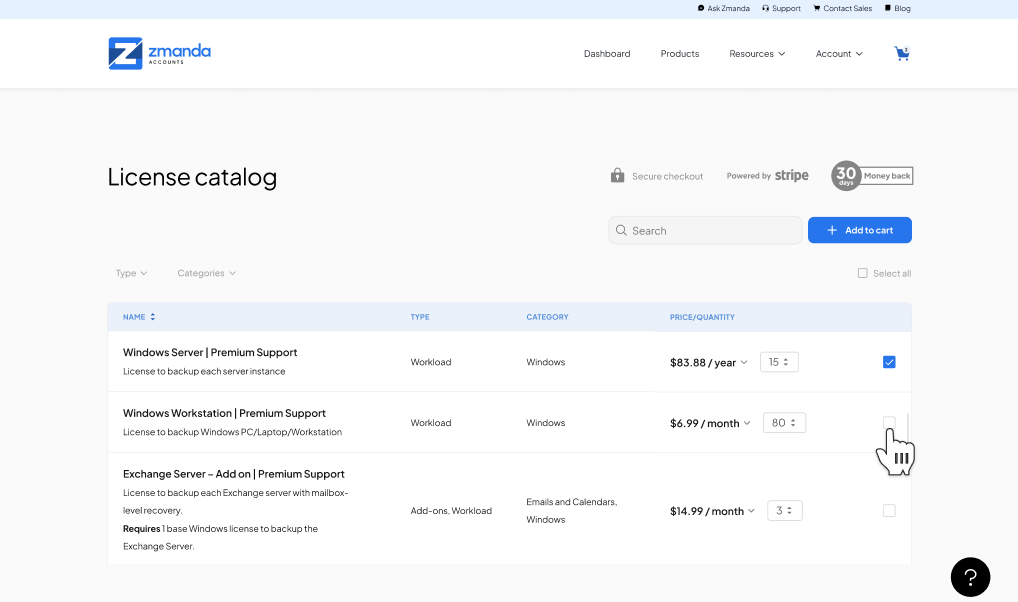
The license catalog organizes Zmanda Pro products into four main categories, each serving specific infrastructure protection needs:

Workload Licenses
These form your licensing foundation and cover the primary backup targets in your environment:
- Physical and virtual servers (Linux, Windows)
- VMware virtual machines
- Desktop and laptop workstations
- Cloud instances
Workload licenses define how many individual systems you can protect with Zmanda Pro.
Device Licenses
Specialized coverage for hardware appliances and NAS devices:
- Synology NAS systems
- Other supported network-attached storage
Device licenses extend Zmanda Pro’s protection to storage infrastructure that requires platform-specific integration.
Add-On Licenses
Enhanced capabilities that extend beyond standard file-level backup:
- Database add-ons: Application-consistent protection for MongoDB, MySQL, and Microsoft SQL Server with transaction-aware snapshots
- Disk imaging add-ons: Bare-metal recovery capabilities for complete system restoration
Add-ons require corresponding base workload licenses. The portal enforces these dependencies automatically—you cannot purchase a SQL Server add-on without the underlying Windows server workload license. This prevents configuration errors and ensures deployments meet technical requirements.
Storage Licenses
Coverage for specific backup destination targets:
- Specialized cloud storage providers
- Certain managed storage services
Note that local backup storage (disk, NAS, tape) requires no additional licensing. Storage licenses apply only to select integrated cloud targets.
3. Navigating the Catalog
The portal provides multiple ways to find the licenses your infrastructure needs:
- Type Filter: Narrow results to workloads, add-ons, or storage options
- Category Filter: Browse by platform (Linux, Windows, VMware, databases)
- Search Function: Direct lookup for specific products or technologies

Each product card displays compatibility requirements, pricing tiers, and links to detailed deployment documentation. Hover tooltips provide quick-reference information without leaving the catalog view.
4. Making Your First Purchase
Once you’ve identified the licenses your infrastructure requires, the checkout process is straightforward:
1. Add Products to Cart
Click “Add to Cart” on each license type. The cart dynamically validates dependencies—if you add a database add-on, the portal confirms you have (or are purchasing) the required base license.
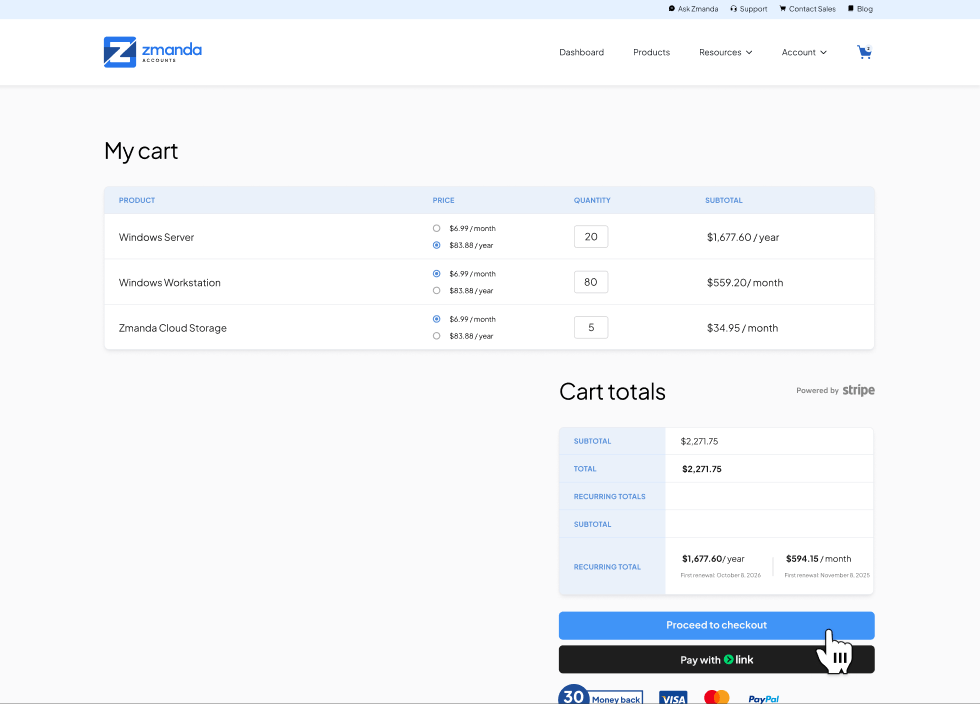
2. Set Quantities and Billing Preferences
In your cart, adjust quantities to match your deployment scale. Choose between monthly or annual billing terms. Annual subscriptions typically offer cost savings for stable infrastructure.
3. Review and Complete Checkout
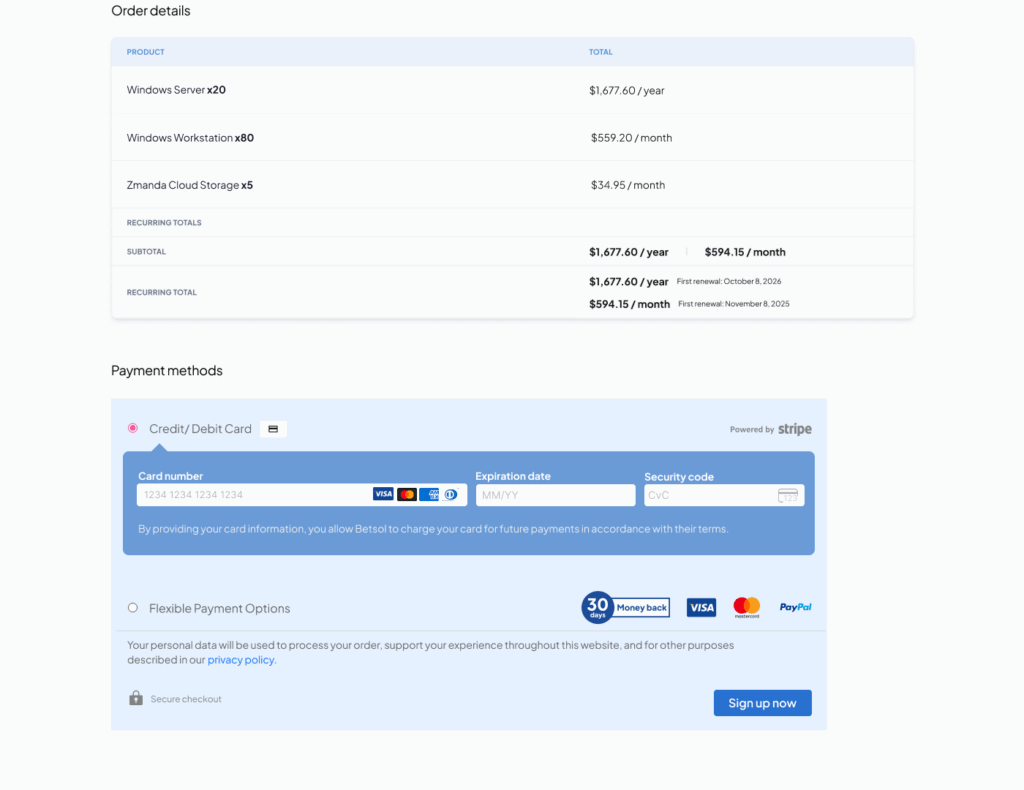
Enter payment information (credit card processing is secure and PCI-compliant). Review your order summary including any applicable discounts or prorations. Complete the transaction.
4. Instant License Delivery
Upon payment confirmation, license keys generate immediately. You’ll receive an email containing:
- Activation codes for each purchased license
- Download links for Zmanda Pro installers
- Deployment documentation for your specific configuration
- Quick-start guides for initial setup
Licenses activate in real-time—there’s no waiting period. You can begin deployment the moment payment processes.
5. Managing Your Subscription Dashboard
The dashboard at account.zmanda.com provides centralized visibility into your entire Zmanda Pro licensing portfolio.
Subscriptions Tab
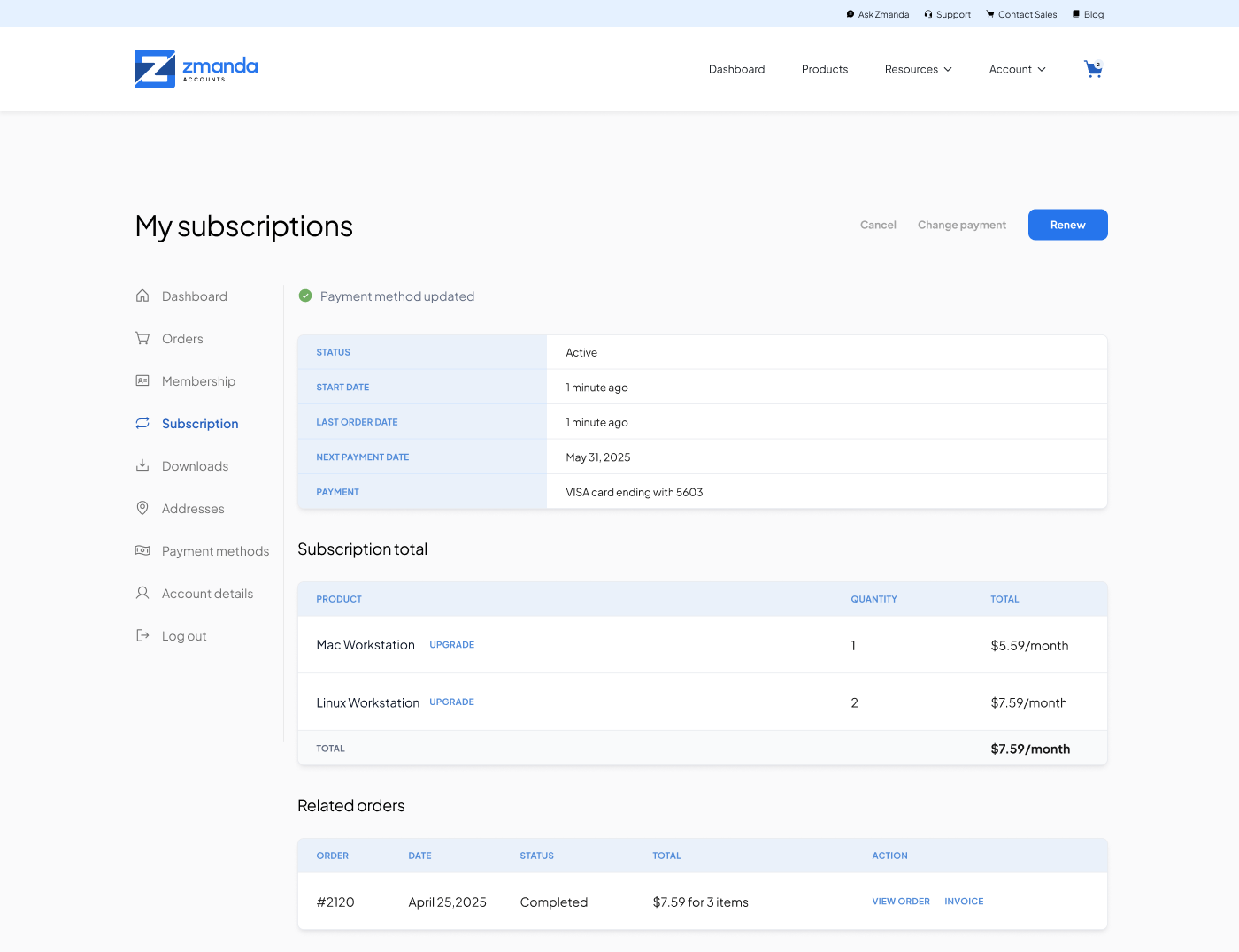
View all active licenses with current quantities, renewal dates, billing cycles, and subscription status. This tab serves as your single source of truth for license inventory—critical for audit compliance and infrastructure planning.
Orders Section
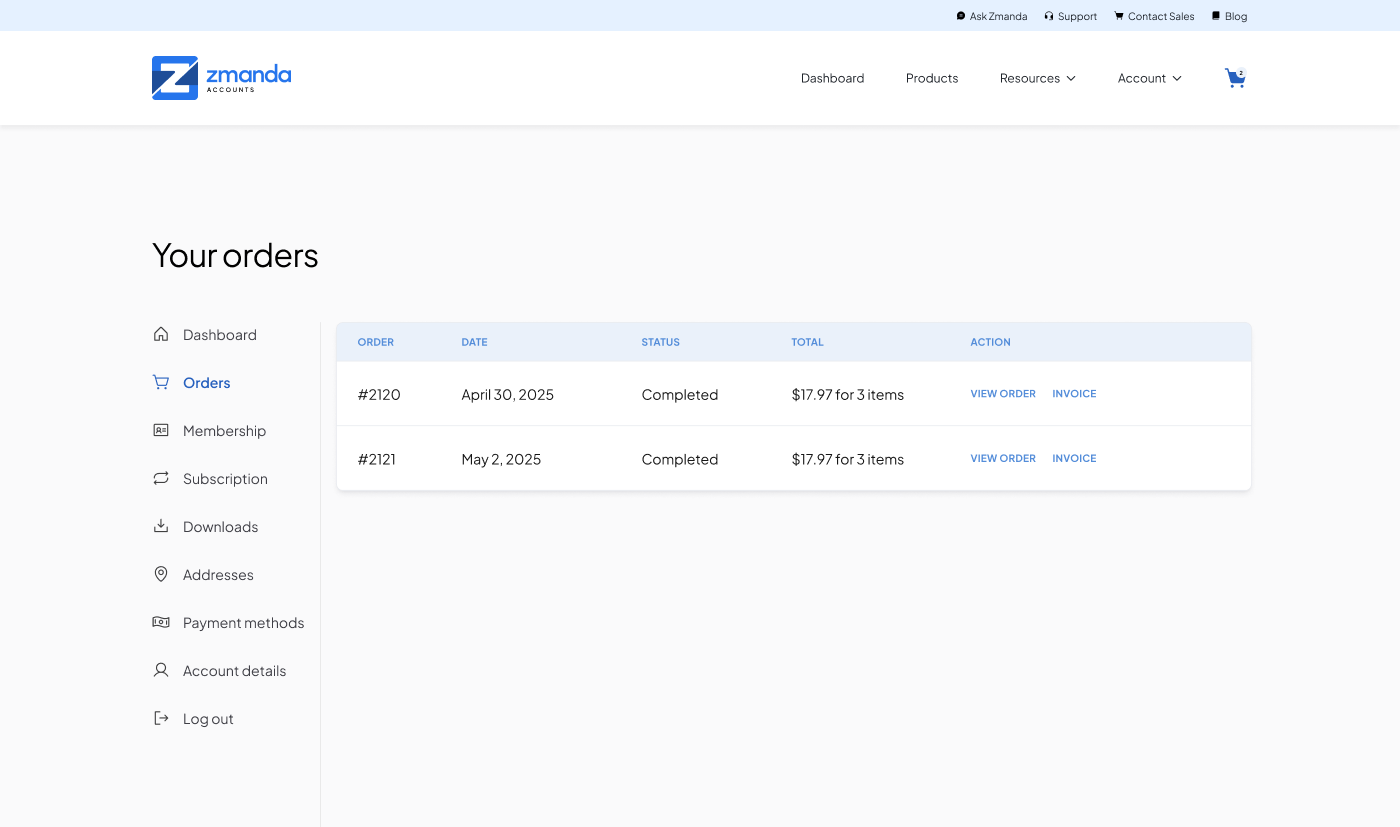
Complete transaction history with downloadable invoices for every purchase. Filter by date range, product type, or amount. Export capabilities support financial reporting and budget reconciliation workflows.
Payment Methods
Securely store and manage payment information. Update credit card details without contacting support. Set primary payment methods for automatic renewals.
6. Scaling Your Licenses Up or Down
Infrastructure changes constantly. The portal makes license adjustments as dynamic as your environment.
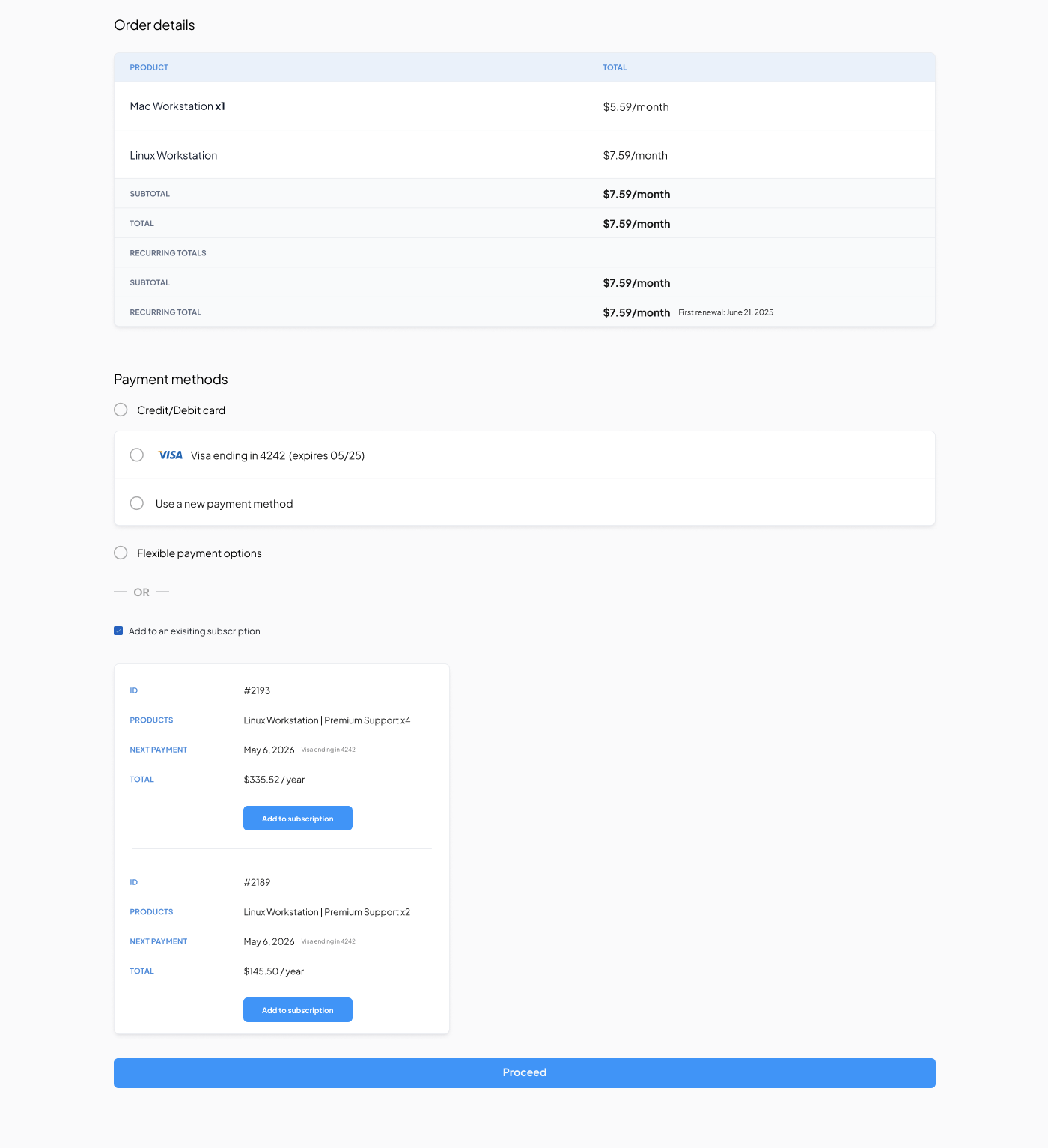
Adding Licenses to Existing Subscriptions
- Navigate to My Subscriptions
- Select the subscription you want to modify
- Click Modify Quantity on the specific product
- Enter your new total quantity (not the additional amount—the portal calculates the difference)
- Choose whether to maintain your current billing cycle or start a new one
If you maintain the same billing date, the portal automatically calculates prorated charges for your remaining subscription period. For example, adding 10 server licenses halfway through your annual term charges you for 6 months of those licenses, keeping everything aligned to your original renewal date.
Payment processes immediately, and new licenses activate within minutes—enabling same-day infrastructure expansion without procurement delays.
Reducing Licenses
Follow the same process, entering a lower total quantity. The portal applies credits to your next billing cycle. Downgrades don’t require special approval or waiting periods—adjust your licensing as your infrastructure scales down.
Important Considerations for Scaling:
- Minimum quantities may apply to certain license types
- Downgrades take effect at the next billing cycle to prevent service disruption
- The portal will warn you if quantity reductions would break add-on dependencies
Traditional Purchasing Still Available
The Zmanda Pro Licensing Portal provides autonomy for teams that want it. However, we recognize that many organizations have established procurement processes, require purchase orders, or prefer working directly with account managers.
Nothing has changed for traditional purchasing. Your sales team remains available at zmanda.com/contact-sales for:
- Enterprise license agreements with volume pricing
- Multi-year contracts with locked-in rates
- Custom payment terms (net-30, net-60, etc.)
- Purchase order processing
- Detailed pre-sales consultations
- Complex multi-site deployments requiring architectural guidance
The portal exists alongside these established channels—use whichever approach fits your organization’s needs.
Get Started with Self-Service Licensing Today
The Zmanda Pro Licensing Portal is live at account.zmanda.com. Create your account, explore the catalog, and experience the operational flexibility that self-service licensing provides.
Questions about which licenses your infrastructure needs? Our technical documentation provides detailed deployment guides, compatibility matrices, and use case examples. For personalized guidance, our sales team is always available at zmanda.com/contact-sales.
Ready to take control of your backup infrastructure licensing?
Your current licenses and pricing remain unchanged. The new portal is ready whenever you are.
FAQs
How quickly do licenses activate after purchase?
Immediately. License keys generate in real-time upon payment confirmation. Activation typically completes within 2-3 minutes, and you’ll receive deployment information via email simultaneously.
Can I get a quote before purchasing?
Yes. Add products to your cart, set quantities, and choose billing terms—the portal displays exact pricing before you enter any payment information. You can export this quote or screenshot it for internal approval processes.
What if I accidentally purchase the wrong license type?
Contact [email protected] within 24 hours of purchase. Our team can help correct licensing errors, swap product types, or process refunds according to our standard policies.
Are there volume discounts available through the portal?
The portal displays standard per-unit pricing. For volume discounts on large deployments (typically 50+ licenses), please connect with the sales team at zmanda.com/contact-sales—they can structure custom pricing that may offer better economics than self-service rates.
How do I track license usage to ensure I’m not over-deployed?
The Zmanda Pro management console provides real-time reporting on active protected systems versus available licenses. This visibility helps you optimize license allocation and identify when you need to scale up or down.
Can multiple users from my organization access the same portal account?
Currently, the portal operates on individual user accounts tied to specific email addresses. For enterprise deployments requiring shared access or role-based permissions, please contact your account manager to discuss organizational account structures.
What happens if my credit card expires or payment fails?
You’ll receive email notifications before renewal charges. If payment fails, the portal provides grace periods to update payment information before service interruption. Critical notifications go out at 15 days, 7 days, and 3 days before license expiration.
Is my payment information secure?
Yes. The portal uses PCI-compliant payment processing with industry-standard encryption. Zmanda never stores complete credit card numbers—only tokenized references for recurring billing purposes.
Can I purchase licenses for specific deployment dates in the future?
Not currently. Licenses activate immediately upon purchase. For future-dated provisioning or scheduled deployments, please work with the sales team who can coordinate delivery timing with your project schedule.
FAQs