The backup-as-a-service market is on track to hit $13.97 billion in 2026, and it’s forecast to nearly double to $28.53 billion by 2032, according to the Research and Markets report. That growth is showing up as more IT teams move away from managing backup infrastructure themselves and toward providers who handle some or all of it for them. If you’re one of the IT managers or directors building that shortlist right now, you’re likely comparing providers on criteria that go beyond the usual feature list: how the service is actually delivered, what it costs once you need to restore data, and whether its recovery claims have been tested.
This guide is built for exactly that stage of the decision. You already know you want backup as a service, and now you’re comparing providers. It walks through categories that actually separate BaaS providers: delivery model, pricing model, workload coverage, recovery testing, and more.

What separates backup-as-a-service providers from each other
“Backup as a service” gets used to describe two genuinely different things, and that ambiguity is the first thing worth clearing up. Some providers sell backup software that runs in the cloud, where you configure, schedule, and troubleshoot it yourself. Others deliver a fully managed service, where a team handles setup, monitoring, and recovery on your behalf.
Here’s how to tell which one you’re actually looking at when a vendor uses the term:
- Self-service software puts you in control of configuration and troubleshooting, and suits a team that already has backup expertise in-house.
- A fully managed service hands day-to-day operation to the provider’s own team, and suits a team that would rather not build that expertise at all.
Some providers, including Zmanda Pro, offer both under one roof, which matters if your needs change as your team grows or shrinks.
Once you know which delivery model you want, two more questions decide almost everything else in this guide: how the provider prices its service, and how much of that pricing it actually shows you before you sign. A backup-as-a-service solution that looks identical to a competitor on paper can behave completely differently once you factor in what a real restore costs.
How Different BaaS Pricing Models Impact Total Cost
Most BaaS pricing falls into one of three models, and each one shifts risk in a different direction. Here’s what to expect from each:
- Per-workload pricing charges a flat rate per protected server, VM, or database, regardless of how much data that workload holds. The buyer’s cost stays predictable, and the provider absorbs the variability in data volume.
- Per-GB pricing charges by the amount of data stored, which sounds fair until a workload’s data grows faster than expected and the bill grows right along with it.
- Consumption-based pricing, common among the hyperscalers, charges for storage and separately for the data you move. The sticker price on a quote is rarely the number you actually pay.
That third model is where most of the real cost surprises live, and it deserves a full breakdown of its own: egress fees, restore charges, and provider markup, and exactly which providers disclose them upfront. A managed backup-as-a-service quote that looks cheaper on the surface can end up costing more the first time you actually need to restore data, which is the entire subject of the cost deep-dive that follows this guide.
What security and compliance capabilities to look for in a provider
A provider’s security posture is one of the few areas where a checklist genuinely works, because the baseline expectations are well established. At minimum, confirm the following before you sign anything:
- Encryption both in transit and at rest, not just one or the other.
- Role-based access controls and multi-factor authentication on every account with access to backup data.
- Immutable or object-locked backups, so a compromised admin account can’t delete your recovery point along with the production data.
- Detailed audit logs you can hand to an auditor without translation.
Compliance certifications show whether a provider has been independently audited against a standard, not just whether they claim to meet it. SOC 2 Type II and ISO 27001 are the two most common baseline certifications in this category. Zmanda Pro holds both, alongside PCI DSS alignment and GDPR compliance, and supports the encryption, access control, and audit-logging features required for HIPAA-regulated environments. For any regulated workload, ask a provider directly which certifications are current, not just listed on a webpage. Certifications lapse, and a two-year-old badge on a marketing page isn’t the same as an active audit.
Why Workload Coverage Matters When Choosing a BaaS Provider
The most common mismatch in a BaaS evaluation is discovering three months in that the provider you chose doesn’t actually protect something you run. Before comparing vendors, map out what actually needs coverage:
- Physical servers and virtual machines, including VMware, Hyper-V, or Proxmox.
- Databases such as SQL Server, MySQL, PostgreSQL, MongoDB, and Oracle.
- SaaS applications, particularly Microsoft 365 and Google Workspace.
- Endpoint devices used by remote and hybrid teams.
A provider that covers 90% of this list still leaves you running a second tool for the remaining 10%, which defeats a lot of the point of consolidating onto a BaaS provider in the first place. Hybrid environments raise the stakes further. If your infrastructure spans on-premises servers, a public cloud, and SaaS applications, confirm the provider manages all three from one console rather than three separate ones. Zmanda Pro, for example, protects 30+ workload types, including physical and virtual servers, databases, Microsoft 365, and endpoints, from a single management console. That’s the kind of baas backup as a service coverage question worth asking any provider directly, not assuming from a feature page.
How to Assess a BaaS Provider’s Recovery Readiness
Everything in a backup pitch is about protection. Almost nothing is about recovery, and recovery is the only part of the process a business actually experiences during an incident. Two numbers matter most:
- Recovery Point Objective (RPO): how much data you can afford to lose.
- Recovery Time Objective (RTO): how long you can afford to be down.
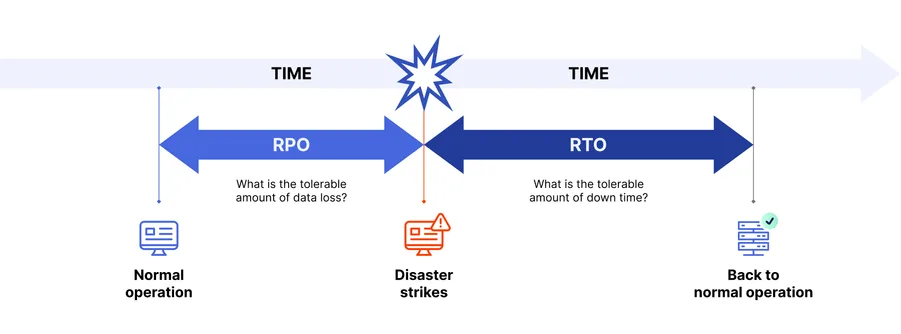
A provider should state both clearly, not gesture at “fast recovery” without a number attached. The more important question, though, is whether those numbers have ever been tested against a real restore rather than just claimed in a data sheet. Ask how often the provider recommends restore testing, and whether restoring an old backup takes meaningfully longer than restoring a recent one. With chunk-level restore architecture, it shouldn’t. This directly answers the statistic that opened this guide: a failure rate that high isn’t really about backup software failing to run. It’s about restoring nobody tested until the moment they actually needed one.
Comparing backup-as-a-service providers providers on pricing and features
The table below compares eight backup-as-a-service providers on the four criteria that matter most from this guide: whether pricing is actually published, whether egress and restore fees are disclosed upfront, how the service is delivered, and how broad its workload coverage is. The pattern that emerges is consistent. Most providers gate real pricing behind a sales call, and fewer still tell you what a restore will cost before you’re already a customer.
| Provider | Pricing transparency | Delivery model | Workload coverage |
|---|---|---|---|
| Zmanda Pro | Yes. Fully public, per-workload pricing across every tier, no quote or sales call required to see a real number. | Self-service software, or fully managed. | 30+ workload types, including VMware vSphere, Hyper-V, and Proxmox VE; MySQL, MariaDB, PostgreSQL, MS SQL Server, MongoDB, and Oracle; Microsoft 365 (Exchange, SharePoint, OneDrive, Teams); and Windows, Mac, and Linux endpoints, from a single console. |
| Druva | Partial. Pricing model described, exact rates require a quote. | Self-service, 100% SaaS, built on AWS. | Endpoints (Windows, macOS, Android, iOS), physical and virtual servers, VMware, Hyper-V, Proxmox, Nutanix AHV, cloud workloads (AWS, Azure), databases (SQL, Oracle, SAP HANA), and SaaS apps including Microsoft 365 and Salesforce. |
| Veeam Cloud Connect | Partial. Pricing varies by VCSP/MSP partner and consumption model; most deployments are quote-based. | Self-service, delivered through Veeam’s network of 12,000+ MSP partners (the VCSP program). | VMware vSphere, Microsoft Hyper-V, Nutanix AHV, physical servers, workstations, and cloud platforms. |
| Acronis Cyber Protect Cloud | No public rate card for Cyber Protect Cloud specifically. Acronis does publish direct pricing for its separate, non-MSP Cyber Protect product, but that’s a different SKU from what’s compared here. | Delivered through MSP and reseller partners, with Acronis-hosted, hybrid, or partner-hosted deployment options. | Physical servers, virtual machines, cloud workloads, and SaaS applications from one console. |
| Commvault Metallic | Yes, partial public pricing available. Published pricing exists for Microsoft 365, Salesforce, endpoints, VMs, and other SaaS backup offerings, while some enterprise deployments remain quote-based. | Self-service SaaS. Control plane runs in Azure, with an on-premises gateway required to back up on-prem sources. | Virtual machines, databases (SQL Server, Oracle, SAP HANA, Active Directory), endpoints, containers, and SaaS apps including Microsoft 365 and Salesforce. |
| AWS Backup | Yes. Published rate card. | Self-service, native to AWS, no partner layer. | Primarily AWS-native services (EC2, EBS, RDS, S3, and similar), with support for selected hybrid workloads, including on-premises VMware via AWS Backup Gateway. |
| Azure Backup | Yes, published, though reviewers note it’s hard to predict in practice. | Self-service, native to Azure. On-premises coverage is possible via the separate Azure Backup Server component. | Azure VMs, SQL, SAP HANA, Azure Files, and AKS natively. Hyper-V, VMware, SQL Server, SharePoint, and Exchange via Azure Backup Server. |
| Unitrends | Partial. Limited public pricing information is available, but most deployments are quote-based. | Choice of hardware appliance, software on existing infrastructure, or cloud/DRaaS. | Physical servers, VMware and Hyper-V VMs, Azure and AWS cloud workloads, Microsoft 365, Google Workspace, and endpoints, across 200+ supported operating systems and hypervisors. |
Seven Questions to Ask Before Choosing a BaaS Provider
Every question below maps back to one of the five criteria in this guide. Treat this as the shortlist to bring into any sales conversation, not a replacement for reading the fine print yourself:
- Is this delivered as self-service software, a fully managed service, or both, and can I change models later without switching vendors entirely?
- What does a full restore cost, in writing, including any egress, retrieval, or restore-specific fees, not just the monthly subscription rate?
- Which specific workloads, hypervisors, and databases are supported, and is that list the same for both backup and full disaster recovery?
- What are the provider’s stated RPO and RTO, and how often do they recommend or require restore testing?
- Are backups immutable by default, and can an administrator account be used to delete them under any circumstances?
- Which compliance certifications are currently active, not just listed historically on a marketing page?
- Is 24/7 support included in the base price, or billed as a separate tier?
A provider that answers all seven clearly, in writing, before you sign anything has already told you most of what you need to know about how they’ll behave after you’re a customer.
How Zmanda Pro delivers backup as a service
Choosing a backup-as-a-service provider comes down to five criteria and Zmanda Pro’s answer to each of these is public:
- Delivery model: Available as self-service software, where your team configures and manages backups directly, or as Zmanda BaaS, a fully managed service. Zmanda is one of the few BaaS providers offering both under one roof.
- Pricing: Zmanda Pro charges per workload, per user, or per TB, with no data-volume metering on its core workload pricing. A 100GB server and a 10TB server cost the same to protect.
- Fee disclosure: Zmanda Cloud Storage has no egress fee. On third-party storage such as AWS S3, Azure, or Wasabi, any egress cost comes from the storage tier you’ve chosen, since that’s determined at the storage level, not by Zmanda.
- Workload coverage: Zmanda Pro protects 30+ workload types, including physical and virtual servers, databases, Microsoft 365, and endpoints, from a single management console.
- Recovery testing: Zmanda Pro’s chunk-level restore architecture means the oldest backup in your retention window restores at the same speed as the newest one, not slower simply because it’s older.
Zmanda Pro also holds SOC 2 Type II and ISO 27001 certification, aligns with PCI DSS, is GDPR compliant, and supports the encryption, access control, and audit-logging features required for HIPAA-regulated environments, with 24/7 expert support included.
FAQs