Enterprise backup at scale requires architecture, not just features. When you provision a new database, backup protection should apply automatically based on predefined policies. When you migrate workloads across cloud providers, your strategy should adapt without manual reconfiguration. When ransomware strikes, immutability should be enforced in infrastructure, not just documented in process.
Most enterprise backup platforms layer on policy engines, scheduling algorithms, and reporting dashboards. But adding features doesn’t guarantee architectural scalability. The real difference between scaling your infrastructure and scaling your operational staff comes down to five specific automation capabilities that separate true automated backup solutions from feature-layered generalists.
This article identifies those five capabilities—not as feature checklists, but as architectural requirements you need to evaluate when assessing your backup approach or potential automated backup solutions.
TL;DR: 5 Core Backup Automation Capabilities
| Capability | What It Does | Why It Matters |
|---|---|---|
| Policy-based automation | Define protection requirements once; apply automatically across all systems | Scales to thousands of systems without per-system configuration |
| Self-healing mechanisms | Automatically detects and fixes common failures | Issues resolve without manual intervention; reduces alert noise |
| Intelligent scheduling | Optimizes when and how backups run based on real-time conditions | Maximizes resource utilization; minimizes production impact |
| Infrastructure integration | Works seamlessly with Terraform, Ansible, CI/CD, and other automation tools | Backup aligns with broader IT automation; eliminates silos |
| Reporting & analytics | Generates compliance reports and predictive insights automatically | Provides visibility and audit evidence without manual log review |
Why Do Large Organizations Require Backup Automation?
Manual backup administration breaks down at enterprise scale. Organizations with hundreds or thousands of protected systems face impossible operational burden if backup requires per-system configuration, monitoring, and troubleshooting. Without automated backup systems, IT teams spend excessive time on backup management instead of strategic initiatives.
The following table shows why automation becomes non-negotiable as you scale:
| Automation Level | Configuration Effort | Ongoing Administration | Scalability Limit |
|---|---|---|---|
| Manual configuration | High (per-system) | Continuous intervention | 50-100 systems |
| Template-based | Moderate (per-group) | Exception handling | 500-1,000 systems |
| Policy-driven | Low (policy definition) | Policy maintenance | 5,000+ systems |
| Intelligent automation | Minimal (auto-discovery) | Review and optimize | Unlimited |
The real problem with manual backup: Human error introduces significant risk. Manual backup processes inevitably result in misconfigured systems, missed backup windows, and unprotected data. Centralized automated backup solutions eliminate these inconsistencies and ensure consistent data protection and business continuity across your entire infrastructure.
Automated Backup Solutions: Core Policy-Based Features Enterprises Need
Now that you understand why automation is essential at enterprise scale, let’s explore the first—and most critical—capability: policy-based automation.
Policy-driven automation enables administrators to define protection requirements once and apply them automatically across hundreds or thousands of systems. Instead of configuring each system manually, you create backup policies that automatically protect new infrastructure as it deploys. This eliminates manual backup configuration and enables scalable enterprise data backup.
The best automated backup solutions offer policy-driven approaches because they eliminate the administrative overhead of managing individual system configurations. As your infrastructure grows, policy-based automated backup software scales without requiring proportional increases in administrative staff.
When selecting automated backup solutions for your enterprise, policy-based configuration should be your top priority. Organizations that implement automated backup solutions with strong policy engines report 60-70% reduction in backup administration time.
Core policy-based automation features:
- Automated system discovery – New VMs, databases, and applications are automatically detected and protection begins without manual intervention
- Tag-based policy assignment – Systems tagged as “production,” “financial,” or “PCI-compliant” automatically receive matching backup policies based on criticality and compliance requirements
- Dynamic policy adjustment – When development systems transition to production, backup policies automatically escalate to match production requirements (increased frequency, longer retention, replication)
- Template-based configuration – Define once, deploy everywhere—policies apply consistently across your entire infrastructure
This discovery mechanism is what separates truly scalable automated backup software from basic tools. Without it, you’re back to manual configuration for every new system.
Policies handle configuration automatically. But what happens when things go wrong? Systems fail, networks go down, storage runs out. Your backup system needs to handle these situations without human intervention.
How Automated Backup Solutions with Self-Healing Automation Reduce Administrative Burden
With policy-based automation handling configuration, the next challenge is managing failures when they occur. Even the most well-designed policies can encounter issues—which is where self-healing automation becomes critical.
Self-healing systems automatically detect and remediate common failure scenarios without waiting for administrator intervention. This dramatically reduces operational overhead while improving backup success rates. Modern automated backup solutions with self-healing capabilities recover from common issues faster than a human could even be notified about them.
Organizations using automated backup software with self-healing features report significantly fewer backup failures and emergency support tickets. Rather than reactive troubleshooting, teams can focus on optimization and planning. The most effective automated backup solutions combine self-healing with intelligent monitoring to prevent issues before they impact your systems.
Self-healing capabilities include:
- Automatic retry logic – Transient failures (network interruptions, resource constraints, brief unavailability) are automatically retried; most complete successfully without anyone knowing they failed
- Intelligent error handling – Only genuine problems requiring human action trigger alerts; minor issues that self-heal never generate noise
- Automated capacity management – Storage utilization is monitored automatically; expired backups are pruned according to retention policies; alerts come well before capacity exhaustion
- Escalation only when necessary – Persistent failures get flagged with context for rapid troubleshooting; transient issues resolve silently
This is why enterprise-grade automated backup solutions with built-in self-healing are becoming industry standards rather than premium features.
Policies define what gets backed up. Self-healing ensures backups continue running when issues occur. But there’s one more variable: timing. When backups run matters just as much as whether they run.

Intelligent Scheduling in Automated Backup Software: Optimizing Enterprise Operations
Beyond handling failures automatically, modern backup systems must also optimize when and how backups run. This is where intelligent scheduling becomes essential.
Traditional fixed-schedule backups create bottlenecks in large environments. Intelligent scheduling distributes workload dynamically to maximize throughput while minimizing production impact. This is a core differentiator between basic backup software and advanced automated backup solutions.
Leading automated backup software solutions employ machine learning and AI to predict optimal backup windows. By analyzing patterns across your infrastructure, these systems continuously improve scheduling efficiency over time. When comparing automated backup solutions, intelligent scheduling should be a non-negotiable requirement for enterprise deployments.
Intelligent scheduling features:
- Workload-aware scheduling – Historical backup durations, data change rates, and utilization patterns are analyzed; large databases schedule during low-utilization windows; quick backups fill remaining capacity
- Adaptive scheduling – Backup timing adjusts in real-time based on infrastructure state; if storage performance degrades, lower-priority backups throttle or postpone automatically
- Global resource optimization – Follow-the-sun operations coordinate across regions and time zones; backup infrastructure stays maximally utilized while respecting local business hours and network constraints
- Performance-aware execution – Backup intensity adjusts based on current system load; production systems never experience unexpected performance spikes
Top-tier automated backup software prevents the scenario where all your big databases try to backup simultaneously at 2 AM and crush your storage infrastructure.
Intelligent scheduling optimizes backup timing across your infrastructure. But those backups exist in a vacuum unless they’re connected to your broader IT automation framework.
How Should Backup Automation Integrate with Infrastructure Automation?
As backup operations scale across multiple systems and regions, they must integrate seamlessly with your broader infrastructure automation efforts. This integration capability is essential for modern enterprises.
Modern enterprises use infrastructure-as-code, configuration management, and orchestration platforms. Your backup solution must integrate seamlessly with these frameworks—backup shouldn’t live in isolation.
Integration capabilities to expect:
- API-first platforms – Terraform, Ansible, Puppet, Chef, and other automation tools can define backup requirements alongside infrastructure specs; protection follows deployment automatically
- Webhook integration – Infrastructure events (VM creation, database provisioning, app deployment) trigger automatic backup policy application through webhook notifications
- CI/CD pipeline integration – Development systems receive lightweight backup configs automatically; production promotions trigger policy escalation without manual intervention
- Event-driven automation – Your backup system responds to infrastructure changes in real-time
For detailed guidance on infrastructure automation best practices, modern automated backup solutions must support these integration patterns to keep pace with DevOps workflows.
Without this integration, you’re managing backup separately from everything else—creating inconsistency and extra work.
You have policies, self-healing, intelligent scheduling, and infrastructure integration all working together. Your backup operations are now automated and aligned with your IT infrastructure. The missing piece? You need visibility into what’s actually happening across your entire backup infrastructure.
Reporting and Compliance Features in Automated Backup Solutions
With policies, self-healing, intelligent scheduling, and infrastructure integration working together, organizations need visibility into their backup operations. This is where reporting and analytics automation becomes essential.
Large organizations need visibility into backup operations across thousands of systems—but not by manually reviewing logs. Automated reporting and analytics provide actionable intelligence with minimal effort. Leading automated backup solutions include sophisticated reporting capabilities that eliminate manual work while providing compliance evidence.
Many organizations struggle with backup visibility because they use fragmented tools. Comprehensive automated backup software consolidates reporting across all systems into unified dashboards and compliance reports. Selecting automated backup solutions with built-in analytics ensures your organization maintains visibility and compliance without additional tools.
These five capabilities—policy automation, self-healing, intelligent scheduling, infrastructure integration, and reporting—form the foundation of enterprise backup automation. They work together as an integrated system, not standalone features.
Reporting and analytics capabilities:
- Automated compliance reporting – Audit-ready documentation generated automatically showing backup coverage, retention compliance, and recovery testing results; no manual compilation needed
- Predictive analytics – Machine learning detects patterns indicating backup duration increases, storage constraints, or success rate degradation; issues flagged before they cause failures
- Executive dashboards – Backup status across entire enterprises aggregated into simple visualizations; leadership gains visibility without technical expertise; drill-down capabilities available for detailed investigation
- Trend analysis – Historical data identifies patterns that inform capacity planning and optimization decisions
For regulatory compliance requirements, modern backup solutions should meet established industry standards for backup and recovery. When evaluating automated backup solutions, ensure they provide reporting capabilities that give you both compliance evidence and actionable business intelligence.
Key Capabilities Summary
Now that we’ve explored each of the five essential capabilities in detail, let’s bring it all together.
When evaluating backup automation solutions, ensure vendors deliver across these five dimensions:
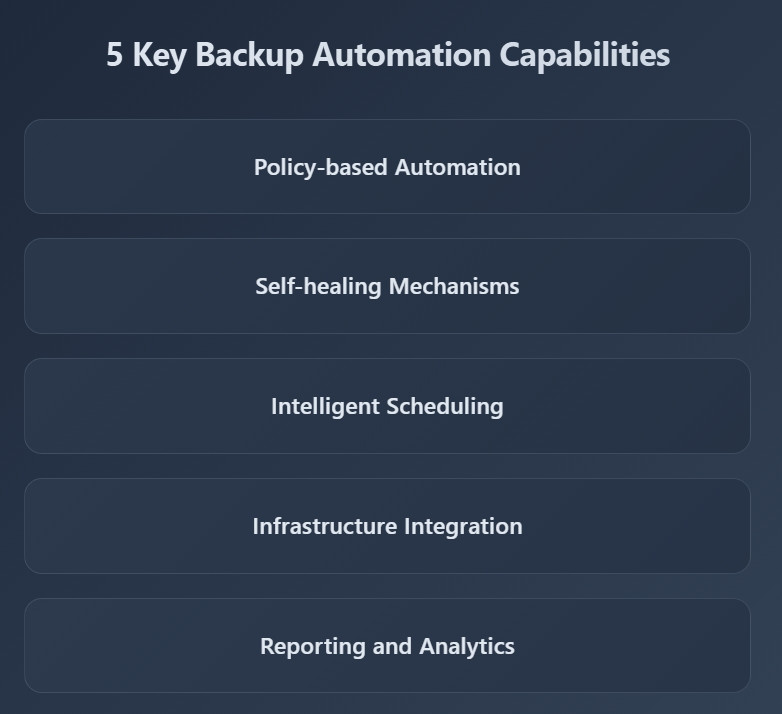
1. Policy-based automation – Scales protection across thousands of systems without per-system configuration
2. Self-healing mechanisms – Resolves common issues automatically without manual intervention
3. Intelligent scheduling – Optimizes when and how backups run based on real-time infrastructure state
4. Infrastructure integration – Aligns backup operations with broader IT automation (Terraform, Ansible, etc.)
5. Reporting and analytics – Provides compliance evidence and visibility without manual log review
Solutions missing any of these dimensions will create operational bottlenecks as your infrastructure scales.
These are the capabilities you need to evaluate. But evaluating capabilities on paper is one thing—seeing them in practice is another.
How Does Zmanda Pro Deliver Enterprise Backup Automation?
Understanding what to look for is one thing—seeing it in practice is another. Zmanda Pro is a high-performance, open-source, restic-based backup and recovery software solution designed for hybrid cloud environments. Here’s how it delivers all five essential capabilities.
Centralized policy management at scale: Deploy and manage thousands of backup clients simultaneously from a single control center with Zmanda Pro’s automation engine. Define standardized configurations once and automatically apply them across your organization, ensuring consistency while eliminating manual configuration errors.
Self-healing that actually works: Zmanda Pro supports ransomware protection with air-gapped backups, client-side deduplication, forever incremental backups, and zero trust security. Client-side deduplication excludes redundant copies, saving up to 89%+ on storage space, while forever incremental backups eliminate the need for periodic full backups after the initial one.
Intelligent resource optimization: Zmanda Pro supports backups to disk, optical devices, and cloud services like Amazon S3, Wasabi, GCP, and Azure, with flexible media options and direct-to-storage capability for faster data handling and reduced network load.
Enterprise platform compatibility: Zmanda Pro is compatible with various Operating Systems (Linux, Windows, MacOS), Databases (MS SQL, MongoDB, MySQL, Oracle), and Virtual Applications (HyperV and VMware). Complete protection for Microsoft 365 Suite includes Outlook, OneDrive for Business, SharePoint, and Teams files.
Visibility and compliance built-in: A real-time dashboard displays health metrics, job status, and potential issues across your entire infrastructure, with automated alerts and reporting that keep you informed while reducing manual oversight.
The bottom line: Zmanda Pro comes at a 50% lower price than the competition, with 24×7 support and a 2× higher NPS than the industry average.
Ready to see this in action? Start your Zmanda Pro 14-day free trial and experience how these five capabilities work together to transform your backup operations. —it’s about fundamentally transforming how your organization approaches data protection. —it’s about fundamentally transforming how your organization approaches data protection.
Scaling Backup Operations Through Intelligent Automation
The capabilities we’ve explored aren’t just theoretical—they’re the foundation for transforming how enterprises approach data protection.
Enterprise backup automation transforms data protection from manual administrative burden into self-managing infrastructure that scales with organizational growth.
Large organizations cannot protect thousands of systems through manual processes—automated backup solutions become essential rather than optional. Policy-driven automation, self-healing capabilities, intelligent scheduling, and comprehensive infrastructure integration enable backup operations that scale without proportional increases in administrative headcount.
As your organization continues expanding infrastructure and embracing cloud-native architectures, backup automation capabilities must evolve accordingly. Solutions delivering comprehensive automation across hybrid environments while maintaining visibility and control enable enterprises to protect growing infrastructure without operational bottlenecks.
Ready to implement enterprise backup automation at scale? Start your Zmanda Pro free trial and experience policy-driven automated backup solutions designed for large-scale enterprise operations.