How to Prune, Recycle, and Drop Older Backups?
Amanda Enterprise (AE), a product of Zmanda, can prune, drop, and recycle aging backup data to free up your...
While performing an Oracle backup on Windows or during source creation, users might encounter an error indicating VSS Write not stable or Writer not found.
During the installation of Oracle on Windows and the creation of a new database, the Oracle Writer service is automatically created. However, there is a possibility that this service might either stop automatically or face a permission denied error upon attempted startup.
1. Check Oracle Writer Service Status:
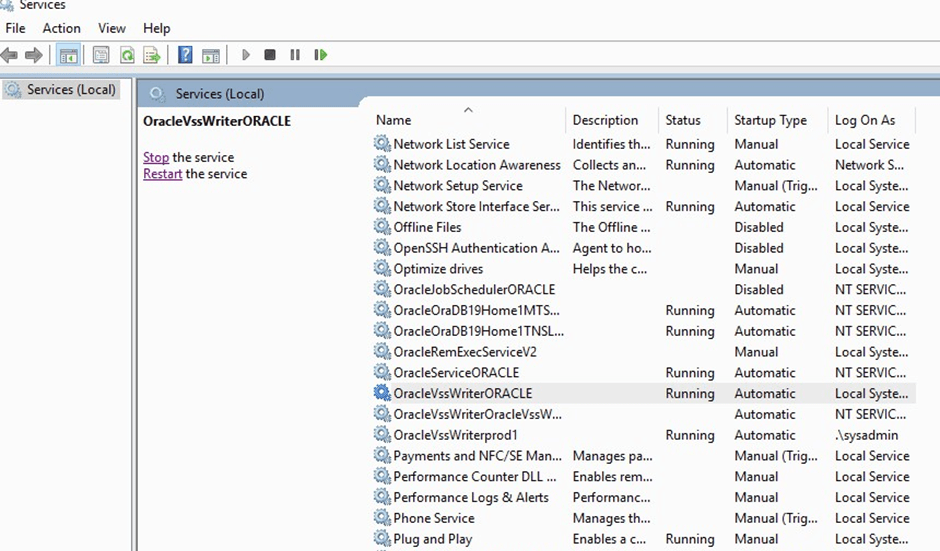
2. Change Log On Mechanism:
Right-click on the Oracle Writer service and select Properties.
Under the Log On tab, change the account to Local System Account.
Try to restart the Writer service. It should now initiate without encountering any permission errors.

3. Verify Successful Operation:
Ensure that the Oracle Writer service is running smoothly before proceeding with source creation or backup processes.
By following these steps, your source creation or backup process in ZMC should proceed successfully.

Contact us for a free 30-minute consultation and learn how our fully managed solution can protect your business and streamline your operations. Get started with Zmanda Pro today!
Book a meeting