How to fix “No acceptable volumes found” error when backups to Cloud Targets fail
The “No acceptable volumes found” error normally indicates that the storage has run out of space and Zmanda is unable...
When the services that provide STS tokens to Amanda are unavailable, volumes for any backups initiated by the user through the UI or scheduled backups will become invalid. This will cause subsequent backups to fail with an error message stating “No acceptable volumes found”. The below guide will help you resolve this error and perform backup runs successfully.
Note: This article is for Zmanda Enterprise version 5.0.
If a backup is triggered manually or scheduled when the services that provide STS tokens to Amanda are down, Amanda will mark the volume currently being written and any subsequent volumes as invalid. With the current configuration of Amanda, the subsequent backups will fail with an error message stating “No acceptable volumes found.” This prevents the user from taking backups for that backup set.
This issue can be verified by looking at the state file and triggering a subsequent backup. All the volumes are marked with “While connecting to Zmanda Managed Cloud bucket: Could not fetch valid STS tokens (None) (CURLcode 7) (after 1 retries)”, causing Amanda to treat all those volumes invalid for the further run (as shown below).
bash-4.2$ cat state
$STATE = {
           'current_slot_by_config' => {},
           'slots' => {
                        's3:zmc-20230521123737-testreset/test_reset-tape1' => {
                                                                                'device_status' => '1',
                                                                                'device_error' => 'While connecting to Zmanda Managed Cloud bucket: Could not fetch valid STS tokens (None) (CURLcode 7) (after 1 retries)',
                                                                                'label' => undef,
                                                                                'state' => 1
                                                                              },
                        's3:zmc-20230521123737-testreset/test_reset-tape5' => {
                                                                                'state' => 1,
                                                                                'label' => undef,
                                                                                'device_error' => 'While connecting to Zmanda Managed Cloud bucket: Could not fetch valid STS tokens (None) (CURLcode 7) (after 1 retries)',
                                                                                'device_status' => '1'
                                                                              },
                        's3:zmc-20230521123737-testreset/test_reset-tape9' => {
                                                                                'state' => 1,
                                                                                'label' => undef,
                                                                                'device_error' => 'While connecting to Zmanda Managed Cloud bucket: Could not fetch valid STS tokens (None) (CURLcode 7) (after 1 retries)',
                                                                                'device_status' => '1'
                                                                              },
                        's3:zmc-20230521123737-testreset/test_reset-tape3' => {
                                                                                'device_status' => '1',
                                                                                'label' => undef,
                                                                                'device_error' => 'While connecting to Zmanda Managed Cloud bucket: Could not fetch valid STS tokens (None) (CURLcode 7) (after 1 retries)',
                                                                                'state' => 1
                                                                              },
                        's3:zmc-20230521123737-testreset/test_reset-tape6' => {
                                                                                'state' => 1,
                                                                                'label' => undef,
                                                                                'device_error' => 'While connecting to Zmanda Managed Cloud bucket: Could not fetch valid STS tokens (None) (CURLcode 7) (after 1 retries)',
                                                                                'device_status' => '1'
                                                                              },
                        's3:zmc-20230521123737-testreset/test_reset-tape10' => {
                                                                                 'device_status' => '1',
                                                                                 'device_error' => 'While connecting to Zmanda Managed Cloud bucket: Could not fetch valid STS tokens (None) (CURLcode 7) (after 1 retries)',
                                                                                 'label' => undef,
                                                                                 'state' => 1
                                                                               },
                        's3:zmc-20230521123737-testreset/test_reset-tape2' => {
                                                                                'state' => 1,
                                                                                'device_status' => '1',
                                                                                'device_error' => 'While connecting to Zmanda Managed Cloud bucket: Could not fetch valid STS tokens (None) (CURLcode 7) (after 1 retries)',
                                                                                'label' => undef
                                                                              },
                        's3:zmc-20230521123737-testreset/test_reset-tape8' => {
                                                                                'label' => undef,
                                                                                'device_error' => 'While connecting to Zmanda Managed Cloud bucket: Could not fetch valid STS tokens (None) (CURLcode 7) (after 1 retries)',
                                                                                'device_status' => '1',
                                                                                'state' => 1
                                                                              },
                        's3:zmc-20230521123737-testreset/test_reset-tape7' => {
                                                                                'state' => 1,
                                                                                'device_status' => '1',
                                                                                'device_error' => 'While connecting to Zmanda Managed Cloud bucket: Could not fetch valid STS tokens (None) (CURLcode 7) (after 1 retries)',
                                                                                'label' => undef
                                                                              },
                        's3:zmc-20230521123737-testreset/test_reset-tape4' => {
                                                                                'state' => 1,
                                                                                'label' => undef,
                                                                                'device_error' => 'While connecting to Zmanda Managed Cloud bucket: Could not fetch valid STS tokens (None) (CURLcode 7) (after 1 retries)',
                                                                                'device_status' => '1'
                                                                              }
                      },
           'current_slot_csc' => {
                                   'test_reset' => {
                                                     'storage' => {
                                                                    'test_reset' => {
                                                                                      'changer' => {}
                                                                                    }
                                                                  }
                                                   }
                                 }
         };
Backup fails with the “No acceptable volumes found“ error shown below.
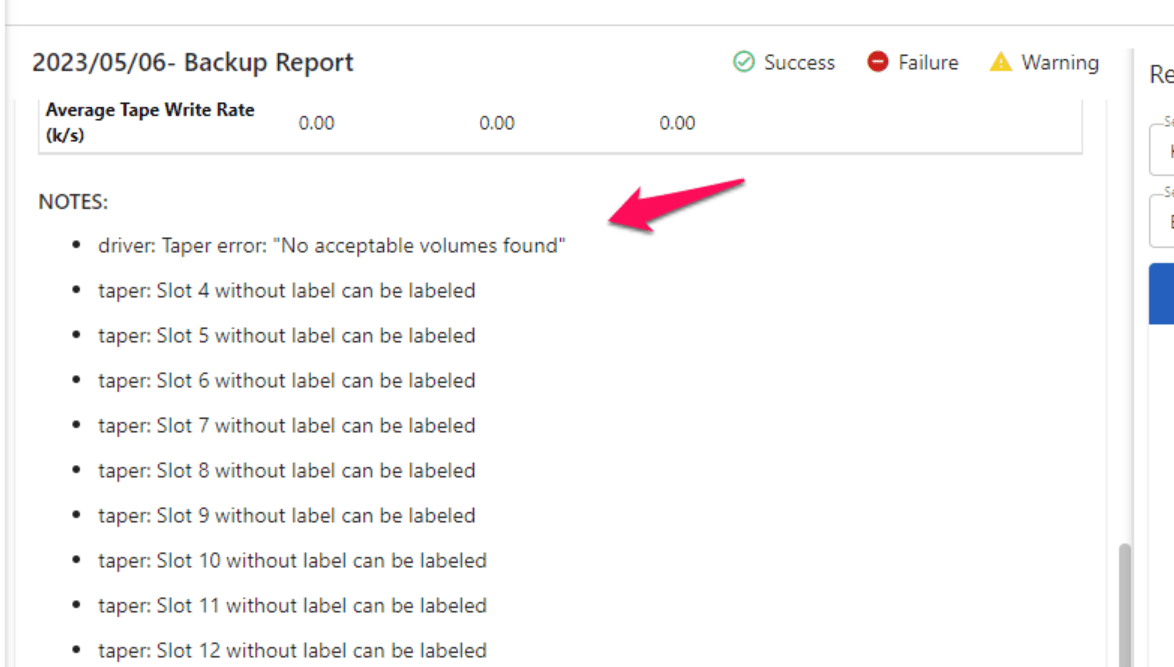
Since the state file is corrupted, we can fix it by executing the following commands.
$amtape <backupset_name> reset
changer reset
This will reset the state file to the following state.

After this, backups will run successfully.

Contact us for a free 30-minute consultation and learn how our fully managed solution can protect your business and streamline your operations. Get started with Zmanda Pro today!
Book a meeting