For organizations where PBS covers their entire backup scope, the Proxmox Backup Server subscription model, with zero licensing cost and optional commercial support tiers, is a genuine advantage that shapes the TCO comparison with every commercial alternative. But “free software” and “free backup” are different things, and the full cost picture for Proxmox backup includes storage infrastructure, support, cloud destinations, and the operational overhead of tools that don’t cover your entire workload mix.
This post calculates the actual cost, not just the software license line, of running Proxmox backup with PBS with Zmanda Pro, across environments of different sizes and complexity. The goal is to give IT Managers and IT Directors the numbers to make a real decision, not a marketing comparison.
This post covers: PBS licensing and subscription options, what drives real backup infrastructure costs beyond licensing, TCO breakdowns for 25-VM, 50-VM, and 100-VM environments, and the specific scenarios where each pricing model is favorable.
Proxmox Backup Server Subscription & Licensing: What It Costs
The Proxmox Backup Server subscription model starts at zero. PBS itself is open-source software available at no licensing cost, with commercial support tiers available per host. You can download, install, and run PBS on any supported hardware without paying anything to Proxmox GmbH. This includes the full feature set: chunk-based deduplication, incremental backups, integrity verification, and the web management interface.
The cost model changes when you want commercial support. Proxmox offers subscription tiers for Proxmox VE (the hypervisor) that include access to the enterprise repository, security updates, and commercial support. These subscriptions are per-host (per physical server running Proxmox). PBS can be installed on a dedicated server, which requires its own subscription if you want commercial support for the PBS host itself.
| Tier | Annual Cost (Per Host) | Repository Access | Support SLA | Support Tickets/Year |
|---|---|---|---|---|
| Community (no subscription) | Free | Community repo only | None | Forum only |
| Basic | ~€119/year (~$130) | Enterprise repository | Business hours | Unlimited (email) |
| Standard | ~€299/year (~$325) | Enterprise repository | Business hours + priority | Unlimited (email + portal) |
| Premium | ~€599/year (~$650) | Enterprise repository | 24/7 coverage | Unlimited (phone + portal) |
Important: these Proxmox Backup Server subscription costs cover one physical host. A Proxmox cluster with 3 nodes and a dedicated PBS server needs 4 subscriptions for full commercial support coverage. At the Standard tier, that’s approximately $1,300/year for the cluster, before storage hardware, cloud offloading costs, and any workloads that PBS doesn’t cover.
The Real Cost Drivers Beyond Software Licensing
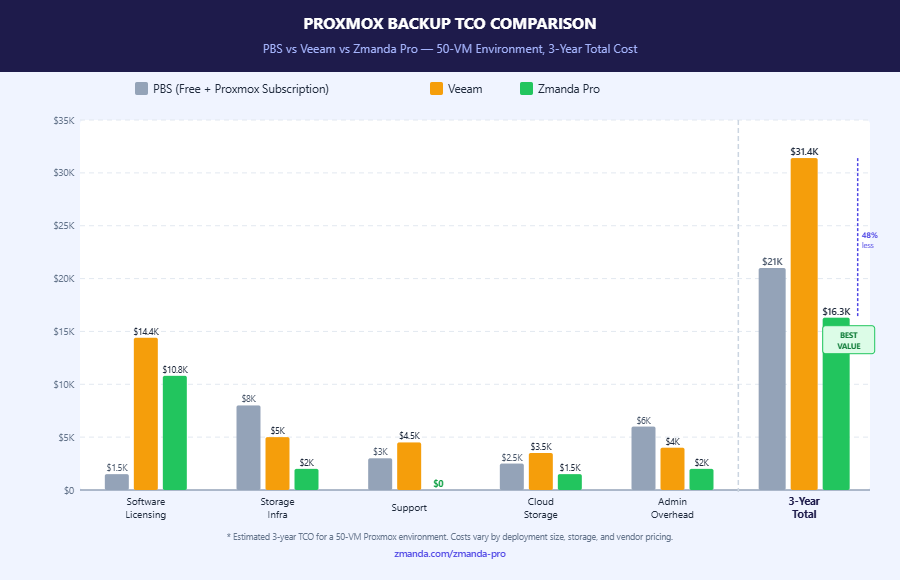
Software licensing is the most visible cost but often not the largest one in a backup TCO calculation. For Proxmox environments, four cost categories beyond licensing matter:
Storage infrastructure. PBS requires local or NAS storage for its datastores. Sizing depends on your data volume, change rate, deduplication efficiency, and retention policy. A 50-VM environment with 10TB of raw data and 90-day retention typically requires 15–30TB of storage capacity after deduplication, depending on VM types and change rates. NAS hardware at that scale runs $2,000–$8,000, depending on configuration, a one-time capital cost that amortizes over hardware lifecycle but is real infrastructure spend.
Cloud offloading costs. For environments that need offsite copies (3-2-1 compliance), PBS’s lack of native S3 support means either additional NAS hardware at an offsite location or rclone sync to cloud object storage. rclone itself is free, but cloud storage costs add up: 10TB stored in Wasabi at $6.99/TB/month is $839/year; in AWS S3 Standard, $2,760/year. These costs are ongoing and scale with data volume and retention.
Coverage gaps for non-Proxmox workloads. If PBS doesn’t cover your entire infrastructure, the tools that fill the gaps carry their own costs. Windows Server Backup is included with Windows Server but limited in capability. Commercial solutions for database backup, physical server backup, and Microsoft 365 backup typically run $500–$2,000+/year per additional category. A team paying for PBS (free) + a Windows backup tool + a database backup tool + an M365 backup tool is paying more in aggregate than a single platform that covers all four.
Admin time. Managing separate backup tools, monitoring separate dashboards, and maintaining separate restore procedures for each workload type has an operational cost measured in IT hours. For a 3-person IT team where backup administration is one of many responsibilities, consolidating to a single platform saves meaningful time per month that has an implicit cost even when it’s not visible as a line item.
TCO Comparison: Three Environment Sizes (PBS vs Veeam vs Zmanda Pro)
The right comparison accounts for full environmental costs: software, storage, support, and coverage gaps, not just the license price per workload.
| Environment | PBS + Subscriptions + Gap Tools | Veeam (Annual Est.) | Zmanda Pro (Annual) |
|---|---|---|---|
| Small: 25 VMs + 5 physical servers + M365 | ~$1,800–$3,500 (subscriptions + gap tools + cloud sync) | ~$4,000–$7,000 | ~$2,154 ($5.99 × 30 × 12) |
| Mid: 50 VMs + 10 physical servers + databases + M365 | ~$3,500–$7,000 (subscriptions + gap tools + cloud) | ~$8,000–$15,000 | ~$4,312 ($5.99 × 60 × 12) |
| Large: 100 VMs + 20 physical servers + databases + M365 | ~$6,000–$12,000 (subscriptions + gap tools + cloud) | ~$15,000–$25,000 | ~$8,626 ($5.99 × 120 × 12) |
The PBS cost range in this table represents the total of Proxmox subscriptions for the cluster, gap tools for non-Proxmox workloads, and cloud storage costs for off-site copies. At a small scale, PBS plus gap tools can be competitive with Zmanda Pro’s annual cost. As environment complexity grows, with more physical servers, databases, M365, the gap tools accumulate, and the aggregate cost approaches or exceeds Zmanda Pro’s all-in workload pricing.
Veeam’s cost range reflects the documented reality that Veeam pricing varies significantly by tier, negotiation, and renewal history. The lower bound represents first-year pricing at competitive tiers; the upper bound reflects typical 3-year average costs including renewal. The Veeam VMCE certification ($3,000+/admin) is excluded from these figures and represents an additional cost with no equivalent in PBS or Zmanda Pro environments.
Zmanda Pro Pricing: How the Per-Workload Model Works
Zmanda Pro uses transparent per-workload pricing: $5.99/workload/month. A “workload” is one protected instance, one VM, one physical server, one database, one Microsoft 365 seat. The price is flat regardless of data size; backing up a 500GB VM costs the same as backing up a 2TB VM. This is the “don’t pay by gig” principle that distinguishes workload-based pricing from per-GB models.
Modular add-ons are priced separately: NAS/file share backup is priced per TB, and Microsoft 365 backup is an add-on per user/month. The base workload price covers VM, physical server, and database protection. This modular structure means small organizations don’t pay for capabilities they don’t need, and it’s clear what’s included versus what’s an add-on before any purchasing decision.
There is no renewal escalation. The $5.99/workload/month price is the price at renewal. This matters because documented Veeam renewal increases of 2–3x represent a significant budget risk at contract expiration, a risk that doesn’t exist with Zmanda Pro’s flat model. For IT directors presenting 3- and 5-year budget forecasts, predictable backup costs are a planning advantage.
Where PBS Wins on Cost and Where It Doesn’t
PBS is genuinely the lower-cost option in one specific scenario: a Proxmox-only environment with local NAS storage, no compliance requirements for vendor-backed SLAs, and no need for cloud offloading beyond what rclone provides. In this scenario, PBS is free, capable, and well-maintained. The subscription cost for commercial support is modest, and there are no gap tools to purchase. This scenario fits small IT environments or homelab-scale deployments where the scope is genuinely limited.
PBS’s cost advantage diminishes in proportion to environment complexity. Each non-Proxmox workload type adds a gap tool. Each cloud storage requirement adds infrastructure or rclone overhead. Each compliance requirement that needs vendor-backed documentation creates a cost that PBS can’t satisfy regardless of price.
For mid-market IT teams managing mixed infrastructure, which describes most organizations with over 50 employees, the all-in cost of PBS plus the gap tools it requires often approaches or exceeds a single-platform solution at Zmanda Pro’s per-workload rate. The comparison that looks obvious at the software license level looks different when all the gap costs are included.
See the full Zmanda Pro pricing breakdown.
Making the Decision: A Cost-Based Framework
Use this framework to evaluate which cost model fits your environment:
- All workloads are Proxmox only, storage is local or NFS, no compliance SLA required: PBS free tier + Proxmox subscription. Total annual cost: $130–$650/host.
- Proxmox + 1–2 other workload types, cloud offload needed, no compliance requirement: Compare PBS + gap tools vs. Zmanda Pro all-in. At small scale (~25 workloads), the totals are often comparable.
- Mixed environment (3+ workload types), cloud required, commercial support needed: Zmanda Pro’s all-in workload pricing typically delivers lower TCO than PBS + gap tools aggregate, and significantly lower than Veeam.
- Already standardized on Veeam for VMware, adding Proxmox coverage: Extending existing Veeam license is a consolidation move worth evaluating against starting a Zmanda Pro trial, specifically on the LXC support gap in Veeam and the renewal cost trajectory.
The free trial makes the evaluation concrete. Deploy Zmanda Pro against your actual environment, run backup jobs for one cycle, and measure the actual deduplication ratio against your data because storage savings directly affect cloud costs, and real ratios against your workloads tell you more than vendor benchmarks.