Enterprise backup software costs spiral out of control when organizations rely on legacy approaches designed for smaller-scale environments. Large organizations protecting 500+ servers and hundreds of terabytes commonly spend $500,000-2M annually on backup infrastructure, licensing, and operations. Strategic optimization can reduce these costs by 40% or more while actually improving recovery capabilities and reducing risk.
Why Do Enterprise Backup Software Costs Escalate Unnecessarily?
Several factors drive excessive backup spending in large organizations:
- Legacy vendor lock-in: Multi-year contracts with automatic escalation clauses increase costs 8-15% annually
- Inefficient storage utilization: Poor deduplication and compression waste 60-80% of capacity
- Manual processes: Administrator time spent on routine tasks costs $50,000-150,000 annually per FTE
- Over-provisioning: Capacity planning with excessive safety margins wastes 30-50% of infrastructure investment
- Suboptimal cloud storage selection: Using premium storage tiers for all data regardless of access patterns
- Lack of policy governance: Retaining data longer than required multiplies storage costs unnecessarily
Addressing these inefficiencies systematically achieves dramatic cost reduction without compromising data protection.
Cost Reduction Strategies at a Glance
| Optimization Strategy | Cost Reduction Potential | Implementation Complexity | Time to Benefit |
|---|---|---|---|
| Advanced Deduplication | 50-70% storage reduction | Low (software configuration) | Immediate |
| Intelligent Storage Tiering | 40-60% storage cost reduction | Medium (policy design) | 30-60 days |
| Automated Retention Management | 20-35% capacity savings | Low (policy configuration) | 60-90 days |
| Backup Window Optimization | 15-25% infrastructure reduction | Medium (scheduling redesign) | 30-45 days |
| Process Automation | 60-80% labor cost reduction | High (workflow redesign) | 90-180 days |
| Vendor Consolidation | 25-40% licensing savings | High (migration effort) | 120-180 days |
How Does Advanced Deduplication Reduce Storage Costs?
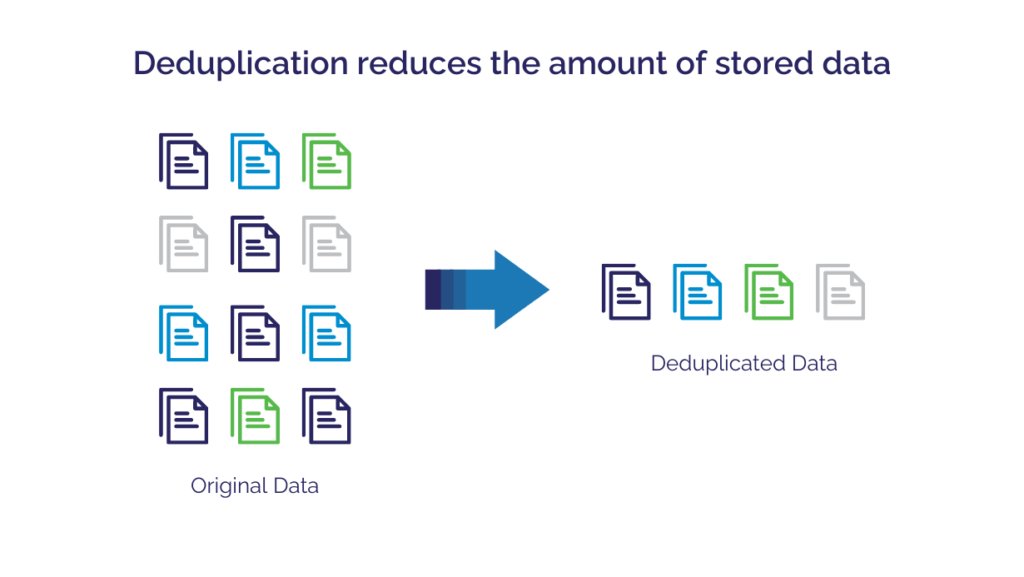
Deduplication eliminates redundant data before storage, dramatically reducing capacity requirements and associated costs:
1. Understanding Deduplication Ratios
Modern enterprise backup solutions achieve impressive data reduction:
- File servers and collaboration systems: 20:1 to 30:1 reduction (high redundancy across users)
- Virtual machine environments: 15:1 to 25:1 reduction (shared OS and application files)
- Database systems: 5:1 to 10:1 reduction (less redundancy but significant compression gains)
- Email systems: 25:1 to 40:1 reduction (attachments shared across mailboxes)
For a typical enterprise environment protecting 500TB of source data, effective deduplication reduces storage requirements to 25-50TB—a 90-95% reduction translating to massive storage savings.
This single optimization strategy demonstrates why controlling enterprise backup software costs requires addressing storage efficiency first.
2. Calculating Storage Cost Savings
Consider an organization protecting 500TB:
- Without deduplication: 500TB × $0.023/GB (AWS S3 Standard) × 12 months = $138,000 annually
- With 20:1 deduplication: 25TB × $0.023/GB × 12 months = $6,900 annually
- Annual savings: $131,100 (95% reduction) from deduplication alone
Solutions like Zmanda Pro provide source-side deduplication that also reduces network bandwidth consumption and backup window duration.
3. Source vs. Target Deduplication
Source-side deduplication: Processes data at the client before transmission, reducing network traffic and accelerating backups. Requires more client-side CPU and memory.
Target-side deduplication: Processes data at the backup server after transmission, simplifying client requirements but consuming network bandwidth for redundant data.
For distributed enterprises with limited bandwidth, source-side deduplication provides additional network cost savings of 15-30%.
What Are Intelligent Storage Tiering Strategies?
Enterprise backup software costs often reflect poor storage tier selection—not all backup data requires expensive high-performance storage:
1. Defining Storage Tiers
Hot/Standard tier (0-30 days): Recent backups requiring fast recovery for operational incidents. Cost: $0.020-0.023/GB monthly.
Warm/Cool tier (31-180 days): Monthly and quarterly backups for project recovery or compliance. Cost: $0.004-0.010/GB monthly (50-75% savings).
Cold/Archive tier (180+ days): Long-term retention for regulatory compliance with rare access. Cost: $0.00099-0.0012/GB monthly (95% savings).
2. Automated Lifecycle Policies
Modern backup solutions automatically transition data between tiers:
- Daily backups: Remain in hot storage for 30 days, then move to warm tier
- Weekly backups: Start in hot tier for 7 days, transition to warm for 90 days, then cold storage
- Monthly backups: 7 days hot, 30 days warm, then archive tier for long-term retention
- Annual compliance snapshots: Directly to cold tier for minimum cost
3. Cost Impact Example
Organization protecting 500TB with 7-year retention:
Single-tier approach (all hot storage):
- 500TB × 7 years = 3,500TB total retention
- 3,500TB × $0.023/GB × 12 months = $966,000 annually
Intelligent tiering (10% hot, 20% warm, 70% cold):
- 350TB hot: $96,600 annually
- 700TB warm: $84,000 annually
- 2,450TB cold: $29,400 annually
- Total: $210,000 annually
Annual savings: $756,000 (78% reduction) through intelligent tiering
How Can Organizations Optimize Backup Retention Policies?
Many organizations retain data far longer than business or regulatory requirements mandate, multiplying storage costs unnecessarily:
1. Conducting Retention Audits
Review each data classification for actual requirements:
- Operational data: Often retained for years when 30-90 days meets recovery needs
- Financial records: Verify actual retention requirements (commonly 7 years, but varies by jurisdiction)
- Healthcare data: HIPAA requires 6 years, not indefinite retention
- Email and collaboration: Litigation hold requirements often narrower than broad retention suggests
- Development and test systems: May require only 7-30 days rather than matching production retention
2. Implementing Granular Retention Policies
Different data types justify different retention periods:
- Tier 1 production systems: 90-day retention for operational recovery
- Financial systems: 7-year retention for regulatory compliance
- Development environments: 14-30 day retention (rapid iteration requires recent backups only)
- Test systems: 7-14 day retention or on-demand backup only
- Archived projects: Single snapshot rather than continuous backup
3. Cost Impact of Retention Optimization
Reducing average retention from 5 years to 2 years appropriate to business needs:
- Decreases required storage capacity by 60%
- Reduces storage costs by $200,000-600,000 annually for large environments
- Simplifies compliance management and e-discovery
- Accelerates backup and recovery operations
Organizations should document retention requirements by data classification in their disaster recovery plans to justify policies during audits.
What Backup Window Optimization Strategies Reduce Infrastructure Costs?
Inefficient backup scheduling inflates enterprise backup software costs by requiring over-provisioned infrastructure to meet service level objectives:
1. Incremental Forever Approaches
Traditional full backups weekly plus daily incrementals waste bandwidth and storage:
- Weekly full backup of 500TB consumes 500TB bandwidth and storage
- Daily incrementals add 10-20TB each
- Total weekly: 570-640TB transferred and stored
Incremental forever with synthetic fulls:
- Initial full backup: 500TB (one time)
- Daily incrementals: 10-20TB (changed blocks only)
- Synthetic full reconstructed from incrementals when needed
- Total weekly: 70-140TB transferred (80-85% reduction)
2. Parallel Backup Streams
Sequential backups extend backup windows and require larger windows of system availability:
- 500 servers backing up sequentially at 100GB/hour = 5,000 hours (208 days!)
- 50 parallel streams reduce window to 100 hours (4.2 days)
- 200 parallel streams achieve 25-hour window (acceptable for daily cycles)
Parallelization requires more network bandwidth and backup server capacity upfront but eliminates need for extended maintenance windows and associated application downtime.
3. Application-Aware Backup Scheduling
Coordinate backup timing with application characteristics:
- Database systems: Schedule during low-transaction periods to minimize performance impact
- File servers: Backup during regional off-hours when user activity minimal
- Development environments: Backup during business hours (non-critical systems)
- Global systems: Follow-the-sun backup strategies that backup regions during their local off-peak
How Does Process Automation Reduce Operational Costs?
Beyond infrastructure and licensing, enterprise backup software costs include substantial operational overhead that automation can eliminate. Manual backup administration consumes expensive IT resources on repetitive tasks; automation handles better:
Self-Service Recovery
Enabling end-users to restore their own files eliminates help desk overhead:
- Average IT labor cost for file restore: $45-75 per ticket
- Organizations processing 2,000 restore requests annually: $90,000-150,000 annual cost
- Self-service portal with user authentication: Reduces IT involvement by 80-90%
- Annual savings: $72,000-135,000 from help desk efficiency alone
Automated Compliance Reporting
Manual audit report generation consumes 40-80 administrator hours quarterly:
- 4 reports annually × 60 hours average × $75/hour = $18,000 annual cost
- Automated reporting with scheduled delivery: 2 hours quarterly review
- Annual savings: $16,500 in administrator time
Intelligent Alerting and Remediation
Traditional backup systems generate hundreds of alerts requiring manual triage:
- 500 servers × 0.5% daily failure rate = 2.5 alerts daily
- 15 minutes average investigation per alert = 625 minutes weekly (10.4 hours)
- Annual cost: 540 hours × $75/hour = $40,500
Intelligent alerting with automatic retry and self-healing:
- Reduces false positives by 70-80%
- Automatically resolves 60-70% of transient failures
- Administrator attention required for 0.5-1 alert daily
- Annual savings: $28,000-32,000 in reduced triage time
Solutions like Zmanda Pro provide built-in automation capabilities that reduce operational overhead while improving backup reliability.
What Vendor Consolidation Opportunities Exist?
Many enterprises run multiple backup solutions across different environments, multiplying licensing and operational costs:
Typical Multi-Vendor Scenarios
- Legacy solution for traditional servers: $150,000 annual maintenance
- Separate cloud backup platform: $80,000 annual subscription
- Database-specific backup tools: $60,000 annual licensing
- SaaS application backup (M365, etc.): $40,000 annual subscription
- Endpoint backup for workstations: $30,000 annual licensing
- Total annual cost: $360,000 across five platforms
Unified Platform Economics
Consolidated solution protecting all workloads:
- Enterprise backup platform: $180,000-220,000 annual cost
- Annual savings: $140,000-180,000 (40-50% reduction)
- Additional benefits: Unified management, consistent policies, simplified compliance
Migration Considerations
Vendor consolidation requires careful planning:
- Phased migration: Move workloads incrementally to limit disruption (6-12 months)
- Parallel operation period: Run both solutions during validation (adds 3-6 months of dual costs)
- Data migration: Determine if historical backups require migration or can age out naturally
- Training and change management: Budget 40-80 hours for team transition
How Can Organizations Optimize Cloud Storage Selection?
Enterprise backup software costs vary dramatically based on cloud storage selection, yet many organizations default to standard cloud storage tiers without evaluating alternatives:
Cloud Provider Comparison
Storage costs vary significantly across providers for equivalent performance:
- AWS S3 Standard: $0.023/GB monthly
- Azure Blob Hot: $0.0184/GB monthly (20% cheaper)
- Google Cloud Standard: $0.020/GB monthly (13% cheaper)
- Wasabi Hot Cloud Storage: $0.0059/GB monthly (74% cheaper with no egress fees)
For 100TB of backup storage, selecting Wasabi over AWS Standard saves $20,000 annually.
S3-Compatible Alternative Providers
Several providers offer S3-compatible APIs at fraction of major cloud costs:
- Wasabi: $5.99/TB monthly, no egress fees, 90-day minimum retention
- Backblaze B2: $6/TB monthly, $0.01/GB egress (first 3× storage free)
- Cloudflare R2: $15/TB monthly, zero egress fees, no minimum retention
These alternatives integrate seamlessly with backup solutions supporting S3-compatible storage, including Zmanda Pro’s S3-compatible cloud support.
Geographic Storage Optimization
Store backup data in regions with lowest costs when data sovereignty permits:
- AWS US-East (Virginia) typically offers lowest pricing among AWS regions
- Avoid premium regions (Asia Pacific, Middle East) with 20-40% higher costs unless required
- Consider cross-region replication costs when evaluating disaster recovery geography
What Workload-Specific Optimization Strategies Exist?
Different data types benefit from specialized backup approaches:
Database Backup Optimization
- Application-level backups: Use native database tools (mysqldump, pg_dump, RMAN) for consistency
- Transaction log shipping: Near-continuous protection with minimal storage overhead
- Incremental backup methods: Only back up changed database blocks rather than the full database
- Compression: Database backups compress 3-5× due to structured data characteristics
Virtual Machine Optimization
- Image-level backups: Faster than file-level with change block tracking (CBT)
- Application-aware snapshots: Ensure database consistency without shutting down VMs
- Exclude virtual swap files: No value backing up memory page files (saves 10-20% capacity)
- Template exclusion: Backup VMs as clones of templates without duplicating template data
File Server Optimization
- Exclude system temp directories: No recovery value, high churn rate
- User profile optimization: Exclude browser caches and local temp files
- Compression for Office documents: Already compressed formats don’t benefit from backup compression
- Large media file handling: Consider archival rather than continuous backup for static video/image libraries
How Can Organizations Measure and Track Cost Reduction?
Tracking enterprise backup software costs requires establishing clear metrics that validate optimization effectiveness across all cost categories:
Key Performance Indicators
- Cost per protected TB: Track monthly to identify trends
- Deduplication ratio: Monitor efficiency of data reduction
- Storage growth rate: Should be significantly lower than data growth rate
- Administrator hours per 100 servers: Measure operational efficiency improvements
- Average backup window duration: Shorter windows indicate better optimization
- Restore success rate: Ensure cost cutting doesn’t compromise recovery capability
Baseline and Target Setting
Document current state before optimization:
- Total annual backup costs (software, infrastructure, personnel, cloud)
- Protected data volume and server count
- Storage efficiency metrics (deduplication ratio, compression ratio)
- Operational metrics (backup success rate, restore times, administrator hours)
Set specific targets:
- 40% total cost reduction within 12 months
- Storage efficiency improvement from 5:1 to 20:1 deduplication
- Administrator time reduction from 80 hours to 30 hours monthly
- Maintained or improved backup success rates and restore capabilities
What Implementation Roadmap Achieves 40% Cost Reduction?
Reducing enterprise backup software costs requires a phased approach that delivers early wins while building toward comprehensive optimization:
Phase 1 (Months 1-2): Quick Wins
- Enable advanced deduplication on existing solution
- Implement automated retention policy enforcement
- Audit and eliminate unnecessary backup jobs
- Expected savings: 15-20%
Phase 2 (Months 3-4): Storage Tiering
- Configure intelligent lifecycle management
- Migrate aged backups to archive tiers
- Evaluate alternative cloud storage providers
- Expected savings: Additional 10-15%
Phase 3 (Months 5-8): Process Automation
- Deploy self-service recovery portal
- Implement automated compliance reporting
- Configure intelligent alerting and auto-remediation
- Expected savings: Additional 8-12%
Phase 4 (Months 9-12): Platform Consolidation
- Evaluate unified backup platform
- Pilot migration of selected workloads
- Execute phased consolidation plan
- Expected savings: Additional 10-15%
Total 12-month savings: 43-62% cost reduction
Achieving Sustainable Cost Reduction
Reducing enterprise backup software costs by 40% while maintaining or improving protection capabilities requires strategic optimization across storage efficiency, intelligent tiering, retention management, process automation, and vendor consolidation.
The highest-impact strategies combine advanced deduplication (50-70% storage reduction), intelligent tiering (40-60% storage cost savings), and process automation (60-80% labor reduction). Together, these approaches routinely achieve 40-50% total cost reduction within 12 months.
Organizations should prioritize quick wins like enabling deduplication and optimizing retention policies before undertaking larger initiatives like vendor consolidation. Phased implementation delivers early cost savings that fund subsequent optimization phases.
Modern backup solutions like Zmanda Pro include built-in capabilities for deduplication, intelligent tiering, automated lifecycle management, and multi-cloud support that enable cost optimization without requiring multiple point solutions. The result: dramatically lower costs, simplified operations, and improved data protection for enterprise environments.