Enterprise backup requirements don’t shrink to fit open-source tooling budgets. Organizations running Proxmox at scale, dozens of VMs across multiple sites, mixed infrastructure with databases and Microsoft 365, compliance frameworks that demand vendor-backed SLAs, need more than what Proxmox Backup Server’s free tier delivers. But they also don’t need the complexity and cost burden of legacy enterprise platforms designed for VMware-centric architectures that treat Proxmox as an afterthought.
Zmanda Pro Proxmox backup solution was built for this gap. This post makes the case specifically: what enterprise Proxmox backup requires, where PBS stops, and why Zmanda Pro’s architecture, agentless coverage, client-side deduplication, native cloud storage, and 30+ workload types in one console delivers the reliability enterprises need at TCO that SMBs and mid-market organizations can actually justify.
This post covers: enterprise backup requirements for Proxmox environments, what Zmanda Pro provides technically and operationally, financial proof points from production deployments, compliance coverage, and how to evaluate whether Zmanda Pro fits your specific environment.
What an Enterprise Proxmox Backup Solution Actually Requires
Proxmox backup solution requirements for Proxmox environments are defined by scope, reliability, and accountability, not just the ability to take a VM snapshot and restore it.
Scope means covering more than Proxmox. Enterprise environments run Windows servers alongside Proxmox VMs. They run MySQL, PostgreSQL, and Microsoft SQL Server databases. They run Microsoft 365 for email and collaboration. They may run VMware clusters in a hybrid environment. A backup solution that covers only Proxmox VMs forces IT teams to maintain parallel tooling for every other workload type, creating separate monitoring surfaces, separate recovery procedures, and separate vendor relationships for what should be a unified data protection strategy.
Reliability means verifiable backups, not just scheduled jobs. Backup jobs that complete without errors don’t automatically mean the data is restorable. Enterprise backup platforms verify backup integrity at the chunk level, test restore paths, and provide alerting that distinguishes between a missed job and a corrupted backup set. For organizations where downtime has material business cost, this distinction matters.
Accountability means SLAs, compliance documentation, and a vendor who can provide evidence that the platform meets HIPAA, SOC 2, PCI DSS, or ISO 27001 requirements. Community-supported open-source tools don’t provide compliance attestations. For regulated industries like healthcare, finance, legal, government contractors, this is a hard requirement, not a preference.
| Requirement | PBS Alone | Zmanda Pro |
|---|---|---|
| Proxmox VM backup (agentless) | Yes | Yes |
| LXC container backup | Yes | Yes |
| Windows / Linux physical servers | No | Yes |
| MySQL / PostgreSQL / MSSQL databases | No | Yes |
| Microsoft 365 (Exchange, SharePoint, Teams) | No | Yes |
| VMware vSphere backup | No | Yes |
| Native cloud storage (S3, Azure, Wasabi) | No | Yes |
| Immutable backups (Object Lock) | ZFS only | Yes — S3 Object Lock |
| Air-gapped / offline deployment | Yes | Yes |
| Multi-site centralized management | No | Yes |
| Vendor-backed SLA | No | Yes — 24/7 included |
| SOC 2 / ISO 27001 / HIPAA compliance | No | Yes |
| FIPS 140-2 encryption | No | Yes |
Zmanda Pro’s Technical Architecture for Proxmox
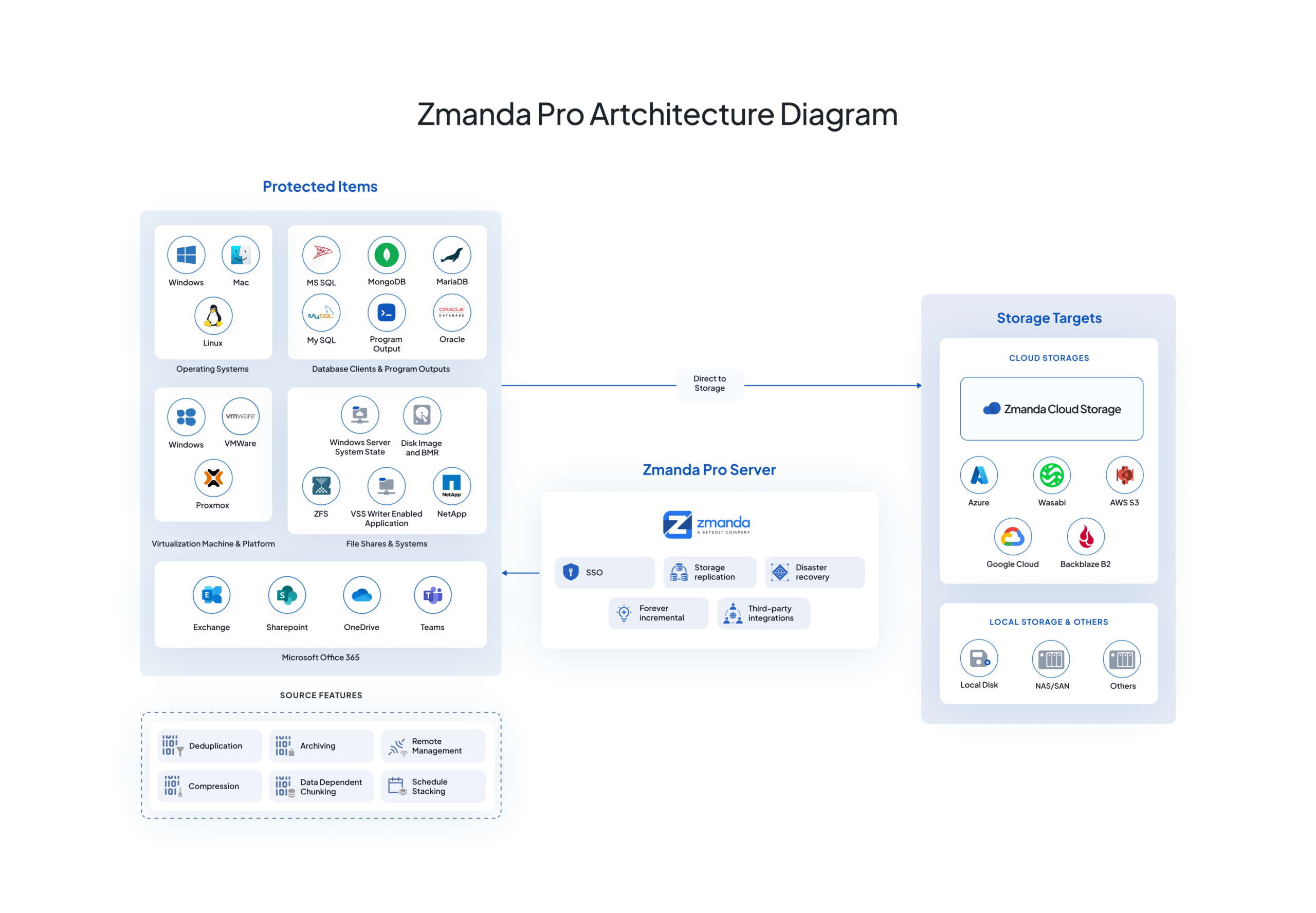
Zmanda Pro backs up Proxmox VMs and LXC containers agentlessly via the Proxmox API. No in-guest agent installation required. The Zmanda Pro server coordinates backup job scheduling and policy enforcement; the Proxmox host handles the snapshot and data transfer to the configured storage destination.
What makes Zmanda Pro’s architecture distinct for enterprise deployments is what happens before data leaves the source. Zmanda Pro applies client-side deduplication using Content Defined Chunking (CDC), the same technique that powers its forever-incremental architecture. Only unique data chunks are transmitted. The initial full backup deduplicates and compresses to approximately 60% of original size; subsequent incremental backups transmit only changed chunks, which in practice reduces transmission to 1–10% of the total dataset per cycle. In production deployments, Zmanda Pro has validated a 10:1 storage reduction ratio and an up to 90% storage saving, as documented in a 2,600-site franchise operator deployment.
Encryption is FIPS 140-2 compliant AES-256-CTR with Poly1305 AEAD applied client-side before data leaves the Proxmox host. Data in transit uses TLS 1.2/1.3. Zmanda’s servers have zero access to customer data (zero-knowledge architecture). BYOK (Bring Your Own Key) is available for organizations with key management requirements. This encryption architecture satisfies HIPAA, PCI DSS, and SOC 2 requirements without additional configuration layers.
Storage destination flexibility is a core design principle. Zmanda Pro is storage-agnostic: AWS S3, Azure Blob, Google Cloud Storage, Wasabi, Backblaze B2, Storj, DigitalOcean Spaces, any S3-compatible endpoint, local disk, NAS/SAN, and SFTP. No proprietary storage format, no vendor lock-in. If your cloud provider changes pricing, you switch destination, you don’t rebuild your backup infrastructure.
Learn more about Zmanda Pro deployment options.
Multi-Site Management with ZPAT
Enterprise Proxmox deployments often span multiple sites, branch offices, colocation facilities, and remote datacenter nodes. PBS manages each server as an independent instance with no aggregation. Zmanda Pro’s centralized console provides unified policy management, monitoring, and reporting across all sites from a single interface.
For large-scale deployments, ZPAT (Zmanda Pro Automation Tool) provides CLI-based management for bulk operations: bulk device onboarding, bulk policy assignment, bulk protected item configuration, and mass restore operations across hundreds of devices simultaneously. A single operator can manage Proxmox environments across hundreds of remote sites. The architecture that enabled the largest US franchisee operator to protect 2,600 sites across 44 states with one operator managing the backup infrastructure.
Financial Proof: What Enterprise Deployments Actually Cost
Enterprise backup TCO comparisons need to account for more than the license line item. Support, storage, admin overhead, and renewal costs all factor into the real cost over a 3- or 5-year horizon.
Zmanda Pro’s documented financial proof points are worth stating precisely:
- 50%+ lower TCO vs. Veeam and Acronis across 1-, 3-, and 5-year horizons in direct comparisons
- 50% cost savings vs. the closest competitor in the franchise operator case study (2,600 sites)
- 80%+ savings on licensing costs in the Fortune 50 certification case study (100,000+ workloads)
- Up to 90% storage reduction (10:1 dedup ratio) in the franchise operator production environment
At $5.99/workload/month with flat renewal pricing and 24/7 support included, the math for a 100-VM Proxmox environment is straightforward: approximately $7,188/year with no renewal escalation risk and no add-on costs for support. Compared to equivalent Veeam licensing with support at $15,000–$25,000/year for a similar environment, before renewal premium risk at contract renewal, the TCO difference is significant over any multi-year horizon.
The Fortune 50 certification is particularly relevant for enterprises evaluating Zmanda Pro’s production readiness. Zmanda Pro is one of the backup solutions to pass this specific certification, including functional testing, performance testing, scalability testing, replication, DR, failover, data integrity verification, and full automation across 100,000+ workloads in a multi-datacenter environment. For organizations with complex, high-scale Proxmox deployments, this certification provides documented evidence of production capability that no marketing claim can replace.
Compliance Coverage for Enterprise Proxmox Environments
Organizations in regulated industries need backup platforms that can provide compliance documentation, not just compliance-adjacent features. Zmanda Pro carries the certifications that enterprise procurement and compliance teams require:
| Standard | Status | Relevant For |
|---|---|---|
| SOC 2 Type II | Certified | SaaS and cloud backup environments; required by many enterprise procurement processes |
| ISO 27001 | Certified | Information security management; required in EU and regulated enterprise contexts |
| ISO 9001 | Certified | Quality management systems; demonstrates process maturity |
| HIPAA | Compliant — BAA available | Healthcare organizations with PHI in backup scope |
| PCI DSS | Aligned (Req. 3.4) | Payment data environments with backup in scope |
| GDPR / CCPA | Compliant | Organizations with EU or California consumer data |
| FIPS 140-2 | Compliant | Government contractors, defense, classified environments |
For HIPAA-covered entities, the BAA (Business Associate Agreement) is a requirement for using any cloud-based backup service when PHI may be in scope. For government contractors and defense environments, the FIPS 140-2 compliant AES-256 encryption and the air-gapped deployment option cover scenarios where online SaaS backup is not permitted. Zmanda Pro’s HIPAA-compliant backup and air-gap backup capabilities address the two most common compliance-driven deployment requirements.
Evaluating Zmanda Pro for Your Proxmox Environment
The 15-minute deployment means evaluation is low-risk. Connect Zmanda Pro to your Proxmox environment, run initial backup jobs against a representative set of VMs and LXC containers, and measure the deduplication ratio against your actual data because deduplication performance varies meaningfully by workload type and change rate, and vendor-stated ratios should always be validated against your specific environment.
Zmanda Pro’s free trial includes full platform access not a feature-limited demo. Run it against your production or staging environment, verify restore speeds against your RTO requirements, and validate that the compliance documentation meets your specific regulatory framework before making a licensing decision. The enterprise proxmox backup solutions page has the technical documentation your procurement team needs, and the consultation booking gets you a direct conversation with a backup specialist who can map the architecture to your specific Proxmox deployment.
FAQs