Most enterprises spend months evaluating backup vendors on features, pricing, and deployment complexity, then discover during their first security audit that they never asked the right questions.
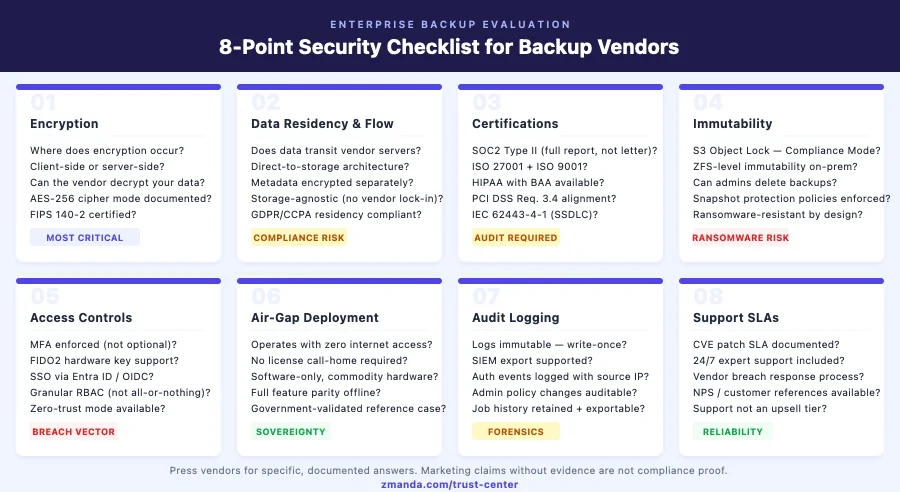
What enterprise buyers should evaluate when comparing backup vendors goes beyond feature checklists: the encryption model, data flow architecture, immutability guarantees, and certification depth are the criteria that determine your actual security exposure.
Backup infrastructure is increasingly becoming the primary target of ransomware operators and the first thing regulators scrutinize when a breach occurs. Your backup vendor’s security architecture either contains your exposure or multiplies it.
This checklist is designed for CISOs, IT Directors, and IT Managers who are mid-evaluation, past the demo stage and now asking what actually differentiates backup and recovery vendors on the security dimension. Each item maps to a real control category that matters during audits, incidents, and board-level risk reviews.
It reflects the evaluation criteria used by the world’s most security-demanding organizations, including the Fortune 50 security review that makes Zmanda Pro only the second backup vendor to earn that certification.
Evaluate Zmanda Pro against your security checklist
1. Encryption: What Separates Serious Backup Vendors from the Rest
This is the most consequential question on the list, and it is the one most vendors answer ambiguously.
The difference between client-side and server-side encryption determines whether your backup vendor can read your data, whether a breach at the vendor’s infrastructure exposes your data, and whether you have a genuine zero-knowledge security posture.
Server-side encryption means your data travels to the vendor’s infrastructure in plaintext, is encrypted there, and the vendor holds the keys.
It protects data at rest on the vendor’s systems but does nothing to protect against a vendor-side breach, a rogue employee, or a subpoena targeting the vendor’s key management system.
When evaluating vendors, ask specifically:
- Where does encryption occur? The answer must be “on the client, before transmission” — not “in transit” or “at our data center.”
- What cipher and mode? AES-256 is table stakes. The mode matters: AES-256-CTR with Poly1305 AEAD provides authenticated encryption that detects tampering — not just confidentiality.
- Can your engineers decrypt our backup data? If the vendor cannot definitively say no, that is a disqualifying answer for regulated environments.
- Is BYOK (Bring Your Own Key) available? For organizations that require full key custody, this is non-negotiable.
- Is FIPS 140-2 compliance documented? U.S. federal environments, healthcare, and defense contractors require this certification for cryptographic modules.
2. Data Flow: Does Backup Data Actually Touch Your Vendor’s Servers?
Even if a vendor encrypts data client-side, you need to understand the data flow path. Does backup data pass through the vendor’s control plane on its way to your storage destination? This matters for data residency compliance under GDPR, CCPA, and sector-specific frameworks.
The architecture to require is direct-to-storage: the backup client transfers data directly to your designated storage destination. The vendor’s server handles orchestration and metadata — it never touches backup payload data.
- Does backup data transit the vendor’s infrastructure? If yes, this should be a hard flag for any regulated workload.
- Where is metadata stored, and is it encrypted? Metadata leakage — file names, sizes, job histories — can be as sensitive as the data itself in some environments.
- What storage destinations are supported? Storage-agnostic architecture gives you control over data residency. Vendor lock-in on storage creates compliance exposure.
3. Backup Vendor Certifications That Matter — and What to Watch Out For
Not all certifications are equal, and this is where enterprise backup vendor evaluation most often goes wrong. Some certify the vendor’s internal processes. Others certify the software product itself. The certifications that carry real weight:
- SOC 2 Type II — Not just Type I. Type II means controls were tested over six to twelve months. Require the full report, not just the certificate.
- ISO 27001 — The international standard for information security management systems.
- ISO 9001 — Quality management certification, which matters for release consistency and support reliability.
- HIPAA (with BAA) — If you operate in healthcare, the Business Associate Agreement is required — not just a certification claim.
- PCI DSS alignment — For cardholder data environments. Ask whether the vendor can demonstrate Requirement 3.4 alignment for stored data.
- FIPS 140-2 — Required for cryptographic modules in U.S. federal and defense environments.
- IEC 62443-4-1 — The SSDLC (Secure Software Development Lifecycle) standard. Certifies the development process, meaning security is designed in, not bolted on.
- GDPR and CCPA compliance — Should be documented in the vendor’s Data Processing Agreement, not just claimed on a marketing page.
| Certification | What It Proves | When Required |
|---|---|---|
| SOC2 Type II | Security controls operated effectively over 6–12 months (not just documented) | Any regulated or enterprise environment — require full report, not attestation letter |
| ISO 27001 | Information security management system meets international standard | Global enterprises; often required in EU and APAC procurement |
| ISO 9001 | Quality management processes — release consistency and support reliability | Enterprises requiring operational predictability from vendors |
| HIPAA + BAA | Vendor handles PHI in compliance with HIPAA technical and administrative safeguards | Healthcare, health-tech, insurers — BAA is legally required |
| PCI DSS (Req. 3.4) | Stored cardholder data is encrypted to PCI standards | Any environment handling payment card data |
| FIPS 140-2 | Cryptographic module meets U.S. federal security standard | U.S. federal agencies, defense contractors, healthcare (HIPAA technical safeguards) |
| IEC 62443-4-1 (SSDLC) | Security is built into the development lifecycle — not added after release | Critical infrastructure, OT/ICS environments, defense |
| GDPR / CCPA (DPA) | Personal data handling documented in Data Processing Agreement | Any vendor processing EU or California resident personal data |
4. Immutability: Can an Attacker—or Your Admin, Still Delete Your Backups?
Ransomware operators have adapted. Modern ransomware strains specifically target backup repositories before executing encryption across production systems — because destroying backups is what turns a recoverable incident into a catastrophic one.
Evaluate vendors on these specific immutability controls:
- Object Lock support — The vendor should support AWS S3 Object Lock in both Governance Mode and Compliance Mode. Object Lock in Compliance Mode means not even the storage administrator can delete or modify objects within the retention period.
- ZFS-level immutability — For local and on-premises storage, ZFS immutability provides snapshot protection at the filesystem level.
- Admin override restrictions — Can your backup admin — or an attacker with admin credentials — delete backups? Compliance Mode Object Lock removes that possibility entirely.
- Snapshot protection policies — Can you enforce policies that prevent backup users from deleting their own snapshots? This protects against insider threat and compromised credentials.
Immutability that an admin can override is not immutability — it is delay. Explore Zmanda’s approach to immutable backup and ransomware protection as reference implementations.
5. Access Controls: Zero Trust, MFA, and RBAC Done Right
Access control failures are the most common vector for backup compromise. Credentials get phished. Admins reuse passwords. Privilege creep accumulates over years until a single compromised account has access to the entire backup estate.
- MFA that is actually enforced — Not optional. Ask whether MFA can be made mandatory for all users and administrators. TOTP is acceptable; FIDO2 hardware keys represent the higher standard for privileged access.
- SSO via enterprise identity providers — Integration with OpenID Connect, Microsoft Entra ID, or comparable enterprise identity frameworks.
- RBAC with least-privilege granularity — Can you scope admin access to specific device groups, storage destinations, or policies? Or is it all-or-nothing?
- Zero-trust mode for backup user passwords — The strongest implementations include a zero-trust mode where administrators cannot reset backup user passwords. This means even a fully compromised admin account cannot access another user’s backup data.
Need help running this checklist against your current vendor?
Book a 30-minute expert call — we'll evaluate each security domain with you.
6. Air-Gapped Deployment: What Real Offline Backup Actually Requires
Connectivity is an attack surface. For classified environments, critical infrastructure, and organizations with strict data sovereignty requirements, fully offline backup deployment is a baseline.
True air-gapped deployment means the backup server operates with no external network access, no cloud dependency, no license call-home requirement, and no proprietary hardware mandate.
- Does the solution require internet connectivity to function? License validation that requires periodic internet access is an operational risk in classified environments.
- Is air-gapped deployment a first-class deployment mode? Or is it a bolt-on with limited feature parity?
- What hardware is required? Software-only deployment on commodity hardware is the correct answer.
- Is there a validated government reference case? Air-gapped claims are easy to make. Ask for evidence — ideally a government or defense sector case study that involved independent security and code audits. Zmanda Pro’s Fortune 50 certification involved exactly this level of independent validation across 7 data centers and 500+ servers in classified government environments.
See Zmanda’s air-gap backup documentation for a validated reference implementation.
7. Audit Logging: What You Need When an Incident Actually Happens
When a breach occurs — and at enterprise scale, the question is when, not if — you need complete forensic visibility into what happened. Backup systems without comprehensive audit logging become a blind spot during incident response.
- Immutable audit logs — Logs that can be altered or deleted by administrators are forensically useless. Logs should be write-once or forwarded to an external SIEM.
- Authentication events — Every login, failed login, MFA challenge, and session termination should be logged with timestamp, source IP, and user identity.
- Administrative actions — Policy changes, user provisioning, storage destination modifications, and retention overrides should generate auditable events.
- Backup and restore job history — Complete job history with success/failure status, data volumes, and destination should be retained and exportable.
8. Support SLAs: The Security Dimension Most Enterprises Miss
A backup vendor’s security posture is only as strong as their ability to respond when something goes wrong. When evaluating the best enterprise backup vendors for customer support, most procurement teams focus on uptime guarantees — but the questions that actually matter at incident time are different.
- What is the vulnerability disclosure and patch SLA? When a CVE is identified, how quickly does the vendor patch and notify customers?
- Is support included or an upsell? 24/7 expert access should not be a premium line item.
- What is the vendor’s incident response process for a vendor-side breach? A mature vendor will have a documented response plan and customer notification protocol.
NPS scores are a proxy for support quality that procurement teams often overlook. An NPS of 78 — twice the industry average — is a quantifiable signal.
| Security Domain | Key Questions to Ask | Answer That Should Disqualify |
|---|---|---|
| Encryption | Where does encryption occur? Can the vendor decrypt your data? | “We encrypt in transit” or “at our data center” |
| Data Flow | Does backup data transit your infrastructure? Is metadata encrypted? | Backup payload passes through vendor servers |
| Certifications | SOC2 Type II full report? ISO 27001? BAA available? | Type I only, or “we’re working on certification” |
| Immutability | S3 Object Lock in Compliance Mode? Can admins delete backups? | Governance Mode only, or admin override possible |
| Access Controls | MFA enforced (mandatory)? Granular RBAC? Zero-trust mode? | MFA optional, or all-or-nothing admin access |
| Air-Gap | Fully offline, no internet required? Government-validated? | Requires cloud connectivity or limited offline feature parity |
| Audit Logging | Immutable logs? SIEM export? Admin actions captured? | Logs editable by admin, or no SIEM integration |
| Support SLAs | CVE patch SLA documented? 24/7 expert support included in base? | 24/7 support is a premium add-on |
How Zmanda Pro Scores Against This Checklist
Zmanda Pro was built to satisfy exactly this evaluation framework:
Encryption: AES-256-CTR with Poly1305 AEAD — client-side, zero-knowledge. Zmanda’s servers cannot decrypt backup data. BYOK available. FIPS 140-2 documented. Optional zero-trust mode prevents administrators from resetting backup user passwords.
Data flow: Direct-to-storage architecture — backup data flows from the client directly to the customer’s storage destination. It never transits Zmanda’s servers.
Certifications: BETSOL, the company behind Zmanda, holds SOC 2 Type II, ISO 27001, ISO 9001, and IEC 62443-4-1 (SSDLC) certifications, which govern Zmanda Pro’s development and operations. Zmanda Pro supports HIPAA-compliant backup environments. PCI DSS Requirement 3.4 alignment. Full documentation at the Zmanda Trust Center.
Immutability: AWS S3 Object Lock (Governance and Compliance modes), Wasabi Object Lock, ZFS-level immutability. In Compliance Mode, no user — including storage administrators — can delete or modify objects within the retention window.
Access controls: MFA via TOTP and FIDO2. SSO via OpenID Connect and Microsoft Entra ID. Granular RBAC. Zero-trust mode available.
Air-gapped deployment: Fully offline, no internet requirement, no proprietary hardware. Validated by a national government cybersecurity organization across 7 data centers and 500+ servers in classified environments. Only the second backup vendor in history to pass Fortune 50 certification — a process that included independent security audits of the air-gapped deployment.
Audit logging: Comprehensive logs covering authentication events, administrative actions, and job history, exportable for SIEM integration. 24/7 expert support included in base license. NPS 78 — twice the industry average across 90+ enterprise clients in 17 countries.
How to Use This Checklist for Your Enterprise Backup Vendor Evaluation
Backup vendor security is the evaluation criterion that matters most when an incident occurs, and the one most likely to determine your regulatory exposure after the fact.
The differentiators emerge when you press on specifics: where encryption actually occurs, whether immutability can be overridden, what zero-trust mode actually means in the product architecture, and whether air-gapped deployment is real or theoretical.
Whether you’re comparing backup as a service vendors, on-premises platforms, or hybrid backup and recovery vendors, the security questions on this checklist apply across deployment models.
If you are evaluating backup vendors for a regulated or security-sensitive environment, consult with an expert — we will walk through your environment and compliance requirements directly. You can also see how Zmanda Pro compares to other leading vendors: Zmanda Pro vs. Veeam and Zmanda Pro vs. Acronis.
Ready to run this checklist against Zmanda Pro?
Book a free assessment — we'll answer every domain with documented evidence.
FAQs